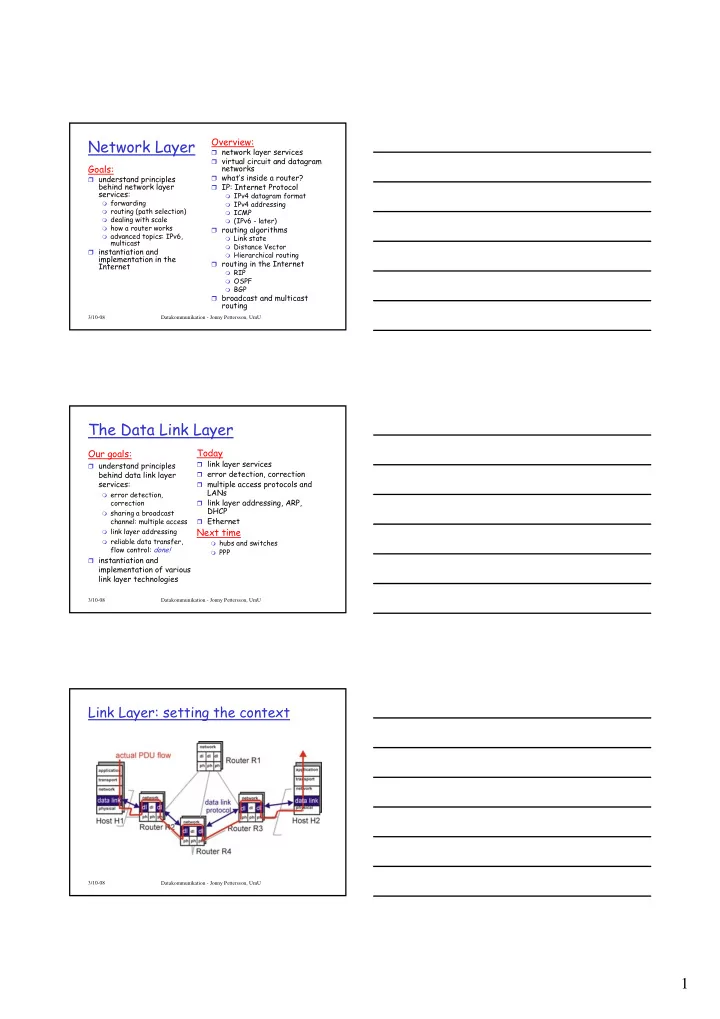
1 Link Layer: setting the context two physically connected devices: - - PDF document

1
SMART_READER_LITE
LIVE PREVIEW

1 Link Layer: setting the context two physically connected devices: - - PDF document

Network Layer Overview: network layer services virtual circuit and datagram Goals: networks whats inside a router? understand principles behind network layer IP: Internet Protocol services: IPv4 datagram format


slide-1
SLIDE 1

1

3/10-08 Datakommunikation - Jonny Pettersson, UmU

Network Layer

Goals:

understand principles

behind network layer services:

forwarding routing (path selection) dealing with scale how a router works advanced topics: IPv6,

multicast instantiation and

implementation in the Internet

Overview:

network layer services virtual circuit and datagram

networks

what’s inside a router? IP: Internet Protocol

IPv4 datagram format IPv4 addressing ICMP (IPv6 - later)

routing algorithms

Link state Distance Vector Hierarchical routing

routing in the Internet

RIP OSPF BGP

broadcast and multicast

routing

3/10-08 Datakommunikation - Jonny Pettersson, UmU

The Data Link Layer

Our goals:

understand principles

behind data link layer services:

error detection,

correction

sharing a broadcast

channel: multiple access

link layer addressing reliable data transfer,

flow control: done! instantiation and

implementation of various link layer technologies

Today

link layer services error detection, correction multiple access protocols and

LANs

link layer addressing, ARP,

DHCP

Ethernet

Next time

hubs and switches PPP 3/10-08 Datakommunikation - Jonny Pettersson, UmU

Link Layer: setting the context

slide-2
SLIDE 2

2

3/10-08 Datakommunikation - Jonny Pettersson, UmU

Link Layer: setting the context

two physically connected devices:

host-router, router-router, host-host

unit of data: frame

application transport network link physical network link physical

M M M M Ht Ht Hn Ht Hn Hl M Ht Hn Hl frame

  • phys. link

data link protocol adapter card

3/10-08 Datakommunikation - Jonny Pettersson, UmU

Link Layer Services

Framing, link access:

encapsulate datagram into frame, adding header, trailer channel access if shared medium ‘physical addresses’ used in frame headers to identify

source, dest

  • different from IP address!

Reliable delivery between two physically connected

devices:

we learned how to do this already (chapter 3)! seldom used on low bit error link (fiber, some twisted

pair)

wireless links: high error rates

  • Q: why both link-level and end-end reliability?

3/10-08 Datakommunikation - Jonny Pettersson, UmU

Link Layer Services (more)

Flow Control:

pacing between adjacent sending and receiving nodes

Error Detection:

errors caused by signal attenuation, noise receiver detects presence of errors:

  • signals sender for retransmission or drops frame

Error Correction:

receiver identifies and corrects bit error(s) without

resorting to retransmission Half-duplex and full-duplex

with half duplex, nodes at both ends of link can transmit,

but not at same time

slide-3
SLIDE 3

3

3/10-08 Datakommunikation - Jonny Pettersson, UmU

Adaptors Communicating

link layer implemented in

“adaptor” (aka NIC)

Ethernet card, PCMCIA

card, 802.11 card

typically includes: RAM, DSP

(Digital Signal Processing) chips, host bus interface, and link interface adapter is semi-autonomous link & physical layers sending side:

encapsulates datagram in a

frame

adds error checking bits, rdt,

flow control, etc receiving side

looks for errors, rdt, flow

control, etc

extracts datagram, passes to

rcving node sending node frame rcving node datagram frame adapter adapter link layer protocol

3/10-08 Datakommunikation - Jonny Pettersson, UmU

Error Detection

EDC= Error Detection and Correction bits (redundancy) D = Data protected by error checking, may include header fields

  • Error detection not 100% reliable!
  • protocol may miss some errors, but rarely
  • larger EDC field yields better detection and correction

3/10-08 Datakommunikation - Jonny Pettersson, UmU

Multiple Access Links and Protocols

Two types of “links”:

point-to-point

PPP for dial-up access point-to-point link between Ethernet switch and host

broadcast (shared wire or medium)

  • ld-fashioned Ethernet

upstream HFC 802.11 wireless LAN shared wire (e.g., cabled Ethernet) shared RF (e.g., 802.11 WiFi) shared RF (satellite) humans at a cocktail party (shared air, acoustical)

slide-4
SLIDE 4

4

3/10-08 Datakommunikation - Jonny Pettersson, UmU

Multiple Access protocols

single shared communication channel two or more simultaneous transmissions by nodes:

interference

collision if node receives two or more signals at the same time

multiple access protocol:

distributed algorithm that determines how nodes share

channel, i.e., determine when node can transmit

communication about channel sharing must use channel itself! what to look for in multiple access protocols:

  • synchronous or asynchronous
  • information needed about other nodes
  • robustness (e.g., to channel errors)
  • performance

3/10-08 Datakommunikation - Jonny Pettersson, UmU

Ideal Mulitple Access Protocol

Broadcast channel of rate R bps

  • 1. When one node wants to transmit, it can send at

rate R

  • 2. When M nodes want to transmit, each can send at

average rate R/M

  • 3. Fully decentralized:

no special node to coordinate transmissions no synchronization of clocks, slots

  • 4. Simple

3/10-08 Datakommunikation - Jonny Pettersson, UmU

MAC Protocols: a taxonomy

(MAC – Media Access Control)

Three broad classes:

Channel Partitioning

divide channel into smaller “pieces” (time slots,

frequency, code)

allocate piece to node for exclusive use

Random Access

channel not divided, allow collisions “recover” from collisions

“Taking turns”

tightly coordinate shared access to avoid collisions

Goal: efficient, fair, simple, decentralized

slide-5
SLIDE 5

5

3/10-08 Datakommunikation - Jonny Pettersson, UmU

Channel Partitioning MAC protocols: TDMA

TDMA: time division multiple access

access to channel in "rounds" each station gets fixed length slot (length = pkt

trans time) in each round

unused slots go idle example: 6-station LAN, 1,3,4 have pkt, slots 2,5,6

idle

3/10-08 Datakommunikation - Jonny Pettersson, UmU

Channel Partitioning MAC protocols: FDMA

FDMA: frequency division multiple access

channel spectrum divided into frequency bands each station assigned fixed frequency band unused transmission time in frequency bands go idle example: 6-station LAN, 1,3,4 have pkt, frequency

bands 2,5,6 idle

frequency bands t i m e FDM cable

3/10-08 Datakommunikation - Jonny Pettersson, UmU

Random Access protocols

When node has packet to send

transmit at full channel data rate R no a priori coordination among nodes

two or more transmitting nodes -> “collision” random access MAC protocol specifies:

how to detect collisions how to recover from collisions (e.g., via delayed

retransmissions) Examples of random access MAC protocols:

slotted ALOHA ALOHA CSMA and CSMA/CD

slide-6
SLIDE 6

6

3/10-08 Datakommunikation - Jonny Pettersson, UmU

Slotted ALOHA

Assumptions

all frames same size time is divided into

equal size slots = time to transmit 1 frame

nodes start to transmit

frames only at beginning of slots

nodes are synchronized if 2 or more nodes

transmit in slot, all nodes detect collision Operation

when node obtains fresh

frame, it transmits in next slot

no collision, node can send

new frame in next slot

if collision, node

retransmits frame in each subsequent slot with prob. p until success

3/10-08 Datakommunikation - Jonny Pettersson, UmU

Slotted ALOHA

Pros

single active node can

continuously transmit at full rate of channel

highly decentralized:

  • nly slots in nodes

need to be in sync

simple

Cons

collisions, wasting slots idle slots nodes may be able to

detect collision in less than time to transmit packet

clock synchronization

3/10-08 Datakommunikation - Jonny Pettersson, UmU

Slotted Aloha efficiency

Suppose N nodes with

many frames to send, each transmits in slot with probability p

prob that node 1 has

success in a slot

= p(1-p)N-1 prob that any node has

a success = Np(1-p)N-1

For max efficiency

with N nodes, find p* that maximizes Np(1-p)N-1

For many nodes, take

limit of Np*(1-p*)N-1 as N goes to infinity, gives 1/e = 0.37 Efficiency is the long-run fraction of successful slots when there are many nodes, each with many frames to send At best: channel used for useful transmissions 37%

  • f time!
slide-7
SLIDE 7

7

3/10-08 Datakommunikation - Jonny Pettersson, UmU

Pure (unslotted) ALOHA

unslotted Aloha: simpler, no synchronization when frame first arrives

transmit immediately

collision probability increases:

frame sent at t0 collides with other frames sent in [t0-1,t0+1] 3/10-08 Datakommunikation - Jonny Pettersson, UmU

Pure Aloha efficiency

P(success by given node) = P(node transmits) . P(no other node transmits in [p0-1,p0] . P(no other node transmits in [p0-1,p0] = p . (1-p)N-1 . (1-p)N-1 = p . (1-p)2(N-1) … choosing optimum p and then letting n -> infty ... = 1/(2e) = 0.18

even worse than slotted Aloha!

protocol constrains effective channel throughput!

3/10-08 Datakommunikation - Jonny Pettersson, UmU

CSMA (Carrier Sense Multiple Access)

CSMA: listen before transmit: If channel sensed idle: transmit entire frame

If channel sensed busy, defer transmission Human analogy: don’t interrupt others!

slide-8
SLIDE 8

8

3/10-08 Datakommunikation - Jonny Pettersson, UmU

CSMA collisions

collisions can still occur:

propagation delay means two nodes may not hear each other’s transmission

collision:

entire packet transmission time wasted

spatial layout of nodes

note:

role of distance & propagation delay in determining collision probability

3/10-08 Datakommunikation - Jonny Pettersson, UmU

CSMA/CD (Collision Detection)

CSMA/CD: carrier sensing, deferral as in CSMA

collisions detected within short time colliding transmissions aborted, reducing channel

wastage collision detection:

easy in wired LANs: measure signal strengths,

compare transmitted, received signals

difficult in wireless LANs: receiver shut off while

transmitting human analogy: the polite conversationalist

3/10-08 Datakommunikation - Jonny Pettersson, UmU

CSMA/CD collision detection

slide-9
SLIDE 9

9

3/10-08 Datakommunikation - Jonny Pettersson, UmU

“Taking Turns” MAC protocols

channel partitioning MAC protocols:

share channel efficiently and fairly at high load inefficient at low load: delay in channel access,

1/N bandwidth allocated even if only 1 active node! Random access MAC protocols

efficient at low load: single node can fully

utilize channel

high load: collision overhead

“taking turns” protocols look for best of both worlds!

Datakommunikation - Jonny Pettersson, UmU

“Taking Turns” MAC protocols

Polling:

master node “invites” slave

nodes to transmit in turn

typically used with “dumb”

slave devices

concerns:

polling overhead latency single point of failure

(master)

Token passing:

control token passed from

  • ne node to next

sequentially

token message concerns:

token overhead latency single point of failure (token)

master slaves

poll data data

3/10-08 Datakommunikation - Jonny Pettersson, UmU

Summary of MAC protocols

channel partitioning, by time, frequency or code

Time Division, Frequency Division

random access (dynamic)

ALOHA, S-ALOHA, CSMA, CSMA/CD carrier sensing: easy in some technologies (wire), hard in

  • thers (wireless)

CSMA/CD used in Ethernet CSMA/CA used in 802.11

taking turns

polling from central site, token passing Bluetooth, FDDI, IBM Token Ring

slide-10
SLIDE 10

10

3/10-08 Datakommunikation - Jonny Pettersson, UmU

MAC Addresses and ARP

32-bit IP address:

network-layer address used to get datagram to destination IP subnet

MAC (or LAN or physical or Ethernet)

address:

function: get frame from one interface to another

physically-connected interface (same network)

48 bit MAC address (for most LANs)

  • burned in NIC ROM, also sometimes software settable

3/10-08 Datakommunikation - Jonny Pettersson, UmU

MAC Addresses

Each adapter on LAN has unique MAC address

Broadcast address = FF-FF-FF-FF-FF-FF = adapter

1A-2F-BB-76-09-AD 58-23-D7-FA-20-B0 0C-C4-11-6F-E3-98 71-65-F7-2B-08-53

LAN (wired or wireless)

3/10-08 Datakommunikation - Jonny Pettersson, UmU

LAN Address (more)

MAC address allocation administered by IEEE manufacturer buys portion of MAC address space

(to assure uniqueness)

analogy:

(a) MAC address: like Social Security Number (b) IP address: like postal address

MAC flat address ➜ portability

can move LAN card from one LAN to another

IP hierarchical address NOT portable

depends on IP subnet to which node is attached

slide-11
SLIDE 11

11

3/10-08 Datakommunikation - Jonny Pettersson, UmU

IP-adress - Fysisk adress

Maskiner kan bara kommunicera via fysiska

adresser

Adaptrar måste översätta IP-adressen till

fysisk adress

Om IP-adress och fysisk adress får

bestämmas vid installation kan översättningen ske med en funktion

Direct Mapping Resolution

Bättre med en dynamisk lösning

Dynamic Binding Resolution

3/10-08 Datakommunikation - Jonny Pettersson, UmU

Dynamic Binding Resolution

TCP/IP använder sig av ett lågnivåprotokoll

ARP (Address Resolution Protocol)

ARP-mekanismen är både effektiv och lätt

att underhålla

Del av det fysiska nätverket och inte en

del av Internetprotokollen

3/10-08 Datakommunikation - Jonny Pettersson, UmU

ARP - Address Resolution Protocol

Mål:

Varje adapter i ett nätverk ska kunna bygga upp

en tabell med IP-adress - länk-nivå-adress mappningar ARP-cache/tabell

En post tas bort efter ca 20 minuter

Använder sig av broadcast

slide-12
SLIDE 12

12

3/10-08 Datakommunikation - Jonny Pettersson, UmU

Hur går det till?

En maskin upptäcker att mottagaren är på samma

nätverk

Kollar i ARP-cachen/tabellen

Om inte där

  • Broadcast ARP-Query (inkl mottagarens IP-adress) till FF-

FF-FF-FF-FF-FF

  • Alla tar emot, den berörda svarar med unicast
  • Båda parter uppdaterar sina cacher/tabeller

ARP-Query innehåller även sändarens IP- och länk-

nivå-adress

Alla kan uppdatera sin cache/tabell om sändaren redan

finns i tabellen ARP är “plug and play”

3/10-08 Datakommunikation - Jonny Pettersson, UmU

Exempel ARP-cache

peppar ~>/usr/sbin/arp -a Net to Media Table: IPv4 Device IP Address Mask Flags Phys Addr

  • ----- -------------------- --------------- ----- ---------------

ce0 NTP.MCAST.NET 255.255.255.255 01:00:5e:00:01:01 ce0 althorn 255.255.255.255 00:30:05:bc:ba:cd ce0 hekto 255.255.255.255 00:0f:fe:d1:9d:56 ce0 piko 255.255.255.255 00:0f:fe:d1:a3:56 ce0 130.239.40.1 255.255.255.255 00:17:df:0f:cc:00 ce0 peppar 255.255.255.255 SP 00:03:ba:ac:56:2b ... ce0 plum 255.255.255.255 00:16:cb:96:06:6e ce0 gooseberry 255.255.255.255 00:16:cb:8c:10:72 ce0 laptop 255.255.255.255 00:30:05:bc:ad:db ce0 BASE-ADDRESS.MCAST.NET 240.0.0.0 SM 01:00:5e:00:00:00 3/10-08 Datakommunikation - Jonny Pettersson, UmU

Addressing: routing to another LAN

R

1A-23-F9-CD-06-9B 222.222.222.220 111.111.111.110 E6-E9-00-17-BB-4B CC-49-DE-D0-AB-7D 111.111.111.112 111.111.111.111

A

74-29-9C-E8-FF-55 222.222.222.221 88-B2-2F-54-1A-0F

B

222.222.222.222 49-BD-D2-C7-56-2A

walkthrough: send datagram from A to B via R assume A knows B’s IP address

two ARP tables in router R, one for each IP

network (LAN)

slide-13
SLIDE 13

13

3/10-08 Datakommunikation - Jonny Pettersson, UmU

A creates IP datagram with source A, destination B A uses ARP to get R’s MAC address for 111.111.111.110 A creates link-layer frame with R's MAC address as dest,

frame contains A-to-B IP datagram

A’s NIC sends frame R’s NIC receives frame R removes IP datagram from Ethernet frame, sees its

destined to B

R uses ARP to get B’s MAC address R creates frame containing A-to-B IP datagram sends to B

R

1A-23-F9-CD-06-9B 222.222.222.220 111.111.111.110 E6-E9-00-17-BB-4B CC-49-DE-D0-AB-7D 111.111.111.112 111.111.111.111

A

74-29-9C-E8-FF-55 222.222.222.221 88-B2-2F-54-1A-0F

B

222.222.222.222 49-BD-D2-C7-56-2A

This is a really important example – make sure you understand!

3/10-08 Datakommunikation - Jonny Pettersson, UmU

Ethernet : IEEE802.3 standard

“Dominant” wired LAN technology:

Cheap, less than $20 for 100Mbs! First widely used LAN technology Simpler, cheaper than token LANs and ATM Kept up with speed race: 10 Mbps – 10 Gbps

Metcalfe’s Ethernet sketch

3/10-08 Datakommunikation - Jonny Pettersson, UmU

Star topology

bus topology popular through mid 90s

all nodes in same collision domain (can collide with each

  • ther)

today: star topology prevails

active switch in center each “spoke” runs a (separate) Ethernet protocol (nodes

do not collide with each other)

switch

bus: coaxial cable star

slide-14
SLIDE 14

14

3/10-08 Datakommunikation - Jonny Pettersson, UmU

Ethernet Frame Structure

Sending adapter encapsulates IP datagram (or other network layer protocol packet) in Ethernet frame Preamble:

7 bytes with pattern 10101010 followed by one

byte with pattern 10101011

used to synchronize receiver, sender clock rates

3/10-08 Datakommunikation - Jonny Pettersson, UmU

Ethernet Frame Structure (more)

Addresses: 6 bytes

if adapter receives frame with matching destination

address, or with broadcast address (eg ARP packet), it passes data in frame to network layer protocol

  • therwise, adapter discards frame

Type: indicates higher layer protocol (mostly IP

but others possible, e.g., Novell IPX, AppleTalk)

Data: 46 – 1500 (MTU) byte CRC: checked at receiver, if error is detected, the

frame is simply dropped

3/10-08 Datakommunikation - Jonny Pettersson, UmU

Unreliable, connectionless service

connectionless: No handshaking between sending

and receiving NICs

unreliable: receiving NIC doesn’t send acks or

nacks to sending NIC

stream of datagrams passed to network layer can have

gaps (missing datagrams)

gaps will be filled if app is using TCP

  • therwise, app will see gaps
slide-15
SLIDE 15

15

3/10-08 Datakommunikation - Jonny Pettersson, UmU

Ethernet uses CSMA/CD

No slots adapter doesn’t transmit

if it senses that some

  • ther adapter is

transmitting, that is, carrier sense

transmitting adapter

aborts when it senses that another adapter is transmitting, that is, collision detection

Before attempting a

retransmission, adapter waits a random time, that is, random access

3/10-08 Datakommunikation - Jonny Pettersson, UmU

Ethernet CSMA/CD algorithm

  • 1. NIC receives datagram

from network layer, creates frame

  • 2. If NIC senses channel idle,

starts frame transmission If NIC senses channel busy, waits until channel idle, then transmits

  • 3. If NIC transmits entire

frame without detecting another transmission, NIC is done with frame !

  • 4. If NIC detects another

transmission while transmitting, aborts and sends jam signal

  • 5. After aborting, NIC

enters exponential backoff: after mth collision, NIC chooses K at random from

{0,1,2,…,2m-1}. NIC waits

K·512 bit times, returns to Step 2

3/10-08 Datakommunikation - Jonny Pettersson, UmU

Ethernet’s CSMA/CD (more)

Jam Signal: make sure all

  • ther transmitters are

aware of collision; 48 bits Bit time: .1 microsec for 10 Mbps Ethernet ; for K=1023, wait time is about 50 msec Exponential Backoff:

Goal: adapt retransmission

attempts to estimated current load

heavy load: random wait

will be longer

first collision: choose K from

{0,1}; delay is K· 512 bit transmission times

after second collision: choose

K from {0,1,2,3}…

after ten collisions, choose K

from {0,1,2,3,4,…,1023} See/interact with Java applet on AWL Web site: highly recommended !

slide-16
SLIDE 16

16

3/10-08 Datakommunikation - Jonny Pettersson, UmU

CSMA/CD efficiency

Tprop = max prop delay between 2 nodes in LAN ttrans = time to transmit max-size frame efficiency goes to 1

as tprop goes to 0 as ttrans goes to infinity

better performance than ALOHA: and simple,

cheap, decentralized!

trans prop /t

t efficiency 5 1 1 + =

3/10-08

802.3 Ethernet Standards: Link & Physical Layers

many different Ethernet standards

common MAC protocol and frame format different speeds: 2 Mbps, 10 Mbps, 100 Mbps,

1Gbps, 10G bps

different physical layer media: fiber, cable application transport network link physical

MAC protocol and frame format

100BASE-TX 100BASE-T4 100BASE-FX 100BASE-T2 100BASE-SX 100BASE-BX

fiber physical layer copper (twister pair) physical layer

3/10-08 Datakommunikation - Jonny Pettersson, UmU

The Data Link Layer

Our goals:

understand principles

behind data link layer services:

error detection,

correction

sharing a broadcast

channel: multiple access

link layer addressing reliable data transfer,

flow control: done! instantiation and

implementation of various link layer technologies

Today

link layer services error detection, correction multiple access protocols and

LANs

link layer addressing, ARP,

DHCP

Ethernet

Next time

hubs and switches PPP