
SLIDE 1
A Crash Course on Programmable Graphics Hardware
Li-Yi Wei Microsoft Research Asia
Abstract
Recent years have witnessed tremendous growth for programmable graphics hardware (GPU), both in terms of performance and func-
- tionality. In this paper, we overview the high-level architecture of
modern GPU, and introduce the GPU programming model. We also briefly describe the kinds the visual effects and applications that can be achieved by programmable graphics hardware. Keywords: Programmable Graphics Hardware
1 Introduction
Programmable graphics hardware is one of the few technologies that have survived through the ashes of the 90s dot com bubble burst, and it is still advancing at warp speed today. Just a few years ago, when SGI still dominated, graphics hardware is almost syn-
- nymous to super computer and people were charmed by these huge
machine boxes (you get a sense of this feeling by the name Onyx
- f one of SGIs last workstations). However, as new generations
- f semiconductor process waved by, the entire graphics pipe has
been shrunken from an entire machine to a single chip. Nowadays, graphics hardware is no longer a luxury item. In contrast, everyone and their brothers seem to have the latest graphics cards to play the hottest games, and it almost seems a shame if you dont have one as
- well. But you probably dont have to worry about this anyway, since
it is almost impossible to buy a computer today without the latest graphics chips from either ATI or NVIDIA. In this paper, we introduce programmable graphics hardware. Our goal is to enable you have fun with graphics chips, so we
- nly describe high level architecture that are just enough for you
to know how to program. In particular, we concentrate on the two programmable stages of the graphics pipeline: the vertex and frag- ment processor, describe their programming model, and demon- strate possible applications with these programmable units.
2 Graphics Hierarchy
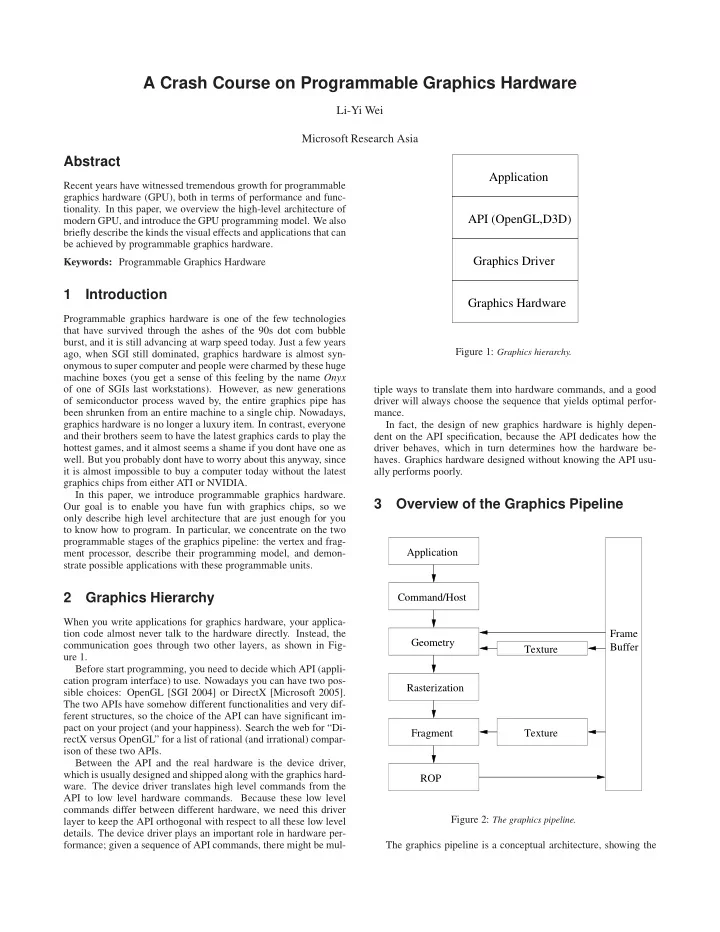
When you write applications for graphics hardware, your applica- tion code almost never talk to the hardware directly. Instead, the communication goes through two other layers, as shown in Fig- ure 1. Before start programming, you need to decide which API (appli- cation program interface) to use. Nowadays you can have two pos- sible choices: OpenGL [SGI 2004] or DirectX [Microsoft 2005]. The two APIs have somehow different functionalities and very dif- ferent structures, so the choice of the API can have significant im- pact on your project (and your happiness). Search the web for “Di- rectX versus OpenGL” for a list of rational (and irrational) compar- ison of these two APIs. Between the API and the real hardware is the device driver, which is usually designed and shipped along with the graphics hard-
- ware. The device driver translates high level commands from the
API to low level hardware commands. Because these low level commands differ between different hardware, we need this driver layer to keep the API orthogonal with respect to all these low level
- details. The device driver plays an important role in hardware per-
formance; given a sequence of API commands, there might be mul-
Graphics Driver Graphics Hardware API (OpenGL,D3D) Application
Figure 1: Graphics hierarchy. tiple ways to translate them into hardware commands, and a good driver will always choose the sequence that yields optimal perfor- mance. In fact, the design of new graphics hardware is highly depen- dent on the API specification, because the API dedicates how the driver behaves, which in turn determines how the hardware be-
- haves. Graphics hardware designed without knowing the API usu-