Basic Types C s basic (built-in) types: o Integer types, including - - PDF document

basic types
SMART_READER_LITE
LIVE PREVIEW

Basic Types C s basic (built-in) types: o Integer types, including - - PDF document

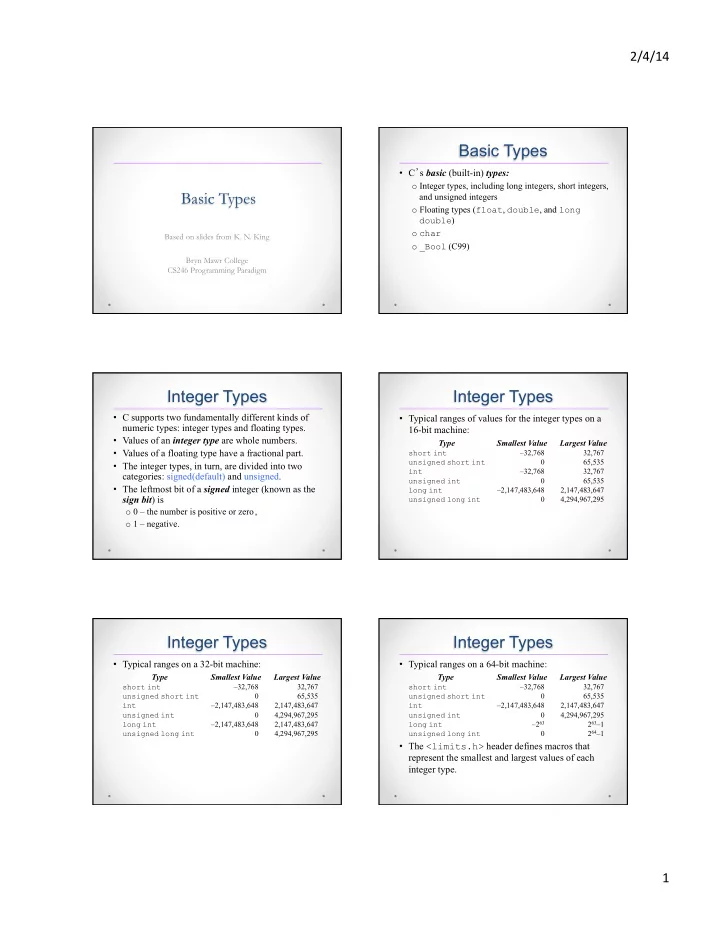
2/4/14 Basic Types C s basic (built-in) types: o Integer types, including long integers, short integers, Basic Types and unsigned integers o Floating types ( float , double , and long double ) o char Based on slides from K. N. King


slide-1
SLIDE 1

2/4/14 ¡ 1 ¡

Basic Types

Based on slides from K. N. King Bryn Mawr College CS246 Programming Paradigm

Basic Types

  • C’s basic (built-in) types:
  • Integer types, including long integers, short integers,

and unsigned integers

  • Floating types (float, double, and long

double)

  • char
  • _Bool (C99)

Integer Types

  • C supports two fundamentally different kinds of

numeric types: integer types and floating types.

  • Values of an integer type are whole numbers.
  • Values of a floating type have a fractional part.
  • The integer types, in turn, are divided into two

categories: signed(default) and unsigned.

  • The leftmost bit of a signed integer (known as the

sign bit) is

  • 0 – the number is positive or zero,
  • 1 – negative.

Integer Types

  • Typical ranges of values for the integer types on a

16-bit machine:

Type Smallest Value Largest Value

short int –32,768 32,767 unsigned short int 65,535 int –32,768 32,767 unsigned int 65,535 long int –2,147,483,648 2,147,483,647 unsigned long int

4,294,967,295

Integer Types

  • Typical ranges on a 32-bit machine:

Type Smallest Value Largest Value

short int –32,768 32,767 unsigned short int 65,535 int –2,147,483,648 2,147,483,647 unsigned int 4,294,967,295 long int –2,147,483,648 2,147,483,647 unsigned long int

4,294,967,295

Integer Types

  • Typical ranges on a 64-bit machine:

Type Smallest Value Largest Value

short int –32,768 32,767 unsigned short int 65,535 int –2,147,483,648 2,147,483,647 unsigned int 4,294,967,295 long int –263 263–1 unsigned long int

264–1

  • The <limits.h> header defines macros that

represent the smallest and largest values of each integer type.

slide-2
SLIDE 2

2/4/14 ¡ 2 ¡

Integers Constants

  • Constants are numbers that appear in the text of a

program.

  • C allows integer constants to be written in decimal

(base 10), octal (base 8), or hexadecimal (base 16).

Octal and Hexadecimal Numbers

  • Octal numbers use only the digits 0 through 7.
  • Each position in an octal number represents a

power of 8.

  • The octal number 237 represents the decimal

number 2 × 82 + 3 × 81 + 7 × 80 = 128 + 24 + 7 = 159.

  • A hexadecimal (or hex) number is written using the

digits 0 through 9 plus the letters A through F, which stand for 10 through 15, respectively.

  • The hex number 1AF has the decimal value 1 × 162

+ 10 × 161 + 15 × 160 = 256 + 160 + 15 = 431.

Integer Constants

  • Decimal constants contain digits between 0 and 9, but must

not begin with a zero:

15 255 32767

  • Octal constants contain only digits between 0 and 7, and

must begin with a zero:

017 0377 077777

  • Hexadecimal constants contain digits between 0 and 9 and

letters between a and f, and always begin with 0x:

0xf 0xff 0x7fff

  • The letters in a hexadecimal constant may be either upper or

lower case:

0xff 0xfF 0xFf 0xFF 0Xff 0XfF 0XFf 0XFF

Integer Constants

  • To force the compiler to treat a constant as a long

integer, just follow it with the letter L (or l):

15L 0377L 0x7fffL

  • To indicate that a constant is unsigned, put the

letter U (or u) after it:

15U 0377U 0x7fffU

  • L and U may be used in combination:

0xffffffffUL

The order of the L and U doesn’t matter, nor does their case.

Integer Overflow

  • When arithmetic operations are performed on integers,

it’s possible that the result will be too large to represent.

  • If the result can’t be represented as an int (because it

requires too many bits), we say that overflow has

  • ccurred.
  • When overflow occurs during an operation on signed

integers, the program’s behavior is undefined.

  • When overflow occurs during an operation on unsigned

integers, the result is defined: we get the correct answer modulo 2n, where n is the number of bits used to store the result.

Reading and Writing Integers

  • When reading or writing an unsigned integer, use the

letter u, o, or x instead of d in the conversion specification.

unsigned int u; scanf("%u", &u); /* reads u in base 10 */ printf("%u", u); /* writes u in base 10 */ scanf("%o", &u); /* reads u in base 8 */ printf("%o", u); /* writes u in base 8 */ scanf("%x", &u); /* reads u in base 16 */ printf("%x", u); /* writes u in base 16 */

slide-3
SLIDE 3

2/4/14 ¡ 3 ¡

Reading and Writing Integers

  • When reading or writing a short integer, put the

letter h in front of d, o, u, or x:

short s; scanf("%hd", &s); printf("%hd", s);

  • When reading or writing a long integer, put the

letter l (“ell,” not “one”) in front of d, o, u, or x.

Floating Types

  • C provides three floating types, corresponding to

different floating-point formats:

  • float Single-precision floating-point
  • double Double-precision floating-point
  • long double Extended-precision floating-point

(rarely used)

  • Macros that define the characteristics of the floating

types can be found in the <float.h> header.

Floating Constants

  • By default, floating constants are stored as double-

precision numbers.

  • To indicate that only single precision is desired, put

the letter F (or f) at the end of the constant (for example, 57.0F).

  • To indicate that a constant should be stored in

long double format, put the letter L (or l) at the end (57.0L).

Reading and Writing Floating-Point Numbers

  • %e, %f, and %g : reading and writing single-precision

floating-point numbers.

  • When reading a value of type double, put the letter l in

front of e, f, or g:

double d; scanf("%lf", &d);

  • Use l only in a scanf format string, NOT a printf string.
  • In a printf format string, the e, f, and g conversions can

be used to write either float or double values.

  • When reading or writing a value of type long double, put

the letter L in front of e, f, or g.

Use of char (character)

  • Basic operations
  • Declaration: char c;
  • Assignment: c = 'a';
  • Reference: c = c + 1;
  • Constants
  • Single-quoted character (only one)
  • Special characters: '\n', '\t' (tab),

'\"' (double quote), '\'' (single quote), '\\' (backslash)

  • A char type represents an integer value from 0

to 255 (1 byte) or –128 to 127.

  • A single quoted character is called a “character

constant”.

  • C characters use ASCII representation:
  • 'A' = 65 … 'Z' = 'A' + 25 = 90
  • 'a' = 97 … 'z' = 'a' + 25 = 122
  • '0'!= 0 (48), '9' - '0' = 9
  • Never make assumptions of char values
  • Always write 'A' instead of 65

Characters are Integers

slide-4
SLIDE 4

2/4/14 ¡ 4 ¡

ASCII Table

American Standard Code for Information Interchange A standard way of representing the alphabet, numbers, and symbols (in computers)

wikipedia on ASCII

Escape Sequences

  • A character constant is usually one character

enclosed in single quotes.

  • Escape sequences provide a way to represent

special characters that are invisible (nonprinting) or can’t be entered from the keyboard.

  • There are two kinds of escape sequences:

character escapes and numeric escapes.

Character Escapes

  • A complete list of character escapes:

Name Escape Sequence Alert (bell) \a Backspace \b Form feed \f New line \n Carriage return \r Horizontal tab \t Vertical tab \v Backslash \\ Question mark \? Single quote \' Double quote \"

Numeric Escapes

  • Character escapes
  • don’t exist for all nonprinting ASCII characters.
  • useless for representing characters beyond the basic

128 ASCII characters.

  • Numeric escapes can represent any character.
  • A numeric escape for a particular character uses the

character’s octal or hexadecimal value.

  • For example, the ASCII escape character (decimal

value: 27) has the value 33 in octal and 1B in hex.

Escape Sequences

  • An octal escape sequence consists of the \

character followed by an octal number with at most three digits, such as \33 or \033.

  • A hexadecimal escape sequence consists of \x

followed by a hexadecimal number, such as \x1b

  • r \x1B.
  • The x must be in lower case, but the hex digits can

be upper or lower case.

Escape Sequences

  • When used as a character constant, an escape

sequence must be enclosed in single quotes.

  • E.g., '\33' (or '\x1b') for decimal value 27.
  • It’s often a good idea to use #define to give

them names:

#define ESC '\33'

  • Escape sequences can also be embedded in strings.
slide-5
SLIDE 5

2/4/14 ¡ 5 ¡

ctype.h

  • The ctype header is used for testing and converting

characters.

  • To use character-handling functions in ctype

header, a program need to have

#include <ctype.h>

  • For example, toupper returns the upper-case

version of its argument. ch = toupper(ch);

ctype.h

  • These functions take an integer (not necessarily a

char!) and return 0 or 1.

  • int isdigit(int c);
  • isalpha, isalnum, isspace,

islower, isupper

  • int tolower/toupper (int c);

Reading and Writing Characters Using scanf and printf

  • The %c conversion specification allows scanf and

printf to read and write single characters:

char ch; scanf("%c", &ch); /* reads one character */ printf("%c", ch); /* writes one character */

  • scanf doesn’t skip white-space characters.
  • To force scanf to skip white space before reading a

character, put a space in its format string just before %c:

scanf(" %c", &ch);

  • Since scanf doesn’t skip white space before

reading a char, it’s easy to detect the end of an input line:

do { scanf("%c", &ch); } while (ch != '\n');

  • When scanf is called the next time, it will read

the first character on the next input line.

Reading and Writing Characters Using scanf and printf

getchar and putchar

  • For single-character input and output, getchar and

putchar are an alternative to scanf and printf.

  • To write a character:

putchar(ch);

  • To read a character:

ch = getchar();

  • getchar returns an int value rather than a char

value, so ch will often have type int.

  • Like scanf, getchar doesn’t skip white-space

characters as it reads a character.

getchar and putchar

  • Consider the scanf loop that we used to skip the

rest of an input line:

do { scanf("%c", &ch); } while (ch != '\n');

  • Rewriting this loop using getchar gives us the

following:

do { ch = getchar(); } while (ch != '\n');

slide-6
SLIDE 6

2/4/14 ¡ 6 ¡

getchar and putchar

  • Moving the call of getchar into the controlling

expression allows us to condense the loop:

while ((ch = getchar()) != '\n') ;

  • The ch variable isn’t even needed; we can just

compare the return value of getchar with the new-line character:

while (getchar() != '\n') ;

getchar and putchar

  • getchar is useful in loops that skip characters as

well as loops that search for characters.

  • A statement that uses getchar to skip an

indefinite number of blank characters:

while ((ch = getchar()) == ' ') ;

  • When the loop terminates, ch will contain the first

nonblank character that getchar encountered.

getchar and putchar

  • Be careful when mixing getchar and scanf.
  • scanf has a tendency to leave behind characters that it

has “peeked” at but not read, including the new-line character:

printf("Enter an integer: "); scanf("%d", &i); printf("Enter a command: "); command = getchar();

scanf will leave behind any characters that weren’t consumed during the reading of i, including (but not limited to) the new-line character.

  • getchar will fetch the first leftover character.

scanf Notes

  • Beware of combining scanf and getchar().
  • Use of multiple specifications can be both

convenient and tricky.

  • Experiment!
  • Remember to use the return value for error

checking.

int main() { char c; c = getchar(); printf("Character >%c< has the value %d.\n", c, c); return 0; }

chartypes.c

The sizeof Operator

  • The value of the expression

sizeof ( type-name )

is an unsigned integer representing the number of bytes required to store a value belonging to type- name.

  • sizeof(char) is always 1, but the sizes of the
  • ther types may vary.
  • On a 32-bit machine, sizeof(int) is normally

4.

The sizeof Operator

  • The sizeof operator can also be applied to constants,

variables, and expressions in general.

  • If i and j are int variables, then sizeof(i) is 4 on a 32-

bit machine.

  • What about sizeof(i + j)?
slide-7
SLIDE 7

2/4/14 ¡ 7 ¡

Type Conversions

Implicit conversions

ú arithmetic ú assignment ú function parameters ú function return type ú promotion if possible

Explicit conversions

ú casting int x; x = (int) 4.0;