BATIS Data Mapper (a.k.a SQL Maps) Roman Dagi Pichlk - - PowerPoint PPT Presentation

batis data mapper a k a sql maps
SMART_READER_LITE
LIVE PREVIEW

BATIS Data Mapper (a.k.a SQL Maps) Roman Dagi Pichlk - - PowerPoint PPT Presentation

BATIS Data Mapper (a.k.a SQL Maps) Roman Dagi Pichlk (http://www.sweb.cz/pichlik) iBATIS targets provide a simple framework to provide 80% of JDBC functionality using only 20% of the code helps reduce the amount of Java/JDBC code that


slide-1
SLIDE 1

BATIS Data Mapper (a.k.a SQL Maps)

Roman „Dagi“ Pichlík (http://www.sweb.cz/pichlik)
slide-2
SLIDE 2

2

iBATIS targets

provide a simple framework to provide 80% of JDBC functionality using only 20% of the code helps reduce the amount of Java/JDBC code that is needed to access relational database simply maps JavaBeans to SQL statements using a very simple XML descriptor easily maps JavaBeans objects to PreparedStatement parameters and ResultSets is not intended to replace Object-Relational Mapping (ORM) tools such as Hibernate, JDO

slide-3
SLIDE 3

3

iBATIS features

connection and transaction management converting SQL ResultSets into Java objects setting Java objects as query parameters configurable and flexible result caching result paging and lazy loading complex objects graph mapping (1:1, 1:N, M:N) lazy loading and N+1 problem solution dynamically construed SQL and SQL reuse

slide-4
SLIDE 4

4

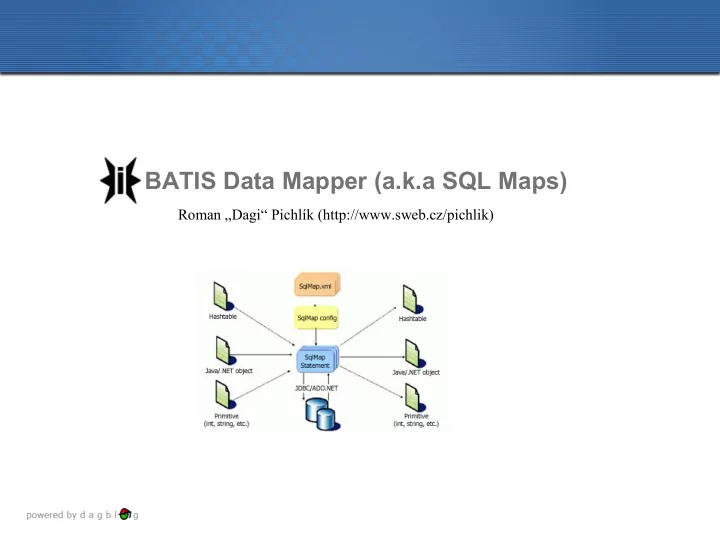
iBATIS concept overview

1.provide an object as a parameter 2.execute the mapped statement 3.single object, collection of objects or rows effected is returned.

slide-5
SLIDE 5

5

Sample Weblog Application

slide-6
SLIDE 6

6

SQL Maps config

<sqlMapConfig> <settings cacheModelsEnabled="true" enhancementEnabled="true" lazyLoadingEnabled="true" errorTracingEnabled="false" maxRequests="32" maxSessions="10" maxTransactions="5" useStatementNamespaces="true" /> <transactionManager type="JDBC"> <dataSource type="SIMPLE" > <property name="JDBC.Driver" value="com.mysql.jdbc.Driver"/> <property name="JDBC.ConnectionURL" value="jdbc:mysql://dagi/dev?useUnicode=true&characterEncoding=UTF-8"/> <property name="JDBC.Username" value="bloger"/> <property name="JDBC.Password" value="changeit"/> <property name="Pool.MaximumActiveConnections" value="10"/> <property name="Pool.MaximumIdleConnections" value="5"/> <property name="Pool.MaximumCheckoutTime" value="120000"/> <property name="Pool.TimeToWait" value="500"/> <property name="Pool.PingQuery" value="select now()"/> <property name="Pool.PingEnabled" value="false"/> <property name="Pool.PingConnectionsOlderThan" value="1"/> <property name="Pool.PingConnectionsNotUsedFor" value="1"/> <property name="Pool.QuietMode" value="false"/> </dataSource> </transactionManager> <sqlMap resource="cz/sweb/pichlik/ibatis/samples/Blog.xml"/> <sqlMap resource="cz/sweb/pichlik/ibatis/samples/Post.xml"/> <sqlMap resource="cz/sweb/pichlik/ibatis/samples/Comment.xml"/> </sqlMapConfig>

Statements resources

slide-7
SLIDE 7

7

Select statement definition and use

Statement definition

<sqlMap namespace="Blog"> <typeAlias alias="blog" type="cz.sweb.pichlik.ibatis.samples.domain.Blog"/> <!-- Selects all blogs--> <select id="getAll" resultClass="blog"> select blog_id as blogId, blog_name as blogName, bloger_firstname as blogerFirstName, bloger_surname as blogerSurName, bloger_email as blogerEmail, created from blogs </select> </sqlMap>

Statement use

Reader configReader = new InputStreamReader(this.class.getResourceAsStream("SqlMapConfig.xml")); //SqlMapClientBuilder is used to read configuration settings SqlMapClient sqlMapClient = SqlMapClientBuilder.buildSqlMapClient(configReader); //SqlMapClient is thread safe client used for interacting with SQLMaps, it is also possible to use SqlMapSession per single thread List<Blog> blogs = sqlMapClient.queryForList("Blog.getAll" , null);

slide-8
SLIDE 8

8

Insert statement definition and use

<insert id="save" parameterClass="blog"> insert into blogs (blog_id, blog_name, bloger_firstname, bloger_surname, bloger_email) values (#blogId#, #blogName#, #blogerFirstName#, #blogerSurName#, #blogerEmail#) </insert>

public void addBlog(final Blog blog) throws SQLException { SqlMapSession session = null; try { session = sqlMapClient.openSession(); //Demarcates the beginning of a transaction scope. Transactions must be properly committed //or rolled back to be effective. session.startTransaction(); //Executes a mapped SQL INSERT statement. session.insert("Blog.save", blog); //Commits the currently started transaction. session.commitTransaction(); } finally { //Ends a transaction and rolls back if necessary. If the transaction has been started, but not committed, it will be // rolled back upon calling endTransaction(). if(session != null){ try{ session.endTransaction(); } finally { session.close(); } } } }

Note: Execution of update and delete statement is same, but session.update and session.delete are used instead of session.insert. It is also possible to call stored procedures.

slide-9
SLIDE 9

9

Select statement result mapping

no way to specify the types of the output columns no way to automatically load related data (complex properties) slight performance consequence

Directly mapped result approach

<select id="getAll" resultClass="blog"> select blog_id as blogId, blog_name as blogName, bloger_firstname as blogerFirstName, bloger_surname as blogerSurName, bloger_email as blogerEmail, created ....

slide-10
SLIDE 10

10

Select statement result mapping

complex property mapping (1:1, 1: M, N:M) column and java type definition null value replacement resultMap reuse (extend)

ResultMap approach

<resultMap id=”resultMapName” class=”some.domain.Class” [extends=”parent-resultMap”]> <result property=”propertyName” column=”COLUMN_NAME” [columnIndex=”1”] [javaType=”int”] [jdbcType=”NUMERIC”] [nullValue=”-999999”] [select=”someOtherStatement”] /> <result ……/> <result ……/> <result ……/> </resultMap>

slide-11
SLIDE 11

11

Select statement result mapping

result map for mapping returned columns to java bean properties result map can be used for any select statement

<resultMap id="blog-result-mapping" class="blog"> <result column="blog_id" property="blogId"/> <result column="blog_name" property="blogName"/> <result column="bloger_firstname" property="blogerFirstName"/> <result column="bloger_surname" property="blogerSurName"/> <result column="bloger_email" property="blogerEmail"/> <result column="created" property="created"/> </resultMap> <select id="findById" resultMap="blog-result-mapping"> select * from blogs where blog_id=#blogId# </select> <select id="findByName" resultMap="blog-result-mapping"> select * from blogs where blog_name=#blogName# </select>

slide-12
SLIDE 12

12

1:1 mapping (nested property)

<typeAlias alias="comment" type="cz.sweb.pichlik.ibatis.samples.domain.Comment"/> <resultMap id="comment-result-mapping" class="comment"> <result column="c.comment_id" property="commentId"/> <result column="c.text" property="text"/> <result column="c.author_name" property="authorName"/> <result column="c.author_email" property="authorEmail"/> <result column="c.author_url" property="authorURL"/> <result column="c.created" property="created"/> <result column="p.post_id" property="post.postId"/> <result column="p.title" property="post.title"/> <result column="p.desc" property="post.desc"/> <result column="p.created" property="post.created"/> </resultMap> <select id="getAllByPostId" resultMap="comment-result-mapping"> select c.*, p.* from posts p, comments c where p.post_id = #postId# and c.post_id = p.post_id </select>

slide-13
SLIDE 13

13

1:1 mapping (separate select)

<typeAlias alias="comment" type="cz.sweb.pichlik.ibatis.samples.domain.Comment"/> <resultMap id="comment-result-mapping" class="comment"> <result column="c.comment_id" property="commentId"/> <result column="c.text" property="text"/> <result column="c.author_name" property="authorName"/> <result column="c.author_email" property="authorEmail"/> <result column="c.author_url" property="authorURL"/> <result column="c.created" property="created"/> <result column="{postId=post_id}" property="post" select="Post.findByIdII"/> </resultMap> <select id="findByIdII" resultMap="generic-post-result-mapping"> select p.* from blogs b, posts p where p.post_id=#postId# and p.blog_id = b.blog_id </select>

slide-14
SLIDE 14

14

1:M mapping

<sqlMap namespace="Post"> <typeAlias alias="post" type="cz.sweb.pichlik.ibatis.samples.domain.Post"/> <resultMap id="post-result-mapping" class="post"> <result column="p.post_id" pr`operty="postId"/> <result column="p.title" property="title"/> <result column="p.desc" property="desc"/> <result column="p.created" property="created"/> <result column="b.blog_id" property="blog.blogId"/> <result column="b.blog_name" property="blog.blogName"/> <result column="b.bloger_firstname" property="blog.blogerFirstName"/> <result column="b.bloger_surname" property="blog.blogerSurName"/> <result column="b.bloger_email" property="blog.blogerEmail"/> <result column="b.blog_created" property="blog.created"/> <result column="{postId=post_id}" property="comments" select="Comment.getAllByPostId" /> </resultMap> <select id="getAllByBlogId" resultMap="post-result-bmapping"> select … </sqlMap> <sqlMap namespace="Comment"> <typeAlias alias="comment" type="cz.sweb.pichlik.ibatis.samples.domain.Comment"/> <select id="getAllByPostId" resultMap="comment-result-mapping"> select ...

slide-15
SLIDE 15

15

Result caching

simply by specifying the cacheModel parameter Read only and Read/Write cache supported various type of cache implementation (LRU, Memory, FIFO, OSCache) parametrized flush behaviour (time, statement execution)

<cacheModel id="blog-cache" type ="LRU"> .... </cacheModel> <select id="getAll" resultClass="blog" cacheModel="blog-cache"> .... </select>

slide-16
SLIDE 16

16

Read Only Cache

returns identic instances of cached object shared per session (???)

  • bjects read from a read-only cache should not

be modified

<cacheModel id="blog-cache" type ="LRU" readOnly="true" serialize="false"> <flushInterval hours="24"/> <flushOnExecute statement="Blog.save"/> <flushOnExecute statement="Blog.update"/> <flushOnExecute statement="Blog.delete"/> <property name="cache-size" value="1000" /> </cacheModel> <!-- Selects all blogs--> <select id="getAll" resultClass="blog" cacheModel="blog-cache"> ...

slide-17
SLIDE 17

17

Read/Write cache different instances (copies) of the cached

  • bject to each session

every cached object must be serializable each session can safely modify returned instance

<cacheModel id="blog-cache-rw" type ="LRU" readOnly="false" serialize="true"> <flushInterval hours="24"/> <flushOnExecute statement="Blog.save"/> <flushOnExecute statement="Blog.update"/> <flushOnExecute statement="Blog.delete"/> <property name="cache-size" value="1000" /> </cacheModel> <!-- Selects all blogs--> <select id="getAll" resultClass="blog" cacheModel="blog-cache-rw"> ...

slide-18
SLIDE 18

18

Inline Parameter Maps

places the JavaBeans property names inline with the Mapped Statement any Mapped Statement that has no explicit parameterMap specified will be parsed for inline parameters

<insert id="save" parameterClass="cz.sweb.pichlik.ibatis.samples.domain.Comment"> insert into comments (comment_id, post_id, text, author_name, author_url, created) values (#commentId#, #post.postId#, #text#, #authorName#, #authorURL#, #created#) </insert>

slide-19
SLIDE 19

19

Parameter Maps

mapping JavaBeans properties to the parameters

  • f a statement

<parameterMap id=”parameterMapName” [class=”com.domain.Product”]> <parameter property =”propertyName” [jdbcType=”VARCHAR”] [javaType=”string”] [nullValue=”NUMERIC”] [null=”-9999999”]/> <parameter …… /> <parameter …… /> </parameterMap> <parameterMap id=”insert-product-param” class=”com.domain.Product”> <parameter property=”description” /> <parameter property=”id”/> </parameterMap> <statement id=”insertProduct” parameterMap=“insert-product-param”> insert into PRODUCT (PRD_DESCRIPTION, PRD_ID) values (?,?); </statement>

slide-20
SLIDE 20

20

Dynamic mapped statement and SQL fragment includes

<sql id="posts_sorting_fragment"> <isPropertyAvailable prepend="order by" property="SORT"> p.created DESC </isPropertyAvailable> </sql> <select id="onlyPosts" resultClass="java.util.HashMap"> select p.* from posts p where p.blog_id = #blogId# <include refid="posts_sorting_fragment"/> </select>

slide-21
SLIDE 21

21

SqlMapClient and SqlMapSession API

EXECUTE SELECT BATCH

delete(String id, Object parameterObject) insert(String id, Object parameterObject) update(String id, Object parameterObject) queryForList(String id, Object parameterObject) queryForList(String id, Object parameterObject, int skip, int max) queryForMap(String id, Object parameterObject, String keyProp) queryForMap(String id, Object parameterObject, String keyProp, String valueProp) queryForPaginatedList(String id, Object parameterObject, int pageSize) queryWithRowHandler(String id, Object parameterObject, RowHandler rowHandler) queryForObject(String id, Object parameterObject) queryForObject(String id, Object parameterObject, Object resultObject startBatch () executeBatch()

slide-22
SLIDE 22

22

Resources

http://www.sweb.cz/pichlik/ibatis/bloger.zip - example application http://www.sweb.cz/pichlik/ibatis/presentation.pdf

  • this presentation

http://ibatis.apache.org/ IBATIS homepage