Binding: Connecting From Procedure to Client and Server Remote - - PowerPoint PPT Presentation

binding connecting from procedure to client and server
SMART_READER_LITE
LIVE PREVIEW

Binding: Connecting From Procedure to Client and Server Remote - - PowerPoint PPT Presentation

Binding: Connecting From Procedure to Client and Server Remote Procedure Server exports its interface Three main concerns Identifies itself to network name server Parameter passing Tells local runtime its dispatcher address Failure cases Import


slide-1
SLIDE 1

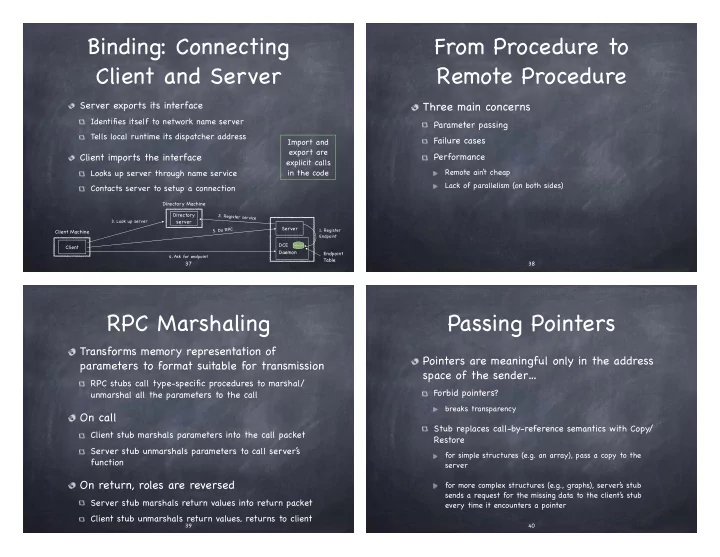
Binding: Connecting Client and Server

Server exports its interface

Identifies itself to network name server Tells local runtime its dispatcher address

Client imports the interface

Looks up server through name service Contacts server to setup a connection Import and export are explicit calls in the code

Directory server Client Client Machine Server DCE Daemon Endpoint Table

  • 1. Register

Endpoint

  • 3. Look up server
  • 5. Do RPC
  • 4. Ask for endpoint

Directory Machine

  • 2. Register service

37

From Procedure to Remote Procedure

Three main concerns

Parameter passing Failure cases Performance

Remote ain’ t cheap Lack of parallelism (on both sides)

38

RPC Marshaling

Transforms memory representation of parameters to format suitable for transmission

RPC stubs call type-specific procedures to marshal/ unmarshal all the parameters to the call

On call

Client stub marshals parameters into the call packet Server stub unmarshals parameters to call server’ s function

On return, roles are reversed

Server stub marshals return values into return packet Client stub unmarshals return values, returns to client

39

Passing Pointers

Pointers are meaningful only in the address space of the sender…

Forbid pointers?

breaks transparency

Stub replaces call-by-reference semantics with Copy/ Restore

for simple structures (e.g. an array), pass a copy to the server for more complex structures (e.g., graphs), server’ s stub sends a request for the missing data to the client’ s stub every time it encounters a pointer

40

slide-2
SLIDE 2

Failures

Request or response are lost Server crashes after receiving request Client crashes after sending request

In local procedure calls, if a machine fails, the applications fails, but with RPC, if a machine fails, only part of application does Cannot tell the difference between a machine failure and a network failure…

Easy! Transform partial failures into total failures Also, while you are at it, aim a gun to your foot

41

RPC Semantics

Exactly once

Impossible in practice

Why?

At least once

If at first you don’ t succeed…

Only for idempotent operations Server must be stateless

At most once

Zero, don’ t know, or once

Server needs to be able to identify requests, so it can resend previously computed replies

Zero or once

Transactional semantics 42

Asynchronous RPC

In traditional RPC, caller blocks until function returns

Time Client Server

Return from call Call remote procedure Request Reply Wait for result Calls local procedure and returns result

43

Asynchronous RPC

In asynchronous RPC, caller only blocks until it learns the request has been accepted

Time Client Server

Return from call Call remote procedure Request Accept Request Wait for acceptance Calls local procedure and returns result

44

slide-3
SLIDE 3

Asynchronous RPC

In asynchronous RPC, caller only blocks until it learns the request has been accepted and is interrupted when reply is received

Time Client Server

Return from call Call remote procedure Request Calls local procedure and returns result Wait for acceptance Accept Request Returns result Ack Interrupt client

45

RPC: Final Thoughts

Common model for communication in distributed applications Relies on language support for distributed programming

Stub compiler and IDL server description

Commonly used for communication between applications running in different address spaces

most RPCs are intra-node!

“Distributed objects are different from local objects, and keeping that difference visible will keep the programmer from forgetting the difference and making mistakes. ” Jim Waldo et al., “A Note on Distributed Computing” (1994)

46

Transport Layer: UDP & TCP

Application Transport Network Link Physical 47

Transport Services and Protocols

Provide logical communication between processes on different hosts

logical communication between hosts is left to the network layer

Sender packages messages into segments, passes them to the network layer Receiver reassembles segments into messages, passes them to the application layer Apps can use multiple protocols (e.g.,

  • n the Internet, UDP or TCP)

48

slide-4
SLIDE 4

Internet Transport-layer Protocols

TCP (Trusty Control Protocol)

Reliable, in-order delivery

Congestion control Flow control Connection setup

UDP (Unreliable Datagram Protocol)

Unreliable, unordered deliver

no-frill extension of best-effort IP (network layer protocol)

Services not available:

delay guarantees bandwidth guarantees

49

Applications and their Transport Protocols

Application Application-Layer Protocol Transport Protocol

Email SMTP TCP Remote terminal access Telnet TCP Web HTTP TCP File Transfer FTP TCP Remote File Server NFS Typically UDP Streaming Multimedia Proprietary UDP or TCP Internet Telephony Prioprietary UDP or TCP Network Management SNMP Typically UDP Routing Protocol RIP Typically UDP Name Translation DNS Typically UDP

Socket

One endpoint of a two way communication between two application processes running on a network

Sending process pushes messages out the socket to the transport protocol Transport protocol delivers message to the socket at the receiving process

Application Transport Network Link Physical

Socket

Application Transport Network Link Physical Identified by the address of the host machine a port number, unique to the application 0-1023 are well known

web server = 80; mail = 25; telnet = 23

51

The Big Picture

(Sender’ s Edition)

Sending application

specifies IP address (to identify host) and destination port uses socket bound to a source port

Transport layer

breaks application message into smaller chunks add to each transport-layer header

Network layer

adds network layer header (with IP address)

52

slide-5
SLIDE 5

The Big Picture

(Receiver’ s Edition)

Network layer

removes network layer header (with IP address)

Transport layer

removes from each segment transport-layer header reassembles application message from segment

Receiving application

receives message on destination port bound to socket

53

Multiplexing at the Sender

Handles data from multiple sockets Adds transport header (later used for demultiplexing)

Application Transport Network Link Physical

80

P1 P2

53

Application Transport Network Link Physical

9157

P3 Application Transport Network Link Physical

5775

P4

Sources Destination Destination

B A C

80 9157 B A

Src Dst

80 5775 B C

Src Dst

54

Demultiplexing at the Receiver

Handles data from multiple sockets Adds transport header (later used for demultiplexing)

Application Transport Network Link Physical

80

P1 P2

53

Application Transport Network Link Physical

9157

P3 Application Transport Network Link Physical

5775

P4

Source Destination

B A C

9157 80 A B

Src Dst

5775 53 C B

Src Dst

55

Source

Socket programming

Two socket types, depending on transport services

UDP: unreliable datagram TCP: reliable, byte-stream oriented

Application at end host distinguished by binding socket to a port number

16 bit unsigned number; 0-1023 are bound to well- know applications

web server = 80; mail = 25; telnet = 23

slide-6
SLIDE 6

Socket Programming with UDP

No connection between client and server

no handshaking before sending data Sender: explicitly attaches destination IP address and port number to each packet Receiver: extracts sender IP address and port number from received packet

Best effort: Data may be lost or received out-of-order UDP provides applications with unreliable transfer of a group of bytes (“datagram’) between client and server

Client/Server Socket Interaction: UDP

Create serversocket; bind to port X Create clientsocket Create message Send message to (ServerIP, port x) via clientsocket Read data and clientAddr from serversocket Send modified data to clientAddr via serversocket Modify data Receive message and serverAddr from clientsocket Close clientsocket

Connectionless Demux

Distinct UDP segments with same dest IP address and port, go to the same socket

even if they come from different source IP!

The application must sort things out!

Application Transport Network Link Physical

6428

P1 Application Transport Network Link Physical

9157

P3 Application Transport Network Link Physical

5775

P4

Source Destination

B A C

9157 6428 A B

Src Dst

5775 6428 C B

Src Dst

59

Source

UDP: Perspective

Speed

no connection establishment (takes time) no congestion control: UDP can blast away!

Simplicity

no connection state at sender/receiver

Extra work for applications

reordering, duplicate suppression, missing packets… but some applications may not care!

streaming multimedia: loss tolerant, rate sensitive (want constant, fast speeds)

slide-7
SLIDE 7

Socket Programming with TCP

Server

Contacted by client Already running Already created a “welcoming socket” When contacted by client, creates a new TCP socket to communicate just with that client

Socket identified by 4- tuple

source IP; source port no;

  • dest. IP; dest port no.

Server can concurrently serve multiple clients

Client

Creates TCP socket with server’ s IP address and port number Client TCP establishes connection to server TCP

TCP provides applications with reliable, in-order byte-stream transfer between client and server

All web traffic travels

  • ver TCP/IP

Enough apps demand reliable ordered delivery

Client/Server Socket Interaction: TCP

Create welcoming serversocket; bind to port x Create clientsocket Create message In response to connection request, create connectionsocket Read data from connectionsocket Send modified data to clientAddr via connectionsocket Modify data Receive message from clientsocket Close clientsocket Connect to (serverIP, port x) Send message via clientsocket Close connectionsocket