Business to Business Interactions Bridging Relational Technology - - PDF document

business to business interactions bridging relational
SMART_READER_LITE
LIVE PREVIEW

Business to Business Interactions Bridging Relational Technology - - PDF document

Business to Business Interactions Bridging Relational Technology Cars R Us Tires R Us and XML eXtensible Markup Language (XML) Jayavel Shanmugasundaram Internet Order Fulfillment Purchasing Cornell University Application Application


slide-1
SLIDE 1

1

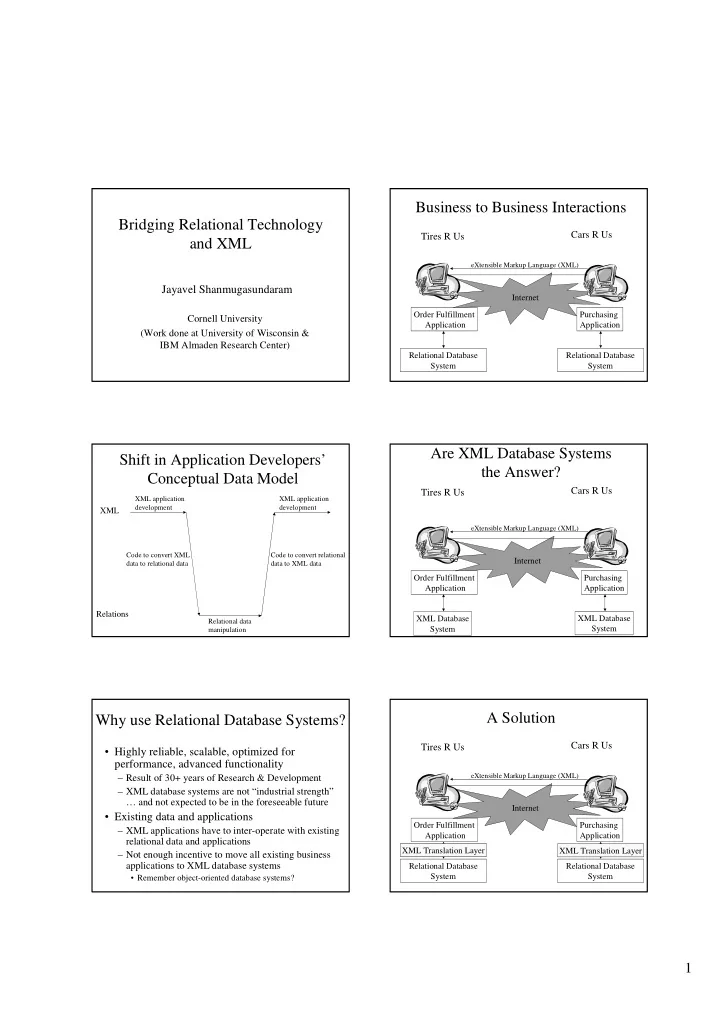
Bridging Relational Technology and XML

Jayavel Shanmugasundaram

Cornell University (Work done at University of Wisconsin & IBM Almaden Research Center)

Business to Business Interactions

Tires R Us Cars R Us

Order Fulfillment Application Purchasing Application Internet

eXtensible Markup Language (XML)

Relational Database System Relational Database System

Shift in Application Developers’ Conceptual Data Model

XML Relations

Code to convert XML data to relational data Relational data manipulation Code to convert relational data to XML data XML application development XML application development

Are XML Database Systems the Answer?

Tires R Us Cars R Us

XML Database System Order Fulfillment Application XML Database System Purchasing Application Internet

eXtensible Markup Language (XML)

Why use Relational Database Systems?

  • Highly reliable, scalable, optimized for

performance, advanced functionality

– Result of 30+ years of Research & Development – XML database systems are not “industrial strength” … and not expected to be in the foreseeable future

  • Existing data and applications

– XML applications have to inter-operate with existing relational data and applications – Not enough incentive to move all existing business applications to XML database systems

  • Remember object-oriented database systems?

A Solution

Tires R Us Cars R Us

Relational Database System Order Fulfillment Application Purchasing Application Internet

eXtensible Markup Language (XML)

XML Translation Layer XML Translation Layer Relational Database System

slide-2
SLIDE 2

2

XML Translation Layer (Contributions)

  • Store and query XML documents

– Harnesses relational database technology for this purpose [VLDB’99]

  • Publish existing relational data as XML

documents

– Allows relational data to be viewed in XML terms [VLDB’00]

Bridging Relational Technology and XML

XML Relations

Code to convert XML data to relational data Relational data manipulation Code to convert relational data to XML data XML application development XML application development

XML Translation Layer

Outline

  • Motivation & High-level Solution
  • Background (Relations, XML)
  • Storing and Querying XML Documents
  • Publishing Relational Data as XML Documents
  • Conclusion

Relational Data

PurchaseOrder

Id Customer 200I Year Month Cars R Us 10 June 1999 300I Day Bikes R Us null July 1999

Item

Name 200I Cost Firestone Tire 50 2000.00 200I Quantity Goodyear Tire 200 8000.00 Pid 300I Trek Tire 20 300I Schwinn Tire 100

Payment

Installment 40% Percentage Pid 300I 100% 200I 60% 1 2 1 200I 2500.00 400.00

SQL Query

Find all the items bought by “Cars R Us” in the year 1999 Select it.name From PurchaseOrder po, Item it Where po.customer = “Cars R Us” and po.year = 1999 and po.id = it.pid Predicates Join

Self-describing tags

XML Document

<PurchaseOrder id=“200I” customer=“Cars R Us”> <Date> <Day> 10 </Day> <Month> June </Month> <Year> 1999 </Year> </Date> <Item name=“Firestone Tire” cost=“2000.00”> <Quantity> 50 </Quantity> </Item> <Item name=“Goodyear Tire” cost=“8000.00”> <Quantity> 200 </Quantity> </Item> <Payment> 40% </Payment> <Payment> 60% </Payment> </PurchaseOrder>

slide-3
SLIDE 3

3

XML Document

<PurchaseOrder id=“200I” customer=“Cars R Us”> <Date> <Day> 10 </Day> <Month> June </Month> <Year> 1999 </Year> </Date> <Item name=“Firestone Tire” cost=“2000.00”> <Quantity> 50 </Quantity> </Item> <Item name=“Goodyear Tire” cost=“8000.00”> <Quantity> 200 </Quantity> </Item> <Payment> 40% </Payment> <Payment> 60% </Payment> </PurchaseOrder> Nested structure Self-describing tags

XML Document

<PurchaseOrder id=“200I” customer=“Cars R Us”> <Date> <Day> 10 </Day> <Month> June </Month> <Year> 1999 </Year> </Date> <Item name=“Firestone Tire” cost=“2000.00”> <Quantity> 50 </Quantity> </Item> <Item name=“Goodyear Tire” cost=“8000.00”> <Quantity> 200 </Quantity> </Item> <Payment> 40% </Payment> <Payment> 60% </Payment> </PurchaseOrder> Nested structure Self-describing tags Nested sets

XML Document

<PurchaseOrder id=“200I” customer=“Cars R Us”> <Date> <Day> 10 </Day> <Month> June </Month> <Year> 1999 </Year> </Date> <Item name=“Firestone Tire” cost=“2000.00”> <Quantity> 50 </Quantity> </Item> <Item name=“Goodyear Tire” cost=“8000.00”> <Quantity> 200 </Quantity> </Item> <Payment> 40% </Payment> <Payment> 60% </Payment> </PurchaseOrder> Nested structure Self-describing tags Nested sets Order

XML Schema

<PurchaseOrder id={integer} customer={string}> Date (Item)* (Payment)* </PurchaseOrder> PurchaseOrder Date <Date> Day? Month Year </Date> Day <Day> {integer} </Day> Month <Month> {string} </Month> Year <Year> {integer} </Year> Item <Item name={string} cost={float}> Quantity </Item> … and so on

XML Schema (contd.)

<PurchaseOrder id={integer} customer={string}> Date? (Item | Payment)* </PurchaseOrder> PurchaseOrder <PurchaseOrder id={integer} customer={string}> (Date | Payment*) (Item (Item Item)* Payment)* </PurchaseOrder> PurchaseOrder <PurchaseOrder id={integer} customer={string}> Date Item (PurchaseOrder)* Payment </PurchaseOrder> PurchaseOrder

XML Query

Find all the items bought by “Cars R Us” in 1999 For $po in /PurchaseOrder Where $po/@customer = “Cars R Us” and $po/date/year = 1999 Return $po/Item

slide-4
SLIDE 4

4

XML Query (contd.)

//Item /(Item/(Item/Payment)*/(Payment | Item))*/Date //Item[5] //Item Before //Payment

Outline

  • Motivation & High-level Solution
  • Background (Relations, XML)
  • Storing and Querying XML Documents
  • Publishing Relational Data as XML Documents
  • Conclusion

Storing and Querying XML Documents

[Shanmugasundaram et. al., VLDB’99] Relational Database System XML Translation Layer

XML Schema Relational Schema Translation Information XML Documents Tuples XML Query SQL Query Relational Result XML Result

Outline

  • Motivation & High-level Solution
  • Background (Relations, XML)
  • Storing and Querying XML Documents

– Relational Schema Design and XML Storage – Query Mapping and Result Construction

  • Publishing Relational Data as XML Documents
  • Conclusion

XML Schema

<PurchaseOrder id={integer} customer={string}> (Date | (Payment)*) (Item (Item Item)* Payment)* </PurchaseOrder> PurchaseOrder

Desired Properties of Generated Relational Schema

  • All XML documents conforming to XML

schema should be “mappable” to tuples in

  • All queries over XML documents should be

“mappable” to SQL queries over

  • Not Required: Ability to re-generate XML

schema from

slide-5
SLIDE 5

5

Simplifying XML Schemas

  • XML schemas can be “simplified” for

translation purposes

  • All without undermining storage and query

functionality!

<PurchaseOrder id={integer} customer={string}> Date? (Item)* (Payment)* </PurchaseOrder> PurchaseOrder <PurchaseOrder id={integer} customer={string}> (Date | (Payment)*) (Item (Item Item)* Payment)* </PurchaseOrder> PurchaseOrder

Why is Simplification Possible?

  • Structure in XML schemas can be captured:

– Partly in relational schema – Partly as data values

<PurchaseOrder id={integer} customer={string}> Date? (Item)* (Payment)* </PurchaseOrder> PurchaseOrder

  • Order field to capture order among siblings
  • Sufficient to answer ordered XML queries

– PurchaseOrder/Item[5] – PurchaseOrder/Item AFTER PurchaseOrder/Payment

  • Sufficient to reconstruct XML document

Simplification Desiderata

  • Simplify structure, but preserve differences

that matter in relational model

– Single occurrence (attribute) – Zero or one occurrences (nullable attribute) – Zero or more occurrences (relation)

<PurchaseOrder id={integer} customer={string}> (Date | (Payment)*) (Item (Item Item)* Payment)* </PurchaseOrder> PurchaseOrder <PurchaseOrder id={integer} customer={string}> Date? (Item)* (Payment)* </PurchaseOrder> PurchaseOrder

Translation Normal Form

  • An XML schema production is either of the

form:

<P attr1={type1} … attrm={typem}> a1 … ap ap+1? … aq? aq+1*… ar* </P> P

  • … or of the form:

<P attr1={type1} … attrm={typem}> {type} </P> P where ai ≠ aj

Example Simplification Rules

(e1 | e2) e1? e2?

(Date | (Payment)*) (Item (Item Item)* Payment)* Date? (Item)*? (Item (Item Item)* Payment)*

e*? e*

Date? (Payment)*? (Item (Item Item)* Payment)* Date? (Item)* (Item (Item Item)* Payment)*

Simplified XML Schema

<PurchaseOrder id={integer} customer={string}> Date (Item)* (Payment)* </PurchaseOrder> PurchaseOrder Date <Date> Day? Month Year </Date> Day <Day> {integer} </Day> Month <Month> {string} </Month> Year <Year> {integer} </Year> Item <Item name={string} cost={float}> Quantity </Item> … and so on

slide-6
SLIDE 6

6

Relational Schema Generation

PurchaseOrder (id, customer) Date Day Month Year Item (name, cost) Quantity Payment 1 ? 1 1 * * 1 Minimize: Number of joins for path expressions Satisfy: Fourth normal form

Generated Relational Schema and Shredded XML Document

PurchaseOrder

Id Customer 200I Year Month Cars R Us 10 June 1999 Day

Item

Order Name 200I Cost Firestone Tire 50 2000.00 200I Quantity Goodyear Tire 200 8000.00 Pid 1 3

Payment

Order 40% Value Pid 200I 60% 2 4 200I

Recursive XML Schema

PurchaseOrder (id, customer) Item (name) Quantity * 1 * PurchaseOrder

Id Customer 200I Cars R Us

Item

Order Name 200I Firestone Tire 50 200I Quantity Goodyear Tire 200 Pid 1 2 Id 5 6 Pid null Order null 5 900I Us Again 1

Relational Schema Generation and XML Document Shredding (Completeness and Optimality)

  • Any XML Schema can be mapped to a

relational schema , and …

  • Any XML document conforming to

can be converted to tuples in

  • Further, can be recovered from the tuples

in

  • Also minimizes the number of joins for path

expressions (given fourth normal form)

Outline

  • Motivation & High-level Solution
  • Background (Relations, XML)
  • Storing and Querying XML Documents

– Relational Schema Design and XML Storage – Query Mapping and Result Construction

  • Publishing Relational Data as XML Documents
  • Conclusion

XML Query

Find all the items bought by “Cars R Us” in 1999 For $po in /PurchaseOrder Where $po/@customer = “Cars R Us” and $po/date/year = 1999 Return $po/Item

slide-7
SLIDE 7

7

Path Expression Automata (Moore Machines)

/PurchaseOrder/Item PurchaseOrder Item //Item Item #

XML Schema Automaton (Mealy Machine)

PurchaseOrder (id, customer) Date Day Month Year Item (name, cost) Quantity Payment

Intersected Automaton

PurchaseOrder (customer) Date Year Item (name, cost) Quantity

= “Cars R Us” = 1999

Generated SQL Query

Select i.name, i.cost, i.quantity From PurchaseOrder p, Item i Where p.customer = “Cars R Us” and p.year = 1999 and p.id = i.pid Predicates Join condition

Recursive XML Query

PurchaseOrder (id, customer) Item (name) Quantity Find all items (directly or indirectly) under a “Cars R Us” purchase order For $po in /PurchaseOrder Where $po/@customer = “Cars R Us” Return $po//Item

Recursive Automata Intersection

PurchaseOrder (customer) PurchaseOrder (id, customer) Item (name) Quantity PurchaseOrder

= “Cars R Us”

Item (name) Quantity

slide-8
SLIDE 8

8

Recursive SQL Generation

PurchaseOrder (customer) PurchaseOrder

= “Cars R Us”

Item (name) Quantity ResultItems (id, name, quantity) as ( Select it.id, it.name, it.quantity From PurchaseOrder po, Item it Where po.customer = “Cars R Us” and po.id = it.pid ) Union all Select it.id, it.name, it.quantity From ResultItems rit, PurchaseOrder po, Item it Where rit.id = po.pid and po.id = it.pid

SQL Generation for Path Expressions (Completeness)

  • (Almost) all path expressions can be

translated to SQL

  • SQL does not support

– Nested recursion – Meta-data querying

  • Meta-data query capability provided in the

XML translation layer

Constructing XML Results

(“Firestone Tire”, 2000.00, 50) (“Goodyear Tire”, 8000.00, 200) <item name = “Firestone Tire” cost=“2000.00”> <quantity> 50 </quantity> </item> <item name=“Goodyear Tire” cost=“8000.00”> <quantity> 200 </quantity> </item>

Complex XML Construction

PurchaseOrder (id, customer) Date Day Month Year Item (name, cost) Quantity Payment

= “Cars R Us” = 1999

Outline

  • Motivation & High-level Solution
  • Background (Relations, XML)
  • Storing and Querying XML Documents
  • Publishing Relational Data as XML Documents
  • Conclusion

Relational Schema and Data

PurchaseOrder

Id Customer 200I Year Month Cars R Us 10 June 1999 Day

Item

Name 200I Cost Firestone Tire 50 2000.00 200I Quantity Goodyear Tire 200 8000.00 Pid

Payment

Installment 40% Percentage Pid 200I 60% 1 2 200I

slide-9
SLIDE 9

9

XML Document

<PurchaseOrder id=“200I” customer=“Cars R Us”> <Date> <Day> 10 </Day> <Month> June </Month> <Year> 1999 </Year> </Date> <Item name=“Firestone Tire” cost=“2000.00”> <Quantity> 50 </Quantity> </Item> <Item name=“Goodyear Tire” cost=“8000.00”> <Quantity> 200 </Quantity> </Item> <Payment> 40% </Payment> <Payment> 60% </Payment> </PurchaseOrder>

Naïve Approach

  • Issue many SQL queries that mirror the structure of

the XML document to be constructed

  • Tag nested structures as they are produced

DBMS Engine

PurchaseOrder Item Payment

Problem 1: Too many SQL queries

(200I, “Cars R Us”, 10, June, 1999) (40%) (60%) (“Firestone Tire”, 2000.00, 50) (“Goodyear Tire”, 8000.00, 200)

Problem 2: Fixed (nested loop) join strategy

Relations to XML: Issues

[Shanmugasundaram et. al., VLDB’00]

  • Two main differences:

– Ordered nested structures – Self-describing tags

  • Space of alternatives:

Late Tagging Early Tagging Late Structuring Early Structuring

  • Late Tagging, Early Structuring
  • Structured XML document content produced

– In document order – “Sorted Outer Union” approach

  • Tagger just adds tags

– In constant space Relational Query Processing

Structured content

Tagging

Result XML Document

Sorted Outer Union Approach

PurchaseOrder Item Payment

(200I, 2, 60%) (200I, 1, 40%) (200I, “Firestone Tire”, 2000.00, 50) (200I, “Goodyear Tire”, 8000.00, 200) (200I, “Cars R Us”, 10, June, 1999) (200I, null , null, null , null , null , null , null, 1 , 40%, 2) (200I, “Cars R Us”, 10 , June, 1999, null , null , null, null, null, 0) (200I, null , null, null , null , null , null , null, 2 , 60%, 2) (200I, null , null, null , null , “Firestone Tire” , 2000.00, 50 , null, null, 1) (200I, null , null, null , null , “Goodyear Tire”, 8000.00, 200, null, null, 1)

Union Sort 1 2 3

Sorted Outer Union Approach

PurchaseOrder Item Payment

(200I, 2, 60%) (200I, 1, 40%) (200I, “Firestone Tire”, 2000.00, 50) (200I, “Goodyear Tire”, 8000.00, 200) (200I, “Cars R Us”, 10, June, 1999) (200I, “Cars R Us”, 10 , June, 1999, null , null , null, null, null, 0) (200I, null , null, null , null , “Firestone Tire” , 2000.00, 50 , null, null, 1) (200I, null , null, null , null , “Goodyear Tire”, 8000.00, 200, null, null, 1) (200I, null , null, null , null , null , null , null, 1 , 40%, 2) (200I, null , null, null , null , null , null , null, 2 , 60%, 2)

Union Sort 1 2 3

slide-10
SLIDE 10

10

XML Document Construction (Completeness and Performance)

  • Any nested XML document can be constructed

using “sorted outer union” approach

  • 9x faster than previous approaches [VLDB’00]

– 10 MB of data – 17 seconds for sorted outer union approach – 160 seconds for “naïve XML application developer” approach

Outline

  • Motivation & High-level Solution
  • Background (Relations, XML)
  • Storing and Querying XML Documents
  • Publishing Relational Data as XML Documents
  • Conclusion

Conclusion

  • XML has emerged as the Internet data format
  • But relational database systems will continue

to be used for data management tasks

  • Internet application developers currently have

to explicitly bridge this “data model gap”

  • Can we design a system that automatically

bridges this gap for application developers?

For $cust in /Customer Where $cust/name = “Jack” Return $cust

// First prepare all the SQL statements to be executed and create cursors for them Exec SQL Prepare CustStmt From “select cust.id, cust.name from Customer cust where cust.name = ‘Jack’“ Exec SQL Declare CustCursor Cursor For CustStmt Exec SQL Prepare AcctStmt From “select acct.id, acct.acctnum from Account acct where acct.custId = ?“ Exec SQL Declare AcctCursor Cursor For AcctStmt Exec SQL Prepare PorderStmt From “select porder.id, porder.acct, porder.date from PurchOrder porder where porder.custId = ?“ Exec SQL Declare PorderCursor Cursor For PorderStmt Exec SQL Prepare ItemStmt From “select item.id, item.desc from Item item where item.poId = ?“ Exec SQL Declare ItemCursor Cursor For ItemStmt Exec SQL Prepare PayStmt From “select pay.id, pay.desc from Payment pay where item.poId = ?“ Exec SQL Declare PayCursor Cursor For PayStmt // Now execute SQL statements in nested order of XML document result. Start with customer XMLresult = ““ Exec SQL Open CustCursor while (CustCursor has more rows) { Exec SQL Fetch CustCursor Into :custId, :custName XMLResult += “<customer id=“ + custId + “><name>“ + custName + “</name><accounts>“ // For each customer, issue sub-query to get account information and add to custAccts Exec SQL Open AcctCursor Using :custId while (AcctCursor has more rows) { Exec SQL Fetch AcctCursor Into :acctId, :acctNum XMLResult += “<account id=“ + acctId + “> “ + acctNum + “</account>“ } XMLResult += “</accounts><porders>“ // For each customer, issue sub-query to get purchase order information and add to custPorders Exec SQL Open PorderCursor Using :custId while (PorderCursor has more rows) { Exec SQL Fetch PorderCursor Into :poId, :poAcct, :poDate XMLResult += “<porder id=“+ poId + “ acct=“+poAcct +“><date>“+poDate +“</date><items>“ // For each purchase order, issue a sub-query to get item information and add to porderItems Exec SQL Open ItemCursor Using :poId while (ItemCursor has more rows) { Exec SQL Fetch ItemCursor Into :itemId, :itemDesc XMLResult += “<item id=“ + itemId + “>“ + itemDesc + “</item>“ } XMLResult += “</items><payments>“ // For each purchase order, issue a sub-query to get payment information and add to porderPays Exec SQL Open PayCursor Using :poId while (PayCursor has more rows) { Exec SQL Fetch PayCursor Into :payId, :payDesc XMLResult += “<payment id=“ + payId + “>“ + payDesc + “</payment>“ } XMLResult += “</payments></porder>“ } // End of looping over all purchase orders associated with a customer XMLResult += “</customer>“ Return XMLResult as one result row; reset XMLResult = ““ } // loop until all customers are tagged and output

Conclusion (Contd.)

  • Yes! XPERANTO is the first such system
  • Allows users to …

– Store and query XML documents using a relational database system – Publish existing relational data as XML documents

… using a high-level XML query language

  • Also provides a dramatic improvement in

performance

slide-11
SLIDE 11

11

Industry Impact

  • Sorted outer union approach is used in the

DB2 XML Extender product (beta version)

  • XPERANTO is now an IBM initiative

Relational Database System Vendors

  • IBM, Microsoft, Oracle, Informix, …

– SQL extensions for XML

  • XML Translation Layer

– “Pure XML” philosophy … provides high-level XML query interface

  • SQL extensions for XML, while better than writing

applications, is still low-level

– More powerful than XML-extended SQL

  • SQL just not designed with nifty XML features in

mind