C Extensions for Python Were all here because we like Python, the - - PDF document

c extensions for python
SMART_READER_LITE
LIVE PREVIEW

C Extensions for Python Were all here because we like Python, the - - PDF document

C Extensions for Python Were all here because we like Python, the programming language. Today Im going to talk a little about Python, the C program underlying that programming language, by walking through how I learned the basics of making a


slide-1
SLIDE 1

C Extensions for Python

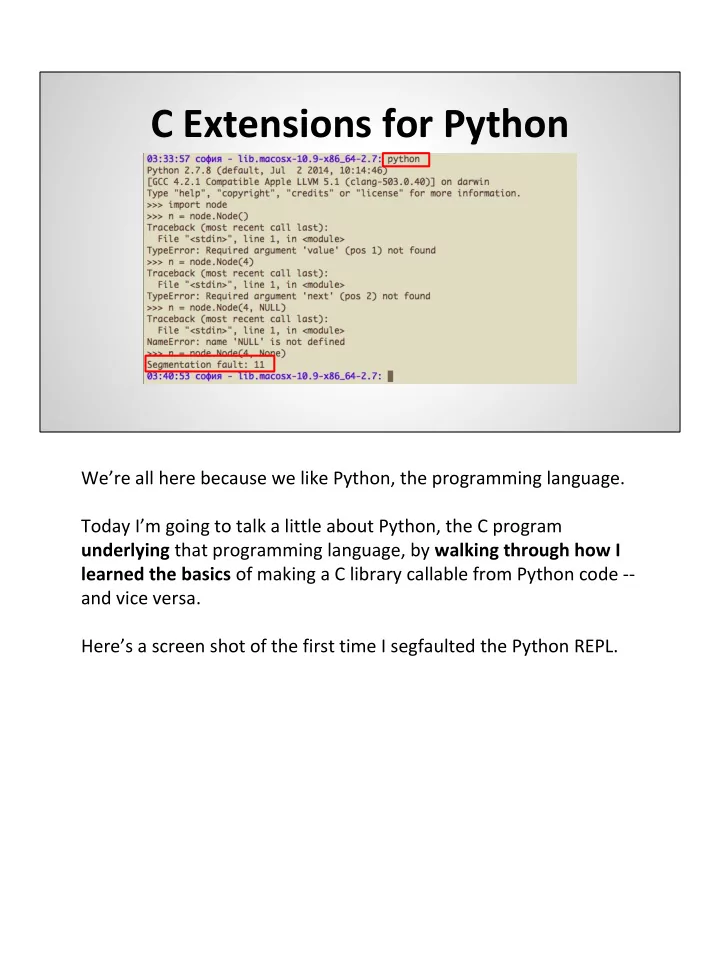
We’re all here because we like Python, the programming language. Today I’m going to talk a little about Python, the C program underlying that programming language, by walking through how I learned the basics of making a C library callable from Python code -- and vice versa. Here’s a screen shot of the first time I segfaulted the Python REPL.

slide-2
SLIDE 2

Background

  • Recurse Center, summer 2014
  • Code & link to slides:

github.com/sophiadavis/hash-table

I’m Sophia, an American software developer based in Amsterdam. In the summer of 2014 I attended the Recurse Center, a sort of writers’ workshop for programmers in NYC. This talk comes out of one of the very down-the-rabbit-hole projects I worked on while there. Code and soon -- the slides -- for this talk are available via my github page -- my username is “sophiadavis”, and the repo is hash-table.

slide-3
SLIDE 3

Background

Let’s get started. This is the story of how I shaved a yak. Probably, if you find yourself breaking out the Python C API docs, you started with a separate problem --

  • ne you thought you could solve using tools in an existing C

codebase. For me, this was a hash table implementation. https://en.wikipedia.org/wiki/Yak

slide-4
SLIDE 4

Let’s talk about Python hash tables!

  • Data structure for mapping keys to values
  • `Dict`
  • Very efficient:

add

  • - O(1)

lookup

  • - O(1)

remove

  • - O(1)

This is probably review for most of you, but in brief: A hash table is a powerful data structure for storing key-value pairs

  • - for associating keys with values, such that every key maps to one

value. Python people tend to call them dictionaries. They’re so powerful because they’re very efficient -- no matter how many key-value pairs you have in your hash table, the average time complexity of adding a key-value pair, looking up the value associated with a key, and removing a key-value pair is constant -- O (1). How does it achieve this amazing performance?

slide-5
SLIDE 5

Hash tables -- how they work

  • Array of “buckets”
  • Hash function

Under the hood, a hash table is just an array. We’ll call each index of the array a “bucket”. Each key-value pair gets put in one of these “buckets”. And how do we know which key-value pair goes in which bucket? That’s where the “hash” of “hash table” comes in. A “hash function” is a mapping of any arbitrary input to a fixed set

  • f values -- like the set of integers.

When we want to put a key and value in our hash table, we pass the key through a hash function to convert it to an integer, and use this number (modulo the size of the array) to determine which bucket the key-value pair should go in. It works similarly for lookup and remove -- calculate the hash of the key, go to the bucket associated with the hash, and lookup or remove the value stored with that key.

slide-6
SLIDE 6

Here’s a picture (thanks wikipedia) of a phonebook stored as a hash table -- calculate the hash value of each person’s name, use that number to determine which bucket in the array to put the phone number entry. https://commons.wikimedia.org/w/index.php?curid=6471915

slide-7
SLIDE 7

Hash tables -- how they work

Collisions?

But what happens if the hash values of two keys result in them being put in the same bucket? This is called a “collision”.

slide-8
SLIDE 8

Hash tables -- how they work

Collisions? Just use a linked list!

There are a couple ways of dealing with this, but one way is to store a linked list at each bucket in the array. Every item that gets assigned to that bucket gets tacked onto the linked list. Again looking at the wikipedia example, we’re using a hash function that results in John Smith and Sandra Dee being assigned to the same index -- 152 -- so we’ve just started a list containing both entries.

slide-9
SLIDE 9

Hash tables -- how they work

Linked list efficiency: add

  • - O(1)

lookup -- O(n) remove -- O(n)

But if lots of items end up in the same buckets, then our hash table starts to look like a lot of linked lists, and the performance of linked lists is not as good as those of hash tables when looking up or removing an item. A lookup or remove on a linked list, in the average case, involves traversing the list -- which is an O(n) operation. And as we add more items to the hash table, it is inevitable that more and more entries will end up in the same bins. Consider a hash table with an underlying array of length 1. No matter what hash function you use, all items will be stored in the

  • ne and only bucket -- which will rapidly turn into a large linked list.

http://4.bp.blogspot.com/- ZQub4l3oliM/UfKzmX88ofI/AAAAAAAACQw/uIdj4ZF1Y4Y/s640/Link-

slide-10
SLIDE 10

list.jpg

slide-11
SLIDE 11

Hash tables -- how they work

  • ==> resize
  • Max load proportion

In order to keep average performance constant, we’ll occasionally increase the size of the underlying array and redistribute the keys. Then (provided we’re using a decent hash function), the number of collisions will decrease -- because we’re spreading out the same number of keys among more buckets. How do we know when to resize? If we keep track of the number of items in the hash table compared to the length of the underlying array, we should resize when the proportion of items to size reaches a certain threshhold -- we’ll call this the maximum load proportion. http://dab1nmslvvntp.cloudfront.net/wp-

slide-12
SLIDE 12

content/uploads/2013/04/array5b.png

slide-13
SLIDE 13

How will performance be affected by:

  • Initial size of array
  • Hash function
  • Max load proportion

So we’ve talked about three variable properties of hash tables:

  • size of the underlying array
  • hash function
  • maximum load proportion

All three can affect performance, for example:

  • initial size helps determines how often you’ll need to resize

your array (which is a costly operation)

  • the hash function impacts how many collisions you may have,

and more complicated hash functions will take longer to evaluate

  • the maximum load proportion plays a role in how long those

linked lists may get before you resize

slide-14
SLIDE 14

So I wrote a C implementation

  • Choose max load proportion, initial size
  • API: init, add, lookup, remove, free_table
  • Integers, floats, strings

To explore how these affect performance, I wrote my own hash table implementation. It enabled the user to choose the maximum load proportion and initial size of the underlying array. My library provided functions to

  • initialize a table with the given properties
  • add, lookup, and remove key-value pairs (of Integer, Float,

and String type)

  • free the memory malloc’d to store the data structure (array,

linked lists, data, whatever)

slide-15
SLIDE 15

C API

HashTable *add( long int hash, union Hashable key, hash_type key_type, union Hashable value, hash_type value_type, HashTable *hashtable);

I also wanted to explore how different hash functions would affect performance. This is the signature of the “add” function in my C implementation.

slide-16
SLIDE 16

C API

HashTable *add( long int hash, union Hashable key, hash_type key_type, union Hashable value, hash_type value_type, HashTable *hashtable);

It accepts a “hash” argument. My idea was the user should do their own hashing of the keys and pass the hash value in when adding, looking up, or removing an entry. My library would find the appropriate bucket for the key-value pair based on the passed-in hash.

slide-17
SLIDE 17

My hash function

long int calculate_hash(union Hashable key, hash_type key_type) { long int hash; switch (key_type) { case INTEGER: hash = key.i; break; case DOUBLE: hash = floor(key.f); break; case STRING: hash = strlen(key.str); break; default: hash = 0; break; } return hash; // TODO actually hash the keys }

If the user chose not to pass in a hash with their key, my library used this hand-rolled hash function:

slide-18
SLIDE 18

My hash function

long int calculate_hash(union Hashable key, hash_type key_type) { long int hash; switch (key_type) { case INTEGER: hash = key.i; break; case DOUBLE: hash = floor(key.f); break; case STRING: hash = strlen(key.str); break; default: hash = 0; break; } return hash; // TODO actually hash the keys }

  • if it’s an integer, use that integer
slide-19
SLIDE 19

My hash function

long int calculate_hash(union Hashable key, hash_type key_type) { long int hash; switch (key_type) { case INTEGER: hash = key.i; break; case DOUBLE: hash = floor(key.f); break; case STRING: hash = strlen(key.str); break; default: hash = 0; break; } return hash; // TODO actually hash the keys }

  • if it’s a float, round it down and use that integer
slide-20
SLIDE 20

My hash function

long int calculate_hash(union Hashable key, hash_type key_type) { long int hash; switch (key_type) { case INTEGER: hash = key.i; break; case DOUBLE: hash = floor(key.f); break; case STRING: hash = strlen(key.str); break; default: hash = 0; break; } return hash; // TODO actually hash the keys }

  • if it’s a string, use the length of the string
  • inspired by the hash function that -- no joke -- an early version of

PHP used to store function names in the symbol table

slide-21
SLIDE 21

My hash function

long int calculate_hash(union Hashable key, hash_type key_type) { long int hash; switch (key_type) { case INTEGER: hash = key.i; break; case DOUBLE: hash = floor(key.f); break; case STRING: hash = strlen(key.str); break; default: hash = 0; break; } return hash; // TODO actually hash the keys }

This is basically a terrible hash function.

slide-22
SLIDE 22

Parsing strings with C!

(I used snprintf)

Next I set off to do some hard core bit-shifting and string manipulation in C to experiment with writing my own hash functions! Just joking. If I were going to experiment, I’d rather do it in

  • Python

http://natashenka.ca/posters/

slide-23
SLIDE 23

Now, let’s talk about Python

slide-24
SLIDE 24

Wouldn’t it be nice...

>>> def my_awesome_python_hash(obj): ... >>> hashtable.HashTable(hash_func=my_awesome_python_hash)

Wouldn’t it be nice if I could write some cool hash functions in Python,

  • and be able to call them from my C hashtable stuff?
slide-25
SLIDE 25

Wouldn’t it be nice...

>>> def my_awesome_python_hash(obj): ... >>> hashtable.HashTable(hash_func=my_awesome_python_hash)

and be able to call them from my C hashtable stuff?

slide-26
SLIDE 26

Now, let’s talk about Python

  • simple
  • concise
  • faster to write

than C...

After all, Python is so nice and easy to write. And I’m a lot faster writing Python than I am at writing C. But under the hood ...

slide-27
SLIDE 27

But it’s actually...

Python is actually a really big and complicated C program that processes the strings of whitespace sensitive code that we write!

slide-28
SLIDE 28

And, thankfully, there is a well documented API for bridging the gap between python-the-programming-language and python-the-c- program.

slide-29
SLIDE 29

The API

#include <Python.h>

It’s as easy to use this API as including one simple line in a C file. Then, the magic begins.

slide-30
SLIDE 30

http://img.memecdn.com/magic-cat_o_1585787.jpg

slide-31
SLIDE 31

PyObject definition

typedef struct { PyObject_HEAD HashTable *hashtable; long int size; long int load; double max_load; PyObject *hash_func; } HashTablePyObject;

My goal is to call a hash function, written in pure Python, from inside my C hash table library. Disclaimer: the C API did change between Python 2 and Python 3, and all code in my talk is Python 2 specific. So I started by wrapping everything I needed to use my hash table library inside of a struct:

slide-32
SLIDE 32

PyObject definition

typedef struct { PyObject_HEAD HashTable *hashtable; long int size; long int load; double max_load; PyObject *hash_func; } HashTablePyObject;

  • I’ve got a pointer to my hashtable data structure
slide-33
SLIDE 33

PyObject definition

typedef struct { PyObject_HEAD HashTable *hashtable; long int size; long int load; double max_load; PyObject *hash_func; } HashTablePyObject;

  • some of the other properties associated with a hashtable --

current load, initial size, etc.

slide-34
SLIDE 34

PyObject definition

typedef struct { PyObject_HEAD HashTable *hashtable; long int size; long int load; double max_load; PyObject *hash_func; } HashTablePyObject;

And this PyObject pointer to a hash function. I had the data that I wanted for my new Python type, but I needed to implement the API telling Python how to manage

  • bjects of my new type.
slide-35
SLIDE 35

PyObject definition

typedef struct { PyObject_HEAD HashTable *hashtable; long int size; long int load; double max_load; PyObject *hash_func; } HashTablePyObject;

It starts with this PyObject_HEAD, which is a Macro imported with the Python headers. This expands to the bare minimum you need to create a new Python object: a reference count (I chose to ignore this at the time) and a pointer to...

slide-36
SLIDE 36

PyTypeObject definition

static PyTypeObject HashTablePyType = { ... "hashtable.HashTable", /* tp_name */ (destructor)HashTablePyObject_dealloc, /* tp_dealloc */ (printfunc)HashTablePy_print, /* tp_print */ (reprfunc)HashTablePy_repr, /* tp_repr */ HashTablePy_methods, /* tp_methods */ HashTable_members, /* tp_members */ (initproc)HashTablePyObject_init, /* tp_init */ (freefunc)HashTablePyObject_free, /* tp_free */ ... };

This “PyTypeObject” thing, which is just a struct of function pointers defining how Python should manage objects of the hash table type -- things like:

slide-37
SLIDE 37

PyTypeObject definition

static PyTypeObject HashTablePyType = { ... "hashtable.HashTable", /* tp_name */ (destructor)HashTablePyObject_dealloc, /* tp_dealloc */ (printfunc)HashTablePy_print, /* tp_print */ (reprfunc)HashTablePy_repr, /* tp_repr */ HashTablePy_methods, /* tp_methods */ HashTable_members, /* tp_members */ (initproc)HashTablePyObject_init, /* tp_init */ (freefunc)HashTablePyObject_free, /* tp_free */ ... };

  • class name
slide-38
SLIDE 38

PyTypeObject definition

static PyTypeObject HashTablePyType = { ... "hashtable.HashTable", /* tp_name */ (destructor)HashTablePyObject_dealloc, /* tp_dealloc */ (printfunc)HashTablePy_print, /* tp_print */ (reprfunc)HashTablePy_repr, /* tp_repr */ HashTablePy_methods, /* tp_methods */ HashTable_members, /* tp_members */ (initproc)HashTablePyObject_init, /* tp_init */ (freefunc)HashTablePyObject_free, /* tp_free */ ... };

  • how to print or repr
slide-39
SLIDE 39

PyTypeObject definition

static PyTypeObject HashTablePyType = { ... "hashtable.HashTable", /* tp_name */ (destructor)HashTablePyObject_dealloc, /*tp_dealloc */ (printfunc)HashTablePy_print, /* tp_print */ (reprfunc)HashTablePy_repr, /* tp_repr */ HashTablePy_methods, /* tp_methods */ HashTable_members, /* tp_members */ (initproc)HashTablePyObject_init, /* tp_init */ (freefunc)HashTablePyObject_free, /* tp_free */ ... };

  • And how to initialize, delete, and free the memory allocated

to hold objects --

  • I’ll come back to these later

There’s a lot more that I left out.

slide-40
SLIDE 40

Module definition

PyMODINIT_FUNC inithashtable(void) { PyObject* m; static char hashtable__doc__[] = "This module..."; HashTablePyType.tp_new = PyType_GenericNew; if (PyType_Ready(&HashTablePyType) < 0) return; m = Py_InitModule3("hashtable",HashTablePy_methods,hashtable__doc__); Py_INCREF(&HashTablePyType); PyModule_AddObject(m, "HashTable", (PyObject *)&HashTablePyType); }

I had a basic type defined, but I needed some way to use this type within Python code. So I created a module to contain my hash table type. Note that module initialization is one aspect of the C API that changed between Python 2 and Python 3, and this code is Python 2 specific. In order to initialize a module, you need a PyMODINIT_FUNC function with the name init<modulename> (so inithashtable in my case). When a Python program imports a module for the first time, this is the function that gets run. Again, I’ve left a few things out, but of note are:

slide-41
SLIDE 41

Module definition

PyMODINIT_FUNC inithashtable(void) { PyObject* m; static char hashtable__doc__[] = "This module..."; HashTablePyType.tp_new = PyType_GenericNew; if (PyType_Ready(&HashTablePyType) < 0) return; m = Py_InitModule3("hashtable",HashTablePy_methods,hashtable__doc__); Py_INCREF(&HashTablePyType); PyModule_AddObject(m, "HashTable", (PyObject *)&HashTablePyType); }

if (PyType_Ready(&HashTablePyType) < 0) Return; ⇒ This initializes the type, and fills in more of the PyTypeObject with compiler-specific functions.

slide-42
SLIDE 42

Module definition

PyMODINIT_FUNC inithashtable(void) { PyObject* m; static char hashtable__doc__[] = "This module..."; HashTablePyType.tp_new = PyType_GenericNew; if (PyType_Ready(&HashTablePyType) < 0) return; m = Py_InitModule3("hashtable",HashTablePy_methods,hashtable__doc__); Py_INCREF(&HashTablePyType); PyModule_AddObject(m, "HashTable", (PyObject *)&HashTablePyType); }

Initializing the module.

slide-43
SLIDE 43

Module definition

PyMODINIT_FUNC inithashtable(void) { PyObject* m; static char hashtable__doc__[] = "This module..."; HashTablePyType.tp_new = PyType_GenericNew; if (PyType_Ready(&HashTablePyType) < 0) return; m = Py_InitModule3("hashtable",HashTablePy_methods,hashtable__doc__); Py_INCREF(&HashTablePyType); PyModule_AddObject(m, "HashTable", (PyObject *)&HashTablePyType); }

And finally, this line adds my new type to the module dictionary, allowing us to create new objects via the class.

slide-44
SLIDE 44

Packaging -- setup.py

from distutils.core import setup, Extension setup(name="hashtable", version="1.0", ext_modules=[ Extension("hashtable", ["hashtablemodule_helpers.c", "hashtablemodule.c", "hashtable.c"])])

There are multiple ways to package a Python module. One simple way is to write a setup.py file telling Python: the name of your module which C files your module needs, etc. This is the entire contents of my setup.py file.

slide-45
SLIDE 45

Packaging -- setup.py

Running “python setup.py build” creates a “build” subdirectory inside your working directory, and outputs a compiled file containing your extension that can be dynamically loaded into a Python program. On Unix, this is a “shared object” file. I use a mac, so my module was named “hashtable.so”. On Windows, this would be a DLL with a “.pyd” extension. If you start up a Python interpreter or run a Python program in the same directory as that file, then you can type “import hashtable” and do hashtable stuff from Python!

slide-46
SLIDE 46

Do hashtable stuff in Python!

Well, sort of... My program kept segfaulting.

slide-47
SLIDE 47

I was forced to look at a section of the API docs that I had kinda been ignoring -- the section on reference counting.

slide-48
SLIDE 48

Reference Counting

One reason why Python is so nice is that it’s a pretty high level

  • language. It handles a lot of things for the programmer -- for

example, memory management. When you use data in a Python program, Python takes care of dealing with the os to ensure that the data is stored in memory. However, if Python only *added* to your program’s memory, eventually the program will run out of memory. So Python needs to know when it can remove data from memory,

  • nce that data isn’t being used any more.

Python-the-C-program uses a method called reference counting to know when it can safely free objects. It keeps track of the number

  • f other things referring to a given object.

When that “reference count” drops to 0, Python cleans up the unneeded object by calling the “deallocation” function defined for its type.
slide-49
SLIDE 49

http://rypress.com/tutorials/objective-c/media/memory- management/reference-counting.png

slide-50
SLIDE 50

Reference Counting

sys.getrefcount(“bilbao”) gc.get_referrers(“bilbao”)

Here are two tools that can help us understand reference counting: From the sys module, we have the getrefcount function. From the gc, “garbage collection”, module, we have get_referrers, which returns a list of all things referencing an object.

slide-51
SLIDE 51

Reference Counting

import gc import sys def show_ref_counts(an_object, times_to_call=1, show_referrers=False): if times_to_call > 0: referrers = gc.get_referrers(an_object) refcount = len(referrers) print "--> In function, refcount: {}".format(refcount) if show_referrers: print "---> referrers: {}".format(referrers) show_ref_counts(an_object, times_to_call - 1)

Here, I’ve written a function, show_ref_counts.

slide-52
SLIDE 52

Reference Counting

import gc import sys def show_ref_counts(an_object, times_to_call=1, show_referrers=False): if times_to_call > 0: referrers = gc.get_referrers(an_object) refcount = len(referrers) print "--> In function, refcount: {}".format(refcount) if show_referrers: print "---> referrers: {}".format(referrers) show_ref_counts(an_object, times_to_call - 1)

All it does is find the objects referring to the argument named an_object.

slide-53
SLIDE 53

Reference Counting

import gc import sys def show_ref_counts(an_object, times_to_call=1, show_referrers=False): if times_to_call > 0: referrers = gc.get_referrers(an_object) refcount = len(referrers) print "--> In function, refcount: {}".format(refcount) if show_referrers: print "---> referrers: {}".format(referrers) show_ref_counts(an_object, times_to_call - 1)

And print out how many there are.

slide-54
SLIDE 54

Reference Counting

import gc import sys def show_ref_counts(an_object, times_to_call=1, show_referrers=False): if times_to_call > 0: referrers = gc.get_referrers(an_object) refcount = len(referrers) print "--> In function, refcount: {}".format(refcount) if show_referrers: print "---> referrers: {}".format(referrers) show_ref_counts(an_object, times_to_call - 1)

Plus, it can optionally call itself multiple times.

slide-55
SLIDE 55

Reference Counting

import gc import sys def show_ref_counts(an_object, times_to_call=1, show_referrers=False): if times_to_call > 0: referrers = gc.get_referrers(an_object) refcount = len(referrers) print "--> In function, refcount: {}".format(refcount) if show_referrers: print "---> referrers: {}".format(referrers) show_ref_counts(an_object, times_to_call - 1)

And optionally print out extra details -- about exactly *which*

  • bjects own references to the argument “an_object”.
slide-56
SLIDE 56

Reference Counting -- demo

So, in a Python shell, we’re going to import the tools we need: the sys and gc modules, and my function (from a file called “refcounts”). First, we’ll instantiate an object... If we assign another variable to that object... What exactly is referring to our object? We’ll use the get_referrers function... So there’s a dict, with the two variables we assigned to our object at memory location blah. That dictionary is the namespace of local variables.

  • Now, what happens to the reference count on our object if we pass it as an

argument to a function? We’ll use that function “show_ref_counts”. First we’ll just call it once, passing in our object, *showing* details on the referrers. There’s still the local namespace, plus something new -- a “frame” object, that now owns a reference to our_object. And if we call “show_ref_counts” again, this time having it call itself lots of

slide-57
SLIDE 57

times. We see that each time, the reference count increases by one -- and if we were looking at the details, we’d see a new “frame” object added to the referrers with each call.

slide-58
SLIDE 58

Reference Counting

PyINCREF PyDECREF

If you’re going to write a C extension and work with Python

  • bjects, first, you need to signal to Python when your program

starts working with a certain object, by triggering Python to increase the reference count on this object by one, thereby keeping it in memory while you -- represented by that one -- need it. Otherwise, if this reference count drops to 0, Python will free the

  • bject.

When your program tries to use the object -- now in a piece of memory that has been released back to the os, your program will crash (hopefully, or weird shit will happen). You also need to take care to tell Python when you’re done working with a certain object by decrementing its reference count by one. If you don’t do your part in decrementing the ref count on that

  • bject, its reference count can never decrease to 0, and it will never
slide-59
SLIDE 59

be freed from memory. This is a memory leak. The Python C API provides two macros to communicate when you’ re starting to work with an object and when you’re finished working with an object. Calling PyINCREF on an object increases its reference count by 1. Calling PyDECREF decreases its reference count by one, and, if the reference count has reached 0, it calls the deallocation function for the type.

slide-60
SLIDE 60

Forgetting to PyINCREF

static void HashTablePyObject_dealloc(HashTablePyObject* self) { printf("C: ---------> Dealloc-ing\n"); Py_XDECREF(self->hash_func);

if (self->hashtable != NULL) { self->ob_type->tp_free((PyObject*)self); }

}

So, what happens when you forget to PyINCREF an object that you need to work on? Remember that PyTypeObject thing -- the struct of function pointers that defined the Python API for my type? I had defined this as the “deallocation” function for Python to call when the reference count of a hash table object reaches 0. It does 2 important things:

  • printf debugging so we can see when it’s being called
  • AND
slide-61
SLIDE 61

Forgetting to PyINCREF

static void HashTablePyObject_dealloc(HashTablePyObject* self) { printf("C: ---------> Dealloc-ing\n"); Py_XDECREF(self->hash_func);

if (self->hashtable != NULL) { self->ob_type->tp_free((PyObject*)self); }

}

Calling the free function that I had defined for my type (via the PyTypeObject struct).

slide-62
SLIDE 62

Forgetting to PyINCREF

static void HashTablePyObject_free(HashTablePyObject* self) { printf("C: ---------> Free-ing\n"); free_table(self->hashtable); }

That free function (has some nice printf’s), then calls the free_table function provided by my initial C program to free the memory malloc’d for the hash table.

slide-63
SLIDE 63

Forgetting to PyINCREF

static HashTablePyObject * HashTablePy_set(HashTablePyObject *self, PyObject *args) { ## parse key/value types, handle errors, etc. ... # At first, I didn't have this: // Py_INCREF(self); ## Update the hashtable... # But return self; }

Initially, the `set` method of my hashtable returned the hashtable

  • bject -- see: “return self”.

Now, there are a lot of rules (and exceptions) about in which situations the caller vs the callee is responsible for PyINCREFing arguments, and I barely scratched the surface. However, I think I caused a problem here because if a C function returns a reference to an object -- like ‘self’ here -- then that reference must be owned by the function -- i.e. the object must have been PyINCREF’d inside the function.

slide-64
SLIDE 64

Forgetting to PyINCREF

static HashTablePyObject * HashTablePy_set(HashTablePyObject *self, PyObject *args) { ## parse key/value types, handle errors, etc. ... # At first, I didn't have this: // Py_INCREF(self); ## Update the hashtable... # But return self; }

But I had left that out.

slide-65
SLIDE 65

Forgetting to PyINCREF -- demo

First, we’ll use the setup.py script to build our module. And I have another window open to the build directory. There’s our .so file. And if we start up the python repl, then we can import the module. I’ll instantiate a new hash table object, and start setting some values. Remember that `set` returns the hash table object -- so that’s the string representation of our object which was just returned from the method: each square represents a bucket, and each star represents a key-value pair that was assigned to the linked list at that bucket. Uh - oh, so we just saw the printfs -- we didn’t tell Python to increase the reference count on that hash table. But all other referrers must have released their references to that hash table, its reference count has dropped to 0, and the clean-up

slide-66
SLIDE 66

functions have been called. So now if we try to do anything with the object... Python segfaults.

slide-67
SLIDE 67

Forgetting to PyINCREF

static HashTablePyObject * HashTablePy_set(HashTablePyObject *self, PyObject *args) { ## parse key/value types, handle errors, etc. ... # At first, I didn't have this: Py_INCREF(self); ## Update the hashtable... # But return self; }

So let’s add that Py_INCREF.

slide-68
SLIDE 68

Forgetting to PyINCREF -- demo

I’ve rebuilt the module and am starting up the python repl again... Import the module, instantiate a new hash table and start setting values. We’ll set pi, set some squares, hey look! It resized! .... set “yolo”! It resized again, great. Looks like we’re not segfaulting any more.

slide-69
SLIDE 69

Forgetting to PyDECREF

typedef struct { PyObject_HEAD HashTable *hashtable; long int size; long int load; double max_load; PyObject *hash_func; } HashTablePyObject;

The other type of mistake you can make is forgetting to call PyDECREF when you’re done with an object. Remember that my Python HashTable type struct contained a pointer to another Python object -- namely, the hash function used to hash keys.

slide-70
SLIDE 70

Forgetting to PyDECREF

static int HashTablePyObject_init(HashTablePyObject *self, PyObject *args) { ... if (hash_func == NULL) { self->hash_func = default_py_hash_func(); } else { self->hash_func = hash_func; } Py_INCREF(self->hash_func); }

Here’s a snippet from the initialization function of my HashTable.

slide-71
SLIDE 71

Forgetting to PyDECREF

static int HashTablePyObject_init(HashTablePyObject *self, PyObject *args) { ... if (hash_func == NULL) { self->hash_func = default_py_hash_func(); } else { self->hash_func = hash_func; } Py_INCREF(self->hash_func); }

Along with some other stuff, I set the object’s hash_func attribute: either to the hash function passed in when the instance was initialized

slide-72
SLIDE 72

Forgetting to PyDECREF

static int HashTablePyObject_init(HashTablePyObject *self, PyObject *args) { ... if (hash_func == NULL) { self->hash_func = default_py_hash_func(); } else { self->hash_func = hash_func; } Py_INCREF(self->hash_func); }

  • r to Python’s built-in hash function by default
slide-73
SLIDE 73

Forgetting to PyDECREF

static int HashTablePyObject_init(HashTablePyObject *self, PyObject *args) { ... if (hash_func == NULL) { self->hash_func = default_py_hash_func(); } else { self->hash_func = hash_func; } Py_INCREF(self->hash_func); }

And I increase the reference count on this hash_function object -- I need to tell Python that I’m going to be working with this function for a while, please don’t clean it up. We say that each hash table object owns a reference to a hash function object.

slide-74
SLIDE 74

Forgetting to PyDECREF

static void HashTablePyObject_dealloc(HashTablePyObject* self) { Py_XDECREF(self->hash_func); if (self->hashtable != NULL) { self->ob_type->tp_free((PyObject*)self); } }

Conversely, in the deallocation function for my type, I tell Python to decrement the reference count on that hash function object. Here’s a simple demo.

slide-75
SLIDE 75

Forgetting to PyDECREF

def main(): print "main: {} referrers".format(sys.getrefcount(hash)) do_hashtable_stuff() do_hashtable_stuff() do_hashtable_stuff() print "main: {} referrers".format(sys.getrefcount(hash)) def do_hashtable_stuff(): h = hashtable.HashTable(hash_func=hash) print "do_ht_stuff: {} referrers".format(sys.getrefcount(hash)) print "leaving do_ht_stuff"

We’re going to look at the reference count on Python’s built-in hash function. We have a function do_hashtable_stuff, which

slide-76
SLIDE 76

Forgetting to PyDECREF

def main(): print "main: {} referrers".format(sys.getrefcount(hash)) do_hashtable_stuff() do_hashtable_stuff() do_hashtable_stuff() print "main: {} referrers".format(sys.getrefcount(hash)) def do_hashtable_stuff(): h = hashtable.HashTable(hash_func=hash) print "do_ht_stuff: {} referrers".format(sys.getrefcount(hash)) print "leaving do_ht_stuff"

initializes a hash table with the built-in hash function. So our hash table object will own a reference to the built-in hash function.

slide-77
SLIDE 77

Forgetting to PyDECREF

def main(): print "main: {} referrers".format(sys.getrefcount(hash)) do_hashtable_stuff() do_hashtable_stuff() do_hashtable_stuff() print "main: {} referrers".format(sys.getrefcount(hash)) def do_hashtable_stuff(): h = hashtable.HashTable(hash_func=hash) print "do_ht_stuff: {} referrers".format(sys.getrefcount(hash)) print "leaving do_ht_stuff"

It prints the reference count on the hash function object

slide-78
SLIDE 78

Forgetting to PyDECREF

def main(): print "main: {} referrers".format(sys.getrefcount(hash)) do_hashtable_stuff() do_hashtable_stuff() do_hashtable_stuff() print "main: {} referrers".format(sys.getrefcount(hash)) def do_hashtable_stuff(): h = hashtable.HashTable(hash_func=hash) print "do_ht_stuff: {} referrers".format(sys.getrefcount(hash)) print "leaving do_ht_stuff"

This program just calls do_hashtable_stuff a couple times.

slide-79
SLIDE 79

Forgetting to PyDECREF -- demo

Let’s look at how the reference count on the built-in hash function changes. So, I’ve just run the build step, and I’m going to run my program. Initially, the reference count is 3. Each time we enter do_hashtable_stuff and instantiate a new hash table that owns a reference to the builtin hash function, the reference count on that function object increases by one -- to 4. And each time do_hashtable_stuff completes, the hash table that initialized inside goes out of scope. The reference count on the *hash table* drops to 0, triggering the deallocation function for hash tables.

slide-80
SLIDE 80

Forgetting to PyDECREF

static void HashTablePyObject_dealloc(HashTablePyObject* self) { Py_XDECREF(self->hash_func); if (self->hashtable != NULL) { self->ob_type->tp_free((PyObject*)self); } }

This function. Which triggers a PyDECREF on the built-in hash function object. So after calling do_hashtable_stuff a couple of times, we still just have a reference count of 3 on the builtin hash function!

slide-81
SLIDE 81

Forgetting to PyDECREF

static void HashTablePyObject_dealloc(HashTablePyObject* self) { // Py_XDECREF(self->hash_func); if (self->hashtable != NULL) { self->ob_type->tp_free((PyObject*)self); } }

But let’s just say we had forgotten to decrease that ref count.

slide-82
SLIDE 82

Forgetting to PyDECREF -- demo

So, I’ve just run the build step -- removing that PyDECREF, and I’m going to run the program again. Initially, the reference count is still 3. Each time we enter do_hashtable_stuff and instantiate a new hash table owning a reference to the builtin hash function, the reference count on the function object increases by one. And each time do_hashtable_stuff completes, its hash table goes

  • ut of scope, the reference count on the *hash table* drops to 0,

and its deallocation function is called. But nowhere did we release the reference on the built-in hash function. So after calling do_hashtable_stuff a couple of times, the reference count on the builtin hash function has increased from 3 to 6.

slide-83
SLIDE 83

Even though the objects that owned those last three references have themselves been freed.

slide-84
SLIDE 84

This is a memory leak! Those three extra references were owned by objects that Python has cleaned up. They no longer exist, so we’ve lost our opportunity to signal to Python that those references are no longer needed. The reference count can never drop to 0, so Python will never remove the function object from memory. Now, we’re talking about the built-in hash function here -- so it’s not like we even really want it removed from memory. But imagine a more memory-intensive object, and a long-running program that created tons of these objects that could never be cleaned up -- eventually, this type of error will become a problem. https://media.makeameme.org/created/memory-leaks-memory.jpg

slide-85
SLIDE 85

So I added back that PyDECREF and rebuilt my program... http://treasure.diylol.com/uploads/post/image/409955/resized_all- the-things-meme-generator-fix-all-the-memory-leaks-ed0d0c.jpg

slide-86
SLIDE 86

It’s useable!

>>> def my_awesome_python_hash(obj): ... >>> hashtable.HashTable(hash_func=my_awesome_python_hash)

After all that, I finally had a module that worked well enough! So I wrote my very own Python hash function.

slide-87
SLIDE 87

>>> def my_awesome_python_hash(obj): if isinstance(obj, int): return obj*2654435761 % 2**32 if isinstance(obj, float): return int(math.ceil(obj*2654435761 % 2**32)) >>> hashtable.HashTable(hash_func=my_awesome_python_hash)

It’s useable!

If the item to hash is an int or a float, it does this one thing I found suggested on SO.

slide-88
SLIDE 88

>>> def my_awesome_python_hash(obj): if isinstance(obj, int): return obj*2654435761 % 2**32 if isinstance(obj, float): return int(math.ceil(obj*2654435761 % 2**32)) else:

  • rd3 = lambda x : '%.3d' % ord(x)

return int(''.join(map(ord3, obj))) >>> hashtable.HashTable(hash_func=my_awesome_python_hash)

It’s useable!

Else, we clearly must be hashing a string, so it does this other thing I found suggested on Stack Overflow. Awesome.

slide-89
SLIDE 89

>>> def my_awesome_python_hash(obj): print "Python: -> now hashing " + str(obj) if isinstance(obj, int): return obj*2654435761 % 2**32 if isinstance(obj, float): return int(math.ceil(obj*2654435761 % 2**32)) else:

  • rd3 = lambda x : '%.3d' % ord(x)

return int(''.join(map(ord3, obj))) >>> hashtable.HashTable(hash_func=my_awesome_python_hash)

It’s useable!

Plus, I’ve included a print statement -- prefixed by the word “Python” -- so we can see when this function is called. I’ve also added more print statements to the C wrapper module and my original C library, which are prefixed by their source.

slide-90
SLIDE 90

It’s useable! -- demo

So here I’ve started an iPython repl with that awesome hash function loaded. We can import the hashtable module -- and we see debug statements from C module initialization function. Now I’m going to instantiate a new hashtable object, such that its hash_function will be the awesome hash function from before. Via the C module, the inner C library is put to work -- mallocing space and creating our data structure. Let’s look at the new hashtable -- it’s empty, great. Next, let’s set some values. We see the C module’s “set” function is calling the function that I wrote in Python to get the hash value of our key, then coordinating with the C library to actually add the key-value pair. Set some more items. Hey look -- the C library has taken care of resizing! So that’s what our hash table now looks like -- It’s a lot bigger. And the hash table part actually works -- we can look up the value associated with “pi”. We can remove it. And if we try to look “pi” up again, the C library can’t find it and the C module

slide-91
SLIDE 91

returns None. When I exit the shell and the deallocation function from the module is called, and the library does the heavy-hitting of actually freeing the memory.

So I’ve got the Python repl calling the functions from my C module, and the C code executing this hash function that I wrote in Python, and ... anyway, I thought it was pretty cool.

slide-92
SLIDE 92

Questions?

scdgrapefruit@gmail.com

https://xkcd.com/353/

slide-93
SLIDE 93

Sources

Yak: https://en.wikipedia.org/wiki/Yak Hashtable illustrations: https://commons.wikimedia.org/w/index.php?curid=6471915 https://commons.wikimedia.org/wiki/File:Hash_table_5_0_1_1_1_1_1_LL.svg Linked List illustrations: http://4.bp.blogspot.com/-ZQub4l3oliM/UfKzmX88ofI/AAAAAAAACQw/uIdj4ZF1Y4Y/s640/Link-list.jpg http://dab1nmslvvntp.cloudfront.net/wp-content/uploads/2013/04/array5b.png Reference counting illustration: http://rypress.com/tutorials/objective-c/media/memory-management/reference-counting.png Snprintf poster: http://natashenka.ca/posters/ Memes: http://img.memecdn.com/magic-cat_o_1585787.jpg http://treasure.diylol.com/uploads/post/image/409955/resized_all-the-things-meme-generator-fix-all-the-memory-leaks- ed0d0c.jpg https://media.makeameme.org/created/memory-leaks-memory.jpg https://xkcd.com/353/ Tutorials: http://starship.python.net/crew/arcege/extwriting/pyext.html https://docs.python.org/2/extending/extending.html