Chapter 5 Ball W orlds In our in tuitiv e description of - - PDF document

chapter 5 ball w orlds in our in tuitiv e description of
SMART_READER_LITE
LIVE PREVIEW

Chapter 5 Ball W orlds In our in tuitiv e description of - - PDF document

Chapter 5 Ball W orlds In our in tuitiv e description of ob ject-orien ted programming presen ted in Chapter 1, w e describ ed an ob ject-orien ted program as a univ erse of in teracting agen ts. Ho w ev er,


slide-1
SLIDE 1 Chapter 5 Ball W
  • rlds
In
  • ur
in tuitiv e description
  • f
  • b
ject-orien ted programming presen ted in Chapter 1, w e describ ed an
  • b
ject-orien ted program as a univ erse
  • f
in teracting agen ts. Ho w ev er, in
  • ur
rst example Ja v a program, in Chapter 4, w e did not actually create an y new
  • b
jects, but
  • nly
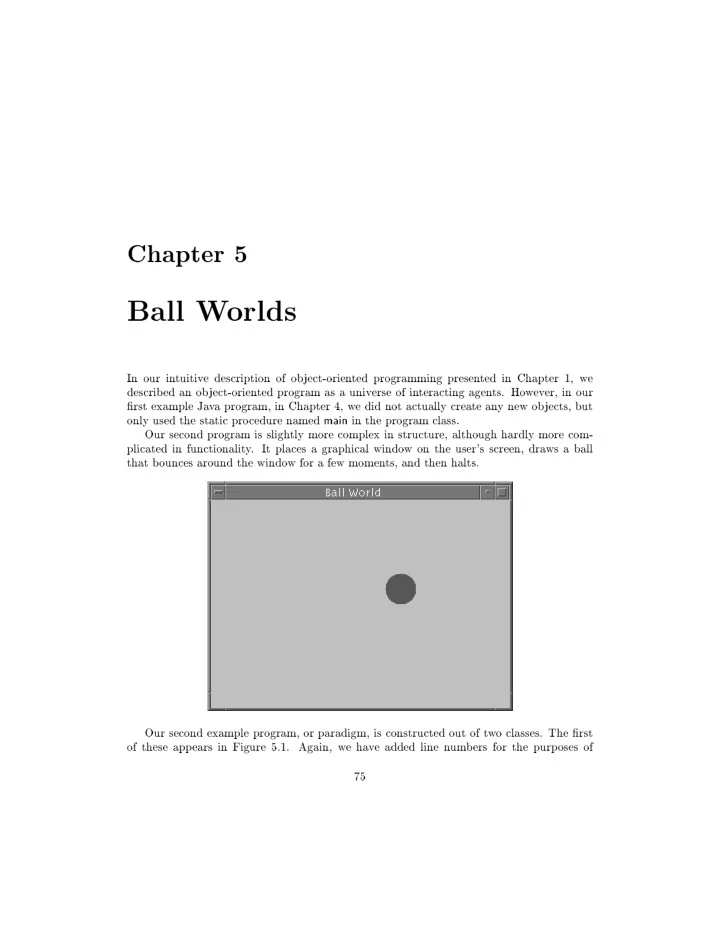
used the static pro cedure named main in the program class. Our second program is sligh tly more complex in structure, although hardly more com- plicated in functionalit y . It places a graphical windo w
  • n
the user's screen, dra ws a ball that b
  • unces
around the windo w for a few momen ts, and then halts. Our second example program,
  • r
paradigm, is constructed
  • ut
  • f
t w
  • classes.
The rst
  • f
these app ears in Figure 5.1. Again, w e ha v e added line n um b ers for the purp
  • ses
  • f
75
slide-2
SLIDE 2 76 CHAPTER 5. BALL W ORLDS reference, ho w ev er these are not part
  • f
the actual program. 1 The reader should compare this program to the example program describ ed in the previous c hapter, noting b
  • th
the similarities and dierences. Lik e the previous program, this program imp
  • rts
(on line 1) information from the Ja v a library . Lik e the earlier program, execution will b egin in the pro cedure named main, (lines 3 through 6), whic h is declared as static, void and public. Lik e all main programs, this pro cedure m ust tak e as argumen t an arra y
  • f
string v alues, whic h are, in this case, b eing ignored. Ho w ev er, this program also incorp
  • rates
a n um b er
  • f
new features. These are summa- rized b y the follo wing list, and will b e the sub ject
  • f
more detailed discussion in subsequen t sections.
  • The
class denes a n um b er
  • f
priv ate in ternal v ariable elds, some
  • f
whic h are con- stan t, some
  • f
whic h are initialized but not constan t, and some
  • f
whic h are not initialized. These data elds will b e describ ed in detail in Section 5.1.
  • The
main program creates an instance
  • f
the class BallW
  • rld.
This
  • b
ject is initialized b y means
  • f
a c
  • nstructor.
A constructor is a function that automatically ties together the actions
  • f
  • b
ject cr e ation and
  • b
ject initialization. Constructors will b e in tro duced in Section 5.2.
  • The
class is declared as an extension
  • f
an existing Ja v a class named F rame. This tec hnique is called inheritanc e, and is the principal means in
  • b
ject-orien ted languages for constructing new soft w are abstractions that are v ariations
  • n
existing data t yp es. Inheritance will b e in tro duced in Section 5.3, and will b e more extensiv ely studied b eginning in Chapter 8.
  • The
  • utput
displa y ed in a windo w b y this program is created using some
  • f
the graph- ics primitiv es pro vided b y the Ja v a run-time library . These graphics
  • p
erators are explained in Section 5.4. 5.1 Data Fields W e ha v e seen in the previous c hapter (Section 4.4) ho w data elds can b e declared within a class and ho w they can b e initialized. The example program here includes features w e ha v e not seen in
  • ur
previous programs in the four data elds declared
  • n
lines 7 to 10: public static final int FrameWidth = 600; // 7 public static final int FrameHeight = 400; // 8 private Ball aBall; // 9 1 In
  • rder
to dra w more atten tion to the Ja v a co de itself, the programs presen ted in this text ha v e purp
  • sely
b een written using v ery few commen ts. In practice commen ts w
  • uld
usually b e used to describ e eac h function in a class.
slide-3
SLIDE 3 5.1. D A T A FIELDS 77 import java.awt.; // 1 public class BallWorld extends Frame f // 2 public static void main (String [ ] args) f // 3 BallWorld world = new BallWorld (Color.red); // 4 world.show (); // 5 g // 6 public static final int FrameWidth = 600; // 7 public static final int FrameHeight = 400; // 8 private Ball aBall; // 9 private int counter = 0; // 10 private BallWorld (Color ballColor) f// constructor for new windo w 11 // resize
  • ur
frame, initialize title 12 setSize (FrameWidth, FrameHeight); // 13 setTitle ("Ball World"); // 14 // initialize aBall data eld 15 aBall = new Ball (10, 15, 5); // 16 aBall.setColor (ballColor); // 17 aBall.setMotion (3.0, 6.0); // 18 g // 19 public void paint (Graphics g) f // 20 // rst, dra w the ball 21 aBall.paint (g); // 22 // then mo v e it sligh tly 23 aBall.move(); // 24 if ((aBall.x() < 0) jj (aBall.x() > FrameWidth)) // 25 aBall.setMotion (-aBall.xMotion() , aBall.yMotion() ); // 26 if ((aBall.y() < 0) jj (aBall.y() > FrameHeight)) // 27 aBall.setMotion (aBall.xMotion(),
  • aBall.yMotion()
); // 28 // nally , redra w the frame 29 counter = counter + 1; // 30 if (counter < 2000) repaint(); // 31 else System.exit(0); // 32 g // 33 g // 34 Figure 5.1: Class Description for Ball W
  • rld
slide-4
SLIDE 4 78 CHAPTER 5. BALL W ORLDS private int counter = 0; // 10 Recall that the k eyw
  • rd
public means that the v ariables b eing declared can b e accessed (that is, used directly) an ywhere in a Ja v a program, while those that are declared as p rivate can b e used
  • nly
within the b
  • unds
  • f
the class description in whic h the declaration app ears. Recall also that the k eyw
  • rd
static means that there is
  • ne
instance
  • f
the data eld, shared b y all instances
  • f
the class. The mo dier k eyw
  • rd
nal generally means that this is the last time when an
  • b
ject is c hanged. It is here applied to a v ariable declaration; w e will in later c hapters see ho w the mo dier can also b e applied to a function denition. When used with a v ariable declaration, the declaration m ust also include an initialization, as sho wn here. V ariables that are static and nal are used to create sym b
  • lic
names for constan ts, as they are v ariables that are guaran teed to exist
  • nly
in
  • ne
place, and not c hange v alues. Because they cannot b e mo died, there is less reason to encapsulate a static nal v ariable b y declaring it p rivate. Th us, suc h v alues are
  • ften
made public, as sho wn here. The particular sym b
  • lic
v alues b eing dened in this program represen t the heigh t and width
  • f
the windo w in whic h the application will ev en tually pro duce its
  • utput.
Sym b
  • lic
constan ts are useful in programs for a n um b er
  • f
dieren t reasons:
  • By
b eing dened in
  • nly
  • ne
place, they mak e it easy to subsequen tly c hange, should circumstances require. F
  • r
example, c hanging the heigh t and
  • r
width
  • f
the windo w merely requires editing the le to c hange the v alues b eing used to initialize these sym b
  • lic
constan ts, rather than h un ting do wn all lo cations in the co de where the quan tities are used.
  • When
subsequen tly used elsewhere in the program, the sym b
  • lic
name helps do cumen t the purp
  • se
  • f
the constan t v alues. The counter data eld is an in teger v alue, initialized to zero: private int counter = 0; // 10 Because the eld is declared p rivate w e kno w it can b e used
  • nly
within the b
  • unds
  • f
the class denition. Because it w as not declared static, w e kno w that eac h instance
  • f
the class will hold its
  • wn
dieren t v alue. Because it w as not declared as nal w e kno w that the v alue b eing assigned is simply the initial v alue the v ariable will hold, but that it subsequen tly could b e reassigned. W e will see ho w this v ariable is used when w e discuss the graphical asp ects
  • f
the curren t program. private Ball aBall; // 9 The nal data eld is declared as an instance
  • f
class Ball, whic h is the second class used in the creation
  • f
  • ur
example program. A ball is an abstraction that represen ts a b
  • uncing
ball. It is represen ted b y a colored circle that can mo v e around the displa y surface. The
slide-5
SLIDE 5 5.2. CONSTR UCTORS 79 class Ball will b e describ ed in Section 5.5. Ho w this eld is initialized is describ ed in the next section. 5.2 Constructors As w e noted at the b eginning
  • f
the c hapter,
  • ne
  • f
the ma jor topics w e address in this c hapter is the creation
  • f
new
  • b
jects. This
  • ccurs
in t w
  • places
in the program sho wn in Figure 5.1. The rst is in the main program, whic h creates an instance
  • f
the class BallW
  • rld.
BallWorld world = new BallWorld (Color.red); // 4 The new
  • p
erator is alw a ys used to create a new
  • b
ject. In this case, it is b eing used to create an instance
  • f
BallW
  • rld,
whic h (w e will see in the next section) is the name giv en to the windo w in whic h the program will displa y its
  • utput.
The new
  • p
erator is follo w ed b y a class name, indicating the t yp e
  • f
  • b
ject b eing created. A paren thesized list then giv es an y argumen ts needed in the initialization
  • f
the
  • b
ject. Ob ject cr e ation and
  • b
ject initialization are in timately tied in concept, and it is imp
  • r-
tan t that a programming language also bring these concepts together. Without supp
  • rt
from the programming language, t w
  • t
yp es
  • f
errors can easily
  • ccur:
  • An
  • b
ject is created, but it is used b efore it is initialized.
  • An
  • b
ject is created, and initialized m ultiple times b efore it is used. The language Ja v a uses a concept called a c
  • nstructor
to guaran tee that
  • b
jects are placed in to a prop er initial state the momen t they are created. A constructor b ears a strong resem blance to a function, ho w ev er the name
  • f
the function matc hes the name
  • f
the class in whic h it app ears, the function do es not sp ecify a return t yp e, and the user will nev er directly execute the constructor. Ho w ev er, lik e a function, a constructor can ha v e argumen ts, and the b
  • dy
  • f
the constructor consists
  • f
a sequence
  • f
statemen ts. In
  • ur
example program the constructor
  • ccurs
in lines 11 to 19: private BallWorld (Color ballColor) f// constructor for new windo w 11 // resize
  • ur
frame, initialize title 12 setSize (FrameWidth, FrameHeight); // 13 setTitle ("Ball World"); // 14 // initialize aBall data eld 15 aBall = new Ball (10, 15, 5); // 16 aBall.setColor (ballColor); // 17 aBall.setMotion (3.0, 6.0); // 18 g // 19
slide-6
SLIDE 6 80 CHAPTER 5. BALL W ORLDS When an
  • b
ject is created (via the new
  • p
erator), the rst function in v
  • k
ed using the newly created
  • b
ject is the constructor function. The argumen ts passed to the constructor are the argumen ts supplied in the new expression. In this particular case, the argumen t represen ts a color. The class Colo r is part
  • f
the Ja v a run-time library . The v alue red is simply a constan t (a v alue declared b
  • th
as static and nal) in the class description
  • f
Colo r. BallWorld world = new BallWorld (Color.red); // 4 The corresp
  • nding
parameter v alue in the constructor function is named ballColo r (see line 11). The constructor function m ust ensure that the instance
  • f
the class BallW
  • rld
is prop erly initialized. As w e noted earlier, the BallW
  • rld
represen ts the windo w in whic h the
  • utput
will b e displa y ed. The rst t w
  • statemen
ts in the constructor set some
  • f
the attributes for this windo w; namely , the size and the title. Line 17
  • f
the constructor again uses the new
  • p
erator to create and initialize a new
  • b
ject. In this case the
  • b
ject is an instance
  • f
the class Ball. Not
  • nly
will memory for this
  • b
ject b e created b y the new statemen t, but the argumen ts will b e matc hed b y a corresp
  • nding
constructor in the class Ball, whic h will then b e in v
  • k
ed to initialize the newly created ball: public class Ball f // a generic round colored
  • b
ject that mo v es ... public Ball (int x, int y, int r) f // ball with giv en cen ter and radius ... g g The complete class description for Ball will b e sho wn in Figure 5.2 (page 84). Not all asp ects
  • f
a Ball are set b y the constructor. The nal t w
  • statemen
ts in the constructor for BallW
  • rld
set the color
  • f
the ball, and set the direction
  • f
motion for the ball. These attributes will b e discussed in more detail in Section 5.5. 5.3 Inheritance The most imp
  • rtan
t feature
  • f
this program is the use
  • f
inheritanc e (sometimes also called extension). As w e noted earlier, the ball w
  • rld
is a rectangular windo w in whic h the action
  • f
the program (the b
  • uncing
ball) is displa y ed. The co de needed to displa y and manipulate a windo w in a mo dern graphical user in terface is exceedingly complex; due in part to the fact that the user can indicate actions suc h as mo ving, resizing,
  • r
iconifying the windo w. As a consequence, recen t languages attempt to pro vide a means
  • f
reusing existing co de so
slide-7
SLIDE 7 5.3. INHERIT ANCE 81 that the programmer need
  • nly
b e concerned with those features
  • f
the application that distinguish the program from
  • ther
windo w applications. The programming language Ja v a uses the class F rame to represen t a generic windo w. By sa ying that the class BallW
  • rld
extends the class F rame, w e indicate that
  • ur
new class, the ball w
  • rld,
is a t yp e
  • f
frame, but a more sp ecialized t yp e with a single purp
  • se.
The class F rame denes co de to p erform actions suc h as resizing the windo w, arranging for the windo w to b e displa y ed
  • n
the w
  • rkstation
screen, and so
  • n.
By extending the class F rame,
  • ur
new class inherits this functionalit y , whic h means the abilities are made a v ailable to the new class, and do not need to b e rewritten anew. public class BallWorld extends Frame f // 2 By executing the example program the reader can v erify that the windo w exhibits the functionalit y w e exp ect
  • f
graphical windo ws; the abilit y to mo v e, resize, and iconify , ev en though the program do es not explicitly dene an y co de to supp
  • rt
these b eha viors. (The reader migh t also note some exp ected b eha viors that are not pro vided. F
  • r
example, the handling
  • f
men u items and the close
  • r
quit b
  • x.
In a later c hapter w e will describ e ho w these features can b e pro vided.) W e can
  • bserv
e the use
  • f
inheritance in the v ariet y
  • f
metho ds that are in v
  • k
ed in
  • ur
example program, but are not dened b y the class BallW
  • rld.
These functions are instead inherited from the p ar ent class F rame. Tw
  • examples
are the functions setSize and setTitle in v
  • k
ed in the BallW
  • rld
constructor. These functions set the dimensions (in pixels) and title v alue for the windo w, resp ectiv ely . private BallWorld (Color ballColor) f// constructor for new windo w 11 // resize
  • ur
frame, initialize title 12 setSize (FrameWidth, FrameHeight); // 13 setTitle ("Ball World"); // 14 ... g // 19 Another example is the function sho w, whic h is in v
  • k
ed in the static pro cedure main after the instance
  • f
BallW
  • rld
has b een created. The sho w function arranges for the windo w to app ear
  • n
the displa y surface, and then for the surface
  • f
the windo w to b e dra wn. public static void main (String [ ] args) f // 3 BallWorld world = new BallWorld (Color.red); // 4 world.show (); // 5 g // 6
slide-8
SLIDE 8 82 CHAPTER 5. BALL W ORLDS 5.4 The Ja v a Graphics Mo del Graphics in Ja v a is pro vided as part
  • f
the A WT,
  • r
the A bstr act Windowing T
  • lkit.
The Ja v a A WT is an example
  • f
a soft w are fr amework. The idea
  • f
a framew
  • rk
is to pro vide the structure
  • f
a program, but no application sp ecic details. The
  • v
erall con trol, the
  • w
  • f
execution, is pro vided b y the framew
  • rk,
and therefore do es not need to b e rewritten for eac h new program. Th us, the programmer do es not \see" the ma jorit y
  • f
the program co de. This is illustrated b y the actions that
  • ccur
subsequen t to the program issuing the sho w metho d that is inherited from the class F rame. The windo w in whic h the action will tak e place is created, and the image
  • f
the windo w m ust b e rendered. T
  • do
so, the sho w metho d in v
  • k
es a function named paint, passing as argumen t a gr aphics
  • bje
ct. The programmer denes the app earance
  • f
the windo w b y pro viding an implemen tation
  • f
the function paint. The graphics
  • b
ject passed as argumen t pro vides the abilit y to dra w a host
  • f
items, suc h as lines and p
  • lygons
as w ell as text. In
  • ur
example program w e use the paint pro cedure for t w
  • purp
  • ses.
The
  • nly
image in the windo w itself is the b
  • uncing
ball. The image
  • f
the ball is pro duced b y in v
  • king
the paint metho d in the class Ball (see Figure 5.2). The second purp
  • se
  • f
the paint metho d is to pro vide a simple means
  • f
up dating the lo cation for the ball. The ball is mo v ed sligh tly , c hec king to see if the resulting new lo cation is
  • utside
the b
  • unds
  • f
the windo w. If so, the direction
  • f
the ball is rev ersed. Finally , in v
  • king
the repaint metho d (also inherited from F rame) indicates to the framew
  • rk
that the windo w should b e redra wn, and the cycle con tin ues. 2 A coun ter is used to prev en t the program from running indenitely , in v
  • king
the function System.exit after a certain n um b er
  • f
iterations. (Later programs will use
  • ther
tec hniques to halt the program). public void paint (Graphics g) f // 20 // rst, dra w the ball 21 aBall.paint (g); // 22 // then mo v e it sligh tly 23 aBall.move(); // 24 if ((aBall.x() < 0) jj (aBall.x() > FrameWidth)) // 25 aBall.setMotion (-aBall.xMotion() , aBall.yMotion() ); // 26 if ((aBall.y() < 0) jj (aBall.y() > FrameHeight)) // 27 aBall.setMotion (aBall.xMotion(),
  • aBall.yMotion()
); // 28 // nally , redra w the frame 29 counter = counter + 1; // 30 if (counter < 2000) repaint(); // 31 else System.exit(0); // 32 2 Some readers migh t
  • b
ject that the con trol
  • f
the animation has little to do with the rendering
  • f
the image
  • n
the windo w, and th us do es not b elong in the paint routine. While there is merit to this argumen t, this is also the simplest w a y to mak e simple animations. In later c hapters w e will presen t more robust w a ys to con trol animations.
slide-9
SLIDE 9 5.5. THE CLASS BALL 83 g // 33 Note that the programmer calls the inherited metho d named repaint, whic h in turn will ev en tually result in the paint metho d b eing in v
  • k
ed. The programmer do es not directly call the paint metho d for the class. In later examples w e will in v estigate more
  • f
the abilities
  • f
the graphics
  • b
jects pro vided b y the Ja v a library . 5.5 The class Ball W e will use a ball, that is, round colored
  • b
ject that mo v es, in a n um b er
  • f
  • ur
subsequen t example programs. It is therefore useful to dene the b eha vior
  • f
a Ball in a general fashion so that it can b e used in a v ariet y
  • f
w a ys. The description
  • f
class Ball is placed in its
  • wn
le (Ball.java) and is link ed together with the BallW
  • rld
class to create the executable program. A Ball (Figure 5.2) main tains four data elds. The lo cation
  • f
the ball is represen ted b y a Rectangle, a general purp
  • se
class pro vided in the Ja v a run-time library . Tw
  • ating
p
  • in
t v alues represen t the horizon tal and v ertical comp
  • nen
ts
  • f
the direction
  • f
motion for the ball. Finally , the color
  • f
the ball is represen ted b y an instance
  • f
class Colo r, a Ja v a library class w e ha v e previously encoun tered. These four data elds are declared as p rotected. This allo ws an y subsequen t c hild classes w e migh t create to ha v e access to the data elds, without exp
  • sing
the data to mo dication b y
  • ther
  • b
jects. It is go
  • d
practice to declare data elds p rotected, rather than p rivate, ev en if y
  • u
do not an ticipate extending the class to mak e new classes. The constructor for the class Ball records the lo cation b y creating a new instance
  • f
class Rectangle. Note that the three in teger argumen ts passed as argumen ts to the constructor represen t the cen ter lo cation
  • f
the ball and the radius: a simple calculation is used to con v ert these to the corner
  • f
the rectangle and the exten t. The constructor also pro vides default v alues for color (blue) and motion. As w e ha v e seen in
  • ur
example program, these can b e redened b y in v
  • king
the functions setColo r and setMotion. A n um b er
  • f
functions are used to access some
  • f
the attributes
  • f
a ball. A ttributes that can b e
  • btained
in this fashion include the radius, the x and y co
  • rdinate
  • f
the cen ter
  • f
the ball, the horizon tal and v ertical directions
  • f
motion, and the region
  • ccupied
b y the ball. F unctions that allo w access to a data eld in a class are termed ac c essor functions. The use
  • f
accessor functions is strongly encouraged in preference to making the data elds themselv es public, as an accessor function
  • nly
p ermits the v alue to b e r e ad, and not mo died. This ensures that an y mo dication to a data eld will b e mediated b y the prop er function, suc h as through the function setMotion
  • r
moveT
  • .
Some
  • f
the functions use
  • p
erations pro vided b y the class Rectangle. A rectangle can pro vide a width (used in function radius), the lo cation
  • f
the upp er corner (used in functions
slide-10
SLIDE 10 84 CHAPTER 5. BALL W ORLDS public class Ball f // a generic round colored
  • b
ject that mo v es protected Rectangle location; // p
  • sition
  • n
graphic surface protected double dx, dy; // x and y comp
  • nen
ts
  • f
motion v ector protected Color color; // color
  • f
ball public Ball (int x, int y, int r) f // ball with giv en cen ter and radius location = new Rectangle(x-r, y-r, 2r, 2r); dx = 0; dy = 0; // initially no motion color = Color.blue; g // functions that set attributes public void setColor (Color newColor) f color = newColor; g public void setMotion (double ndx, double ndy) f dx = ndx; dy = ndy; g // functions that access attributes
  • f
ball public int radius () f return location.width / 2; g public int x () f return location.x + radius(); g public int y () f return location.y + radius(); g public double xMotion () f return dx; g public double yMotion () f return dy; g public Rectangle region () f return location; g // functions that c hange attributes
  • f
ball public void moveTo (int x, int y) f location.setLocat ion (x, y); g public void move () f location.translat e ((int) dx, (int) dy); g public void paint (Graphics g) f g.setColor (color); g.fillOval (location.x, location.y, location.width, location.height) ; g g Figure 5.2: Implemen tation
  • f
the class Ball
slide-11
SLIDE 11 5.6. MUL TIPLE OBJECTS OF THE SAME CLASS 85 x and y), can mo v e to a new p
  • sition
(used in function moveT
  • ),
and can transliterate
  • n
the 2-dimensional surface (used in the function move). Finally , the function paint uses t w
  • p
erations that are pro vided b y the class Graphics in the Ja v a library . These are the abilit y to set the curren t color for rendering graphics (setColo r) and to displa y a pain ted
  • v
al at a giv en lo cation
  • n
the windo w (llOval). 5.6 Multiple Ob jects
  • f
the Same Class Ev ery instance
  • f
a class main tains its
  • wn
in ternal data elds. W e can illustrate this b y making v ariations
  • n
  • ur
sample program. The simplest c hange is to mo dify the main routine to create t w
  • indep
enden t windo ws. Eac h windo w will ha v e a dieren t ball, eac h windo w can b e indep enden tly mo v ed
  • r
resized. public static void main (String [ ] args) f // create rst windo w with red ball BallWorld world = new BallWorld (Color.red); world.show(); // no w create a second windo w with y ello w ball BallWorld world2 = new BallWorld (Color.yellow); world2.show(); g The reader should try making this c hange, and
  • bserv
e the result. Note ho w
  • ne
windo w is b
  • uncing
a red ball, and the second is b
  • uncing
a y ello w ball. This indicates that eac h instance
  • f
class BallW
  • rld
m ust b e main taining its
  • wn
Ball v alue, as a ball cannot b e b
  • th
red and y ello w at the same time. A second v ariation illustrates ev en more dramatically the indep endence
  • f
dieren t
  • b-
jects, ev en when they deriv e from the same class. The class MultiBallW
  • rld
(Figure 5.3) is similar to
  • ur
initial program,
  • nly
it creates a collection
  • f
balls, rather than just a single ball. Only the lines that ha v e c hanged are included, and those that are elided are the same as the earlier program. The new program declares an arra y
  • f
Balls, rather than just a single ball. Note the syn tax used to declare an arra y . As w e noted in the previous c hapter, arra ys in Ja v a are dieren t from arra ys in most
  • ther
languages. Ev en though the arra y is declared, space is still not set aside for the arra y elemen ts. Instead, the arra y itself m ust b e created (again with a new command): ballArray = new Ball [ BallArraySize ]; Note ho w the size
  • f
the arra y is sp ecied b y a sym b
  • lic
constan t, dened earlier in the program. Ev en then, ho w ev er, the arra y elemen ts cannot b e accessed. Instead, eac h arra y elemen t m ust b e individually created,
  • nce
more using a new
  • p
eration:
slide-12
SLIDE 12 86 CHAPTER 5. BALL W ORLDS public class MultiBallWorld extends Frame f ... private Ball [ ] ballArray; private static final int BallArraySize = 10; private MultiBallWorld (Color ballColor) f ... // initialize
  • b
ject data eld ballArray = new Ball [ BallArraySize ]; for (int i = 0; i < BallArraySize; i++) f ballArray[i] = new Ball(10, 15, 5); ballArray[i].set Col
  • r
(ballColor); ballArray[i].set Mot io n (3.0+i, 6.0-i); g g public void paint (Graphics g) f for (int i = 0; i < BallArraySize; i++) f ballArray[i].pai nt (g); // then mo v e it sligh tly ballArray[i].mov e() ; if ((ballArray[i].x () < 0) jj (ballArray[i].x( ) > FrameWidth)) ballArray[i].setM
  • ti
  • n
(-ballArray[i].x Mo ti
  • n(
), ballArray[i].yMo tio n( )) ; if ((ballArray[i].y () < 0) jj (ballArray[i].y( ) > FrameHeight)) ballArray[i].setM
  • ti
  • n
(ballArray[i].xM
  • t
io n() ,
  • ballArray[i].yMo
tio n( )) ; ... g g g Figure 5.3: Class description for Multiple Ball W
  • rld
slide-13
SLIDE 13 5.7. CHAPTER SUMMAR Y 87 for (int i = 0; i < BallArraySize; i++) f ballArray[i] = new Ball(10, 15, 5); ballArray[i].set Col
  • r
(ballColor); ballArray[i].set Mot io n (3.0+i, 6.0-i); g Eac h ball is created, and initialized with the giv en color, and set in motion. W e ha v e used the lo
  • p
index v ariable to c hange the direction
  • f
motion sligh tly , so that eac h ball will initially mo v e in a dieren t direction. When executed, ten dieren t balls will b e created. Eac h ball will main tain its
  • wn
lo cation and direction. As eac h ball is ask ed to pain t it will displa y its v alue
  • n
the windo w. Eac h ball will then mo v e, indep enden tly
  • f
all
  • ther
balls. 5.7 Chapter Summary The t w
  • ma
jor themes in tro duced in this c hapter ha v e b een the creation
  • f
new
  • b
jects using the
  • p
erator new, and the denition
  • f
new classes using inheritanc e to extend an existing class. T
  • pics
discussed in this c hapter include the follo wing:
  • Data
elds whic h are declared nal cannot b e subsequen tly redened. A static and nal v alue is the tec hnique normally used to create a sym b
  • lic
constan t.
  • New
  • b
jects are alw a ys created using the
  • p
erator new.
  • When
a new
  • b
ject is created, the c
  • nstructor
for the class
  • f
the
  • b
ject is automat- ically in v
  • k
ed as part
  • f
the creation pro cess. The constructor should guaran tee the
  • b
ject is prop erly initialized.
  • A
constructor is a function that has the same name as the class in whic h it is dened.
  • An
y argumen ts used b y the constructor m ust app ear in the new statemen t that creates the corresp
  • nding
  • b
ject.
  • Classes
can b e dened using inheritanc e. Suc h classes extend the functionalit y
  • f
an existing class. An y public
  • r
protected data elds
  • r
functions dened in the paren t class b ecome part
  • f
the new class.
  • The
class F rame can b e used to create simple Ja v a windo ws. This class can b e extended to dene application-sp ecic windo ws.
  • The
fr amework pro vided b y the Ja v a A WT displa ys a frame (a windo w) when the frame
  • b
ject is giv en the message sho w. T
  • create
the image sho wn in the windo w the message paint is used. The programmer can dene this metho d to pro duce application- sp ecic pictures.
slide-14
SLIDE 14 88 CHAPTER 5. BALL W ORLDS
  • The
paint metho d is giv en as argumen t an instance
  • f
the library class Graphics. This
  • b
ject can b e used to create a v ariet y
  • f
graphical images.
  • The
class Rectangle (used in
  • ur
class Ball) is a library class that represen ts a rect- angular region
  • n
the t w
  • -dimensional
windo w surface. The class pro vides a large amoun t
  • f
useful functionalit y .
  • Multiple
instances
  • f
the same class eac h main tain their
  • wn
separate data elds. This w as illustrated b y creating m ultiple indep enden t Ball
  • b
jects, whic h mo v e inde- p enden tly
  • f
eac h
  • ther.
Cross References W e will use the Ball class in case studies in Chapters 6, 7, 8 and 20. The topic
  • f
inheritance is simple to explain, but has man y subtle p
  • in
ts that can easily trap the un w ary . W e will examine inheritance in detail in Chapters 8 through 11. The A WT will b e examined in more detail in Chapter 13. Study Questions 1. Ho w w
  • uld
y
  • u
c hange the color
  • f
the ball in
  • ur
example application to y ello w? 2. Ho w w
  • uld
y
  • u
c hange the size
  • f
the application windo w to 500 b y 300 pixels? 3. What do es the mo dier k eyw
  • rd
nal mean when applied in a data eld declaration? 4. Wh y do sym b
  • lic
constan ts mak e it easier to read and main tain programs? 5. What t w
  • actions
are tied together b y the concept
  • f
a constructor? 6. What t yp es
  • f
errors do es the use
  • f
constructors prev en t? 7. What do es it mean to sa y that a new class inherits from an existing class? 8. What metho ds inherited from class F rame are used in
  • ur
example application? 9. What metho ds pro vided b y
  • ur
example program are in v
  • k
ed b y the co de inherited from class F rame? 10. What abstraction do es the Ja v a library class Rectangle represen t? 11. What are some reasons that data elds should b e declared as p rivate
  • r
p rotected, and access pro vided
  • nly
through mem b er functions? 12. In Ja v a, what are the steps in v
  • lv
ed in creating an arra y
  • f
  • b
jects?
slide-15
SLIDE 15 5.7. CHAPTER SUMMAR Y 89 Exercises 1. The function Math.random returns a random
  • ating
p
  • in
t v alue b et w een and 1.0. Using this function, mo dify the example program sho wn in Figure 5.1 so that the ball will initially mo v e in a random direction. 2. Mo dify the MultiBallW
  • rld
so that the colors
  • f
the v arious balls created are selected randomly from the v alues red, blue and y ello w. (Hin t: call Math.random() and test the resulting v alue for v arious ranges, selecting red if the v alue is in
  • ne
range, blue if it is in another, and so
  • n).
3. Mo dify the MultiBallW
  • rld
so that it will pro duce balls
  • f
dieren t radiuses, as w ell as dieren t colors. 4. Rather than testing whether
  • r
not a ball has hit the w all in
  • ur
main program, w e could ha v e used inheritance to pro vide a sp ecialized form
  • f
Ball. Create a class BoundedBall that inherits from class Ball. The constructor for this class should pro vide the heigh t and width
  • f
the windo w, whic h should subsequen tly b e main tained as data elds in the class. Rewrite the move function so that if the ball mo v es
  • utside
the b
  • unds,
it automatically rev erses direction. Finally , rewrite the BallW
  • rld
class to use an instance
  • f
BoundedBall, rather than an
  • rdinary
Ball, and eliminate the b
  • unds
test in the main program. 5. Our Ball abstraction is not as simple as it could ha v e b een. Separate the Ball class in to t w
  • separate
classes. The rst, the new class Ball, kno ws
  • nly
a lo cation, its size, and ho w to pain t itself. The second class, MovableBall, extends the class Ball and adds all b eha vior related to motion, suc h as the data elds dx and dy, the functions setMotion and move, and so
  • n.
Rewrite the MultiBallW
  • rld
to use instances
  • f
class MovableBall.