Code Coverage SWEN-261 Introduction to Software Engineering - - PowerPoint PPT Presentation

code coverage
SMART_READER_LITE
LIVE PREVIEW

Code Coverage SWEN-261 Introduction to Software Engineering - - PowerPoint PPT Presentation

Code Coverage SWEN-261 Introduction to Software Engineering Department of Software Engineering Rochester Institute of Technology Code coverage analysis is measuring how well your unit tests exercise the production code. Code coverage

slide-1
SLIDE 1

SWEN-261 Introduction to Software Engineering

Department of Software Engineering Rochester Institute of Technology

Code Coverage

slide-2
SLIDE 2

Code coverage analysis is measuring how well your unit tests exercise the production code.

  • Code coverage works like this:
  • 1. Compile the project into bytecode
  • 2. Instrument the bytecode with "touch points"
  • 3. Run the unit tests, which gathers coverage data
  • 4. Generate a coverage report from the gathered data
  • There are a few Java coverage tools.
  • Your project will use JaCoCo
  • It integrates well with Maven
  • Having this information is a double-edge sword.
  • It's mostly a positive thing; telling the team where to

spend additional testing effort.

  • But don't be a slave to the metrics; we'll talk more

about this later.

2

slide-3
SLIDE 3

JaCoCo's coverage report is a simple HTML web site that lets you drill down for more information.

3

  • The report is stored in /target/site/jacoco.
slide-4
SLIDE 4

It's at the class-level where you can start a meaningful analysis.

4

Color Legend Green  covered Yellow  partially covered Red  not covered

slide-5
SLIDE 5

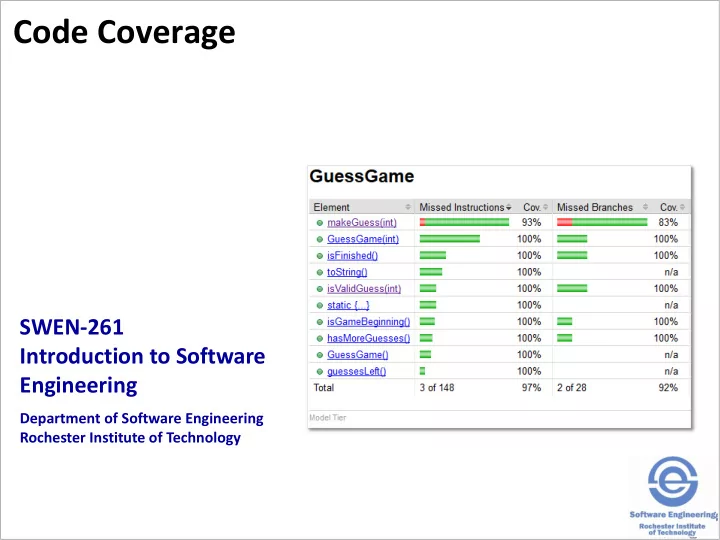
The GuessGame code had 97% coverage. So what do you do?

  • On the one hand:
  • That's REALLY good already.
  • The only missing test is a defensive check so

maybe say "that's good enough."

  • On the other hand:
  • This is a core Model tier class.
  • We want these to be "friendly" test dependencies.
  • So maybe the team agrees to make this 100%

covered.

  • What tests need to be added?

5

slide-6
SLIDE 6

There needs to be a test to check making an invalid guess.

  • Here's a test.

@Test public void make_an_invalid_guess() { final GuessGame CuT = new GuessGame(); assertEquals(CuT.makeGuess(TOO_SMALL), GuessResult.INVALID); assertFalse(CuT.isFinished(), "Game is not finished"); }

  • Here's the updated analysis:

6

This line is tested but only through this part of the branch. We need to test the second part of the branch.

slide-7
SLIDE 7

If we test that second branch, we should be there.

  • Here's a test of a guess that is too big.

@Test public void make_an_invalid_guess_too_big() { final GuessGame CuT = new GuessGame(); assertEquals(CuT.makeGuess(TOO_BIG), GuessResult.INVALID); assertFalse(CuT.isFinished(), "Game is not finished"); }

  • Here's the updated analysis:
  • Now the Model tier is fully tested!

7

slide-8
SLIDE 8

Deciding what level of coverage depends upon several factors…

  • Some components (Model tier) are used across

multiple other architectural tiers.

  • We recommend 95% or better for Model tier.
  • Others, like the UI Controllers, are only used by

the web server.

  • We recommend 80% or better in all other tiers.
  • Other factors:
  • Team and company culture
  • Application domain

 Regulatory requirements may specify testing requirements.  Those defensive checks may be safety checks. You can not know if the system is safe if you do not test the checks.

8

slide-9
SLIDE 9

The coverage data is cumulative across all tests which may make results look better than they are.

  • You want to gather coverage data from unit tests
  • f a class not use of the class by tests of other

classes.

  • The ultimate is to test one class at a time which is

not reasonable.

  • A reasonable compromise is measure code coverage

for testing one tier at a time.

  • The JUnit framework and build tools allow that.
  • @Tag("name") each test file to place it into a tier
  • category. Use Model-tier, Application-tier, UI-

tier

  • Reset the coverage data after each tier is tested and

generate the report in a separate location.

9

slide-10
SLIDE 10

Your project's pom.xml file has several test execution ids defined.

  • Clean the target directory, and run all three tier-

based tests

  • mvn exec:exec@tests-and-coverage
  • The reports are in

/target/site/jacoco/tier/index.html where tier is model, ui, or appl.

  • To run tests on a single tier
  • mvn clean test-compile surefire:test@tier

jacoco:report@tier where tier is model, ui, or appl.

  • The report is in the directory listed above.

10