CPU Scheduling The scheduling problem: - Have K jobs ready to run - - - PowerPoint PPT Presentation

cpu scheduling
SMART_READER_LITE
LIVE PREVIEW

CPU Scheduling The scheduling problem: - Have K jobs ready to run - - - PowerPoint PPT Presentation

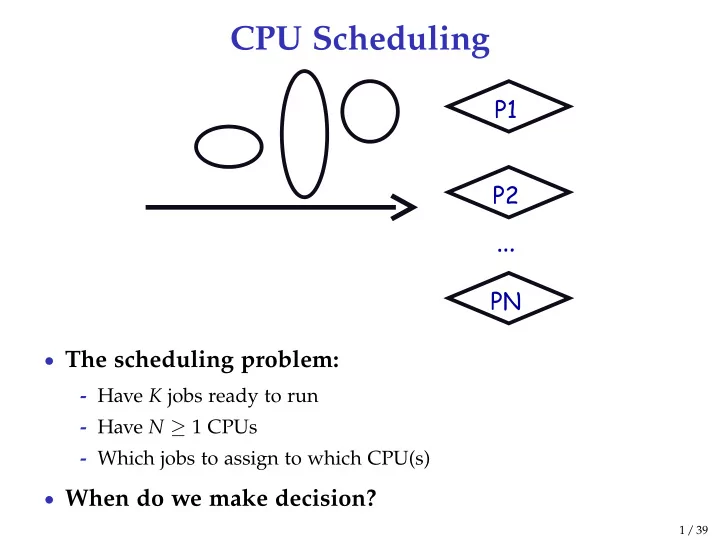
CPU Scheduling The scheduling problem: - Have K jobs ready to run - Have N 1 CPUs - Which jobs to assign to which CPU(s) When do we make decision? 1 / 39 CPU Scheduling new admitted exit terminated interrupt ready running


slide-1
SLIDE 1

CPU Scheduling

  • The scheduling problem:
  • Have K jobs ready to run
  • Have N ≥ 1 CPUs
  • Which jobs to assign to which CPU(s)
  • When do we make decision?

1 / 39

slide-2
SLIDE 2

CPU Scheduling

new ready waiting running terminated

I/O or event completion I/O or event wait scheduler dispatch interrupt exit admitted

  • Scheduling decisions may take place when a process:
  • 1. Switches from running to waiting state
  • 2. Switches from running to ready state
  • 3. Switches from new/waiting to ready
  • 4. Exits
  • Non-preemptive schedules use 1 & 4 only
  • Preemptive schedulers run at all four points

2 / 39

slide-3
SLIDE 3

Scheduling criteria

  • Why do we care?
  • What goals should we have for a scheduling algorithm?

3 / 39

slide-4
SLIDE 4

Scheduling criteria

  • Why do we care?
  • What goals should we have for a scheduling algorithm?
  • Throughput – # of procs that complete per unit time
  • Higher is better
  • Turnaround time – time for each proc to complete
  • Lower is better
  • Response time – time from request to first response

(e.g., key press to character echo, not launch to exit)

  • Lower is better
  • Above criteria are affected by secondary criteria
  • CPU utilization – fraction of time CPU doing productive work
  • Waiting time – time each proc waits in ready queue

3 / 39

slide-5
SLIDE 5

Example: FCFS Scheduling

  • Run jobs in order that they arrive
  • Called “First-come first-served” (FCFS)
  • E.g.., Say P1 needs 24 sec, while P2 and P3 need 3.
  • Say P2, P3 arrived immediately after P1, get:
  • Dirt simple to implement—how good is it?
  • Throughput: 3 jobs / 30 sec = 0.1 jobs/sec
  • Turnaround Time: P1 : 24, P2 : 27, P3 : 30
  • Average TT: (24 + 27 + 30)/3 = 27
  • Can we do better?

4 / 39

slide-6
SLIDE 6

FCFS continued

  • Suppose we scheduled P2, P3, then P1
  • Would get:
  • Throughput: 3 jobs / 30 sec = 0.1 jobs/sec
  • Turnaround time: P1 : 30, P2 : 3, P3 : 6
  • Average TT: (30 + 3 + 6)/3 = 13 – much less than 27
  • Lesson: scheduling algorithm can reduce TT
  • Minimizing waiting time can improve RT and TT
  • What about throughput?

5 / 39

slide-7
SLIDE 7

View CPU and I/O devices the same

  • CPU is one of several devices needed by users’ jobs
  • CPU runs compute jobs, Disk drive runs disk jobs, etc.
  • With network, part of job may run on remote CPU
  • Scheduling 1-CPU system with n I/O devices like

scheduling asymmetric (n + 1)-CPU multiprocessor

  • Result: all I/O devices + CPU busy =

⇒ n+1 fold speedup!

grep matrix multiply running waiting for disk waiting in ready queue

  • Overlap them just right? throughput will be almost doubled

6 / 39

slide-8
SLIDE 8

Bursts of computation & I/O

  • Jobs contain I/O and computation
  • Bursts of computation
  • Then must wait for I/O
  • To Maximize throughput
  • Must maximize CPU utilization
  • Also maximize I/O device utilization
  • How to do?
  • Overlap I/O & computation from

multiple jobs

  • Means response time very important

for I/O-intensive jobs: I/O device will be idle until job gets small amount of CPU to issue next I/O request

7 / 39

slide-9
SLIDE 9

Histogram of CPU-burst times

  • What does this mean for FCFS?

8 / 39

slide-10
SLIDE 10

FCFS Convoy effect

  • CPU-bound jobs will hold CPU until exit or I/O

(but I/O rare for CPU-bound thread)

  • long periods where no I/O requests issued, and CPU held
  • Result: poor I/O device utilization
  • Example: one CPU-bound job, many I/O bound
  • CPU-bound job runs (I/O devices idle)
  • CPU-bound job blocks
  • I/O-bound job(s) run, quickly block on I/O
  • CPU-bound job runs again
  • I/O completes
  • CPU-bound job continues while I/O devices idle
  • Simple hack: run process whose I/O completed?
  • What is a potential problem?

9 / 39

slide-11
SLIDE 11

SJF Scheduling

  • Shortest-job first (SJF) attempts to minimize TT
  • Schedule the job whose next CPU burst is the shortest
  • Two schemes:
  • Non-preemptive – once CPU given to the process it cannot be

preempted until completes its CPU burst

  • Preemptive – if a new process arrives with CPU burst length less

than remaining time of current executing process, preempt (Known as the Shortest-Remaining-Time-First or SRTF)

  • What does SJF optimize?

10 / 39

slide-12
SLIDE 12

SJF Scheduling

  • Shortest-job first (SJF) attempts to minimize TT
  • Schedule the job whose next CPU burst is the shortest
  • Two schemes:
  • Non-preemptive – once CPU given to the process it cannot be

preempted until completes its CPU burst

  • Preemptive – if a new process arrives with CPU burst length less

than remaining time of current executing process, preempt (Known as the Shortest-Remaining-Time-First or SRTF)

  • What does SJF optimize?
  • Gives minimum average waiting time for a given set of processes

10 / 39

slide-13
SLIDE 13

Examples

Process Arrival Time Burst Time P1 0.0 7 P2 2.0 4 P3 4.0 1 P4 5.0 4

  • Non-preemptive
  • Preemptive
  • Drawbacks?

11 / 39

slide-14
SLIDE 14

SJF limitations

  • Doesn’t always minimize average turnaround time
  • Only minimizes waiting time, which minimizes response time
  • Example where turnaround time might be suboptimal?
  • Can lead to unfairness or starvation
  • In practice, can’t actually predict the future
  • But can estimate CPU burst length based on past
  • Exponentially weighted average a good idea
  • tn actual length of proc’s nth CPU burst
  • τn+1 estimated length of proc’s n + 1st
  • Choose parameter α where 0 < α ≤ 1
  • Let τn+1 = αtn + (1 − α)τn

12 / 39

slide-15
SLIDE 15

SJF limitations

  • Doesn’t always minimize average turnaround time
  • Only minimizes waiting time, which minimizes response time
  • Example where turnaround time might be suboptimal?
  • Overall longer job has shorter bursts
  • Can lead to unfairness or starvation
  • In practice, can’t actually predict the future
  • But can estimate CPU burst length based on past
  • Exponentially weighted average a good idea
  • tn actual length of proc’s nth CPU burst
  • τn+1 estimated length of proc’s n + 1st
  • Choose parameter α where 0 < α ≤ 1
  • Let τn+1 = αtn + (1 − α)τn

12 / 39

slide-16
SLIDE 16
  • Exp. weighted average example

13 / 39

slide-17
SLIDE 17

Round robin (RR) scheduling

  • Solution to fairness and starvation
  • Preempt job after some time slice or quantum
  • When preempted, move to back of FIFO queue
  • (Most systems do some flavor of this)
  • Advantages:
  • Fair allocation of CPU across jobs
  • Low average waiting time when job lengths vary
  • Good for responsiveness if small number of jobs
  • Disadvantages?

14 / 39

slide-18
SLIDE 18

RR disadvantages

  • Varying sized jobs are good . . . what about same-sized

jobs?

  • Assume 2 jobs of time=100 each:
  • Even if context switches were free. . .
  • What would average completion time be with RR?
  • How does that compare to FCFS?

15 / 39

slide-19
SLIDE 19

RR disadvantages

  • Varying sized jobs are good . . . what about same-sized

jobs?

  • Assume 2 jobs of time=100 each:
  • Even if context switches were free. . .
  • What would average completion time be with RR? 199.5
  • How does that compare to FCFS? 150

15 / 39

slide-20
SLIDE 20

Context switch costs

  • What is the cost of a context switch?

16 / 39

slide-21
SLIDE 21

Context switch costs

  • What is the cost of a context switch?
  • Brute CPU time cost in kernel
  • Save and restore resisters, etc.
  • Switch address spaces (expensive instructions)
  • Indirect costs: cache, buffer cache, & TLB misses

16 / 39

slide-22
SLIDE 22

Time quantum

  • How to pick quantum?
  • Want much larger than context switch cost
  • Majority of bursts should be less than quantum
  • But not so large system reverts to FCFS
  • Typical values: 10–100 msec

17 / 39

slide-23
SLIDE 23

Turnaround time vs. quantum

18 / 39

slide-24
SLIDE 24

Two-level scheduling

  • Switching to swapped out process very expensive
  • Swapped out process has most memory pages on disk
  • Will have to fault them all in while running
  • One disk access costs ∼10ms. On 1GHz machine, 10ms = 10

million cycles!

  • Context-switch-cost aware scheduling
  • Run in-core subset for “a while”
  • Then swap some between disk and memory
  • How to pick subset? How to define “a while”?
  • View as scheduling memory before scheduling CPU
  • Swapping in process is cost of memory “context switch”
  • So want “memory quantum” much larger than swapping cost

19 / 39

slide-25
SLIDE 25

Priority scheduling

  • Associate a numeric priority with each process
  • E.g., smaller number means higher priority (Unix/BSD)
  • Or smaller number means lower priority (Pintos)
  • Give CPU to the process with highest priority
  • Can be done preemptively or non-preemptively
  • Note SJF is a priority scheduling where priority is the

predicted next CPU burst time

  • Starvation – low priority processes may never execute
  • Solution?

20 / 39

slide-26
SLIDE 26

Priority scheduling

  • Associate a numeric priority with each process
  • E.g., smaller number means higher priority (Unix/BSD)
  • Or smaller number means lower priority (Pintos)
  • Give CPU to the process with highest priority
  • Can be done preemptively or non-preemptively
  • Note SJF is a priority scheduling where priority is the

predicted next CPU burst time

  • Starvation – low priority processes may never execute
  • Solution?
  • Aging: increase a process’s priority as it waits

20 / 39

slide-27
SLIDE 27

Multilevel feeedback queues (BSD)

  • Every runnable process on one of 32 run queues
  • Kernel runs process on highest-priority non-empty queue
  • Round-robins among processes on same queue
  • Process priorities dynamically computed
  • Processes moved between queues to reflect priority changes
  • If a process gets higher priority than running process, run it
  • Idea: Favor interactive jobs that use less CPU

21 / 39

slide-28
SLIDE 28

Process priority

  • p nice – user-settable weighting factor
  • p estcpu – per-process estimated CPU usage
  • Incremented whenever timer interrupt found proc. running
  • Decayed every second while process runnable

p estcpu ←

  • 2 · load

2 · load + 1

  • p estcpu + p nice
  • Load is sampled average of length of run queue plus short-term

sleep queue over last minute

  • Run queue determined by p usrpri/4

p usrpri ← 50 + p estcpu 4

  • + 2 · p nice

(value clipped if over 127)

22 / 39

slide-29
SLIDE 29

Sleeping process increases priority

  • p estcpu not updated while asleep
  • Instead p slptime keeps count of sleep time
  • When process becomes runnable

p estcpu ←

  • 2 · load

2 · load + 1 p slptime

× p estcpu

  • Approximates decay ignoring nice and past loads
  • Previous description based on [McKusick]1 (The Design

and Implementation of the 4.4BSD Operating System)

1See library.stanford.edu for off-campus access

23 / 39

slide-30
SLIDE 30

Pintos notes

  • Same basic idea for second half of project 1
  • But 64 priorities, not 128
  • Higher numbers mean higher priority
  • Okay to have only one run queue if you prefer

(less efficient, but we won’t deduct points for it)

  • Have to negate priority equation:

priority = 63 − recent cpu 4

  • − 2 · nice

24 / 39

slide-31
SLIDE 31

Real-time scheduling

  • Two categories:
  • Soft real time—miss deadline and CD will sound funny
  • Hard real time—miss deadline and plane will crash
  • System must handle periodic and aperiodic events
  • E.g., procs A, B, C must be scheduled every 100, 200, 500 msec,

require 50, 30, 100 msec respectively

  • Schedulable if ∑

CPU period ≤ 1 (not counting switch time)

  • Variety of scheduling strategies
  • E.g., first deadline first

(works if schedulable, otherwise fails spectacularly)

25 / 39

slide-32
SLIDE 32

Multiprocessor scheduling issues

  • Must decide on more than which processes to run
  • Must decide on which CPU to run which process
  • Moving between CPUs has costs
  • More cache misses, depending on arch more TLB misses too
  • Affinity scheduling—try to keep threads on same CPU
  • But also prevent load imbalances
  • Do cost-benefit analysis when deciding to migrate

26 / 39

slide-33
SLIDE 33

Multiprocessor scheduling (cont)

  • Want related processes scheduled together
  • Good if threads access same resources (e.g., cached files)
  • Even more important if threads communicate often,
  • therwise must context switch to communicate
  • Gang scheduling—schedule all CPUs synchronously
  • With synchronized quanta, easier to schedule related

processes/threads together

27 / 39

slide-34
SLIDE 34

Thread scheduling

  • With thread library, have two scheduling decisions:
  • Local Scheduling – Thread library decides which user thread to put
  • nto an available kernel thread
  • Global Scheduling – Kernel decides which kernel thread to run next
  • Can expose to the user
  • E.g., pthread attr setscope allows two choices
  • PTHREAD SCOPE SYSTEM – thread scheduled like a process

(effectively one kernel thread bound to user thread – Will return ENOTSUP in user-level pthreads implementation)

  • PTHREAD SCOPE PROCESS – thread scheduled within the current

process (may have multiple user threads multiplexed onto kernel threads)

28 / 39

slide-35
SLIDE 35

Thread dependencies

  • Say H at high priority, L at low priority
  • L acquires lock l.
  • Scenario 1: H tries to acquire l, fails, spins. L never gets to run.
  • Scenario 2: H tries to acquire l, fails, blocks. M enters system at

medium priority. L never gets to run.

  • Both scenes are examples of priority inversion
  • Scheduling = deciding who should make progress
  • A thread’s importance should increase with the importance of

those that depend on it

  • Na¨

ıve priority schemes violate this

29 / 39

slide-36
SLIDE 36

Priority donation

  • Say higher number = higher priority (like Pintos)
  • Example 1: L (prio 2), M (prio 4), H (prio 8)
  • L holds lock l
  • M waits on l, L’s priority raised to L1 = max(M, L) = 4
  • Then H waits on l, L’s priority raised to max(H, L1) = 8
  • Example 2: Same L, M, H as above
  • L holds lock l, M holds lock l2
  • M waits on l, L’s priority now L1 = 4 (as before)
  • Then H waits on l2. M’s priority goes to M1 = max(H, M) = 8, and

L’s priority raised to max(M1, L1) = 8

  • Example 3: L (prio 2), M1, . . . M1000 (all prio 4)
  • L has l, and M1, . . . , M1000 all block on l. L’s priority is

max(L, M1, . . . , M1000) = 4.

30 / 39

slide-37
SLIDE 37

Advanced scheduling w. virtual time

  • Many modern schedulers employ notion of virtual time
  • Idea: Equalize virtual CPU time consumed by different processes
  • Case study: Borrowed Virtual Time (BVT) [Duda]
  • Idea: Run process w. lowest effective virtual time
  • Ai – actual virtual time consumed by process i
  • effective virtual time Ei = Ai − (warpi ? Wi : 0)
  • Special warp factor allows borrowing against future CPU time

. . . hence name of algorithm

31 / 39

slide-38
SLIDE 38

Process weights

  • Each process i’s faction of CPU determined by weight wi
  • i should get wi/ ∑

j

wj faction of CPU

  • So wi is seconds per virtual time tick while i has CPU
  • When i consumes t CPU time, track it: Ai += t/wi
  • Example: gcc (weight 2), bigsim (weight 1)
  • Assuming no IO, runs: gcc, gcc, bigsim, gcc, gcc, bigsim, . . .
  • Lots of context switches, not so good for performance
  • Add in context switch allowance, C
  • Only switch from i to j if Ej ≤ Ei − C/wi
  • C is wall-clock time (>

> context switch cost), so must divide by wi

  • Ignore C if j just became runable. . . why?

32 / 39

slide-39
SLIDE 39

Process weights

  • Each process i’s faction of CPU determined by weight wi
  • i should get wi/ ∑

j

wj faction of CPU

  • So wi is seconds per virtual time tick while i has CPU
  • When i consumes t CPU time, track it: Ai += t/wi
  • Example: gcc (weight 2), bigsim (weight 1)
  • Assuming no IO, runs: gcc, gcc, bigsim, gcc, gcc, bigsim, . . .
  • Lots of context switches, not so good for performance
  • Add in context switch allowance, C
  • Only switch from i to j if Ej ≤ Ei − C/wi
  • C is wall-clock time (>

> context switch cost), so must divide by wi

  • Ignore C if j just became runable to avoid affecting response time

32 / 39

slide-40
SLIDE 40

BVT example

20 40 real time virtual time 60 80 100 120 140 160 180 3 6 9 12 15 18 21 24 27 bigsim gcc

  • gcc has weight 2, bigsim weight 1, C = 2, no I/O
  • bigsim consumes virtual time at twice the rate of gcc
  • Procs always run for C time after exceeding other’s Ei

33 / 39

slide-41
SLIDE 41

Sleep/wakeup

  • Must lower priority (increase Ai) after wakeup
  • Otherwise process with very low Ai would starve everyone
  • Bound lag with Scheduler Virtual Time (SVT)
  • SVT is minimum Aj for all runnable threads j
  • When waking i from voluntary sleep, set Ai ← max(Ai, SVT)
  • Note voluntary/involuntary sleep distinction
  • E.g., Don’t reset Aj to SVT after page fault
  • Faulting thread needs a chance to catch up
  • But do set Ai ← max(Ai, SVT) after socket read
  • Note: Even with SVT Ai can never decrease
  • After short sleep, might have Ai > SVT, so max(Ai, SVT) = Ai
  • i never gets more than its fair share of CPU in long run

34 / 39

slide-42
SLIDE 42

gcc wakes up after I/O

50 100 150 200 250 300 350 400 15 30 gcc bigsim

  • gcc’s Ai gets reset to SVT on wakeup
  • Otherwise, would be at lower (blue) line and starve bigsim

35 / 39

slide-43
SLIDE 43

Real-time threads

  • Also want to support soft real-time threads
  • E.g., mpeg player must run every 10 clock ticks
  • Recall Ei = Ai − (warpi ? Wi : 0)
  • Wi is warp factor – gives thread precedence
  • Just give mpeg player i large Wi factor
  • Will get CPU whenever it is runable
  • But long term CPU share won’t exceed wi/ ∑

j

wj

  • Note Wi only matters when warpi is true
  • Can set warpi with a syscall, or have it set in signal handler
  • Also gets cleared if i keeps using CPU for Li time
  • Li limit gets reset every Ui time
  • Li = 0 means no limit – okay for small Wi value

36 / 39

slide-44
SLIDE 44

Running warped

−60 −40 −20 20 40 60 80 100 120 5 10 15 20 25 bigsim mpeg gcc

  • mpeg player runs with −50 warp value
  • Always gets CPU when needed, never misses a frame

37 / 39

slide-45
SLIDE 45

Warped thread hogging CPU

−60 −40 −20 20 40 60 80 100 120 5 10 15 20 25 gcc bigsim mpeg

  • mpeg goes into tight loop at time 5
  • Exceeds Li at time 10, so warpi ← false

38 / 39

slide-46
SLIDE 46

BVT example: Search engine

  • Common queries 150 times faster than uncommon
  • Have 10-thread pool of threads to handle requests
  • Assign Wi value sufficient to process fast query (say 50)
  • Say 1 slow query, small trickle of fast queries
  • Fast queries come in, warped by 50, execute immediately
  • Slow query runs in background
  • Say 1 slow query, but many fast queries
  • At first, only fast queries run
  • But SVT is bounded by Ai of slow query thread i
  • Eventually Fast query thread j gets Aj = max(Aj, SVT) = Aj, and

eventually Aj − warpj > Ai.

  • At that point thread i will run again, so no starvation

39 / 39