Directories & Continuation This Week: How to program with - - PDF document

directories continuation this week how to program with
SMART_READER_LITE
LIVE PREVIEW

Directories & Continuation This Week: How to program with - - PDF document

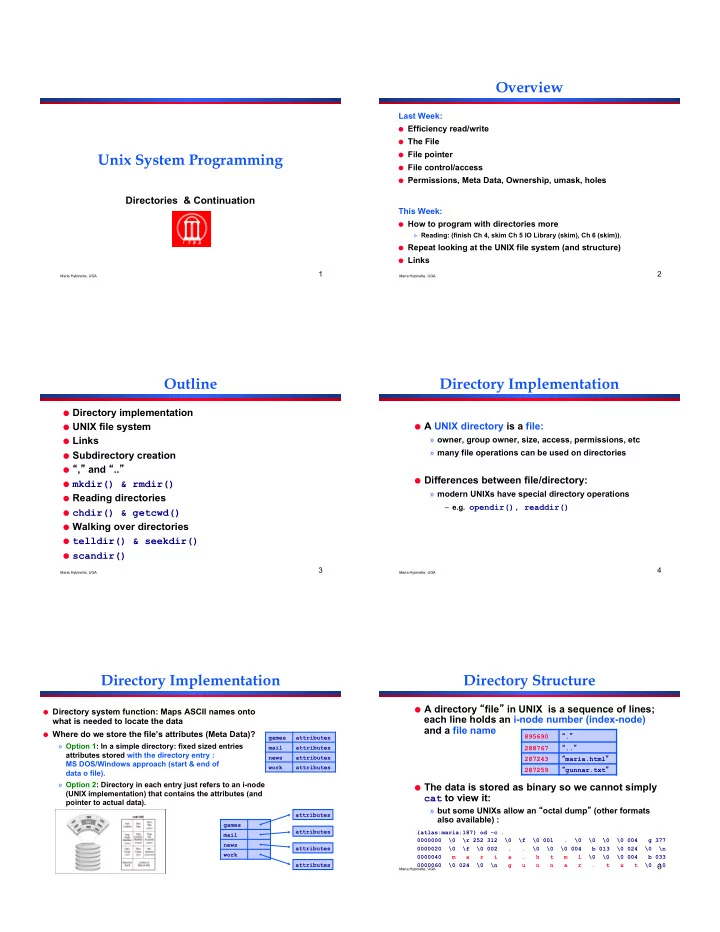
Overview Last Week: Efficiency read/write The File File pointer Unix System Programming File control/access Permissions, Meta Data, Ownership, umask, holes Directories & Continuation This Week: How to program with


slide-1
SLIDE 1

Maria Hybinette, UGA

1

Unix System Programming

Directories & Continuation

Maria Hybinette, UGA

2

Overview

Last Week:

  • Efficiency read/write
  • The File
  • File pointer
  • File control/access
  • Permissions, Meta Data, Ownership, umask, holes

This Week:

  • How to program with directories more

» Reading: (finish Ch 4, skim Ch 5 IO Library (skim), Ch 6 (skim)).

  • Repeat looking at the UNIX file system (and structure)
  • Links

Maria Hybinette, UGA

3

Outline

  • Directory implementation
  • UNIX file system
  • Links
  • Subdirectory creation
  • , and ..
  • mkdir() & rmdir()
  • Reading directories
  • chdir() & getcwd()
  • Walking over directories
  • telldir() & seekdir()
  • scandir()

Maria Hybinette, UGA

4

Directory Implementation

  • A UNIX directory is a file:

» owner, group owner, size, access, permissions, etc » many file operations can be used on directories

  • Differences between file/directory:

» modern UNIXs have special directory operations

– e.g. opendir(), readdir()

Maria Hybinette, UGA

5

Directory Implementation

  • Directory system function: Maps ASCII names onto

what is needed to locate the data

  • Where do we store the file’s attributes (Meta Data)?

» Option 1: In a simple directory: fixed sized entries attributes stored with the directory entry : MS DOS/Windows approach (start & end of data o file). » Option 2: Directory in each entry just refers to an i-node (UNIX implementation) that contains the attributes (and pointer to actual data).

games attributes mail attributes news attributes work attributes games mail news work attributes attributes attributes attributes

Maria Hybinette, UGA

6

Directory Structure

  • A directory file in UNIX is a sequence of lines;

each line holds an i-node number (index-node) and a file name

  • The data is stored as binary so we cannot simply

cat to view it:

» but some UNIXs allow an octal dump (other formats also available) :

895690 . 288767 .. 287243 maria.html 287259 gunnar.txt

{atlas:maria:187} od -c . 0000000 \0 \r 252 312 \0 \f \0 001 . \0 \0 \0 \0 004 g 377 0000020 \0 \f \0 002 . . \0 \0 \0 004 b 013 \0 024 \0 \n 0000040 m a r i a . h t m l \0 \0 \0 004 b 033 0000060 \0 024 \0 \n g u n n a r . t x t \0 \0

slide-2
SLIDE 2

Maria Hybinette, UGA

7

Something about i-nodes.

  • "ls -i" lists the inode of a file

{nike:maria:22} ls -lai! total 12! 23335653 drwxr-xr-x. 3 maria users 4096 Sep 16 11:59 .! 23199745 drwxr-x---. 18 maria apache 4096 Sep 16 11:48 ..! 23594400 drwxr-xr-x. 2 maria users 4096 Sep 16 11:59 adir! 23335656 -rw-r--r--. 1 maria users 0 Sep 16 11:59 afile! !

  • {nike:maria:36} cd / ; ls -lai | sort -n -k 1

» Across partitions Inode numbers could repeat » Inodes are unique per partition

  • Find . –inum xxxx –delete (danger)
  • Df

Maria Hybinette, UGA

8

Big Picture: The Unix File Structure

MBR Partition Partition Partition … i-node i-node i-node … i-node Boot block Super Block i-list Data blocks for files, directories, etc. Partition Table Free Space Management Entire Disk: File System:

Maria Hybinette, UGA

9

Entire Disk & Booting Computer

  • Disk is divided into 1+ partitions: one file system per

partition

  • Master Boot Record (typically sector 0) MBR- Pentium

» first sector on disk » used to boot computer

  • Partition Table

» staring and ending address of each partition

  • A program (e.g. the system Basic Input Output System or

BIOS for Pentiums) reads in and executes the MBR

» MBR searches for first active partition (noted in the partition table) » reads in its first block (the boot block) and executes it.

MBR Partition Partition Partition … Partition Table

Maria Hybinette, UGA

10

Partition Layout

  • Boot block:

» contains a hardware specific program that is called automatically to load UNIX at system startup time (loads OS in kernel space)

  • Super block:

» file system type, #blocks in file system

  • Free space management (two lists):

» a chain of free data block numbers » a chain of free i-node numbers

  • i-list/i-node table:

» administrative information about a file (meta-data: name, type, location, size, protection bits, … ) structured into an array: inode table or simply the i-list » An i-node number:

– uniquely identifies a file in a file system – is an index to the i-node table

Boot block Super Block i-list Data blocks for files, directories, etc. Free Space Management

Maria Hybinette, UGA

11

File System Expanded

895690 . 288767 .. 287243 maria.html 287259 gunnar.txt i-node i-node … 895690

BB SB i-list directory data directory data data data data

Maria Hybinette, UGA

12

UNIX Directories: Tree-Structured (not three)

  • Directory listing contains <name, index>, but a name can be

directory, making branches.

» Directory is stored and treated like a file » Special bit set in meta-data (attributes) for directories

– User programs can read directories (stat, fcntl). – Only system programs can write directories

» Specify full pathname by separating directories and files with special characters (e.g., \ or /)

  • Special directories

» Root /: Fixed index for meta-data (e.g., 2) » This directory: . » Parent directory: ..

  • Example: mkdir /a/b/c!

» Read meta-data 2 / (by default 2 is root in linux), look for a: find <a, 5> » Read 5, look for b: find <b, 9> » Read 9, verify no c exists; allocate c and add c to directory

slide-3
SLIDE 3

Maria Hybinette, UGA

13

Acyclic-Graph Directories

  • More general than tree structure

» Add connections across the tree (no cycles) » Create links from one file (or directory) to another

  • Hard link: ln a b (a must exist already)

» Idea: Can use name a or b to get to same file data » Implementation: Multiple directory entries point to same meta-data

link( maria.html, tucker.html );!

895690 . 288767 .. 287243 maria.html 287259 gunnar.txt 287243 tucker.html 895690 . 288767 .. 287243 maria.html 287259 gunnar.txt

Maria Hybinette, UGA

14

Links - Outline

  • Why Links?
  • Creating a Link
  • Seeing Links
  • Removing a Link
  • Symbolic Links
  • Implementation

Maria Hybinette, UGA

15

tucker-todo.txt

Why Links?

  • A link is a pointer to a file
  • Useful for sharing files;

» A file can be shared by giving each person their own link (pointer to it)

ln <existing-file> <new-pointer>

  • Maria types, in directory: ~/maria

ln tucker-todo.txt /home/tucker/todo.txt

/ tmp home bin tucker maria a.txt g.txt

/home/maria/tucker-todo.txt /home/tucker/todo.txt

and

Maria Hybinette, UGA

16

tucker-todo.txt

What is a Link?

  • A link is a pointer to a file
  • Useful for sharing files;

» A file can be shared by giving each person their own link (pointer to it)

ln <existing-file> <new-pointer>

  • Maria types, in directory: ~/maria

ln tucker-todo.txt /home/tucker/todo.txt

/ tmp home bin tucker maria a.txt g.txt

/home/maria/tucker-todo.txt /home/tucker/todo.txt

and

Maria Hybinette, UGA

17

Creating Links

  • Changes to a file affect every link:

{atlas} cat file_a This is file A. {atlas} ln file_a file_b {atlas} cat file_b This is file A {atlas} echo appending this to b >> file_b {atlas} cat file_b This is file A. appending this to b {atlas} cat file_a This is file A. appending this to b

Maria Hybinette, UGA

18

Seeing Links

  • Compare status information :

{saffron:maria:104} ls -l file_a file_b file_c

  • rw-r--r-- 2 maria 36 May 24 10:52 file_a
  • rw-r--r-- 2 maria 36 May 24 10:52 file_b
  • rw-r--r-- 1 maria 16 May 24 10:55 file_c

File mode, # links, owners name, group name, #bytes, date, pathname

  • Look at i-node number:

{saffron:maria:105} ls -i file_a file_b file_c 3534 file_a 3534 file_b 5800 file_c

  • Directories may appear to have more links:

{saffron:maria:106} ls -ld dir drwxr-xr-x 2 maria users 68 Apr 7 17:57 dir/ {saffron:maria:107} mkdir dir/hello {saffron:maria:108} ls -ld dir drwxr-xr-x 3 maria users 68 Apr 7 17:58 dir/!

  • This is because subdirectories (e.g. directories inside

dir/)have a link back to their parent.

slide-4
SLIDE 4

Maria Hybinette, UGA

19

Removing a Link

  • Removing or deleting a link does not

necessarily remove the file

  • Only when the file and every link is gone will

the file be removed

Maria Hybinette, UGA

20

Symbolic Links

  • The links described so far are hard links

» A hard link is a pointer to a file which must be on the same file system

  • A symbolic link is an in-direct

to a file

» Stores the pathname of the file that it points to » Symbolic links can link across file systems

  • Symbolic links are listed differently:

{saffron:ingrid:62} ln -s dir ~/unix/d/Sdir {saffron:ingrid:62} ls -lFd dir ~/unix/d/Sdir lrwxr-xr-x 1 ingrid staff 3 1 Apr 21:51 /home/ingrid/unix/d/Sdir@ -> dir drwxr-xr-x 3 ingrid staff 102 1 Apr 21:39 dir/

Maria Hybinette, UGA

21

Link Creation, Update & Removal

?

abc abc abc

update new delete bob

XY XY abc

new bob new bob bob new

abc

cp bob new

abc abc

ln bob new bob

abc

new

XY

ln -s bob new

Maria Hybinette, UGA

22

link()

#include <unistd.h>! long link( const char *oldpath, const char *newpath );!

!

  • Meaning of:

» link( maria.html, tucker.html );!

895690 . 288767 .. 287243 maria.html 287259 gunnar.txt 287243 tucker.html 895690 . 288767 .. 287243 maria.html 287259 gunnar.txt

Maria Hybinette, UGA

23

unlink()

  • clears directory record

» usually means that the i-node number is set to 0 » the file may not be affected

  • The i-node is only deleted when the last link

to it is removed; the file data blocks are deleted/reclaimed when there are no processes having the file opened.

Maria Hybinette, UGA

24

Example unlink

#include <stdio.h> #include <sys/stat.h> #include <sys/types.h> #include <fcntl.h> int main(void) { if( open( temp, O_RDWR ) < 0 ) { perror( open error ); exit( 1 ); } if( unlink( temp ) < 0 ) { perror( unlink error ); exit( 1 ); } printf( file temp is unlinked\n ); exit( 0 ); } {saffron} make unlinktemp gcc unlinktemp.c -o unlinktemp {saffron} ./unlinktemp file temp is unlinked {saffron} ./unlinktemp

  • pen error: No such file or directory
slide-5
SLIDE 5

Maria Hybinette, UGA

25

remove()

#include <stdio.h>! int remove( const char *pathname );! !

  • C Library function (not a system call)
  • Delete a name and possibly the file it refers

to.

» It calls unlink() for files and rmdir() for directories!

Maria Hybinette, UGA

26

rename()

#include <stdio.h>! int rename( const char *oldpath, const char *newpath );

  • Changes the names of oldpath to newpath (for

both directories and files)

  • If oldpath is open or is a nonexistent file, or if

newpath names a file that already exists, then the action of rename() is implementation dependent.

Maria Hybinette, UGA

27

symlink()

#include <stdio.h>! int symlink( const char *oldpath, const char *newpath );! !

  • Creates a symbolic link named newpath

which contains the string oldpath

  • Symbolic links are interpreted at run-time
  • Dangling link - may point to a nonexisting file
  • If newpath exists it will not be overwritten!

Maria Hybinette, UGA

28

readlink()

#include <stdio.h>! int readlink( const char *path, char buf, size_t bufsize );!

  • Read value of a symbolic link (does not follow the

link)

» Places the contents of the symbolic link path in the buffer buf which has size bufsize » Does not append a NULL character to buf

  • Return value

» The count of characters placed in the buffer if it succeeds » -1 on error

Maria Hybinette, UGA

29

Subdirectory Creation

  • shell command mkdir uga causes

» the creation of uga directory file and new i-node » an i-node number and name are added to the parent directory

895690 . 288767 .. 287243 maria.html 288000 uga 895690 . 288767 .. 287243 maria.html

Maria Hybinette, UGA

30

. and ..

  • . and .. are stored as ordinary file names

with i-node numbers pointing to the correct directory files

155 . 111 .. 300 maria 600 tucker 300 . 155 .. 589 uga 600 . 155 .. 680 gtech

Directory faculty Directory maria Directory tucker

home maria tucker uga gtech

slide-6
SLIDE 6

Maria Hybinette, UGA

31

mkdir()

#include <sys/types.h>! #include <fcntl.h>! #include <unistd.h>! ! int mkdir( char *path, mode_t mode );!

  • Creates a new directory with the specified mode
  • Returns 0 if OK and -1 on error
  • . and .. entries are added automatically
  • mode must include execute permissions so user(s)

can use cd

» e.g. 0755

Maria Hybinette, UGA

32

rmdir()

#include <unistd.h>! ! int rmdir( char *pathname );!

  • Deletes an empty directory
  • Returns 0 if OK, -1 on error
  • Will delay until other processes have stopped

using the directory

Maria Hybinette, UGA

33

Reading Directories

!

  • Directories can be read by any one who have

access

  • Directories can be modified only by the kernel

» Note we may be able to create new files and remove files from a directory

Maria Hybinette, UGA

34

Reading Directories

#include <sys/types.h>! #include <dirent.h>! DIR *opendir( char *pathname );! ! struct dirent *readdir( DIR *dp );! ! void rewinddir( DIR *dp );! ! int closedir( DIR *dp );! !

  • DIR is a directory stream (similar to FILE)

» when a directory is first opened the stream points to the first entry in the directory

  • dirent next slide

!

returns a pointer if OK NULL on error returns a pointer if OK NULL at end or on error returns 0 if OK

  • 1 on error

Maria Hybinette, UGA

35

dirent

struct dirent { long d_ino; /* i-node number */ char d_name[NAME_MAX + 1]; /* null terminated file name */

  • ff_t d_off;

/* offset to next record */ unsigned short d_reclen; /* record length */ }

  • NAME_MAX not available on all UNIXs, may need to use a function

to define it (fpathconf defined in unistd.h) - gets configurable pathname variables)

Maria Hybinette, UGA

36

Example: listdir.c

#include <stdio.h> #include <dirent.h> int main( void ) { DIR *dp; struct dirent *dir; if( (dp = opendir( . )) == NULL ) { fprintf( stderr, Cannot open dir\n ); exit( 1 ); } /* read entries */ while( (dir = readdir( dp )) != NULL ) if( dir-> d_ino != 0 ) /* ignore empty records */ printf( %s\n, dir->d_name ); closedir( dp ); return 0; } /* end main */

{saffron:50} ./listdir . .. listdir.c listdir {saffron:51}

slide-7
SLIDE 7

Maria Hybinette, UGA

37

chdir()

#include <unistd.h>! ! int chdir( char *pathname );! int fchdir( int fd );!

  • Every process has a current working directory (search

for a relative pathname starts here)

  • Change the current working director working directory

(cwd) of the calling process

  • Returns 0 if OK, -1 on error
  • Directory change is limited to within the program

Maria Hybinette, UGA

38

Example to_tmp.c : Changing current working directory

#include <stdio.h> #include <unistd.h> int main( void ) { if( chdir( /tmp ) < 0 ) { fprintf( stderr, chdir failed\n ); exit( 1 ); } else printf( In /tmp\n ); exit( 0 ); }

{saffron} pwd /usr/lib {saffron} ./to_tmp In /tmp {saffron} pwd /usr/lib {saffron}

Maria Hybinette, UGA

39

getcwd()

#include <unistd.h>! ! int *getcwd( char *buf, size_t size );! !

  • Store the cwd of the calling process in buf
  • Return buf if OK, NULL on error
  • buf must be big enough for the pathname string

(size specifies maximum length of buf );!

! !

Maria Hybinette, UGA

40

Example printcwd.c

#include <stdio.h> #include <unistd.h> #define BUFSIZE 255 int main( void ) { char name[BUFSIZE+1]; /* accommodate \0 */ if( getcwd( name, BUFSIZE+1 ) == NULL ) perror( getcwd error\n ); else printf( Current directory is %s\n, name ); exit(0); }

{saffron} pwd /usr/lib {saffron} ./printcwd Current directory is /usr/lib {saffron}

Maria Hybinette, UGA

41

Walking over Directories

  • Visit every file in a specified directory and

all of its subdirectories

» visit means the get name of the file

  • Apply a user-defined function to every visited

file

Maria Hybinette, UGA

42

ftw()

#include <ftw.h>! ! /* file tree walk starting at dir */! int ftw( char *dir, MyFunc *fp, int depth );! ! /* apply MyFunc() to each visited file */! typedef int MyFunc( const char *file, ! ! ! !struct stat *sbuf, int flag );!

  • depth is the maximum number of directories that can be
  • pened at once. Safest value is 1, although it slows down ftw()
  • Returns 0 on success (visiting every file), -1 on error
  • file is the pathname relative to the start directory, it is passed

to MyFunc() automatically by ftw() as it visits each file

  • sbuf is a pointer to the stat information for the current file

examined

slide-8
SLIDE 8

Maria Hybinette, UGA

43

ftw() - (cont)

  • The flag argument will be set to one of the

following for the item being examined

» FTW_F Item is a regular file » FTW_D Item is a directory » FTW_NS Could not get stat info for item » FTW_DNR Directory cannot be read

  • If MyFunc() returns a non-zero value then

ftw() will terminate

Maria Hybinette, UGA

44

Example: shower.c

#include <stdio.h> #include <sys/types.h> #include <sys/stat.h> #include <ftw.h> int shower( const char *file, const struct stat *sbuf, int flag ); int main( void ) { ftw( ,, shower, 1 ); } Print the names of all the file found below the current directory

Maria Hybinette, UGA

45

Example: shower.c (cont)

int shower( const char *file, const struct stat *sbuf, int flag ) { if( flag == FTW_F ) /* is a file */ printf( Found: %s, file ); return 0; }

Maria Hybinette, UGA

46

telldir() & seekdir()

#include <dirent.h>! !

  • ff_t telldir( DIR *dp );!
  • Returns the location of the current record in the

directory, -1 on error #include <dirent.h>! !

  • ff_t seekdir( DIR *dp, off_t loc );!
  • Set the location in the directory file

Maria Hybinette, UGA

47

scandir()

#include <dirent.h>

  • ff_t scandir( char *dir, struct dirent ***pitems, SelectFnc *sfp,

CompareFnc *cfp ); /* selection function for searching */ typedef int SelectFnc( const struct dirent *d ); /* comparison function for sorting */ typedef int CompareFnc( const struct dirent *d1, const struct dirent *d2 );

  • Scan the directory file calling the selection function (sfp) on each

directory item

  • Items for which sfp returns non-zero are stored in an array

pointed by pitems

  • The items in the array are sorted using qsort() using the

comparison function (cfp)

  • scandir() and alpasort() not implemented on Solaris

Maria Hybinette, UGA

48

  • dirent.h includes one predefined comparison

function, which compares directory item names

int alphasort( const struct dirent *d1, const struct dirent *d2 );

  • Causes the pitems array to be sorted in

increasing alphabetical order by item name

NULL item 1 item 2 item 3 pitems

slide-9
SLIDE 9

Maria Hybinette, UGA

49

Example geth.c

#include <stdio.h> #include <dirent.h> #include <sys/types.h> /* our selection function */ int selectH( struct dirent *d ); int main( void ) { struct dirent ** pitems; scandir( ., &pitems, selectH, alphasort ); while( *pitems != NULL ) { printf( %s\n, (*pitems)->d_name ); pitems++: } exit( 0 ); }

List files/subdirectories in the current directory which begin with an h sorted in alphabetical order

Maria Hybinette, UGA

50 int selectH( struct dirent *d ) { if( d-> d_name[0] == h ) return 1; return 0; }