
SLIDE 1
¡ 1 ¡ 1 ¡ EVENTS-FIRST PROGRAMMING IN APP INVENTOR ¡ ¡ Franklyn Turbak Mark Sherman and Fred Martin ¡ Computer Science Department Department of Computer Science ¡ Wellesley College University of Massachusetts Lowell ¡ fturbak@wellesley.edu {msherman, fredm}@cs.uml.edu ¡ ¡ David Wolber Shaileen Crawford Pokress ¡ Computer Science Department MIT Media Lab University of San Francisco Massachusetts Institute of Technology wolber@usfca.edu shaileen@media.mit.edu ¡ ¡ ABSTRACT ¡ Events are a central concept in computer science. They are becoming more important with the prevalence of mobile and web platforms that use event-based
- programming. Yet, events are typically taught late in the CS curriculum—e.g., in a web
programming or operating systems course. We have introduced events to CS0 students from day one using MIT App Inventor, a blocks-based programming environment that enables students to create apps for Android devices. This paper presents the system’s event-based model, along with typical coding problems and best-practice approaches for solving them. We advocate for increasing early emphasis on events in the CS curriculum. ¡ ¡ INTRODUCTION ¡ The programming model in introductory CS courses is typically based on executing a main program with a single entry point or evaluating expressions in an
- interpreter. Events and user interfaces are left for later. Event handling, even for simple
button clicks, can be remarkably complex (e.g., specifying a listener in Java). ¡ With MIT App Inventor, our CS0 students are immediately introduced to an event-based processing model as they build mobile apps [1]. Their first programs involve specifying how their app should respond to events related to device features, such as touching the screen, shaking the device, changing its location, receiving a text, etc. ¡
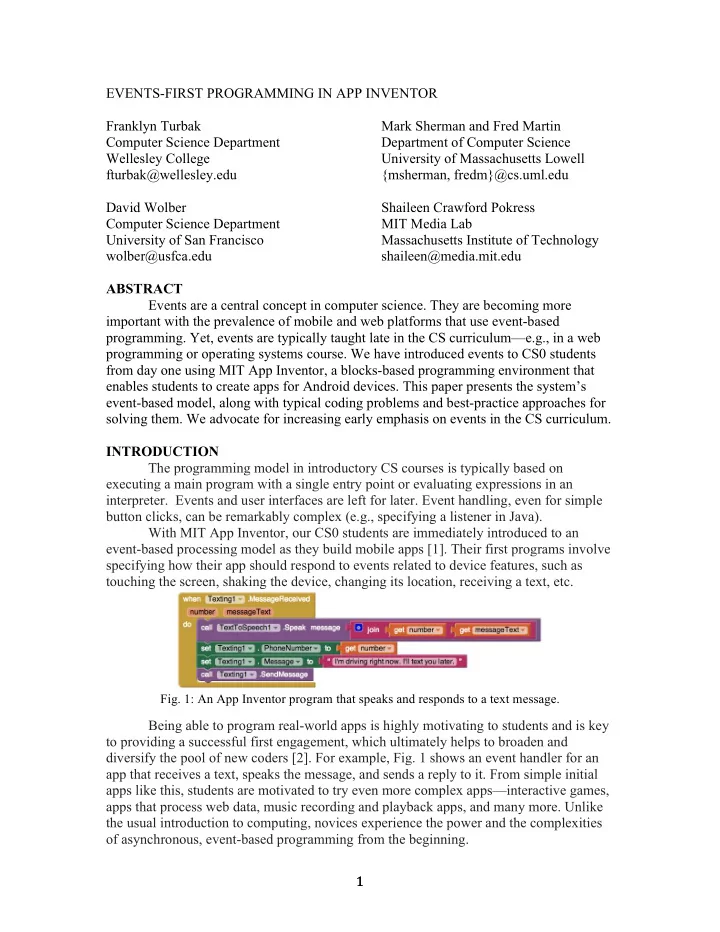
- Fig. 1: An App Inventor program that speaks and responds to a text message. ¡
¡
Being able to program real-world apps is highly motivating to students and is key to providing a successful first engagement, which ultimately helps to broaden and diversify the pool of new coders [2]. For example, Fig. 1 shows an event handler for an app that receives a text, speaks the message, and sends a reply to it. From simple initial apps like this, students are motivated to try even more complex apps—interactive games, apps that process web data, music recording and playback apps, and many more. Unlike the usual introduction to computing, novices experience the power and the complexities
- f asynchronous, event-based programming from the beginning. ¡