Examples of I/O Devices Device Behaviour Partner Data Rate - - PowerPoint PPT Presentation

examples of i o devices
SMART_READER_LITE
LIVE PREVIEW

Examples of I/O Devices Device Behaviour Partner Data Rate - - PowerPoint PPT Presentation

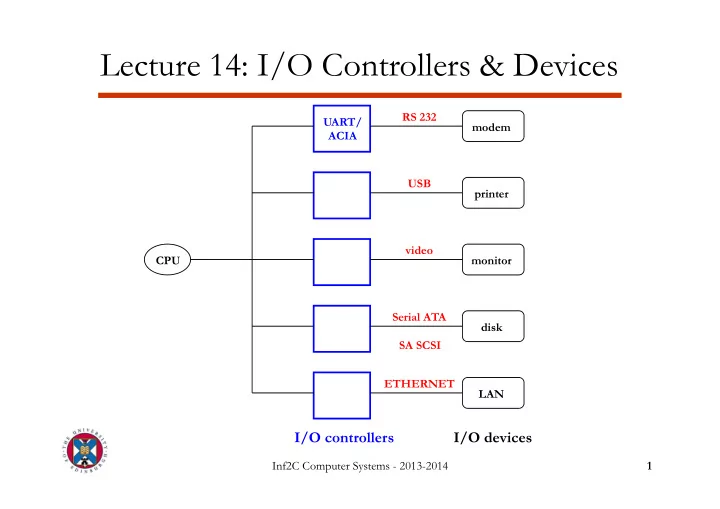
Lecture 14: I/O Controllers & Devices RS 232 UART/ modem ACIA USB printer video CPU monitor Serial ATA disk SA SCSI ETHERNET LAN I/O controllers I/O devices Inf2C Computer Systems - 2013-2014 1 Examples of I/O Devices Device


slide-1
SLIDE 1

Inf2C Computer Systems - 2013-2014 1

Lecture 14: I/O Controllers & Devices

I/O controllers

CPU UART/ ACIA modem printer monitor disk RS 232 USB video Serial ATA SA SCSI

I/O devices

LAN ETHERNET
slide-2
SLIDE 2

Inf2C Computer Systems - 2013-2014 2

Examples of I/O Devices

Device Behaviour Partner Data Rate (Mbit/sec) Keyboard Input Human 0.001 Mouse Input Human 0.004 Voice input Input Human 0.26 Laser printer Output Human 3.2 Graphics display Output Human 800-8000 Network/LAN Input or output Machine 100-10000 Magnetic disk Storage Machine 800-3000

slide-3
SLIDE 3

Inf2C Computer Systems - 2013-2014 3

Example: RS232 Serial Interface

§ I/O controller: UART (Universal Asynchronous Receiver Transmitter) or ACIA (Asynchronous Communications Interface Adapter) § Used for modems and other serial devices § Physical Implementation:

– 2 signal wires (one for each direction) + ground reference

Tx data wire (CPU to I/O device) Rx data wire (I/O device to CPU) GROUND wire

slide-4
SLIDE 4

Inf2C Computer Systems - 2013-2014 4

Example: RS232 Serial Interface

§ Encoding:

– 1 character = 10 or 11 bits (including signaling) – Idle state is represented by a constant “1”

§ Parity: for detection of transmission errors

– odd → total number of “1”s (including parity bit) is odd – even → total number of “1”s is even

1 idle (1) start bit (0) data (7 or 8 bits) parity bit stop bit (1)

slide-5
SLIDE 5

Inf2C Computer Systems - 2013-2014 5

UART Controller

shift register shift register serial data in receiver status Rx data register Tx data register transmitter status serial data out write control data data read control RECEIVER TRANSMITTER FROM/TO I/O device FROM/TO processor

1 8 8 1 1 1 8 8

slide-6
SLIDE 6

Inf2C Computer Systems - 2013-2014 6

Connecting CPU and I/O Controllers

§ Option 1: connect the I/O Tx and Rx registers directly into some special CPU I/O registers → not flexible § Option 2: keep I/O registers in separate I/O controller and connect CPU to I/O controller through special I/O bus → expensive, not flexible I/O bus:

– data lines (8 bits) – control lines (READ and WRITE signals), – address lines (some few bits) → each I/O controller is assigned a range of addresses for its registers

Data is accessed through special I/O loads and stores

slide-7
SLIDE 7

Inf2C Computer Systems - 2013-2014 7

Connecting CPU and I/O Controllers

§ Option 3: keep I/O registers in I/O controller and connect CPU to I/O controller through memory bus Memory mapped I/O:

– I/O controller registers (data and control) are mapped to a dedicated portion of memory and are accessed with regular load and store instructions – Takes bus bandwidth away from CPU-memory

§ Option 4: connect I/O controllers to I/O bus and the I/O bus to the memory bus through a bus adapter

– More flexible – Off-load memory bus (multiple I/O devices appear as a single device to the memory bus) – Used in high-performance systems

slide-8
SLIDE 8

Inf2C Computer Systems - 2013-2014 8

Use of a bus adapter

Memory bus

CPU

Cache Main memory Bus adapter I/O bus I/O controller I/O controller I/O controller

slide-9
SLIDE 9

Inf2C Computer Systems - 2013-2014 9

I/O via I/O or memory bus

Tx data register Rx data register status register WRITE

8

READ

8

READ

8

UART data 128 bits address 32 bits memory bus from processor

receiver status bit receiver status bit

data 8 bits address 8 bits read/ write control 2 bits I/O bus from

  • mem. bus adapter
slide-10
SLIDE 10

Inf2C Computer Systems - 2013-2014 10

Polling and interrupt-based I/O

§ Checking I/O status:

– Option 1: Polling

§ User process calls OS at regular intervals to check status of I/O

  • peration

§ Time-consuming § Not flexible § Used in embedded systems

– Option 2: Interrupt

§ I/O controller interrupts user process to signal an I/O event § Used in general purpose systems

slide-11
SLIDE 11

Inf2C Computer Systems - 2013-2014 11

Hard Disks

§ 1-4 platters per drive 2 surfaces per platter 10-50k tracks per surface 100-500 sectors per track 512B – 4KB per sector § Spinning speed:

– 5400-15000 rpm (90-250 revs per sec)

arm + head platter axis track sector arm + head

slide-12
SLIDE 12

Inf2C Computer Systems - 2013-2014 12

Disk Performance

§ Total time of a disk operation is divided in two parts:

  • 1. Access time: time to get head into position to read/write data

access time = seek time + rotational latency

– Seek time: time to move head to appropriate track (< 10ms) – Rotational latency: time to wait for appropriate sector to arrive underneath the head (< 10ms)

Dependent on spinning speed

  • 2. Transfer time: time to move data to/from disk

transfer time = time to transfer 1 byte * number of bytes of data

– Dependent on both spinning speed and recording density – 75-125 MB/s in 2008

slide-13
SLIDE 13

Inf2C Computer Systems - 2013-2014 13

Disk Controllers

§ Disk controller inside disk unit → responsible for all mechanical

  • peration of disk + interface with CPU

§ I/O registers:

– Exchange data and control between CPU and controller – Command register → tells controller what to do next e.g. Seek n Read Sector m Write Sector m Format Track

High-level commands

slide-14
SLIDE 14

Inf2C Computer Systems - 2013-2014 14

Using a Disk Controller

§ Step 1: user program requests data from a file § Step 2: OS file system determines sector(s) to be accessed § Step 3: OS disk handler issues Seek command and CPU goes to work on some other process (multi-tasking) § Step 4: I/O controller interrupts CPU to signal completion of seek § Step 5: OS disk handler issues Read Sector command and CPU goes to work on some other process § Step 6: I/O controller interrupts CPU to signal data ready § Step 7: OS disk handler transfers data to/from disk § Step 8: go to step 3 or 5 and repeat until all data transferred

slide-15
SLIDE 15

Inf2C Computer Systems - 2013-2014 15

Interrupt Approach

§ CPU (through OS) has to issue individual commands to read every sector from disk § Data transfer is very slow (~100µs for a 512 byte sector) § Interrupt mechanism is very expensive (Lecture 11) § Time taken by interrupt mechanism makes it difficult to synchronize head position with Read Sector command § Solution: Direct Memory Access (DMA)

slide-16
SLIDE 16

Inf2C Computer Systems - 2013-2014 16

Direct Memory Access

§ DMA controller: sits on the memory bus and can independently transfer data to/from memory from/to disk § DMA registers:

– Address register → position in memory of next data to be read/written – Data register → temporary storage for data to be transferred – Length register → number of bytes remaining to be transferred

slide-17
SLIDE 17

Inf2C Computer Systems - 2013-2014 17

DMA Organization

address

Address register

data

DMA Controller disk Data register Length register CPU Memory

control Bus Request Bus Grant

FROM/ TO

slide-18
SLIDE 18

Inf2C Computer Systems - 2013-2014 18

DMA Operation

§ Step 1, 2: user program requests data, OS determines location of data on disk § Step 3: OS disk handler issues Seek command and sets up DMA registers (address, length); CPU goes to work on another process § Step 4, 5: I/O controller interrupts CPU, OS disk handler issues Read Sector command § Step 6: I/O controller informs DMA controller that data is ready (no need to interrupt CPU) § Step 7: DMA controller transfers data into memory; length register is decremented until all data is moved (advanced DMA controllers can access multiple tracks with a single operation) § Step 8: DMA controller interrupts CPU to inform completion of DMA operation

slide-19
SLIDE 19

Inf2C Computer Systems - 2013-2014 19

Bus Arbitration

§ DMA and CPU connect to memory bus → access must be somehow arbitrated to avoid conflicts § Solution: additional logic (bus arbiter)

– Authorizes CPU or DMA controller to access memory at any given time

§ 2 new wires on memory bus:

– Bus Request → asserted by DMA when it requires the bus – Bus Grant → asserted by the CPU when it is not using the bus and thus DMA can use it – In case of conflicting requests in the same cycle, CPU usually has priority