From Yesterday private = accessible only to the class that declares - - PowerPoint PPT Presentation

from yesterday
SMART_READER_LITE
LIVE PREVIEW

From Yesterday private = accessible only to the class that declares - - PowerPoint PPT Presentation

From Yesterday private = accessible only to the class that declares it public = accessible to any class at all protected = accessible to the class and its sub-classes default = accessible to classes in same package


slide-1
SLIDE 1

1

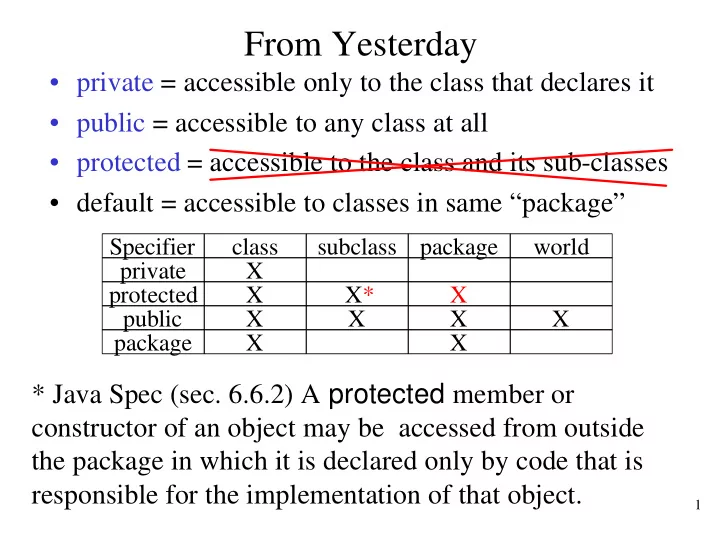
From Yesterday

  • private = accessible only to the class that declares it
  • public = accessible to any class at all
  • protected = accessible to the class and its sub-classes
  • default = accessible to classes in same “package”

* Java Spec (sec. 6.6.2) A protected member or constructor of an object may be accessed from outside the package in which it is declared only by code that is responsible for the implementation of that object.

Specifier class subclass package world private X protected X X* X public X X X X package X X

slide-2
SLIDE 2

2

LockPick Take Two

class XBox implements LockBox { protected boolean open; … } class LockPick extends LockBox { public static void openXBox(XBox x) { x.open = true; // only if LockPick in same package } } XBox x = new XBox(…) LockPick.openXBox(x);

slide-3
SLIDE 3

3

Exceptions

Weiss sec. 2.5

slide-4
SLIDE 4

4

Errors

  • What to do when errors are encountered?

import java.io.PrintStream; class DangerMouse { public static void main(String args[]) { printOneInteger(args, System.out); } public static void printOneInteger(String args[], PrintStream out) { System.out.println("got: " + getOneInteger(args);); } public static int getOneInteger(String args[]) { return Integer.parseInt(args[0]); } }

slide-5
SLIDE 5

5

Avoiding Errors

  • What to do when errors are encountered?
  • Idea #1: Avoidance

– Add checks before “dangerous” operations – Don’t do anything that will (might) fail – Too many checks! – What to do when a check fails?

  • Idea #2: Avoidance + Error Codes

– Add checks after “fallible” operations too – If errors encountered, return some kind of error code – Too many checks! – Clumsy, error-prone, confusing

slide-6
SLIDE 6

6

Ugly Code

public static void printOneInteger(String args[], PrintStream out) { int i = getOneInteger(args); if (i % 2 == 0) i = i / 2; else return -1; // some kind of error in args if (!checkForEnoughMemory(5 + 10)) return -2; // hope 10 is enough! String s = "got: " + i; if (s == null) return -4; // something went wrong with allocation if (out == null) return -3; // bad output stream if (out.println(s) < 0) return -5; // something went wrong with output return 0; } // return an 2*integer, or -1 if arg is missing, or -3 if not in right format public static int getOneInteger(String args[]) { if (args == null || args.length == 0) return -1; if (!checkIntegerFormat(args[0]) return -3; return 2*Integer.parseInt(args[0]); }

slide-7
SLIDE 7

7

Structured Exception Handling

  • Errors cause programs, even machines, to crash.
  • Can’t avoid all dangerous operations.
  • Goal:

– Want “normal case” code should flow nicely – Want to catch exceptional cases, and deal with them separately – Keep information about what went wrong:

  • what kind of exceptional case
  • details about what specifically went wrong
  • where it happened in the code
  • other info particular to this kind of exceptional case

– Be able to return this info up the call-chain to whatever method can deal with the problem

  • But don’t interfere with normal return statements!
  • Instead, we say that we “throw” the exceptional case up the call chain
slide-8
SLIDE 8

8

Throwable Hierarchy

Throwable Error Exception RuntimeException

OutOfMemoryError InternalError UnknownError … NullPointerException ArrayIndexOutOfBoundsException ArithmeticException NoSuchElementException ClassCastException …

IOException

FileNotFoundException ZipException MalformedURLException …

slide-9
SLIDE 9

9

Throwable

  • Contains a “stack trace” / “call chain”

– which method called which method called … called the method that had a problem

  • Has a String message (some detail about what

happened)

  • Can have a Throwable cause (some other error that

caused this one)

  • “An Error is a subclass of Throwable that indicates

serious problems that a reasonable application should not try to catch. Most such errors are abnormal conditions.” (Java Documentation)

  • “The class Exception and its subclasses are a form
  • f Throwable that indicates conditions that a

reasonable application might want to catch.”

slide-10
SLIDE 10

10

Throwing an Exception

class Typo extends Exception {…} static int eval(TreeCell t) throws Typo { String s = t.getElt(); if (s.length() == 0) throw new Typo(“empty token”); if (s.equals(“+”)) return … else if (Character.isLetter(s.charAt(0))) return … else if (Character.isDigit(s.charAt(0))) return … else throw new Typo(“unrecognized operand: “ + s); }

  • Keyword throws tells compiler (and programmer) what

exceptions might get thrown by this method

  • Keyword throw takes a Throwable object, aborts the current

method (with NO return value!), and passes the Throwable

  • bject up the call-chain

If s is empty, abort! We create a new Typo

  • bject to hold details
slide-11
SLIDE 11

11

Propagating an Exception

  • The exception (e.g., Throwable object) passes up the

call chain, aborting every method it encounters…

abort!

void getExpression(BufferedReader in) throws Typo, IOException { String s = in.readLine(); doExpression(s); } void doExpression(String s) throws Typo { TreeCell t = parseExpression(s); int i = eval(t); System.out.println(“eval returned “ + i); } int eval(TreeCell t) throws Typo { … throw new Typo(…); … }

abort! abort!

slide-12
SLIDE 12

12

Catching an Exception

  • Until it lands inside a try-catch block that specifies

the correct type of exception

public static void main(String args[]) { try { … getExpression(in); … } catch (Typo te) { System.out.println(“oops: you made a typo “ + te.getMessage()); // other error handling code } catch (IOException ioe) { // more error handling code } } void getExpression(BufferedReader in) throws Typo, IOException { String s = in.readLine(); doExpression(s); }

Kind of error you want to catch A name for the object that was thrown, and is now caught

slide-13
SLIDE 13

13

Control Flow

  • Normal execution (no exceptions thrown):

start body ----- end // no errors

  • Exception Typo thrown

start part of body catch-clause end

  • Exception other than Typo thrown

start part of body ---- ---- abort! …start… try { … body … } catch (Typo e) { … catch-clause… } …end…

slide-14
SLIDE 14

14

Finally Clause

  • Often want to execute certain code no matter what

– e.g., close a file, with or without an exception happening

  • Rule: if body begins, then finally-clause will run

– if no exceptions, runs after body – if exception is thrown and caught, right after catch-clause – if exception thrown and not caught, runs before propagating the exception up the call chain

…start… try { … body … } catch (Typo e) { … catch-clause… } finally { … final-clause…} …end…

slide-15
SLIDE 15

15

Checked vs Unchecked

  • Most exception types are checked. If a method body

might generate a checked exception, it must either:

– Have a try-catch block for that exception type – Declare the exception type in a throws declaration

  • Some exception types are unchecked. These you do

not need to catch (unless you want to) or declare.

  • Why the distinction?

– Could happen at any time: e.g. OutOfMemoryError – Nearly any line of code could generate one: e.g., NullPointerException – Nothing you could do about it anyway: e.g. InternalError