How to log into Mastering Astronomy when you have a NEW textbook - - PowerPoint PPT Presentation

how to log into mastering astronomy when you have a new
SMART_READER_LITE
LIVE PREVIEW

How to log into Mastering Astronomy when you have a NEW textbook - - PowerPoint PPT Presentation

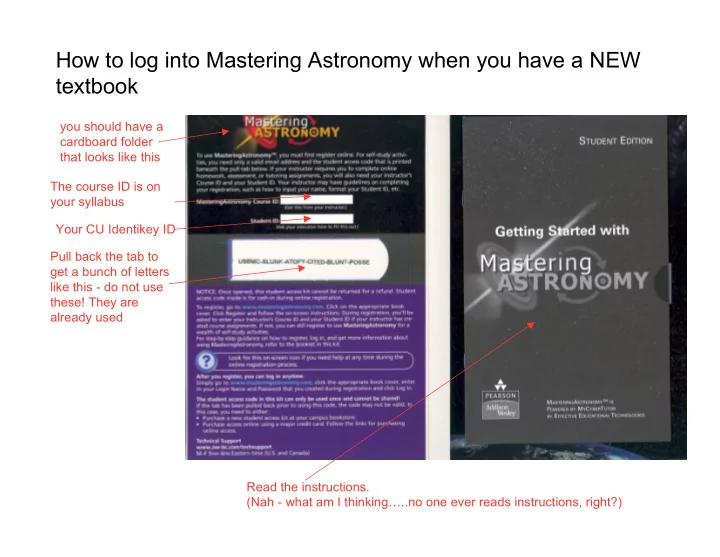
How to log into Mastering Astronomy when you have a NEW textbook you should have a cardboard folder that looks like this The course ID is on your syllabus Your CU Identikey ID Pull back the tab to get a bunch of letters like this - do not


slide-1
SLIDE 1

How to log into Mastering Astronomy when you have a NEW textbook

you should have a cardboard folder that looks like this The course ID is on your syllabus Your CU Identikey ID Pull back the tab to get a bunch of letters like this - do not use these! They are already used Read the instructions. (Nah - what am I thinking…..no one ever reads instructions, right?)

slide-2
SLIDE 2

Go to www.masteringastronomy.com - and you get this

Click on our book

slide-3
SLIDE 3

Then hit Register

slide-4
SLIDE 4

Put your access code from your cardboard folder in here. (If you use this one

  • or any other code

that someone has already used you will be told it is already in use)

slide-5
SLIDE 5

Register with a login name and password you can remember. (Your login can be whatever you want.) And write your login down somewhere!

slide-6
SLIDE 6

DO THIS Your confirmation

AStudent astudent@colorado.edu

slide-7
SLIDE 7

AStudent ********

Log in here to go to Mastering Astronomy

slide-8
SLIDE 8

Now you need to join our class!

Andrea Student astudent@colorado.edu Andrea Student astudent@colorado.edu 1234567

Use your CULearn logon ID (not your student number!) Use the Course ID given in class (or

  • n the syllabus)

Be SURE to click Save!!!

slide-9
SLIDE 9

Ta-da! You're in!

Andrea Student (AStudent)