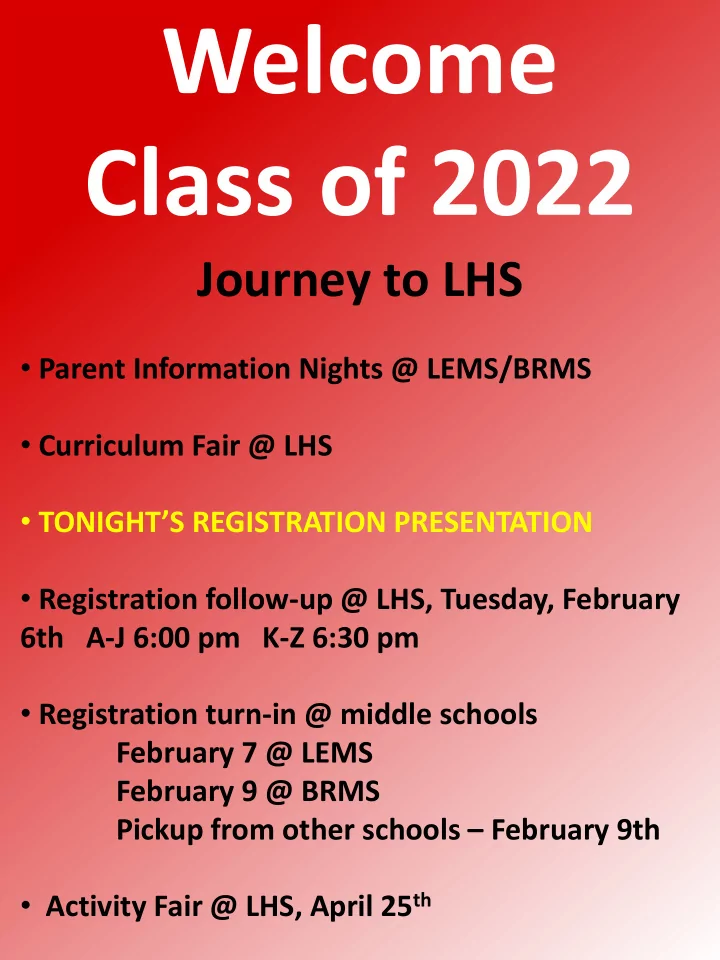
SLIDE 1 Journey to LHS
- Parent Information Nights @ LEMS/BRMS
- Curriculum Fair @ LHS
- TONIGHT’S REGISTRATION PRESENTATION
- Registration follow-up @ LHS, Tuesday, February
6th A-J 6:00 pm K-Z 6:30 pm
- Registration turn-in @ middle schools
February 7 @ LEMS February 9 @ BRMS Pickup from other schools – February 9th
- Activity Fair @ LHS, April 25th
SLIDE 2 Registration Steps
- 1. Choose Traditional or IB MYP course of
study
- 2. Complete worksheet for the program
you select
- 3. Use worksheet to enter course
requests through Parent Portal
- 4. Print a summary of online requests
- 5. Sign registration forms where
indicated (parent and student)
- 6. Return the pink worksheet and online
request summary to your middle school next week
SLIDE 3 Comprehensive High School Options
- Traditional registration worksheet is
1st page
- IB MYP (Middle Years Programme)
registration worksheet is 2nd page Students may choose to study at the standard level or honors level in either program (*Exception – Civics)
SLIDE 4 COURSE OFFERINGS:
- Comprehensive curriculum in all core subjects:
English, Math, Science, & Social Studies
- 4 world languages: French, German, Spanish and
American Sign Language
- Standard level and Honors level are offered in all
core classes as well as French, German, and Spanish.
- Wide variety of elective options
International Baccalaureate Middle Years Programme (IB MYP)
- Open to all students
- MYP Certificate of Completion –
Complete 9th & 10th grade MYP classes Personal Project in 10th grade
SLIDE 5 HONORS COURSES
High ability, motivated learners Faster pace Prep for AP, IB Diploma, or concurrent enrollment classes. All three options are college level and may carry college credit. Flexibility to choose which honors courses fit well with the student’s ability level
SLIDE 6
Please use a pencil to fill out your forms
SLIDE 7
SLIDE 8
SLIDE 9
SLIDE 10
SLIDE 11 See the LHS website for:
- A copy of this presentation
- Course offering list
- TSD Course Guidebook
Choose “Students” Heading Click on Counseling Link
SLIDE 12 Choose “2018-2019 Registration”
- n left side of LHS Counseling page
SLIDE 13
SLIDE 14
SLIDE 15
SLIDE 16
1.0
1.0
2.0 Algebra 1/Materials, Process, Entrepreneurship & Design
1.0
1.0
2.0
Math Options
SLIDE 17 World Language Options
American Sign Language French 1 French 1 Honors French 2 French 2 Honors German 1 German 1 Honors Spanish 1 Spanish 1 Honors Spanish 2 Spanish 2 Honors
SLIDE 18 Fitness Options
Fitness 0.5 Aquatics & Fitness 0.5 Team Sports & Fitness 0.5 Men’s Weights & Fitness 0.5 Women’s Weights & Fitness 0.5 *Students must complete their Fitness requirement before taking other Physical Education classes.
SLIDE 19 ART Computer Graphics Art 1 0.5 Drawing 1 0.5 Drawing 2 0.5 Sculpture & Ceramics 1 0.5 Painting 1 0.5 Photography 1 0.5 MUSIC Choir (Women’s or Men’s) 1.0 Orchestra 1.0 Concert Band 1.0 Marching Band (Wind or Perc.) 1.0
0.5 Jazz Ensemble 1.0
Fine Arts
SLIDE 20 Career Pathway Electives
BUSINESS & MARKETING Computer Applications 0.5 Computer Graphics Business 0.5 Accounting 1 1.0 Introduction to Business/Mktg. 0.5 Business Law 0.5 Web Design 0.5 FAMILY & CONSUMER SCIENCES Teen Challenges & Choices 0.5 Design Seminar 0.5 Child & Adolescent Development 0.5 Culinary Careers & Nutrition 0.5 Nutrition & Wellness 0.5 INDUSTRIAL SCIENCE AND TECHNOLOGY AMPED 2.0 Geometry in Construction 2.0
SLIDE 21
Online Course Requests
1) Log in to Parent Portal 2) Click on “Registration LHS 18-19”
SLIDE 22 Search for Classes
- 1. Click on “Course Search”
- 2. Search by course name or course
number – course number is easier
SLIDE 23
Select a Course to view
SLIDE 24
Read course descriptions & click “Request this Course” Remember to add the numbers for both semesters of a full year (1.0 credit) class
SLIDE 25
As you enter your requests, they will appear under “Requested Courses” Units are tallied until you have 16/16
SLIDE 26
To Drop a Class:
Click on course title from list of requests Click “Drop This Request”
SLIDE 27
After you enter 16 requests, enter 4 alternate courses in priority order Click “Request as an Alternate” to add each course to your alternate list
SLIDE 28
Completed registration includes 16 requests + 4 alternates Click “Print Request Summary”
SLIDE 29
Printouts Require Parent Signature
Return printout and your worksheet
SLIDE 30
- Finish 8th grade strongly
- Early grades count
- Athletes: be aware of NCAA
requirements
- Make the most of your high
school experience!
Tips For Students
SLIDE 31
- Encourage challenging courses &
- pportunities for college credit
- Keep lines of communication open –
Parent Portal
- Encourage extracurricular activities
- Use the LHS website
- Build an expectation for post-secondary
training
Tips For Parents
SLIDE 32 Pick up Dates
Registration follow-up @ Loveland High School – Tuesday, February 6th This is an opportunity to get questions answered and return forms A-J – 6:00 pm K-Z – 6:30 pm Return during school hours:
Wednesday, February 7 Lucile Erwin MS (with HS Counselors) Friday, February 9 Bill Reed MS (with HS Counselors) All other middle schools
Return pink worksheet and printout of
- nline course requests. Two options: