MATLAB Basics: Data Files save filename var1 var2 binary save - - PDF document

matlab basics data files
SMART_READER_LITE
LIVE PREVIEW

MATLAB Basics: Data Files save filename var1 var2 binary save - - PDF document

MATLAB Basics: Data Files save filename var1 var2 binary save homework.mat x y Input/Output Functions ascii save x.dat x ascii load filename Selim Aksoy binary load filename.mat Bilkent University ascii


slide-1
SLIDE 1

Input/Output Functions

Selim Aksoy Bilkent University Department of Computer Engineering saksoy@cs.bilkent.edu.tr

Spring 2004 CS 111 2

MATLAB Basics: Data Files

save filename var1 var2 …

save homework.mat x y

→ binary

save x.dat x –ascii

→ ascii

load filename

load filename.mat

→ binary

load x.dat –ascii

→ ascii

Spring 2004 CS 111 3

The textread Function

It is designed to read ASCII files that

are formatted into columns of data

Each column can be of a different type It is useful for importing tables of data

printed out by other applications

Spring 2004 CS 111 4

The textread Function

[a,b,c,…] = textread(filename,format,n)

filename: a string that is the name of the

file to be read

format: a string containing the format

primitives (just like in fprintf)

n: number of lines to read (if not specified,

the file is read until the end)

Spring 2004 CS 111 5

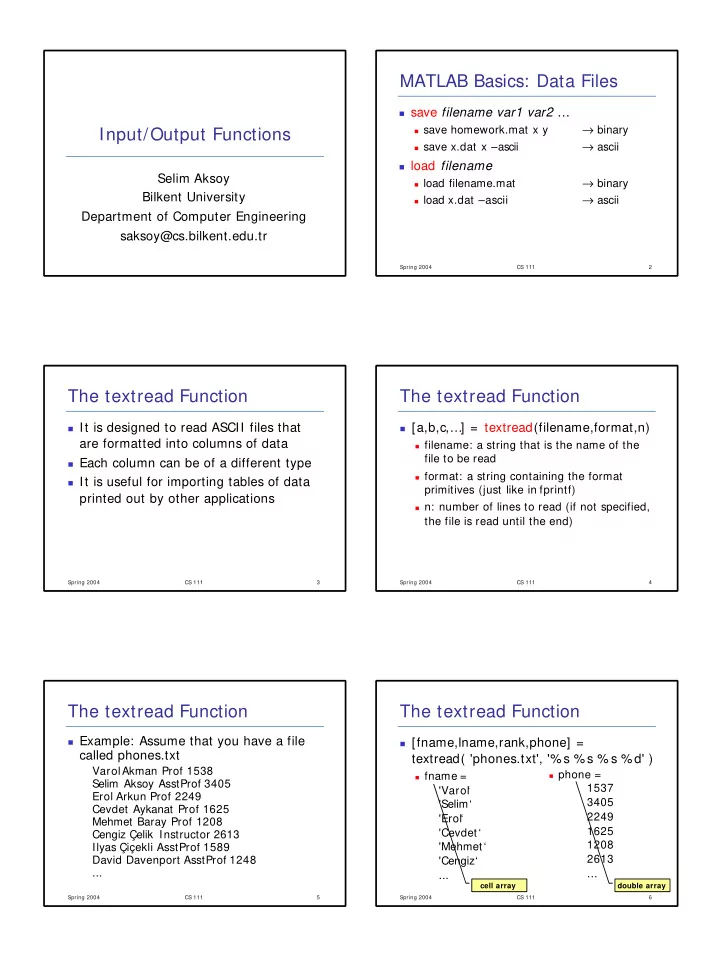
The textread Function

Example: Assume that you have a file

called phones.txt

VarolAkman Prof 1538 Selim Aksoy AsstProf 3405 Erol Arkun Prof 2249 Cevdet Aykanat Prof 1625 Mehmet Baray Prof 1208 Cengiz Çelik Instructor 2613 Ilyas Çiçekli AsstProf 1589 David Davenport AsstProf 1248 ...

Spring 2004 CS 111 6

The textread Function

[fname,lname,rank,phone] =

textread( 'phones.txt', '%s %s % s % d' )

fname =

'Varol ‘ 'Selim‘ 'Erol‘ 'Cevdet ‘ 'Mehmet‘ 'Cengiz‘ ...

phone =

1537 3405 2249 1625 1208 2613 ...

cell array double array

slide-2
SLIDE 2

Spring 2004 CS 111 7

The textread Function

The textread function skips the columns

that have an asterisk (* ) in the format descriptor

[fname, phone] =

textread( 'phones.txt', '% s % * s % * s % d' )

The load command (with ASCII option)

assumes all of the data is of a single type but textread is more flexible

Spring 2004 CS 111 8

The textread Function

Example: Searching for telephone

numbers

name = ‘Selim’; for ii = 1:length(fname), if ( strcmp( fname(ii), name ) ), disp( phone(ii) ); end end

be careful about the usage of cell arrays

Spring 2004 CS 111 9

File Processing

File types:

Binary files

Data is stored in program readable format Processing is fast

Text (ASCII) files

Data is stored in human readable format Processing is slower Spring 2004 CS 111 10

Opening Files

fid = fopen( filename, permission )

  • pens the file filename in the mode specified

by permission

fid is the file id (a positive integer) that is assigned

to the file by MATLAB

fid is used for all reading, writing and control

  • perations on that file

file id 1 is the standard output device and file id 2

is the standard error device

fid will contain -1 if the file could not be opened Spring 2004 CS 111 11

Opening Files

Permission can be:

‘r’: open file for reading (default) ‘w’: open file, or create a new file, for writing;

discard existing contents, if any

‘a’: open file, or create a new file, for writing;

append data to the end of the file

‘r+ ’: open file for reading and writing ‘w+ ’: open file, or create a new file, for reading

and writing; discard existing contents, if any

‘a+ ’: open file, or create a new file, for reading

and writing; append data to the end of the file

Add ‘t’ to the permission string for a text file

Spring 2004 CS 111 12

Opening Files

Examples:

fid = fopen( ‘example.dat’, ‘r’ )

  • pens a binary file for input

fid = fopen( ‘example.dat’, ‘wt’ )

  • pens a text file for output (if example.dat

already exists, it will be deleted)

fid = fopen( ‘example.dat’, ‘at’ )

  • pens a text file for output (if example.dat

already exists, new data will be appended to the end)

slide-3
SLIDE 3

Spring 2004 CS 111 13

Closing Files

status = fclose( fid )

closes the file with file id fid

If the closing operation is successful,

status will be 0

If the closing operation is unsuccessful,

status will be -1

status = fclose( ‘all’ )

closes all open files (except for standard

  • utput and standard error)

Spring 2004 CS 111 14

Writing Binary Data

count = fwrite( fid, array, precision )

writes data in array in binary format

fid: file id of the file opened using fopen array: array of values to write count: number of values written to the file

MATLAB writes data in column order (if

array is [1 2;3 4;5 6], data is written as 1, 3, 5, 2, 4, 6)

You can use array’ to write in row order

Spring 2004 CS 111 15

Writing Binary Data

Precision (platform independent) can be:

‘char’: 8-bit characters ‘uchar’: 8-bit unsigned characters ‘int16’: 16-bit integer ‘int32’: 32-bit integer ‘uint16’: 16-bit unsigned integer ‘uint32’: 32-bit unsigned integer ‘float32’: 32-bit floating point ‘float64’: 64-bit floating point Spring 2004 CS 111 16

Reading Binary Data

[array,count] = fread(fid,size,precision)

reads binary data in a user-specified format

size: number of values to read

n: read exactly n values (array will be a column

vector with length n)

Inf: read until the end of the file (column vector) [n m]: read exactly n x m values (array will be a

n-by-m matrix)

array: array that contains the data count: number of values read from the file Spring 2004 CS 111 17

Binary I/O Examples

% Script file: binary_io.m % Purpose: To illustrate the use of binary i/o functions. % Prompt for file name filename = input('Enter file name: ','s'); % Generate the data array

  • ut_array = randn(1,10000);

% Open the output file for writing. [fid,msg] = fopen(filename,'w'); % Was the open successful? if fid > 0 % Write the output data. count = fwrite(fid,out_array,'float64'); % Tell user disp([int2str(count) ' values written...']); % Close the file status = fclose(fid); else % Output file open failed. Display message. disp(msg); end % Now try to recover the data. Open the file for reading. [fid,msg] = fopen(filename,'r'); % Was the open successful? if fid > 0 % Read the input data. [in_array, count] = fread(fid,[100 100],'float64'); % Tell user disp([int2str(count) ' values read...']); % Close the file status = fclose(fid); else % Input file open failed. Display message. disp(msg); end

Spring 2004 CS 111 18

Binary I/O Examples

%Randomly generate 100 passwords with 8 characters passwords = []; for ii = 1:100, %Generate each password s = []; for jj = 1:8, %Generate each character of each password t = char( round( ('z'-'a')*rand + 'a' ) ); s = [ s t ]; end passwords = strvcat( passwords, s ); end %Write passwords to a binary file passwd.dat %Open the file [ fid, msg ] = fopen( 'passwd.dat', 'wb' ); if ( fid < 1 ), error( msg ); end %Write the passwords count = fwrite( fid, passwords, 'char' ); fprintf( '%d characters were written\n', count ); %Close the file status = fclose( fid ); if ( status ~= 0 ), error( 'Could not close the file' ); end
slide-4
SLIDE 4

Spring 2004 CS 111 19

Binary I/O Examples

%Read the passwords from the binary file passwd.dat %Open the file [ fid, msg ] = fopen( 'passwd.dat', 'rb' ); if ( fid < 1 ), error( msg ); end %Read the passwords [ passwords2, count ] = fread( fid, [100 8], 'char' ); fprintf( '%d characters were read\n', count ); %Close the file status = fclose( fid ); if ( status ~= 0 ), error( 'Could not close the file' ); end

Spring 2004 CS 111 20

Writing Formatted Text Data

count = fprintf(fid,format,val1,val2,…)

writes formatted text data in a user- specified format

fid: file id (if fid is missing, data is written

to the standard output device (command window)

format: same as what we have been using

(combination of format specifiers that start with % )

count: number of characters written Spring 2004 CS 111 21

Writing Formatted Text Data

Make sure there is a one-to-one

correspondence between format specifiers and types of data in variables

Format strings are scanned from left to right Program goes back to the beginning of the

format string if there are still values to write (format string is recycled)

If you want to print the actual % character,

you can use % % in the format string

Spring 2004 CS 111 22

Reading Formatted Text Data

[array,count] = fscanf(fid,format,size)

reads formatted text data in a user- specified format

fid: file id format: same as format in fprintf size: same as size in fread array: array that receives the data count: number of elements read Spring 2004 CS 111 23

Reading Formatted Text Data

line = fgetl( fid )

reads the next line excluding the end-

  • f-line characters from a file as a

character string

line: character array that receives the data line is set to -1 if fgetlencounters the end

  • f a file

Spring 2004 CS 111 24

Reading Formatted Text Data

line = fgets( fid )

reads the next line including the end-of- line characters from a file as a character string

line: character array that receives the data line is set to -1 if fgets encounters the end

  • f a file
slide-5
SLIDE 5

Spring 2004 CS 111 25

Formatted Text I/O Examples

% Script file: table.m % Purpose: To create a table of square roots, squares, and cubes. % Open the file. fid = fopen('table.dat', 'wt'); % Print the title of the table. fprintf(fid, ' Table of Square Roots, Squares, and Cubes\n\n'); % Print column headings fprintf(fid, ' Number Square Root Square Cube\n'); fprintf(fid, ' ====== =========== ====== ====\n'); % Generate the required data ii = 1:10; square_root = sqrt(ii); square = ii.^2; cube = ii.^3; % Create the output array

  • ut = [ii' square_root' square' cube'];

% Print the data for ii = 1:10 fprintf (fid, ' %2d %11.4f %6d %8d\n',out(ii,:)); end % Close the file. status = fclose(fid); Spring 2004 CS 111 26

Formatted Text I/O Examples

%Updates the phone number of a person %Get the name and new phone number name = input( 'Enter the last name of the person: ', 's' ); new_phone = input( 'Enter the new phone number: ' ); %Read the phone numbers [fname,lname,rank,phone] = textread( 'phones.txt', '%s %s %s %d' ); %Find the person and update the phone number for i = 1:length(lname), if ( strcmp( lname(i), name ) ), phone(i) = new_phone; end end %Write the updated phone numbers fid = fopen( 'phones2.txt', 'wt' ); for i = 1:length(fname), fprintf( fid, '%s %s %s %d\n', fname{i}, lname{i}, rank{i}, phone(i) ); end fclose( fid );

Spring 2004 CS 111 27

Formatted Text I/O Examples

%Updates the name of a person %Get the old and new names

  • ld_name = input( 'Enter the old name: ', 's' );

new_name = input( 'Enter the new name: ', 's' ); %Open the input file fid1 = fopen( 'phones.txt', 'rt' ); %Open the output file fid2 = fopen( 'phones3.txt', 'wt' ); %Read lines one by one line = fgets( fid1 ); while ( line > 0 ), %Replace the old name with the new name line2 = strrep( line, old_name, new_name ); %Write to the new file fprintf( fid2, '%s', line2 ); %Read the next line line = fgets( fid1 ); end %Close the file status = fclose( 'all' );

Spring 2004 CS 111 28

The exist Function

ident = exist( ‘item’, ‘kind’ )

checks the existing of ‘item’

item: name of the item to search for kind: optional value for restricting the

search for a specific kind of item (possible values are ‘var’, ‘file’, ‘builtin’, ‘dir’)

ident: a value based on the type of the

item

Spring 2004 CS 111 29

The exist Function

Values returned by exist can be:

0: item not found 1: item is a variable in the current

workspace

2: item is an m-file or a file of unknown

type

5: item is a built -in function 7: item is a directory Spring 2004 CS 111 30

Examples

  • exist( 'phones.txt' )

ans = 2

  • exist( 'phones5.txt' )

ans =

  • clear
  • x = 5;
  • exist( 'x' )

ans = 1

  • exist( 'y' )

ans =

  • exist( 'sum' )

ans = 5