Microprocessors & Interfacing Computer buses I/O Addressing - - PowerPoint PPT Presentation

microprocessors interfacing
SMART_READER_LITE
LIVE PREVIEW

Microprocessors & Interfacing Computer buses I/O Addressing - - PowerPoint PPT Presentation

Lecture Overview Buses Microprocessors & Interfacing Computer buses I/O Addressing Memory mapped I/O Buses and Parallel Separate I/O Input/Output Parallel Input/Output AVR examples Lecturer : Dr. Annie Guo


slide-1
SLIDE 1

S2, 2008 COMP9032 Week5 1

Microprocessors & Interfacing

Buses and Parallel Input/Output

Lecturer : Dr. Annie Guo

S2, 2008 COMP9032 Week5 2

Lecture Overview

  • Buses

– Computer buses

  • I/O Addressing

– Memory mapped I/O – Separate I/O

  • Parallel Input/Output

– AVR examples

S2, 2008 COMP9032 Week5 3

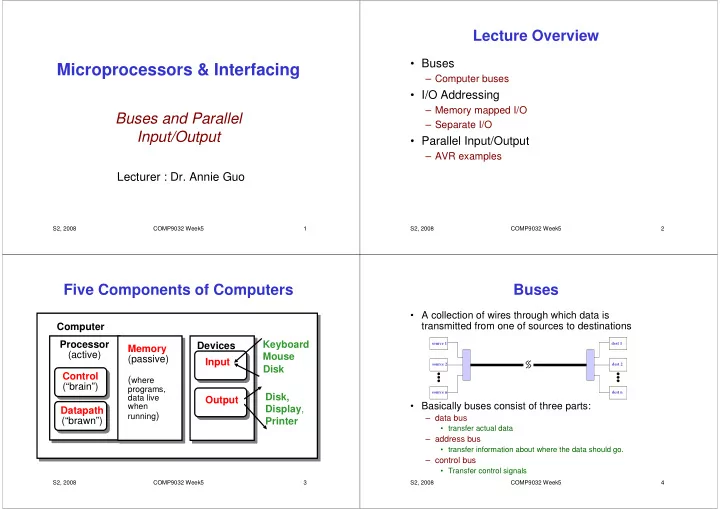
Five Components of Computers

Processor (active) Computer Control (“brain”) Datapath (“brawn”) Memory (passive) (where

programs, data live when running)

Devices Input Output Keyboard Mouse Disk, Display, Printer Disk

S2, 2008 COMP9032 Week5 4

Buses

  • A collection of wires through which data is

transmitted from one of sources to destinations

  • Basically buses consist of three parts:

– data bus

  • transfer actual data

– address bus

  • transfer information about where the data should go.

– control bus

  • Transfer control signals

source 1 source 2 source n dest 1 dest 2 dest n

slide-2
SLIDE 2

S2, 2008 COMP9032 Week5 5

Data Bus Address Bus Control Bus CPU Parallel I/O Device Serial I/O Device Memory I/O Interface

Typical Computer Bus Structure

S2, 2008 COMP9032 Week5 6

Computer Buses

  • CPU is connected to memory and I/O devices

via data, address and control buses.

  • Data bus is bi-directional and transfers

information (memory data and instructions, I/O data) to and from CPU.

  • Address bus is most often unidirectional

because CPU is the only source of the addresses.

  • Control bus carries all control signals required

to control the operation of the data transfer.

S2, 2008 COMP9032 Week5 7

  • Data Bus

CPU Multiple Destinations Multiple Sources

Computer Buses (cont.)

  • Each line of a bus has multiple sources and
  • destinations. The bus transfers data from one

source each time.

S2, 2008 COMP9032 Week5 8

Input Interface

  • Connects multiple data sources

– Only one source data is sent to the bus at a time

  • Often implemented with three-state buffers for

data buses

– For example,

  • a parallel, eight-bit input data is connected to eight three-

state gates whose enable lines are tied together

  • When the data is to sent to the bus the eight three-state

gates are enabled.

  • The open-collector gate is often used for

control signals such as request for interrupts

– Since one way switch is often required.

slide-3
SLIDE 3

S2, 2008 COMP9032 Week5 9

A G G A Y 0 0 0 0 1 1 1 0 X 1 1 X High Impedance (a) Three-state gate Vcc (b) Typical open-collector gate

External Pull-up Resistor Open Collector

Data source input Bus line

Typical Bus Interface Gates

Y

S2, 2008 COMP9032 Week5 10 D Q C1 C2 CLR Clock 74116 Dual 4-bit Latch with Clear Destination or Output Device DBn

Output Interface

  • The output interface between the data bus

and a destination or output device contains a latch.

S2, 2008 COMP9032 Week5 11

Address Decoding

  • The interface must provides the ability for

CPU to select one of many sources and destinations.

– The address decoder is used.

S2, 2008 COMP9032 Week5 12 O1 O0 O2 O3 A0 A1 E A1 A0 Read Control From CPU Data Bus 74LS139 2-of-4 Decoder Info Source To/From CPU Info Source Info Source Info Source

Address Decoding for Input Devices

slide-4
SLIDE 4

S2, 2008 COMP9032 Week5 13 O1 O0 O2 O3 A0 A1 E A1 A0 Write Control From CPU Data Bus 74LS139 2-of-4 Decoder 74116 Dual 4-Bit Latch 74116 Dual 4-Bit Latch 74116 Dual 4-Bit Latch 74116 Dual 4-Bit Latch To/From CPU

Address Decoding for Output Devices

S2, 2008 COMP9032 Week5 14

CPU Timing Signals

  • CPU must provide timing and synchronization

so that the transfer of information occurs at the right time.

– CPU has its own clock. – I/O devices may have a separate I/O clock. – Typical timing signals include READ and WRITE.

S2, 2008 COMP9032 Week5 15 CPU Clock Address Bus address from CPU valid Data Bus data from device valid A C READ Control Signal B

Typical CPU Read Cycle

S2, 2008 COMP9032 Week5 16

Typical CPU Read Cycle

  • CPU places the address on the address bus

at point A.

  • The control signal READ is asserted at point

B to signal the external device that CPU is ready to take the data from the data bus.

  • CPU reads the data bus at point C whether
  • r not the input device has put it ready

– If NOT, some form of synchronization is required.

slide-5
SLIDE 5

S2, 2008 COMP9032 Week5 17 CPU Clock Address Bus address from CPU valid Data Bus data from CPU valid A B WRITE Control Signal D C

Typical CPU Write Cycle

S2, 2008 COMP9032 Week5 18

Typical CPU Write Cycle

  • CPU places the address on the address bus at point

A.

  • The data bits are supplied by CPU at point B.
  • The control signal WRITE is asserted by CPU at

point C to signal the external device that the data is ready to be taken from the data bus.

– This signal is used to create the clock to latch the data at the correct time.

  • Depending on the type of latch and when WRITE is

asserted, the data may be captured on the falling edge or rising edge.

S2, 2008 COMP9032 Week5 19

O1 O0 O2 O3 A0 A1 E A1 A0 74LS139 2-of-4 Decoder O1 O0 O2 O3 A0 A1 E A1 A0 74116 Dual 4-Bit Latch Destination Source SOURCE_ADR_OK DES_ADR_OK Data Bus 74LS244 Octal Buffer READ WRITE

Complete I/O Interface

S2, 2008 COMP9032 Week5 20

Complete I/O Interface (cont.)

  • READ and WRITE control the enable (E).
  • Three state enables and the latch clock

signals are not asserted until the correct address is on the address bus AND the correct time in the read or write cycle has arrived.

slide-6
SLIDE 6

S2, 2008 COMP9032 Week5 21

I/O Addressing

  • If the same address bus is used for both

memory and I/O, how does hardware distinguish between memory reads/writes and I/O reads/writes?

– Two approaches:

  • Memory-mapped I/O.
  • Separate I/O.

– AVR supports both.

S2, 2008 COMP9032 Week5 22

Memory I/O

Memory Mapped I/O

  • The entire memory address space is divided

into memory space and I/O space.

S2, 2008 COMP9032 Week5 23

AVR Memory Mapped I/O

  • In AVR, 64 I/O

registers are mapped into memory space $0020 ~ $005F

– 2 bytes

  • With such memory

addresses, the access to the I/Os uses memory access type of instructions.

S2, 2008 COMP9032 Week5 24

Memory Mapped I/O (cont.)

  • Advantages:

– Simple CPU design. – No special instructions for I/O accesses.

  • Disadvantages:

– I/O devices reduce the amount of memory space available for application programs. – The address decoder needs to decode the full address bus to avoid conflict with memory addresses.

slide-7
SLIDE 7

S2, 2008 COMP9032 Week5 25

I/O Interface for Memory-Mapped I/O

Address Bus Decoder D Q CL Information Destination Data Bus Information Source READ WRITE ADR_OK ADR_OK to memory to input devices to output devices ADR_OK

S2, 2008 COMP9032 Week5 26

Separate I/O

  • Two separate spaces for memory and I/O.

– Less expensive address decoders than those needed for memory-mapped I/O (Why?)

  • Additional control signal, called IO/M, is

required to prevent both memory and I/O trying to place data on the bus simultaneously.

– IO/M is high for I/O use and low for memory use.

  • Special I/O instructions are required.

S2, 2008 COMP9032 Week5 27

I/O Interface for Separate I/O

Reduced Address Bus Decoder Data Bus Information Source - memory READ ADR_OK IO/M IO_READ Information Source – input device S2, 2008 COMP9032 Week5 28

Separate I/O (cont.)

  • In AVR, 64 I/O registers can also be

addressed with separate addresses $00 ~ $3F

– 1 byte

  • With such separate addresses, the access to

the I/Os uses I/O specific instructions.

– E.g. IN and OUT

slide-8
SLIDE 8

S2, 2008 COMP9032 Week5 29

I/O Synchronization

  • CPU is typically much faster than I/O devices.
  • Therefore, synchronization between CPU and

I/O devices is required.

  • Two synchronization approaches:

– Software synchronization. – Hardware synchronization.

S2, 2008 COMP9032 Week5 30

Software Synchronization

Two software synchronization approaches:

  • Real-time synchronization

– Uses a software delay to match CPU to the timing requirements of the I/O device.

  • The timing requirement must be known
  • Sensitive to CPU clock frequency.
  • Waste CPU time.
  • Polling I/O

– A status register, with a DATA_READY bit, is added to the

  • device. The software keeps reading the status register until

the DATA_READY bit is set.

  • Not sensitive to CPU clock frequency.
  • Still waste CPU time, but CPU can do other tasks.

S2, 2008 COMP9032 Week5 31

Handshaking I/O

  • A hardware synchronization approach with control

signal READY or WAIT.

– For an input device, when CPU is asking for input data, the input device will assert WAIT if the input data is NOT

  • available. When the input data is available, it will deassert
  • WAIT. While WAIT is asserted, CPU must wait until this

control signal is deasserted. – For an output device, when CPU is sending output data via the data bus, the output device will assert WAIT if it is not ready to take the data. When it is ready, it will deassert

  • WAIT. While WAIT is asserted, CPU must wait until this

control signal is deasserted.

S2, 2008 COMP9032 Week5 32 Address Bus READ

Input Handshaking Hardware

Wait State Logic Data Register INPUT DEVICE To CPU WAIT DATA_REQUEST INFO_ADD_OK Data Bus

slide-9
SLIDE 9

S2, 2008 COMP9032 Week5 33

Read Cycle with Wait States

S2, 2008 COMP9032 Week5 34

Parallel Input/Output in AVR

  • Communication through ports
  • There are two special instructions designed

for parallel input/output operations

– In – Out

S2, 2008 COMP9032 Week5 35

Atmega64 Pin Configuration

Source: Atmega64 Data Sheet S2, 2008 COMP9032 Week5 36

Source: Atmega64 Data Sheet

slide-10
SLIDE 10

S2, 2008 COMP9032 Week5 37

AVR PORTs

  • Can be configured to receive data or send out data
  • Include physical pins and related circuitry to enable

input/output operations.

  • Different AVR microcontroller devices have different

port design

– ATmega64 has 64 pins, most of them form six ports for parallel input/output.

  • Port A to Port F
  • Three I/O memory addresses (in data memory) are allocated

for each port

– PORTx for data register – DDRx for data direction register – PINx for port input pins

S2, 2008 COMP9032 Week5 38

Load I/O Location to Register

  • Syntax: in Rd, A
  • Operands: 0 ≤ d ≤31, 0 ≤ A ≤63
  • Operation: Rd I/O(A)
  • Words: 1
  • Cycles: 1
  • Example:

In r25, $16 ; read port B

S2, 2008 COMP9032 Week5 39

Store Register to I/O Location

  • Syntax: out A, Rr
  • Operands: 0 ≤ r ≤31, 0 ≤ A ≤63
  • Operation: I/O(A) Rr
  • Words: 1
  • Cycles: 1
  • Example:
  • ut $18, r16

; write to port B

S2, 2008 COMP9032 Week5 40

One-bit Port Circuitry

Source: Atmega64 Data Sheet

slide-11
SLIDE 11

S2, 2008 COMP9032 Week5 41

How does it work?

  • Each port pin consists of three register bits

– DDxn, PORTxn, and PINxn.

  • DDxn bits are accessed at the DDRx I/O address,
  • PORTxn bits at the PORTx I/O address
  • PINxn bits at the PINx I/O address.
  • The DDxn bit in the DDRx Register selects

the direction of this pin.

– If DDxn is written logic one, Pxn is configured as an output pin. If DDxn is written logic zero, Pxn is configured as an input pin.

S2, 2008 COMP9032 Week5 42

How does it work? (cont.)

  • When the pin is configured as an input pin,

the pull-up resistor can be activated/deactivated.

  • To active pull-up resistor for input pin,

PORTxn needs to be written logic one.

S2, 2008 COMP9032 Week5 43

Sample Code for Output

.include “m64def.inc” clr r16 ; clear r16 ser r17 ; set r17

  • ut

DDRB, r17 ; set Port B for output operation

  • ut

PORTB, r16 ; write zeros to Port B nop ; wait (do nothing)

  • ut

PORTB, r17 ; write ones to Port B

S2, 2008 COMP9032 Week5 44

Sample Code for Input

.include “m64def.inc” clr r15

  • ut

DDRB, r15 ; set Port B for input operation in r25, PINB ; read Port B cpi r25, 4 ; compare read value with constant breq exit ; branch if r25=4 ... exit: nop ; branch destination (do nothing)

slide-12
SLIDE 12

S2, 2008 COMP9032 Week5 45

Example 1

  • Design a simple control system that can

control a set of LEDs to display a fixed pattern.

S2, 2008 COMP9032 Week5 46

LED and Its Operation

S2, 2008 COMP9032 Week5 47

Example 1 (solution)

  • Consists of a number of steps:

– Set a port for the output operation, each pin of the ports is connected to one LED – Write the pattern value to the port so that it drives the LEDs to display the related pattern.

.include “m64def.inc” ser r16

  • ut DDRB, r16

; set Port B for output ldi r16, 0xAA ; write the pattern

  • ut PORTB, r16

end: rjmp end

S2, 2008 COMP9032 Week5 48

Example 2

  • Design a simple control system that can

control a set of LEDs to display a fixed pattern for one second then turn the LEDs off.

slide-13
SLIDE 13

S2, 2008 COMP9032 Week5 49

Example 2 (solution)

  • Consists of a number of steps:

– Set a port for the output operation, each pin of the ports is connected to one LED – Write the pattern value to the port so that it drives the display of LEDs – Count one second – Write a pattern to set all LEDs off.

S2, 2008 COMP9032 Week5 50

Counting One Second

  • Assume we know the clock cycle period that is 1 ms

(very very slow, not a real value). Then we can write a program that executes

single cycle instructions.

  • Execution of the code will take 1 second if each

instruction in the code takes one clock cycle.

  • An implementation example is given in the next slide

3 3

10 1 10 1 × × × × = = = =

− − − − S2, 2008 COMP9032 Week5 51

.include “m64def.inc” .equ loop_count = 124 .def iH=r25 .def iL=r24 .def countH = r17 .def countL = r16 .macro oneSecondDelay ldi countL, low(loop_count) ; 1 cycle ldi countH, high(loop_count) clr iH ; 1 clr iL loop: cp iL, countL ; 1 cpc iH, countH brsh done ; 1, 2 (if branch) adiw iH:iL, 1 ; 2 nop rjmp loop ; 2 done: .endmacro

Code for One Second Delay

S2, 2008 COMP9032 Week5 52

Code for Example 2

.include “m64def.inc” ser r15

  • ut DDRB, r15

; set Port B for output ldi r15, 0xAA ; write the pattern

  • ut PORTB, r15
  • neSecondDelay

; 1 second delay ldi r15, 0x00

  • ut PORTB, r15

; turn off the LEDs end: rjmp end

slide-14
SLIDE 14

S2, 2008 COMP9032 Week5 53

Example 3

  • Design a simple control system that can

control a set of LEDs to display a fixed pattern specified by the user.

S2, 2008 COMP9032 Week5 54

Example 3 (solution)

  • Consists of a number of steps:

– Set the switches and connect the switches to the pins of a port – Set the port for input – Read the input – Set another port for the output operation, each pin

  • f the ports is connected to one LED

– Write the pattern value to the port so that it drives the display of LEDs

S2, 2008 COMP9032 Week5 55

Code for Example 3

.include “m64def.inc” clr r17

  • ut DDRC, r17

; set Port C for input ser r17

  • ut PORTC, r17

; activate the pull up in r17, PINC ; read pattern set by the user ; from the switches ser r16

  • ut DDRB, r16

; set Port B for output

  • ut PORTB, r17

; write the input pattern end: rjmp end

S2, 2008 COMP9032 Week5 56

Example 4

  • Design a simple control system that can

control a set of LEDs to display a pattern specified by the user during the execution.

slide-15
SLIDE 15

S2, 2008 COMP9032 Week5 57

Example 4 (solution)

  • One solution is that the processor continuing

checking if there is an input for read. If there is, then read the input and go to next task,

  • therwise the processor is in a waiting state

for the input. Such an approach to hand dynamic input is called polling.

S2, 2008 COMP9032 Week5 58

Code for Example 4

  • Set an extra input bit for signal from user when the

input is ready.

.include “m64def.inc” cbi DDRD, 7 ; clear Port D bit 7 for input waiting: in r16, PIND ; check if that bit is 1 sbic PIND, 7 ; if yes skip to the next instruction rjmp waiting ; waiting clr r17

  • ut DDRC, r17

; set Port C for input ser r17

  • ut PORTC, r17

; activate the pull up in r17, PINC ; read pattern set by the user ; from the switches ser r16

  • ut DDRB, r16

; set Port B for output

  • ut PORTB, r17

end: rjmp end

S2, 2008 COMP9032 Week5 59

Reading Materials

  • Chapter 7: Computer Buses and Parallel

Input and Output. Microcontrollers and Microcomputers by Fredrick M. Cady.

  • Mega64 Data Sheet.

– AVR CPU Core

  • PORTS

S2, 2008 COMP9032 Week5 60

Homework

  • 1. Refer to the AVR Instruction Set manual,

study the following instructions:

  • Arithmetic and logic instructions
  • ser
  • Data transfer instructions
  • in, out

– Bit operations

  • sbi, cbi

– Program control instructions

  • sbic, sbis

– MCU control instructions

  • nop
slide-16
SLIDE 16

S2, 2008 COMP9032 Week5 61

Homework

2.One of very common functions a microcontroller

application usually has is timing control. The function below is such a timing control function. Convert it to assembly program.

static int iSeconds, iMinutes: void timing-control (void) { ++iSeconds; if (iSeconds >= 60) { iSeconds = 0; ++iMinutes; if (iMinutes >30){ //do something //and reset the timer } } }