Model-view-controller View hierarchy - - PDF document

model view controller view hierarchy
SMART_READER_LITE
LIVE PREVIEW

Model-view-controller View hierarchy - - PDF document

Model-view-controller View hierarchy Observer Fall 2004 6.831 UI Design and


slide-1
SLIDE 1

1

Fall 2004 6.831 UI Design and Implementation 1

  • Fall 2004

6.831 UI Design and Implementation 2

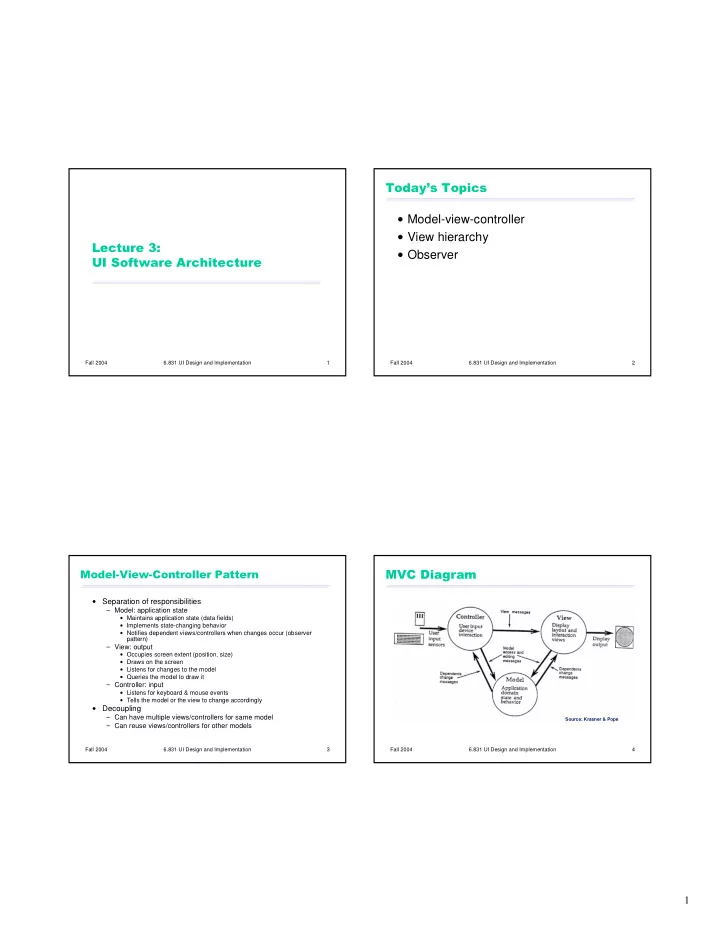
  • Model-view-controller

View hierarchy Observer

Fall 2004 6.831 UI Design and Implementation 3

  • Separation of responsibilities

Model: application state

Maintains application state (data fields) Implements state-changing behavior Notifies dependent views/controllers when changes occur (observer pattern)

View: output

Occupies screen extent (position, size) Draws on the screen Listens for changes to the model Queries the model to draw it

Controller: input

Listens for keyboard & mouse events Tells the model or the view to change accordingly

  • Decoupling

Can have multiple views/controllers for same model Can reuse views/controllers for other models

Fall 2004 6.831 UI Design and Implementation 4

!"#

Source: Krasner & Pope

slide-2
SLIDE 2

2

Fall 2004 6.831 UI Design and Implementation 5

$%#%& Text display Mutable string Keystroke handler

Controller View Model change events get text edit text Screen Keyboard

Fall 2004 6.831 UI Design and Implementation 6

$%#'() Rendered page view Document Object Model (DOM) Hyperlink handler

Controller View Model change events get nodes load new page Screen Mouse

Fall 2004 6.831 UI Design and Implementation 7

$%#!()*'(+ Web page generator (e.g. JSP) Database Request handler (e.g. servlet)

Controller View Model get data update Network Network

Fall 2004 6.831 UI Design and Implementation 8

$%#, Map display Traffic data Speed detector

Controller View Model get data update change events Screen Sensors

slide-3
SLIDE 3

3

Fall 2004 6.831 UI Design and Implementation 9

  • How fine-grained are the observable parts of

the model?

getText() vs. getPartOfText(start, end)

How fine-grained are the change descriptions (events)?

The string has changed somehow vs. Insertion between offsets 3 and 5

How fine-grained are event registrations (the events the listener actually sees)?

Tell me about every change vs. Tell me about changes between offsets 3 and 5

Fall 2004 6.831 UI Design and Implementation 10

.

Controller often needs output

View must provide affordances for controller (e.g. scrollbar thumb) View must also provide feedback about controller state (e.g., depressed button)

State shared between controller and view: Who manages the selection?

Must be displayed by the view (as blinking text cursor or highlight) Must be updated and used by the controller Should selection be in model?

Generally not Some views need independent selections (e.g. two windows on the same document) Other views need synchronized selections (e.g. table view & chart view)

Fall 2004 6.831 UI Design and Implementation 11

/"0

MVC has largely been superseded by MV (Model-View) A reusable view manages both output and input

Also called widget or component

Examples: scrollbar, button, menubar

Fall 2004 6.831 UI Design and Implementation 12

.

Views are arranged into a hierarchy Containers

Window, panel, rich text widget

Components

Canvas, button, label, textbox Containers are also components

Every GUI system has a view hierarchy, and the hierarchy is used in lots of ways

Output Input Layout

slide-4
SLIDE 4

4

Fall 2004 6.831 UI Design and Implementation 13

.1

Drawing

Draw requests are passed top-down through the hierarchy

Clipping

Parent container prevents its child components from drawing

  • utside its extent

Z-order

Children are (usually) drawn on top of parents Child order dictates drawing order between siblings

Coordinate system

Every container has its own coordinate system (origin usually at the top left) Child positions are expressed in terms of parent coordinates

Fall 2004 6.831 UI Design and Implementation 14

. Event dispatch and propagation

Raw input events (key presses, mouse movements, mouse clicks) are sent to lowest component Event propagates up the hierarchy until some component handles it

Keyboard focus

One component in the hierarchy has the focus (implicitly, its ancestors do too)

Fall 2004 6.831 UI Design and Implementation 15

. Automatic layout: children are positioned and sized within parent

Allows window resizing Smoothly deals with internationalization and platform differences (e.g. fonts or widget sizes) Lifts burden of maintaining sizes and positions from the programmer

Although actually just raises the level of abstraction, because you still want to get the graphic design (alignment & spacing) right

Fall 2004 6.831 UI Design and Implementation 16

1(+

Observer pattern is used to decouple model from views

Model View A View B Model Model Observer Observer stock market data graph table

slide-5
SLIDE 5

5

Fall 2004 6.831 UI Design and Implementation 17

)

Model Listener modify update gets return register interface Model { void register(Observer) void unregister(Observer) Object get() void modify() } interface Observer { void update(Event) }

Fall 2004 6.831 UI Design and Implementation 18

))

Model Observer modify update gets return register model must establish its invariants here, so that gets are correct

Fall 2004 6.831 UI Design and Implementation 19

/""!"

Model Observer modify update gets unregister register

  • bserver may

unregister itself in response to an update

Fall 2004 6.831 UI Design and Implementation 20

""

Model Observer modify(X) update(X) modify(Y) update(Y)

slide-6
SLIDE 6

6

Fall 2004 6.831 UI Design and Implementation 21

11

Model Observer A modify(X) update(X) modify(Y) Observer B update(Y) update(Y) update(X) . . .