Operating System Supports virtual machines o Promises each process - - PowerPoint PPT Presentation

operating system
SMART_READER_LITE
LIVE PREVIEW

Operating System Supports virtual machines o Promises each process - - PowerPoint PPT Presentation

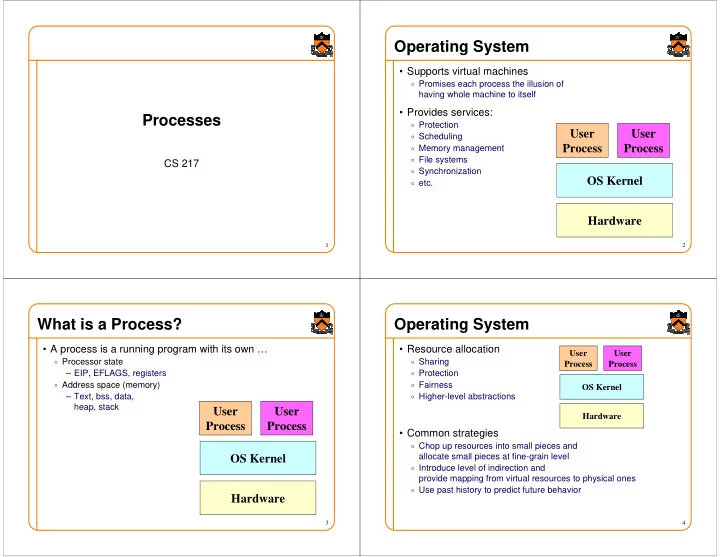
Operating System Supports virtual machines o Promises each process the illusion of having whole machine to itself Provides services: Processes o Protection User User o Scheduling o Memory management Process Process o File systems CS


slide-1
SLIDE 1

1

Processes

CS 217

2

Operating System

  • Supports virtual machines
  • Promises each process the illusion of

having whole machine to itself

  • Provides services:
  • Protection
  • Scheduling
  • Memory management
  • File systems
  • Synchronization
  • etc.

Hardware OS Kernel User Process User Process

3

What is a Process?

  • A process is a running program with its own …
  • Processor state

– EIP, EFLAGS, registers

  • Address space (memory)

– Text, bss, data, heap, stack

Hardware OS Kernel User Process User Process

4

Operating System

  • Resource allocation
  • Sharing
  • Protection
  • Fairness
  • Higher-level abstractions
  • Common strategies
  • Chop up resources into small pieces and

allocate small pieces at fine-grain level

  • Introduce level of indirection and

provide mapping from virtual resources to physical ones

  • Use past history to predict future behavior

Hardware OS Kernel User Process User Process

slide-2
SLIDE 2

5

Life Cycle of a Process

  • Running: instructions are being executed
  • Waiting: waiting for some event (e.g., i/o finish)
  • Ready: ready to be assigned to a processor

Create Ready Running Termination Waiting

6

Context Switch

Running Running Save context Load context Save context Load context

. . . . . .

Running Waiting Waiting Waiting

Process A Process B

7

Overlap CPU with I/O operations

  • Schedule CPU for process B

while process A is waiting for I/O

  • Better utilize CPU

CPU CPU CPU I/O I/O I/O

A:

CPU CPU CPU I/O I/O I/O

B:

8

Process Control Block

  • For each process, the kernel keeps track of ...
  • Process state (new, ready, waiting, halted)
  • CPU registers (EIP, EFLAGS, EAX, EBX, …)
  • CPU scheduling information (priority, queues, ...)
  • Memory management information (page tables, ...)
  • Accounting information (time limits, group ID, ...)
  • I/O status information (open files, I/O requests, ...)
slide-3
SLIDE 3

9

Fork

  • Create a new process (system call)
  • child process inherits state from parent process
  • parent and child have separate copies of that state
  • parent and child share access to any open files

pid = fork(); if (pid != 0) { /* in parent */ ... } /* in child */ ... Parent Child

10

Wait

  • Parent waits for a child (system call)
  • blocks until a child terminates
  • returns pid of the child process
  • returns –1 if no children exist (already exited)
  • status

#include <sys/types.h> #include <sys/wait.h> pid_t wait(int *status);

  • Parent waits for a specific child to terminate

#include <sys/types.h> #include <sys/wait.h> pid_t waitpid(pid_t pid, int *status, int options);

11

Fork

  • Inherited:
  • user and group IDs
  • environment
  • close-on-exec flag
  • signal handling settings
  • supplementary group IDs
  • set-user-ID mode bit
  • set-group-ID mode bit
  • profiling on/off/mode status
  • debugger tracing status
  • nice value
  • stdin
  • scheduler class
  • all shared memory segments
  • all mapped files
  • file pointers
  • non-degrading priority
  • process group ID
  • session ID
  • current working directory
  • root directory
  • file mode creation mask
  • resource limits
  • controlling terminal
  • all machine register states
  • control register(s)
  • Separate in child
  • process ID
  • address space (memory)
  • file descriptors
  • active process group ID.
  • parent process ID
  • process locks, file locks, page locks,

text locks and data locks

  • pending signals
  • timer signal reset times
  • share mask

12

Exec

  • Overlay current process image with a specified image file

(system call)

  • affects process memory and registers
  • has no affect on file table
  • Example:

execlp(“ls”, “ls”, “-l”, NULL); fprintf(stderr, “exec failed\n”); exit(1);

slide-4
SLIDE 4

13

Exec (cont)

  • Many variations of exec

int execlp(const char *file, const char *arg, ...) int execl(const char *path, const char *arg, ...) int execv(const char *path, char * const argv[]) int execle(const char *path, const char *arg, ..., char * const envp[])

  • Also execve and execvp

14

Fork/Exec

  • Commonly used together by the shell

... parse command line ... pid = fork() if (pid == -1) fprintf(stderr, “fork failed\n”); else if (pid == 0) { /* in child */ execvp(file, argv); fprintf(stderr, “exec failed\n”); } else { /* in parent */ pid = wait(&status); } ... return to top of loop ...

15

System

  • Convenient way to invoke fork/exec/wait
  • Forks new process
  • Execs command
  • Waits until it is complete

int system(const char *cmd);

  • Example:

int main() { system(“echo Hello world”); }

16

Summary

  • Operating systems manage resources
  • Divide up resources (e.g., quantum time slides)
  • Allocate them (e.g., process scheduling)
  • A processes is a running program with its own …
  • Processor state
  • Address space (memory)
  • Create and manage processes with ...
  • fork
  • exec
  • wait
  • system }

Used in shell