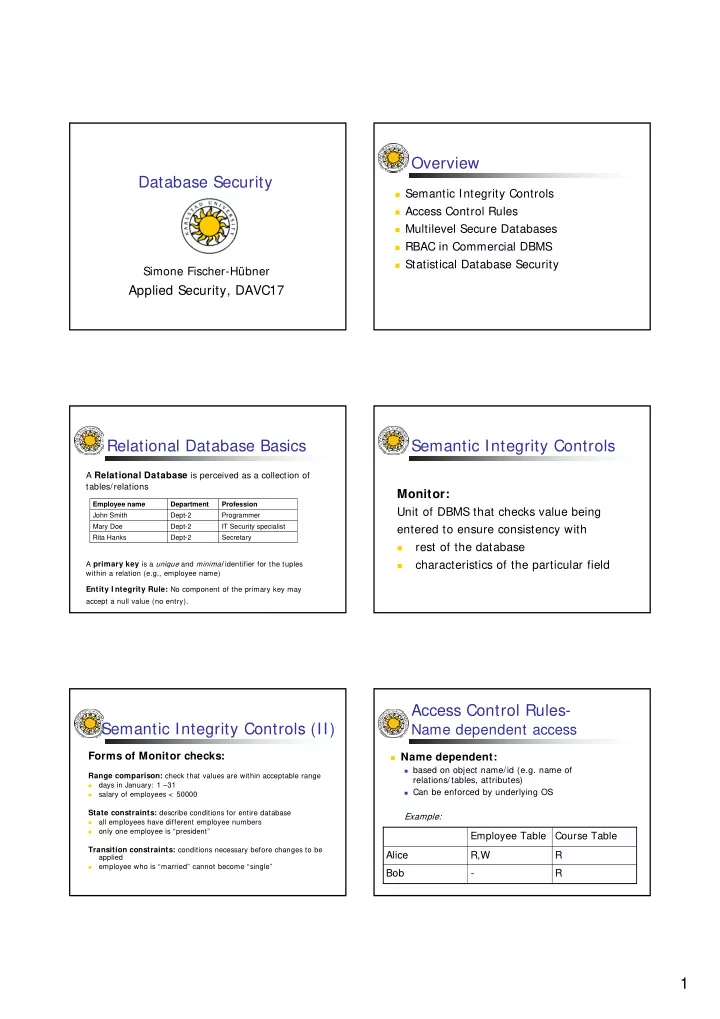
Overview Database Security Semantic Integrity Controls Access - - PDF document

overview database security
SMART_READER_LITE
LIVE PREVIEW

Overview Database Security Semantic Integrity Controls Access - - PDF document

Overview Database Security Semantic Integrity Controls Access Control Rules Multilevel Secure Databases RBAC in Commercial DBMS Statistical Database Security Simone Fischer-Hbner Applied Security, DAVC17 Relational Database


slide-1
SLIDE 1

1 Database Security

Simone Fischer-Hübner

Applied Security, DAVC17

Overview

Semantic Integrity Controls Access Control Rules Multilevel Secure Databases RBAC in Commercial DBMS Statistical Database Security

Relational Database Basics

A Relational Database is perceived as a collection of tables/relations

Secretary Dept-2 Rita Hanks IT Security specialist Dept-2 Mary Doe Programmer Dept-2 John Smith Profession Department Employee name A primary key is a unique and minimal identifier for the tuples within a relation (e.g., employee name)

Entity I ntegrity Rule: No component of the primary key may accept a null value (no entry).

Semantic Integrity Controls

Monitor:

Unit of DBMS that checks value being entered to ensure consistency with

  • rest of the database
  • characteristics of the particular field

Semantic Integrity Controls (II)

Forms of Monitor checks:

Range comparison: check that values are within acceptable range

  • days in January: 1 –31
  • salary of employees < 50000

State constraints: describe conditions for entire database

  • all employees have different employee numbers
  • nly one employee is “president”

Transition constraints: conditions necessary before changes to be applied

  • employee who is “married” cannot become “single”

Access Control Rules-

Name dependent access

Name dependent:

based on object name/id (e.g. name of

relations/tables, attributes)

Can be enforced by underlying OS

Example:

R

  • Bob

R R,W Alice Course Table Employee Table

slide-2
SLIDE 2

2 Content dependent Access

Content-dependent: based on object content Implementation: content-based views, query

modification Example: Content-based View DEFINE VIEW X (Employee-no, salary) AS SELECT Employee-no, salary From Employee WHERE SALARY < 30.000.

Content-dependent Access (II)

Example: Query Modification DENY (Name, SALARY) WHERE SALARY > 30.000 FIND Salary WHERE Name = Smith

  • > (is modified to)

FIND Salary WHERE Name = Smith AND NOT Salary > 30.000

Context-dependent Access

Context-dependent:

based on system variables such as data, time,

query source

context-based views

Example: ”Salary information can only be updated at the end of the year”

Multilevel Secure Databases

Implement Bell LaPadula´ s Mandatory

(“Multi-Level”) Security policy in a relational database

First prototype in the Seaview (Secure

data VIEW) project (1988)

Major database vendors have DBMS

versions with multi-level database security support (e.g. Trusted Oracle)

Multilevel Secure Databases – Structure

Labeling Objects:

R: multi-level relation with n attributes A tuple in R is of the form (v1, c1, …, vn, cn, tc) where vi: ith attribute value ci: security level of the ith field (not visible to users) tc: security level of the tuple (not visible)

Multilevel Secure Databases – Example

U U Secretary U Dept-2 U Rita Hanks S S IT Security specialist S Dept-2 U Mary Doe TS TS

Virus programmer

S Dept-1 S John Bob

tc Cprof Profession CDept Department Cname Employee name

Example:

U: unclassified S: Secret TS: Top Secret

(For simplicity, we only consider the security classification parts of the security level in this and in the following examples)

slide-3
SLIDE 3

3

Multilevel Secure Databases- Instances

C-I nstance of a relation: Information in relation accessible by users at classification C. Values not accessible are replaced by null values (no entry). Examples: S-Instance:

Secretary Dept-2 Rita Hanks IT Security specialist Dept-2 Mary Doe

  • Dept-1

John Bob Profession Department Employee name

Multilevel Secure Databses – Instances (II)

U-Instance:

Secretary Dept-2 Rita Hanks

  • Mary Doe

Profession Department Employee name

Consistent Addressing

In order to address a data item, you have to specify

a database D a relation R within D a primary key for a tuple r within D the attribute i, identifying element ri within r To get through to element ri , the following must hold:

fO(D) ≤ fO(R) ≤ fO (ri) (fO: object security level) Since a user who has access to a tuple r has also access to all its elements fO(ri) ≤ fO (r) is required

Multilevel Entity Integrity

No tuples in an instance of R have null

values for any of the primary key attributes

All components of a primary key of a

relation R have the same security level, which is dominated by the security levels of all non-key attributes

Polyinstantiation

Polyinstantiation:

Several tuples might exist for the same primary key

Polyinstantiated elements:

Elements of an attribute which have different security levels, but are associated with the same primary key and key security level Problem: Tradeoff between confidentiality (covert channel protection) and integrity

Polyinstantiation (II)

How do polyinstantiated elements arise ? A subject updates what appears a null element in a tuple, but which actually hides data with a higher (or incomparable) security level Problem:

Subject cannot be informed about existence of higher

security level data (-> covert channel)

Overwriting the old value allows “low” users to

unwittingly destroy “high” data Insertion must be accepted

slide-4
SLIDE 4

4 Polyinstantiation – Example

Primary key: Employee Name Unclassified Subject requests the following operation: Update employee SET profession = “Programmer” WHERE name = “Mary Doe” Secretary Dept-2 Rita Hanks

  • Mary Doe

Profession Department Employee name

U-I nstance of our Example Database:

Polyinstantiation- Example (cont.)

U U Secretary U Dept-2 U Rita Hanks S S IT Security specialist S Dept-2 U Mary Doe TS TS Virus Programmer S Dept-1 S John Bob tc Cprof Profession CDept Department Cname Employee name U U Secretary U Dept-2 U Rita Hanks S U Programmer S Dept-2 U Mary Doe S S IT Security specialist S Dept-2 U Mary Doe TS TS Virus Programmer S Dept-1 S John Bob tc Cprof Profession CDept Department Cname Employee name

Unique Identification

Extended primary key:

Primary key + security levels of all

fields in a tuple

needed for a unique identification of

tuples

RBAC Features in Commercial DBMS

YES YES YES GRANT DBMS Object Privileges to a role YES YES NO Grant DBMS System Privileges to a role NO NO NO Specify maximum or minimum cardinality for role membership NO YES (YES) Specify dynamic separation of duty constraints on roles NO YES NO Specify static separation of duty constraints on roles YES YES YES Build a role hierarchy YES YES NO Specify a default active role set for a user session YES YES NO Multiple active roles for a user session YES NO YES Ability for a role grantee to grant that role to other users

Oracle Sybase Informix Feature

Statistical Database Security

Statistical Database:

Information is retrieved by means of

statistical queries on an attribute (column) of a table

Attributes directly identifying persons

(e.g., names, personal numbers) are usually not allowed for statistical queries

Statistical Database - Example

2 CS 18 m Sveniek 10 2 CS 19 m Cohn 9 4 CS 21 m Silver 8 1 Math 20 f Knuth 7 2 Math 21 m Fisher 6 1 Math 20 f Bob 5 2 Math 21 m Hall 4 3 Math 21 f Sneyer 3 4 CS 18 f Smith 2 2 CS 20 m Mayer 1 GP Major Age Sex Name Record No. Name: identity data (identifying the persons) Sex, Age, Major: demographic data (generally known to many people) GP(student grades): analysis data (not publicly known, of interest for attackers)

slide-5
SLIDE 5

5 Statistical Queries

Statistical query: q(C,U) (or simply: q(C)) q: statistical function C: characteristic formula, logical formula over the values of attributes using the operators OR, AND, NOT U: subset of attributes Example: COUNT (( SEX = MALE ) AND ( MAJOR = CS )) SUM(( SEX = MALE ) AND ( MAJOR = CS ), GP) query set (C) = set of records whose values match a characteristic formula C ALL = formula whose query set is the entire database

Simple Attacks

Small Query Set Attacks:

Attacker knows that Smith is a female CS student: COUNT (( SEX = FEMALE ) AND ( MAJOR = CS )) = 1 = > Smith is the only female CS student. SUM(( SEX = FEMALE ) AND ( MAJOR = CS ), GP) = Smith’s GP = 4

Simple Attacks (II)

Large Query Set Attacks:

It is not sufficient to suppress only small query sets ! The same statistics can be calculated by: COUNT(ALL) – COUNT(NOT ((SEX = FEMALE) AND (MAJOR = CS))) = 1 SUM(ALL, GP) – SUM(NOT((SEX = FEMALE) AND (MAJOR = CS)),GP) = 4

Query Set Size Control

A statistic q(C) is permitted only if n ≤ |query set (C)| ≤ N-n for parameter n ≥ 2, N: size (No. of tuples) of database q(ALL) can be computed from: q (All) = q (C) + q (NOT C) for C with n ≤ | query set (C) | ≤ N-n However: Tracker attacks can still compromise security !

Individual Tracker Attack

I ndividual Tracker: Suppose: q (C) is rejected, because |query set (C)| = 1 C = C1 AND C2, n ≤ | query set (C1) |≤ N - n n ≤ | query set (C1 AND NOT C2) | ≤ N – n Individual Tracker: { C1, C1 AND NOT C2} I ndividual Tracker Attack: (for q : SUM or COUNT)) q(C) = q(C1 AND C2) = q(C1) - q (C1 AND NOT C2)

Individual Tracker Attack (II)

Venn Diagram:

x z y C1 C= C1 AND C2 C2

q(C1) = x + z = q(C1 AND NOT C2) + q(C) = > q(C) = q(C1 AND C2) = q(C1) - q (C1 AND NOT C2)

slide-6
SLIDE 6

6 Individual Tracker - Example

Example: n = 2,

Individual Tracker = { (Major = CS), (Major = CS) AND NOT (SEX = f))} SUM((Major = CS) AND (Sex = f),GP) = SUM (Major = CS, GP) - SUM ((Major = CS) AND NOT (Sex = f), GP) = 14 – 10 = 4 A new Individual Tracker has to be found for each person !

General Tracker Attack

General Tracker:

Characteristic Formula T such that 2* n ≤ |query set (T)| ≤ N – 2* n , n ≤ N/4

General Tracker Attack:

q(ALL) = q(T) + q(not T) If |query set (C)| < n: q(C) = q(C or T) + q(C or not T) - q(ALL)

General Tracker Attack (II)

Venn-Diagram:

z y not C x w C not T T

q(All) = w + x + y + z = q(T) + q(not T) q(C or T) + q(C or not T) = (w+ x+ y) + (w+ x+ z) = (w+ x) + (w+ x+ y+ z) = q(C) + q(All) = > q(C) = q(C or T) + q(C or not T) - q(ALL)

General Tracker Attack - Example

Example: n = 2, T = (Sex= Male) SUM ((SEX = FEMALE) AND (MAJOR = CS), GP) = SUM((SEX = FEMALE) AND (MAJOR = CS)) OR (SEX = MALE),GP) + SUM (((SEX = FEMALE) AND (MAJOR = CS)) OR (NOT (SEX = MALE)), GP) - SUM (ALL, GP) = 18 + 9 - 23= 4 SUM (ALL, GP) = SUM (SEX = MALE, GP) + SUM (NOT (SEX = MALE), GP)

Inference Controls

Security Controls for Statistical Databases:

Data Pertubation (slightly modifies data values in

database)

Output Controls

Output Modification (modifies statistics, adds small

relative errors to outputs, e.g, rounding, adding random numbers)

Output Selection (rejects ”sensitive” statistics, e.g.

query set size control, maximum order control)

Exercise

Find a

General Tracker Individual Tracker

to compromise Mayer’s GP (see example DB above)