Page 1 Linker Operation Linker Operation Classify all program - - PDF document

page 1
SMART_READER_LITE
LIVE PREVIEW

Page 1 Linker Operation Linker Operation Classify all program - - PDF document

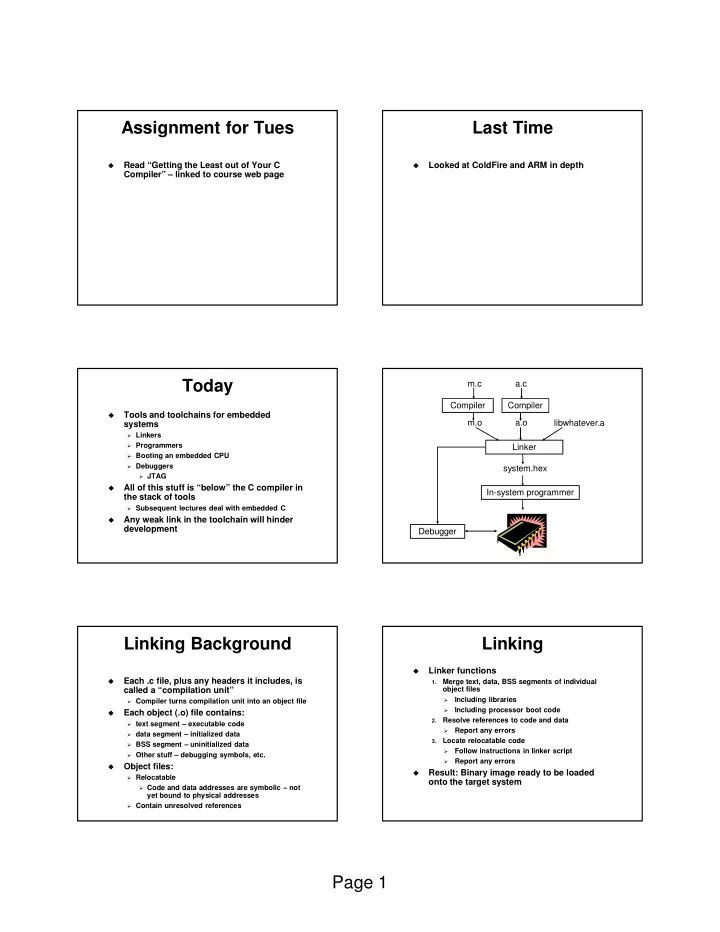
Assignment for Tues Last Time Read Getting the Least out of Your C Looked at ColdFire and ARM in depth Compiler linked to course web page Today m.c a.c Compiler Compiler Tools and toolchains for embedded m.o a.o


slide-1
SLIDE 1

Page 1 Assignment for Tues

  • Read “Getting the Least out of Your C

Compiler” – linked to course web page

Last Time

  • Looked at ColdFire and ARM in depth

Today

  • Tools and toolchains for embedded

systems

Linkers Programmers Booting an embedded CPU Debuggers JTAG

  • All of this stuff is “below” the C compiler in

the stack of tools

Subsequent lectures deal with embedded C

  • Any weak link in the toolchain will hinder

development Compiler m.c m.o Compiler a.c a.o Linker In-system programmer libwhatever.a system.hex Debugger

Linking Background

  • Each .c file, plus any headers it includes, is

called a “compilation unit”

Compiler turns compilation unit into an object file

  • Each object (.o) file contains:

text segment – executable code data segment – initialized data BSS segment – uninitialized data Other stuff – debugging symbols, etc.

  • Object files:

Relocatable Code and data addresses are symbolic – not

yet bound to physical addresses

Contain unresolved references

Linking

  • Linker functions

1.

Merge text, data, BSS segments of individual

  • bject files
  • Including libraries
  • Including processor boot code

2.

Resolve references to code and data

  • Report any errors

3.

Locate relocatable code

  • Follow instructions in linker script
  • Report any errors
  • Result: Binary image ready to be loaded
  • nto the target system
slide-2
SLIDE 2

Page 2 Linker Operation

  • Classify all program symbols as either:
  • Weak – uninitialized globals
  • Strong – functions and initialized globals
  • Scan object files in order supplied to the

linker, applying linker rules

  • Bizarre consequence: Same object file might

have to appear on command line multiple times

int foo=5; p1() { } int foo; p2() { } p1.c p2.c strong weak strong strong

Linker Operation

1.

A strong symbol can only appear once

  • therwise error

2.

A weak symbol is overridden by a strong symbol of the same name

  • I.e. all references to that name resolve to the

strong symbol

3.

If there are multiple weak symbols, the linker can pick an arbitrary one

  • uh oh
  • Lots more details in CS 4400

Linker Scripts

  • CodeWarrior linker is flexible and powerful

Needs a “program” to tell it how to link for a given

embedded platform

Linker script syntax looks just like GNU linker

  • Linker script functionality:

Put parts of executable into the right parts of

memory

Insert padding to meet alignment requirements Define extra symbols Do arithmetic Keep track of current position in memory as “.”

MCF52233 Linker Script

MEMORY { code (RX) : ORIGIN = 0x00000500, LENGTH = 0x0003FB00 userram (RWX) : ORIGIN = 0x20000400, LENGTH = 0x00007C00 } SECTIONS { ___heap_size = 0x1000; ___stack_size = 0x1000; }

More Linker Script

RAMBAR = 0x20000000; RAMBAR_SIZE = 0x00008000; FLASHBAR = 0x00000000; FLASHBAR_SIZE = 0x00040000; .vectors : { mcf5xxx_vectors.s (.text) . = ALIGN (0x4); } >> vectorrom .text : { *(.text) . = ALIGN (0x4); *(.rodata) . = ALIGN (0x4); ___ROM_AT = .; ___DATA_ROM = .; } >> code

More Linker Script

.data :

{ ___DATA_RAM = .; . = ALIGN(0x4); ___sinit__ = .; STATICINIT __START_DATA = .; *(.data) . = ALIGN (0x4); __END_DATA = .; } >> userram

slide-3
SLIDE 3

Page 3 More Linker Script

.bss : { __START_BSS = .; *(.bss) . = ALIGN (0x4); *(COMMON) __END_BSS = .; ___BSS_END = .; . = ALIGN(0x4); } >> userram

Loading Programs

  • Goal: Set things up so CPU runs the desired

program when powered up

  • How is this done?

Make a ROM, plug it in Burn a PROM / EPROM / EEPROM, plug it in Download into RAM or flash ROM using an ISP “In system programmer” Load new code over a network

  • Pros and cons of each?

Booting a CPU

  • Execute a sequence of steps
  • May run in different orders in different systems
  • Some steps optional
  • Usually want to cope with both hard and

soft boot

Bootup Steps

1.

Disable all interrupts

Most processors power up with interrupts off However – may be a soft reboot

2.

Perform RAM and ROM checks

RAM – “walking 1s” test ROM – checksum No point proceeding if one of these fails

3.

Initialize devices to known states

4.

Copy initialized data segment from ROM to RAM

5.

Clear BSS – uninitialized data segment

More Booting

6.

Initialize the stack

Initialize the stack pointer Create initial stack frame

7.

Initialize the heap

8.

Execute constructors and initializers for all global variables

9.

Enable interrupts

  • 10. Call main()
  • 11. Deal with the fact that main exited

MCF52233 Boot Code

_asm_startmeup: move.w #0x2700, SR move.l #(___RAMBAR + 0x21), d0 movec d0, RAMBAR1 move.l #___IPSBAR, d0 add.l #0x1, d0 move.l d0, 0x40000000 move.l #___FLASHBAR, d0 cmp.l #0x00000000, d0 bne change_flashbar add.l #0x61, d0 movec d0, FLASHBAR

slide-4
SLIDE 4

Page 4 More Boot Code

move.l #___SP_INIT, sp jsr _SYSTEM_SysInit movea.l #0, A6 link A6, #0 jsr _main nop nop halt

Linker Scripts and Boot Code

  • All code I showed you is in your

CodeWarrior project

Plus lots more

  • You can read it, modify it, etc.
  • Example: disassemble fp_coldfire.a and

take a look

Debugging

  • Important capabilities:

Observability – See internal processor state Real-time analysis – Follow execution without

slowing it down or stopping it

Run control – Start and stop the processor, set

breakpoints, watches, etc.

  • For each debugging method:

Which capabilities does it provide? What are its other pros and cons?

Debugging Methods

  • LEDs under software control

Minimal workable debugging environment A most unpleasant way to debug complex

software

  • printf() to serial console or LCD

Severely perturbs timing, typically Generally, a debug printf() is synchronous Means: Hangs the system until the printf

completes

Why?

More Debugging

  • Logic analyzer hooked to external pins

Timing mode – displays logic transitions on pins State mode – decode executing instructions, bus

transactions, etc.

Triggers – give the analyzer conditions on which

to start a detailed trace

Triggers can be highly elaborate

  • Remote debugger

Debugging stub runs on embedded processor Main debugger (e.g., GDB) runs on a separate

machine

The two communicate using Ethernet, serial line,

  • r whatever

More Debugging

  • JTAG, BDM, Nexus

Basically just hardware implementations of

debugging stubs

  • ICE – in-circuit emulator

Acts like your embedded processor but provides

lots of extra functionality

Runs at full speed Typically expensive

slide-5
SLIDE 5

Page 5 More Debugging

  • ROM emulator

Looks like ROM, actually RAM + processor At minimum supports rapid loading of new SW Can implement breakpoints, execution tracing

  • Simulator

Maximum controllability and observability Often slow Hard to interface to the real world Easy to simulate the CPU, hard to simulate

everything else

JTAG – IEEE1149.1

  • Initially for hardware testing, evolved to

support software testing

  • Basic idea:

Each I/O pin, register, etc. can be “sniffed” by a

JTAG cell

JTAG cells are connected in a “JTAG loop” Contents of entire JTAG loop can be read using a

shift register

Can also be written External tool can reconstruct machine state from

the JTAG bit stream

JTAG Hardware Debugging

Each JTAG cell “sniffs” the state of the corresponding output bit of the IC JTAG bit stream in JTAG bit stream out

Bit stream forms one long shift-register

PC Board JTAG Connector

JTAG Software Debugging

Processor Core

Program Counter - PC Register R1 Register R2 Register Rn Addr Bus Interface Data Bus Interface Status Bus Interface JTAG Control State Machine JTAG in Clock in JTAG out “SPECIAL” REGISTER SET

More JTAG

  • Advantages of shift-register approach:

Simple Requires few pins

  • Disadvantage of shift-register approach:

End up reading and writing a lot of data just to

change one register

  • JTAG optimizations:

Commands – Directly change a single register or

memory cell

Addressable loops – smaller JTAG loops each

containing a subset of the machine state

More JTAG

  • Pins:

TCK – clock TDI – input data stream, sampled on rising edge

  • f TCK

TDO – output data stream, updated on falling

edge of TCK

TRST – Resets JTAG state machine (optional) TMS – Test mode select: advances JTAG state

machine

  • JTAG interface modules tend to be

expensive

“Low cost” solutions may be $2000 However, all-software solutions (on the host side)

exist

MCF52233 has JTAG

slide-6
SLIDE 6

Page 6 Summary

  • Embedded system development is strongly

dependent on good tools

There is huge variation in tool quality Lots of times free tools can be found Sometimes they suck Non-free tools can be really expensive E.g., more than $10K per developer seat These can suck too

  • You need to understand what the tools do,

what the tradeoffs are, etc.

  • Generally it’s far better to buy the right

tools up front

Saving $$ not worth if it makes the product ship

late