Parts of a Contract Syntax - Method signature Method name - - PowerPoint PPT Presentation

parts of a contract
SMART_READER_LITE
LIVE PREVIEW

Parts of a Contract Syntax - Method signature Method name - - PowerPoint PPT Presentation

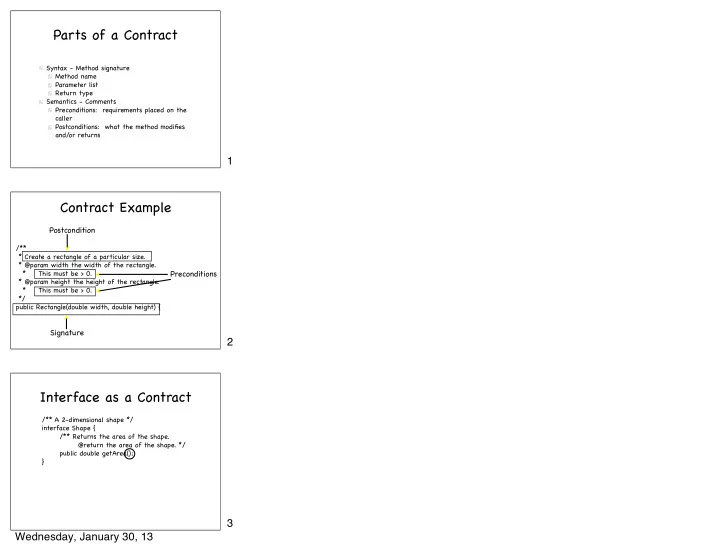
Parts of a Contract Syntax - Method signature Method name Parameter list Return type Semantics - Comments Preconditions: requirements placed on the caller Postconditions: what the method modifies and/or returns 1 Contract Example


slide-1
SLIDE 1

Parts of a Contract

Syntax - Method signature Method name Parameter list Return type Semantics - Comments Preconditions: requirements placed on the caller Postconditions: what the method modifies and/or returns

Postcondition Preconditions Signature

/** * Create a rectangle of a particular size. * @param width the width of the rectangle. * This must be > 0. * @param height the height of the rectangle. * This must be > 0. */ public Rectangle(double width, double height) {

Contract Example

/** A 2-dimensional shape */ interface Shape { /** Returns the area of the shape. @return the area of the shape. */ public double getArea(); }

Interface as a Contract

1 2 3 Wednesday, January 30, 13

slide-2
SLIDE 2

public class Rectangle implements Shape { private double width; private double height; public Rectangle(double width, double height) { this.width = width; this.height = height; } public double getArea() { return width*height; } }

The Supplier Side of the Contract

Must define this to satisfy the contract.

Shape someShape; someShape = new Rectangle (3, 5); double area = someShape.getArea();

The Client Side of the Contract

Can use interface names as types Can assign instance of implementing classes to variables declared with interface types

Shape someShape; someShape = new Rectangle (3, 5); double area = someShape.getArea();

The Client Side of the Contract

Can call methods declared in the interface.

4 5 6 Wednesday, January 30, 13

slide-3
SLIDE 3

Polymorphism

public class ShapeArray {

  • private Shape[] shapes = new Shape[10];
  • private int nextIndex = 0;
  • public void addShape (Shape newShape) {
  • if (nextIndex < shapes.length) {
  • shapes[nextIndex] = newShape;
  • nextIndex++;
  • }
  • }
  • public double getArea (int index) {
  • if (index >= 0 && index < nextIndex) {
  • return shapes[index].getArea();
  • }
  • return -1;
  • }

}

Which entries in the array are circles???

Swing

Package used to create Graphical User Interfaces (GUIs) in Java

JButton JComboBox JCheckBox JSlider JTextField JLabel

Displaying Buttons in Swing

Construct a JButton, passing in its label JButton click = new JButton (“Click me!”); Add the button to a panel JPanel buttonPanel = new JPanel(); buttonPanel.add (click); Add the panel to the display, no need to specify size or exact location

getContentPane().add (buttonPanel, BorderLayout.CENTER);

7 8 9 Wednesday, January 30, 13

slide-4
SLIDE 4

ActionListener Interface

public interface ActionListener { public void actionPerformed (ActionEvent e); }

actionPerformed is the method that Java calls when the user clicks on a JButton. To handle button clicks, you must do 3 things: Have your class “implement ActionListener” Define the actionPerformed method Attach your ActionListener object to the JButton: myButton.addActionListener (this);

ActionListener Contract

Handling Button Clicks

Tell Java where to find the event handler click.addActionListener (this); Define the event handler

public class ClickMe implements ActionListener

public void actionPerformed (ActionEvent event) { counter++; counterLabel.setText("" + counter); }

10 11 12 Wednesday, January 30, 13

slide-5
SLIDE 5

ActionListener Contract

Your side of the contract: Attach a listener to your button “implement ActionListener” Define the actionPerformed method Java’ s side of the contract: Java will call your actionPerformed method when the user clicks the button.

Swing Events

Every event handling method has a parameter describing the event that occurred. The most useful method for us is: public Object getSource() This returns the Swing component that the user interacted with. Useful if an event handling method handles events for more than 1 object.

BorderLayout Rules

One component per compass point Component expands to fill the entire area

13 14 15 Wednesday, January 30, 13

slide-6
SLIDE 6

BorderLayout

NORTH WEST EAST SOUTH BorderLayout lays out components using compass directions + CENTER Default for a JFrame’ s content pane.

What Gives???

There are 2 buttons in the EAST! The buttons do not fill the entire east area! Conclusion: My professor lied to me! EAST

More on “add”ing components

Adding a button to a panel: JPanel buttonPanel = new JPanel(); buttonPanel.add (clickButton);

➡ JPanel lays out its components like words on a page

Adding a panel to the frame:

getContentPane().add (buttonPanel, BorderLayout.CENTER);

➡ contentPane lays out its components using compass

directions: NORTH, SOUTH, EAST, WEST and CENTER

16 17 18 Wednesday, January 30, 13

slide-7
SLIDE 7

Grouping Components with JPanel

JPanel buttonPanel = new JPanel(); buttonPanel.add (new JButton("Place order")); buttonPanel.add (new JButton("Cancel order")); contentPane.add(buttonPanel, BorderLayout.EAST);

FlowLayout

A JPanel uses FlowLayout as its layout manager rather than BorderLayout. With BorderLayout, we say: contentPane.add (buttonPanel, BorderLayout.SOUTH); With FlowLayout, we omit the compass direction: buttonPanel.add(orderButton); Components are added from left to right.

FlowLayout

buttonPanel.add (orderButton); buttonPanel.add (cancelButton); There are 2 buttons in the button panel. There is 1 button panel in the EAST. FlowLayout sizes components in a more natural way. Conclusion: My professor didn’ t lie to me!

19 20 21 Wednesday, January 30, 13

slide-8
SLIDE 8

JPanel gives “natural” size

contentPane.add(comboBox, BorderLayout.SOUTH); toppingsPanel.add (comboBox); contentPane.add(toppingsPanel, BorderLayout.SOUTH);

22 Wednesday, January 30, 13