Peer-to-Peer Computing Peer-to-Peer (P2P) employ distributed - - PDF document

peer to peer computing
SMART_READER_LITE
LIVE PREVIEW

Peer-to-Peer Computing Peer-to-Peer (P2P) employ distributed - - PDF document

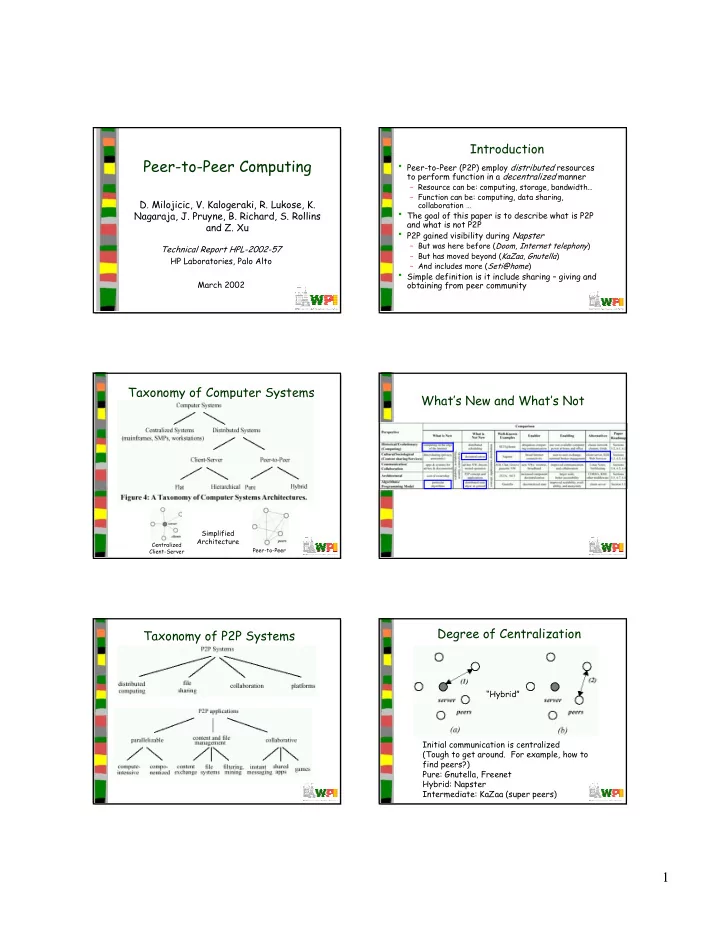
Introduction Peer-to-Peer Computing Peer-to-Peer (P2P) employ distributed resources to perform function in a decentralized manner Resource can be: computing, storage, bandwidth Function can be: computing, data sharing, D.


slide-1
SLIDE 1

1

Peer-to-Peer Computing

  • D. Milojicic, V. Kalogeraki, R. Lukose, K.

Nagaraja, J. Pruyne, B. Richard, S. Rollins and Z. Xu

Technical Report HPL-2002-57 HP Laboratories, Palo Alto March 2002

Introduction

  • Peer-to-Peer (P2P) employ distributed resources

to perform function in a decentralized manner

– Resource can be: computing, storage, bandwidth… – Function can be: computing, data sharing, collaboration …

  • The goal of this paper is to describe what is P2P

and what is not P2P

  • P2P gained visibility during Napster

– But was here before (Doom, Internet telephony) – But has moved beyond (KaZaa, Gnutella) – And includes more (Seti@home)

  • Simple definition is it include sharing – giving and
  • btaining from peer community

Taxonomy of Computer Systems

Centralized Client-Server Peer-to-Peer

Simplified Architecture

What’s New and What’s Not Taxonomy of P2P Systems Degree of Centralization

Initial communication is centralized (Tough to get around. For example, how to find peers?) Pure: Gnutella, Freenet Hybrid: Napster Intermediate: KaZaa (super peers) “Hybrid”

slide-2
SLIDE 2

2

Decentralization and Taxonomy Outline

  • Introduction

(done)

  • Components and Algorithms

(next)

  • Systems
  • Case Studies
  • Summary

P2P Components

(Specific applications here) (Overcome dynamic nature

  • f peers)

(Find and move data among) (Robust when peers autonomous) (Different data types)

P2P Algorithms – Centralized Index

  • Search central index, download content from peer

– Popular with Napster

  • Need representation for “best” peer

– Cheapest, closest, most available

P2P Algorithms – Flooded Requests

  • Each request flooded (broadcast) to directly

connected peers

– Repeat until answered or too many hops (5-9)

  • Uses lots of network capacity
  • Revise with

– “Super-Peer” to concentrate most requests – Caching of recent requests

P2P Algorithms – Document Routing

  • When document published, generate hash

based on name and content

  • Move document node with ID closest to hash
  • Requests also migrate to such node

– Note, requires knowing document name ahead of time, so harder to do search

slide-3
SLIDE 3

3

Outline

  • Introduction

(done)

  • Components and Algorithms

(done)

  • Systems

(next)

  • Case Studies
  • Summary

P2P Systems

  • Historical
  • Distributed Computing
  • File Sharing
  • Collaboration

Historical (1 of 2)

  • Most early distributed systems were P2P

– Examples:

  • Email (on top of SMTP peers)
  • Usenet News (on top of NNTP peers)

– Local servers communicated with peers

  • File Transfer (via FTP) centralized

– But since many ran own server, similar to today’s file sharing – Indexing system named “Archie” to query across FTP servers

  • Exactly like Napster

Historical (2 of 2)

  • Prior to continuously connected computers

(Internet) had UUNet and Fidonet

– Would periodically dial-up and exchange information (email and bboard) – Message routing

  • Similar to Gnutella
  • In “modern” area, first widely used P2P was

instant messaging

  • P2P interest shift came because of legal

ramifications (Napster)

– (MLC: plus traffic! See next paper.)

P2P Systems

  • Historical
  • Distributed Computing
  • File Sharing
  • Collaboration

Distributed Computing

  • Clusters

– Inexpensive PCs plus open source software super computer

  • NASA’s Beowulf project, MOSIX, …

– Issues include delegation and migration

  • Grid computing

– Connect distributed computers so can use idle cycles – Transparent way to add jobs, have work executed, results returned

slide-4
SLIDE 4

4

Distributed Computing

  • Historical

– January 1999, 10k computers broke RSA challenge in less than 24 hours

  • Users realized the power of Internet PCs
  • Recent

– seti@home and genome@home – Realize a teraflop

How it Works

  • Parallelizable job

– Split into subtasks

  • PCs agree to

participate

  • Centralized

dispatcher

  • When PCs idle

(screensaver), subtasks work

  • Send results to

centralized DB

  • P2P?

Application Area Examples

  • Financial

– Complex market simulations (pricing, portfolios, credit, …) – Run-during night, but real-time important – Plus, larger so only big institutions – Use P2P – speedup 15 hours to 30 minutes, and available to smaller companies

  • Biotechnology

– Colossal amounts of data (3 billion sequences in human genome dbase) – Only high-perf clusters and approximation – But using P2P can do exact and used by smaller companies

P2P Systems

  • Historical
  • Distributed Computing
  • File Sharing
  • Collaboration

File Sharing

  • One of the most successful
  • Features

– Large, when otherwise could not store

  • Multimedia content inherently large files

– Available, from multiple sources – Anonymity to protect publisher and reader – Manageability for better performance (download from close hosts)

  • Issues: bandwidth consumption, search, and

security

File Sharing Examples

  • Napster

– Centralized index, single peer download – Since centralized does not scale well, performance may suffer

  • Morpheus

– Simultaneous downloads from multiple peers – Encryption for privacy

  • KaZaa

– Distribute centralized among SuperNodes – Use “intelligent” selection for peers – MD5 checksums to verify content

slide-5
SLIDE 5

5

P2P Systems

  • Historical
  • Distributed Computing
  • File Sharing
  • Collaboration

Collaboration

  • Instant messaging to chat to online games
  • Finding location of peers still a challenge
  • Use centralized server for peer location

– NetMeeting, GameSpy, …

  • Use out-of-band system to identify peers

– Ie- call on telephone and give IP

Outline

  • Introduction

(done)

  • Components and Algorithms

(done)

  • Systems

(done)

  • Case Studies

(next)

  • Summary

Case Studies

  • Avaki

(distributed computing)

  • seti@home

(distributed computing)

  • Groove

(collaboration)

  • Magi

(collaboration)

  • FreeNet

(file sharing)

  • Gnutella

(file sharing)

  • JXTA

(platforms)

  • .Net

(platforms)

Seti@home

  • Search for Extraterrestrial Intelligence
  • Background

– Search through massive amounts of radio telescope data to look for signals – Build huge virtual computer by using idle cycles on Internet computer

  • Runs computation as part of screen saver

– Old enough project so robust tools

  • Features

– Fault resilience – since clients can stop at anytime, use checkpointing every 10 minutes – Scalability – horizontal, but vertical (to db) could still be a bottleneck (still, many users)

  • Lessons

– Can apply this technology to real problems – Expected 100k participants, but have 3 million

Magi (1 of 2)

  • P2P infrastructure for building secure,

collaborative applications

– Started as research project from UC Berkeley 1998, commercial release 2001

  • Uses standard technology: HTTP, XML,

WebDAV

– "Web-based Distributed Authoring and Versioning“ - extensions to HTTP to allow collaborative edits at remote web servers

  • Was largest non-Sun Java project
slide-6
SLIDE 6

6

Magi (2 of 2)

  • Core is micro-Apache server
  • Users could build modules over Magi services
  • Uses DNS to find Magi servers
  • No fault resilience
  • JVM and Server means maybe tough for PDA
  • Existing standards makes highly interoperable

FreeNet

  • File sharing with primary design is to make system

anonymous

– Read, Publish, Store

  • Completely decentralized

– File location based on hash (and on path in-between) – Hash generated automatically – Users find hash names by out-of-band source (ie- posted on Web page)

  • Nodes cache until full, then LRU
  • Nodes do “search” to announce presence to others
  • Scales to O(log n)
  • Available as open source
  • Lessons: issues of anonymity (good for discourse,

bad for intellectual property rights)

.NET

  • More than P2P (c#, tools, Web servers),

but “My Services” has a lot of P2P stuff

  • Microsoft introduced in 2000
  • Goals is to enable Web servers to variety
  • f devices. Focus on user data.

“Passport” login gives puid. That used for services. Cons:

  • only Windows?

Summary

  • As P2P matures, infrastructure will improve

– Increased interoperability – More robust software

  • Will remain an important technology because:

– Scalability a concern, especially with global connections – Ad-hoc, disconnected networks lend themselves to P2P – Some applications inherently P2p

Future Work

  • Algorithms

– Scalable, anonymity, connectivity

  • Applications

– Beyond music and movie sharing

  • Platforms

– Tools to build better, newer P2P systems