
SLIDE 1
Pixel Art
class presentation by Berrin Sun Supervised by Ekmel Ertan
VA 402
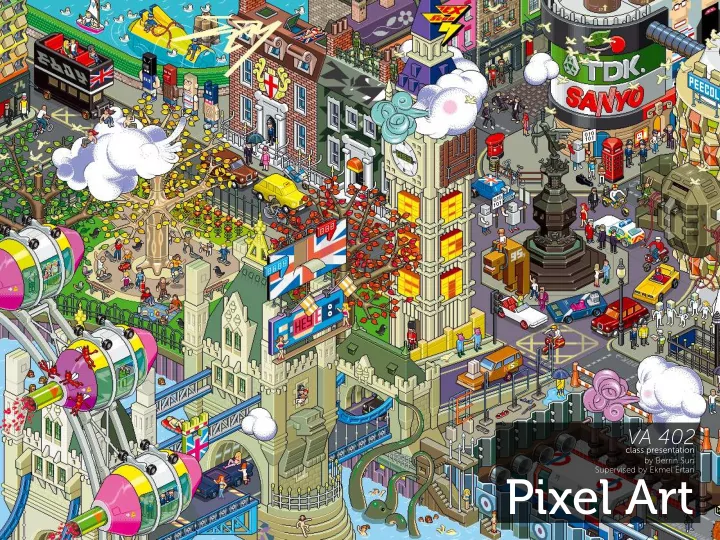
Pixel Art What is pixel art? Pixel art is a digital art form that - - PowerPoint PPT Presentation
VA 402 class presentation by Berrin Sun Supervised by Ekmel Ertan Pixel Art What is pixel art? Pixel art is a digital art form that is created in raster in its original size, and that is edited in pixel level. Types isometric non-isometric
class presentation by Berrin Sun Supervised by Ekmel Ertan
VA 402
What is pixel art?
Pixel art is a digital art form that is created in raster in its original size, and that is edited in pixel level.
Types
isometric non-isometric
Isometry
In mathematics, an isometry is a distance-preserving isomorphism between metric spaces. An isometric pro- jection is one method of visually representing a three dimensional object in two dimensions, and is generally used for visualizing engineering drawings in pseudo-3D.
Isometric Pixel Art
While isometric projections have their use in visualiz- ing engineering drawings, isometric pixel art is a style
display capabilities, but truly found its voice with the un- derground art scene, as many art forms tend to. This art style is strongly typefjed by old games like Q-Bert or Za- xxon, some of the fjrst mass-market games to use this
in nature, some artists can achieve impressive near-pho- torealistic efgects in their art.
Where is pixel art used?
Games Advertising Art Icons Animation
Use in Games
Pixel art was used in console games like Nintendo’s GameBoy (1989) and NES (1983), (both being 8-bit) mainly because of the ca- pacity of their processors. Games that contain pixel art mainly consist of tiles and animated sprites, and these are small in fjle size.
Games: The Secret of Monkey Island
Monkey Island is about Guybrush Threepwood who wants to be a pirate. The environment design is quite detailed and reels the player in the game. You can see that even though the scenes are detailed, the color palette isn’t that wide. These screenshots are taken from the DOS version.
Games: Seiken Densetsu 3
Even though the scenes look very detailed and real- istic, the color palette of this SNES game is fairly little
Games: Final Fantasy III
The third of the legendary Final Fantasy series. Look carefully at the screenshots taken from SNES, some- times it’s really hard to tell where tiles end and begin.
Advertising
Here are some of the advertisement examples. They are mostly complicated looking cities or rooms.
BBC’s new media website
eBoy’s Yahoo! advertisement features several yahoo! services.
Screenshots from the Bell pixel campaign by Riotsquad
Art
Some artists are experts on pixel art. It’s a very time con- suming business and they mostly constrain themselves in terms of color shade numbers to challenge them- selves. 16 colors 15 colors
Characters ranging from 16 to 28 colors Einstein in the Swiss pat- ent offjce King Arthur and his knights on stage
Illustration by Arjan Westerdiep that took about 560 hours in total to complete.
Icons
You could also recognize that the Icons on your mobile phone and PC are made by using pixel art. Here are some examples for icons.
Frame based animation
Pixel art animation is made frame by frame. Usually the sprites are individually animated to make series of
Man.
Trucker’s Delight
This isn’t exactly pixel art but was inspired by it. New York is being invaded by 8-bit creatures
Method
sketch vectorizing
colors shading gradient is bad
Tools
scanner raster editor (like MS Paint, Photoshop) vector editor (like Illustrator) tablet
Sketching
The artists usually start by sketching out their ideas, planning is important here because the perspective depends on what kind of output the artist wants. The more larger, the more complicated and sometimes the pixel art is animated so the frames need to be planned
Sketches for some animation sequences made in CAP-
planned out because there are lots of artists in the de- velopment team so they have to communicate and un- derstand every movement of the character correctly.
Vectorizing
Some artists want very precise lines that have just the right angle, especially if they’re working with isometric
but the artist wanted the lines to have the perfect angle.
Outline
The outline is very important when making pixel art, be- cause most often it defjnes the shapes. The artist edits every line down to a single pixel thickness, like the line in the example. This is a boring chore at times, but it does improve the appearance of sprites. Failure to put in this efgort shows in the reduced quality of the fjnal piece.
Colors
Good selection of colours not only takes the art closer to looking like a real object, but can add personality and mood to it. Light, pastel tones - close to grey (almost equal RGB values) create a soft, carefree atmosphere. Dark colours, with low RGB values create an oppressive, brooding at- mosphere. Using a restricted palette with variations on a single colour can produce some interesting results. A Grey palette is often used for fmashback scenes. Brown pal- ettes look like parchment or old photos. A blue palette can be used to evoke everything from an ocean vibe to deep sadness. For pixel art avoiding strong, neon colors and using more desaturated pastel tones are better.
Shading
In order to begin shading an object, it is important to fjrst establish where light falling upon it is coming from. For outdoor settings, or indoor areas with consistent
tion for light to fall from. This common kind of light all strikes your object at the same angle.
Gradient is bad
People might think that when they make a gradient ef- fect they have done good shading, but mostly whet they do is called ‘pillow shading’, which appears to as- sume a single point light source hanging directly be- tween us and our object. This sort of radial tone gradient is suitable only for a sur- face lit by a very close light source - like burning torch- es, but when it is used for an object it looks bad. Depending on the amount of colors, the artist might be forced to use a technique called ‘dithering’. tIf the amount of colors is limited, transitions between one color and the other can be mimicked by varying the density of pixels of both colors. By gradually increasing the number of pixels of one color, both colors seem to blend together. Depending on the amount of color, this transition is more or less subtle.
References
http://www.mobygames.com/ http://gas13.ru/v3/tutorials/sywtbapa_de-mystifying_greats_1.php http://www.drububu.com/ http://www.armyoftrolls.co.uk/ http://www.pixeljoint.com/p/6741.htm http://www.natomic.com/hosted/marks/mpat/index.html http://hello.eboy.com/eboy/about/ http://www.nitrome.com/ http://www.youtube.com/watch?v=SEVU-YLpM8A http://vimeo.com/7670880 http://www.pixelbath.com/isometric-pixel-art/ch1.php#isometry
Communities
http://www.pixeljoint.com/ http://www.pixeldam.net/ http://www.deviantart.com/