
SLIDE 1
Plotting
Selim Aksoy Bilkent University Department of Computer Engineering saksoy@cs.bilkent.edu.tr
Fall 2004 CS 111 2
Plotting
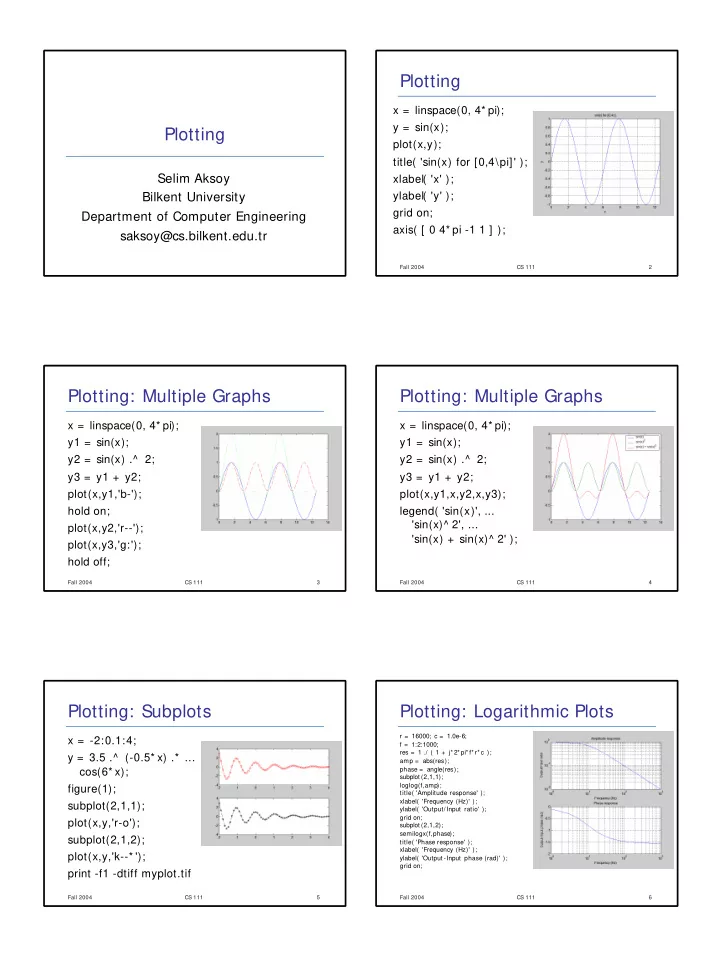
x = linspace(0, 4* pi); y = sin(x); plot(x,y); title( 'sin(x) for [0,4\pi]' ); xlabel( 'x' ); ylabel( 'y' ); grid on; axis( [ 0 4* pi -1 1 ] );
Fall 2004 CS 111 3
Plotting: Multiple Graphs
x = linspace(0, 4* pi); y1 = sin(x); y2 = sin(x) .^ 2; y3 = y1 + y2; plot(x,y1,'b-'); hold on; plot(x,y2,'r--'); plot(x,y3,'g:'); hold off;
Fall 2004 CS 111 4
Plotting: Multiple Graphs
x = linspace(0, 4* pi); y1 = sin(x); y2 = sin(x) .^ 2; y3 = y1 + y2; plot(x,y1,x,y2,x,y3); legend( 'sin(x)', ... 'sin(x)^ 2', ... 'sin(x) + sin(x)^ 2' );
Fall 2004 CS 111 5
Plotting: Subplots
x = -2:0.1:4; y = 3.5 .^ (-0.5* x) .* ... cos(6* x); figure(1); subplot(2,1,1); plot(x,y,'r-o'); subplot(2,1,2); plot(x,y,'k--* '); print -f1 -dtiff myplot.tif
Fall 2004 CS 111 6
Plotting: Logarithmic Plots
r = 16000; c = 1.0e-6; f = 1:2:1000; res = 1 ./ ( 1 + j* 2* pi* f* r* c ); amp = abs(res); phase = angle(res); subplot (2,1,1); loglog(f,amp); title( 'Amplitude response' ); xlabel( 'Frequency (Hz)' ); ylabel( 'Output/Input ratio' ); grid on; subplot (2,1,2); semilogx(f,phase); title( 'Phase response' ); xlabel( 'Frequency (Hz)' ); ylabel( 'Output -Input phase (rad)' ); grid on;