Problem Statement Physical and Data Link Layer Overview Make two - - PowerPoint PPT Presentation

▶
problem statement physical and data link layer overview
SMART_READER_LITE
LIVE PREVIEW

Problem Statement Physical and Data Link Layer Overview Make two - - PowerPoint PPT Presentation

Problem Statement Physical and Data Link Layer Overview Make two computers talk to


slide-1
SLIDE 1

Physical and Data Link Layer Overview

Kameswari Chebrolu

  • Dept. of Electrical Engineering, IIT Kanpur

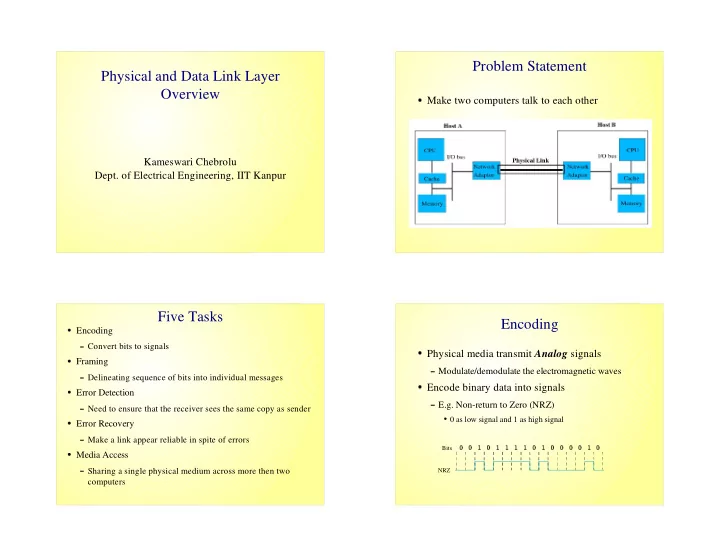
Problem Statement

  • Make two computers talk to each other

Five Tasks

✁

Encoding

✂

Convert bits to signals

✁

Framing

✂

Delineating sequence of bits into individual messages

✁

Error Detection

✂

Need to ensure that the receiver sees the same copy as sender

✁

Error Recovery

✂

Make a link appear reliable in spite of errors

✁

Media Access

✂

Sharing a single physical medium across more then two computers

Encoding

  • Physical media transmit Analog signals
✄

Modulate/demodulate the electromagnetic waves

  • Encode binary data into signals
✄

E.g. Non-return to Zero (NRZ)

☎

0 as low signal and 1 as high signal

Bits NRZ

✆ ✆ ✝ ✆ ✝ ✝ ✝ ✝ ✆ ✝ ✆ ✆ ✆ ✆ ✝ ✆
slide-2
SLIDE 2

Problems with NRZ

  • Consecutive 1s and 0s
✄

Changes the average making it difficult to detect signals (baseline wander)

✄

Clock Recovery

☎

Sender's and receiver clocks have to be precisely synchronized

☎

Receiver derives the clock from the received signal vis signal transition

☎

Lesser number of transitions leads to clock drift

Alternative Encodings

  • Non-return to Zero Inverted (NRZI)
✄

To encode a 1, make a transition

✄

To encode a 0, stay at the current signal

✄

Solves problem of consecutive 1's but not 0's

  • Manchester Encoding
✄

Transmits XOR of the NRZ encoded data and the clock

☎

0 is encoded as low-to-high transition, 1 as high-to-low transition

✄

Only 50% efficient

Example

Bits NRZ Clock Manchester NRZI

  • ✁
  • ✁
✁ ✁ ✁
  • ✁
  • ✁
  • 4B/5B Encoding
  • Every 4 bit of actual data is encoded into a 5 bit

code

  • The 5 bit code words have
✄

No more than one leading 0

✄

No more than two trailing 0s

✄

Solves consecutive zeros problem

  • The 5 bit codes are sent using NRZI
  • Achieves 80% efficiency
slide-3
SLIDE 3

4B/5B Encoding Five Tasks

✁

Encoding

✂

Convert bits to signals

✁

Framing

✂

Delineating sequence of bits into individual messages

✁

Error Detection

✂

Need to ensure that the receiver sees the same copy as sender

✁

Error Recovery

✂

Make a link appear reliable in spite of errors

✁

Media Access

✂

Sharing a single physical medium across more then two computers

Framing

  • Framing breaks bit streams into frames of

smaller sizes

  • Challenge: What sets of bits constitute a frame
✄

Where is the beginning and the end of frame?

  • Framing Protocols
✄

Examples: PPP, HDLC, DDCMP

Theory behind Framing

  • Delineate a frame with a special pattern
✄

HDLC uses an 8 bit pattern: 01111110

  • Problem: Special pattern may appear in payload
  • Solution: Bit Stuffing
✄

Sender inserts a 0 after 5 consecutive 1's

✄

Receiver removes the 0 that follows 5 1's

Header Body 8 16 16 8 CRC Beginning sequence Ending sequence

slide-4
SLIDE 4

Five Tasks

✁

Encoding

✂

Convert bits to signals

✁

Framing

✂

Delineating sequence of bits into individual messages

✁

Error Detection

✂

Need to ensure that the receiver sees the same copy as sender

✁

Error Recovery

✂

Make a link appear reliable in spite of errors

✁

Media Access

✂

Sharing a single physical medium across more then two computers

Error Detection

  • Basic Idea: Add redundant information to a

frame

✄

Add k bits of redundant data to a n bit message

✄

k << n; k = 32; n = 12,000

✄

k derived from original message through some algorithm

  • Examples: CRC, checksum, two-dimensional

parity

Checksum

  • View data in a frame to be transmitted as a

sequence of 16-bit integers.

  • Add the integers using 16 bit one's complement

arithmetic.

  • Take the one's complement of the result – this

result is the checksum

Five Tasks

✁

Encoding

✂

Convert bits to signals

✁

Framing

✂

Delineating sequence of bits into individual messages

✁

Error Detection

✂

Need to ensure that the receiver sees the same copy as sender

✁

Error Recovery

✂

Make a link appear reliable in spite of errors

✁

Media Access

✂

Sharing a single physical medium across more then two computers

slide-5
SLIDE 5

Error Recovery

  • Two forms of error recovery:
✄

Automatic Repeat reQuest (ARQ)

✄

Forward Error Correction (FEC)

  • ARQ relies on two mechanisms
✄

Acknowledgments

✄

Timeout

Stop and Wait ARQ

  • Problem: Can't keep pipe full
  • Example: Consider a 1.5 Mbps link with a 45ms

round trip time; Frame size is 1024 bytes

✄

Utilization is 1024*8/0.045 = 182kbps

Sender Receiver Frame 0 ACK 0 Frame 1 ACK 1 Time

Stop and Wait ARQ Cont...

Sender Receiver Frame ACK Frame ACK Timeout Timeout Time Sender Receiver Frame ACK Timeout (a) (b) Sender Receiver Frame Frame ACK Timeout Timeout Sender Frame ACK Frame ACK Timeout Timeout Receiver

Bandwidth-Delay Product (BDP)

  • View a link as a hollow pipe
✄

Latency corresponds to the length of the pipe

✄

Bandwidth gives diameter of the pipe

✄

BDP gives the volume of the pipe – the number of bits it holds

✄

E.g. a transcontinental link with bandwidth 45Mbps and latency 50ms can hold 2.25 * 106 bits

  • BDP represents #bits the sender can transmit before the

sender gets acknowledgment of the first bit

  • If the sender does not send BDP's worth of data, it is

under utilizing the link

slide-6
SLIDE 6

Sliding Window

  • Allow multiple outstanding (un-Acked) frames
  • Place an upper bound on un-Acked frames,

called window

Sender Receiver Time

Sender Side

  • Assign a sequence number to each frame (SeqNum)
  • Maintain 3 variables:
✄

Send Window Size (SWS): upper bound on the number of unacked frames that sender can transmit

✄

LAR denotes sequence number of Last Acknowledgment Received; Advance LAR when ACK arrives

✄

LFS denotes sequence number of Last Frame Sent

  • Maintain Invariant: LFS-LAR <= SWS

< SWS LAR LFS

Receiver Side

  • Maintains the following three variables
✄

Received Window Size (RWS): upper bound on the number

  • f out of order frames
✄

LAF denotes sequence number of last acceptable frame

✄

LFR denotes sequence number of last frame received

  • Maintain invariant: LAF – LFR <= RWS

RWS LFR LAF <

Receiver Side cont..

  • Frame SeqNum arrives
✄

If SeqNum <= LFR or SeqNum > LAF, discard

✄

If LFR< SeqNum <= LAF, accept

  • Send cumulative Acks
slide-7
SLIDE 7

Summary

  • Five key problems have to be solved for two

computers to talk with each

  • We covered four of these problems
✄

Encoding

✄

Framing

✄

Error Detection

✄

Error Recovery

  • The fifth problem and our topic of next session is

Media Access Protocols