Recall: Bresenhams Line Drawing Algorithm Problem: Given endpoints - - PowerPoint PPT Presentation

recall bresenham s line drawing algorithm
SMART_READER_LITE
LIVE PREVIEW

Recall: Bresenhams Line Drawing Algorithm Problem: Given endpoints - - PowerPoint PPT Presentation

Recall: Bresenhams Line Drawing Algorithm Problem: Given endpoints (Ax, Ay) and (Bx, By) of line, determine intervening pixels First make two simplifying assumptions (remove later): (Ax < Bx) and (0 < m < 1)


slide-1
SLIDE 1

Recall: Bresenham’s Line‐Drawing Algorithm

 Problem: Given endpoints (Ax, Ay) and (Bx, By) of line,

determine intervening pixels

 First make two simplifying assumptions (remove later):  (Ax < Bx) and  (0 < m < 1)

 Define

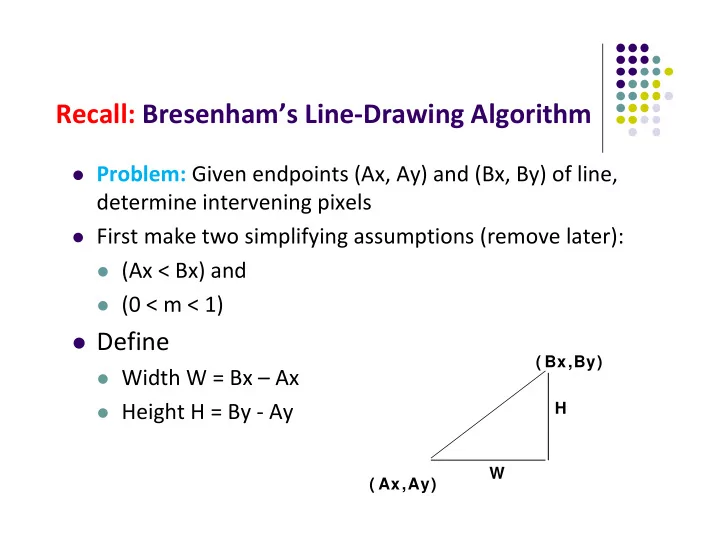
 Width W = Bx – Ax  Height H = By ‐ Ay ( Bx,By) ( Ax,Ay) H W

slide-2
SLIDE 2

Recall: Bresenham’s Line‐Drawing Algorithm

 Based on assumptions (Ax < Bx) and (0 < m < 1)

 W, H are +ve  H < W  Increment x by +1, y incr by +1 or stays same  Midpoint algorithm determines which happens ( Bx,By) ( Ax,Ay) H W

slide-3
SLIDE 3

Recall: Bresenham’s Line‐Drawing Algorithm

(x0, y0)

Build equation of actual line, compare to midpoint

(x1,y1)

What Pixels to turn on or off? Consider pixel midpoint M(Mx, My) = (x + 1, y + ½)

M(Mx,My)

Case a: If midpoint (red dot) is below line, Shade upper pixel, (x + 1, y + 1) Case b: If midpoint (red dot) is above line, Shade lower pixel, (x + 1, y)

(x1,y1)

slide-4
SLIDE 4

Build Equation of the Line

 Using similar triangles:

H(x – Ax) = W(y – Ay) ‐W(y – Ay) + H(x – Ax) = 0

 Above is equation of line from (Ax, Ay) to (Bx, By)  Thus, any point (x,y) that lies on ideal line makes eqn = 0  Double expression (to avoid floats later), and call it F(x,y)

F(x,y) = ‐2W(y – Ay) + 2H(x – Ax)

W H Ax x Ay y   

( Bx,By) ( Ax,Ay) ( x,y) H W

slide-5
SLIDE 5

Bresenham’s Line‐Drawing Algorithm

 So, F(x,y) = ‐2W(y – Ay) + 2H(x – Ax)  Algorithm, If:  F(x, y) < 0, (x, y) above line  F(x, y) > 0, (x, y) below line  Hint: F(x, y) = 0 is on line  Increase y keeping x constant, F(x, y) becomes more

negative

slide-6
SLIDE 6

Bresenham’s Line‐Drawing Algorithm

 Example: to find line segment between (3, 7) and (9, 11)

F(x,y) = ‐2W(y – Ay) + 2H(x – Ax) = (‐12)(y – 7) + (8)(x – 3)

 For points on line. E.g. (7, 29/3), F(x, y) = 0  A = (4, 4) lies below line since F = 44  B = (5, 9) lies above line since F = ‐8 ( 5 ,9 ) ( 4 ,4 )

slide-7
SLIDE 7

Bresenham’s Line‐Drawing Algorithm

(x0, y0) Case a: If M below actual line F(Mx, My) < 0 shade upper pixel (x + 1, y + 1) (x1,y1)

What Pixels to turn on or off? Consider pixel midpoint M(Mx, My) = (x0 + 1, Y0 + ½)

M(Mx,My) Case b: If M above actual line F(Mx,My) > 0 shade lower pixel (x + 1, y) (x1,y1)

slide-8
SLIDE 8

Can compute F(x,y) incrementally

Initially, midpoint M = (Ax + 1, Ay + ½) F(Mx, My) = ‐2W(y – Ay) + 2H(x – Ax) i.e. F(Ax + 1, Ay + ½) = 2H – W Can compute F(x,y) for next midpoint incrementally If we increment to (x + 1, y), compute new F(Mx,My) F(Mx, My) += 2H i.e. F(Ax + 2, Ay + ½) ‐ F(Ax + 1, Ay + ½) = 2H

(Ax + 1, Ay + ½) (Ax + 2, Ay + ½)

slide-9
SLIDE 9

Can compute F(x,y) incrementally

If we increment to (x +1, y + 1) F(Mx, My) += 2(H – W) i.e. F(Ax + 2, Ay + 3/2) ‐ F(Ax + 1, Ay + ½) = 2(H – W)

(Ax + 1, Ay + ½) (Ax + 2, Ay + 3/2)

slide-10
SLIDE 10

Bresenham’s Line‐Drawing Algorithm

Bresenham(IntPoint a, InPoint b) { // restriction: a.x < b.x and 0 < H/W < 1 int y = a.y, W = b.x – a.x, H = b.y – a.y; int F = 2 * H – W; // current error term for(int x = a.x; x <= b.x; x++) { setpixel at (x, y); // to desired color value if F < 0 // y stays same F = F + 2H; else{ Y++, F = F + 2(H – W) // increment y } } }

Recall: F is equation of line

slide-11
SLIDE 11

Bresenham’s Line‐Drawing Algorithm

 Final words: we developed algorithm with restrictions

0 < m < 1 and Ax < Bx

 Can add code to remove restrictions  When Ax > Bx (swap and draw)  Lines having m > 1 (interchange x with y)  Lines with m < 0 (step x++, decrement y not incr)  Horizontal and vertical lines (pretest a.x = b.x and skip

tests)

slide-12
SLIDE 12

Computer Graphics CS 4731 Lecture 25 Polygon Filling & Antialiasing Prof Emmanuel Agu

Computer Science Dept. Worcester Polytechnic Institute (WPI)

slide-13
SLIDE 13

Defining and Filling Regions of Pixels

 Methods of defining region

 Pixel‐defined: specifies pixels in color or geometric

range

 Symbolic: provides property pixels in region must

have

 Examples of symbolic:

 Closeness to some pixel  Within circle of radius R  Within a specified polygon

slide-14
SLIDE 14

Pixel‐Defined Regions

 Definition: Region R is the set of all pixels having

color C that are connected to a given pixel S

 4‐adjacent: pixels that lie next to each other

horizontally or vertically, NOT diagonally

 8‐adjacent: pixels that lie next to each other

horizontally, vertically OR diagonally

 4‐connected: if there is unbroken path of 4‐adjacent

pixels connecting them

 8‐connected: unbroken path of 8‐adjacent pixels

connecting them

slide-15
SLIDE 15

Recursive Flood‐Fill Algorithm

 Recursive algorithm  Starts from initial pixel of color, intColor  Recursively set 4‐connected neighbors to newColor  Flood‐Fill: floods region with newColor  Basic idea:

 start at “seed” pixel (x, y)  If (x, y) has color intColor, change it to newColor  Do same recursively for all 4 neighbors

(x, y+1) (x, y) (x, y-1) (x+1, y) (x-1, y

slide-16
SLIDE 16

Recursive Flood‐Fill Algorithm

 Note: getPixel(x,y) used to interrogate pixel color at (x, y)

void floodFill(short x, short y, short intColor) { if(getPixel(x, y) == intColor) { setPixel(x, y); floodFill(x – 1, y, intColor); // left pixel floodFill(x + 1, y, intColor); // right pixel floodFill(x, y + 1, intColor); // down pixel floodFill(x, y – 1, intColor); // up pixel } }

(x, y+1) (x, y) (x, y-1) (x+1, y) (x-1, y

slide-17
SLIDE 17

Recursive Flood‐Fill Algorithm

 Recursive flood‐fill is blind  Some pixels retested several times  Region coherence is likelihood that an interior pixel

mostly likely adjacent to another interior pixel

 Coherence can be used to improve algorithm

performance

 A run: group of adjacent pixels lying on same scanline  Fill runs(adjacent, on same scan line) of pixels

slide-18
SLIDE 18

Region Filling Using Coherence

 Example: start at s, initial seed

Push address of seed pixel onto stack while(stack is not empty) { Pop stack to provide next seed Fill in run defined by seed In row above find reachable interior runs Push address of their rightmost pixels Do same for row below current run }

Note: algorithm most efficient if there is span coherence (pixels on scanline have same value) and scan-line coherence (consecutive scanlines similar) Pseudocode:

slide-19
SLIDE 19

Filling Polygon‐Defined Regions

 Problem: Region defined polygon with vertices

Pi = (Xi, Yi), for i = 1…N, specifying sequence of P’s vertices

P1 P7 P6 P5 P4 P3 P2

slide-20
SLIDE 20

Filling Polygon‐Defined Regions

 Solution: Progress through frame buffer scan line by

scan line, filling in appropriate portions of each line

 Filled portions defined by intersection of scan line

and polygon edges

 Runs lying between edges inside P are filled  Pseudocode:

for(each scan Line L) { Find intersections of L with all edges of P Sort the intersections by increasing x-value Fill pixel runs between all pairs of intersections }

slide-21
SLIDE 21

Filling Polygon‐Defined Regions

 Example: scan line y = 3 intersects 4 edges e3, e4, e5, e6  Sort x values of intersections and fill runs in pairs  Note: at each intersection, inside‐outside (parity), or vice versa

P1 P7 P6 P5 P4 P3 P2 e6 e5 e4 e3 3

slide-22
SLIDE 22

Data Structure

slide-23
SLIDE 23

Filling Polygon‐Defined Regions

 Problem: What if two polygons A, B share an edge?  Algorithm behavior could result in:  setting edge first in one color and the another  Drawing edge twice too bright  Make Rule: when two polygons share edge, each polygon

  • wns its left and bottom edges

 E.g. below draw shared edge with color of polygon B

A B

slide-24
SLIDE 24

Filling Polygon‐Defined Regions

 Problem: How to handle cases where scan line intersects

with polygon endpoints to avoid wrong parity?

 Solution: Discard intersections with horizontal edges and

with upper endpoint of any edge

See 0 See 2 See 1 See 0 See 1 See 2 See 0

slide-25
SLIDE 25

Antialiasing

 Raster displays have pixels as rectangles  Aliasing: Discrete nature of pixels introduces

“jaggies”

slide-26
SLIDE 26

Antialiasing

 Aliasing effects:

 Distant objects may disappear entirely  Objects can blink on and off in animations

 Antialiasing techniques involve some form of

blurring to reduce contrast, smoothen image

 Three antialiasing techniques:

 Prefiltering  Postfiltering  Supersampling

slide-27
SLIDE 27

References

 Hill and Kelley, chapter 11  Angel and Shreiner, Interactive Computer

Graphics, 6th edition