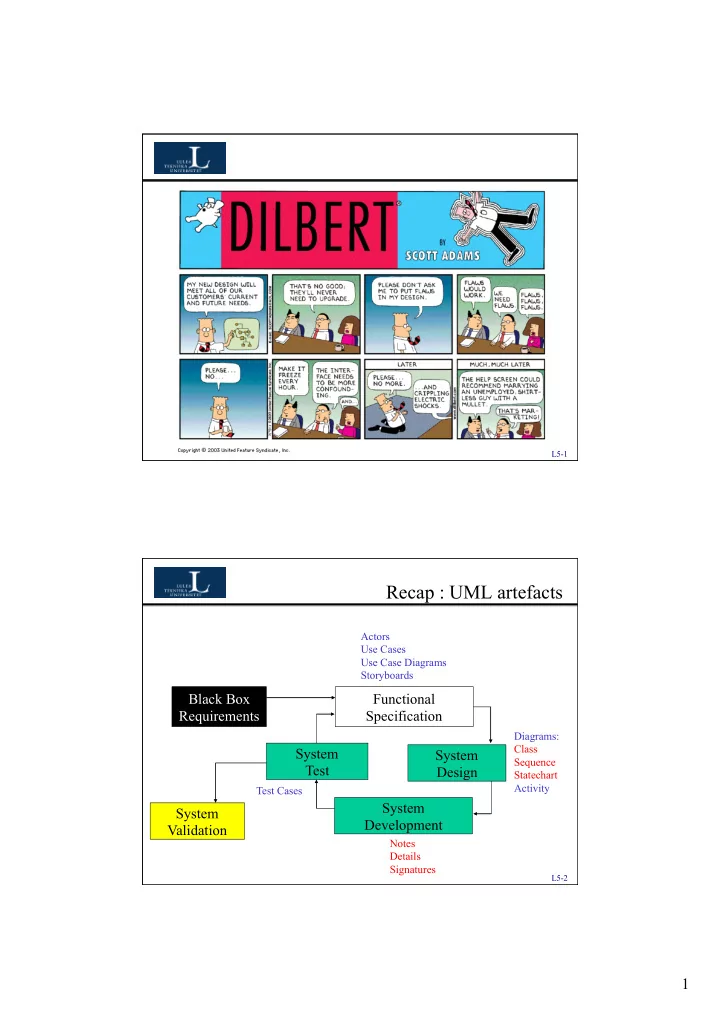
Recap : UML artefacts Actors Use Cases Use Case Diagrams - - PDF document

recap uml artefacts
SMART_READER_LITE
LIVE PREVIEW

Recap : UML artefacts Actors Use Cases Use Case Diagrams - - PDF document

L5-1 Recap : UML artefacts Actors Use Cases Use Case Diagrams Storyboards Black Box Functional Requirements Specification Diagrams: Class System System Sequence Test Design Statechart Activity Test Cases System System


slide-1
SLIDE 1

1

L5-1 L5-2

Recap : UML artefacts

Black Box Requirements System Design System Development System Test System Validation Functional Specification

Actors Use Cases Use Case Diagrams Storyboards Test Cases Diagrams: Class Sequence Statechart Activity Notes Details Signatures

slide-2
SLIDE 2

2

L5-3

Today

  • Modeling the run-time view!
  • Software Design

– Metrics

  • Classification
  • Code Review

L5-4

Modeling using UML

Diagrams are the main artefacts of UML.

(These are not a sequence of steps!!!!)

  • Use case diagrams

– Functional behavior of the system as seen by the user.

  • Activity diagrams

– Dynamic behavior of a system expressed as a flowchart.

  • Class diagrams

– Static structure of the system: Objects, Attributes, and Associations.

  • Sequence diagrams

– Dynamic behavior between actors and system objects.

  • Statechart diagrams

– Dynamic behavior of an individual object.

  • ...
slide-3
SLIDE 3

3

L5-5

Use Case Example

Name: Purchase ticket Participating actor: Passenger Entry condition:

  • Passenger standing in front
  • f ticket distributor.
  • Passenger has sufficient

money to purchase ticket. Exit condition:

  • Passenger has ticket.

Event flow:

  • 1. Passenger selects the number
  • f zones to be traveled.
  • 2. Distributor displays the

amount due.

  • 3. Passenger inserts money, of

at least the amount due.

  • 4. Distributor returns change.
  • 5. Distributor issues ticket.

L5-6

UML Sequence Diagrams

  • In requirements analysis

To refine use case descriptions to find additional objects (“participating objects”)

  • In system design

to refine subsystem interfaces

  • Columns = classes
  • Arrows = messages
  • Narrow rectangles =

activations

  • Dashed lines = lifelines

selectZone() pickupChange() pickUpTicket() insertCoins() Passenger TicketMachine

slide-4
SLIDE 4

4

L5-7

UML Sequence Diagrams: Nested Messages

  • The source of an arrow indicates the activation which sent the

message

  • An activation is as long as all nested activations

selectZone() Passenger ZoneCheckbox TarifSchedule Display lookupPrice(selection) displayPrice(price) price

Dataflow

…to be continued...

L5-8

Sequence Diagram Observations

  • UML sequence diagram represent behavior in terms of

interactions

– Run-time view

  • They complement class diagrams, which represent

structure

– Compile-time view

  • Very useful for finding participating objects
  • Time-consuming to build but worth the investment

where interactions are complex

slide-5
SLIDE 5

5

L5-9

Sequence Diagram

Object Message Activation

blinkHours() blinkMinutes() incrementMinutes() refresh() commitNewTime() stopBlinking() pressButton1() pressButton2() pressButtons1And2() pressButton1() :WatchUser :Time :LCDDisplay :SimpleWatch L5-10

Sequence Diagrams – Interaction Frames

  • alt (conditional)
  • opt (optional)
  • par (run in parallel)
  • loop (iteration)
  • region (one thread)
  • neg (invalid)
  • ref (reference:

defined in another diagram)

slide-6
SLIDE 6

6

L5-11

button1&2Pressed button1&2Pressed button1Pressed button2Pressed button2Pressed button2Pressed button1Pressed button1&2Pressed Increment Minutes Increment Hours Blink Hours Blink Seconds Blink Minutes Increment Seconds Stop Blinking

Statechart Diagrams

State Initial state Final state Transition Event

L5-12

Summary

  • UML provides a wide variety of notations for representing many

aspects of software development

– Powerful, but complex language (keep it simple!) – Can be misused to generate unreadable models (automatic generators) – Can be misunderstood when using too many exotic features (KISS!)

  • We concentrate only on a few notations:

* Functional model: use case diagram * Object model: class diagram * Dynamic model: sequence, statechart and activity diagrams

  • UML is not a methodology, but the textbook describes a

methodology that uses UML

slide-7
SLIDE 7

7

L5-13

UML artefacts

Black Box Requirements System Design System Development System Test System Validation Functional Specification

Actors Use Cases Use Case Diagrams Storyboards Test Cases Diagrams: Class Sequence Statechart Activity Notes Details Signatures

L5-14

Measuring quality of abstractions

We will never make an ultimate design on the first try. Design is an incremental and iterative process! How can we know if our architecture is well designed? When shall we stop the design process?

Five meaningful metrics:

  • 1. Coupling
  • 2. Cohesion
  • 3. Sufficiency
  • 4. Completeness
  • 5. Primitiveness
slide-8
SLIDE 8

8

L5-15

Coupling

"Coupling is the strength of association between modules." Strong coupling makes a system harder to understand, change or correct. Complexity can be reduced by designing for weak coupling. Inheritance introduces significant coupling! Thus, select inheritance as a design method restrictively.

L5-16

Coupling

1 Exhaust System Muffler Tailpipe 0..2 3 TicketMachine ZoneButton Button ZoneButton CancelButton

Composition = strong coupling Inheritance = strongest coupling Aggregation = weak coupling

slide-9
SLIDE 9

9

L5-17

Cohesion

"Cohesion measures the degree of connectivity within a module." Try to avoid coincidental cohesion, where entirely unrelated abstractions form a class or module. Thus, struggle for well-bounded behavior, where functional cohesiveness is achieved (semantics kept within the module). A class should be focused on one kind of thing

L5-18

Sufficiency "A sufficient module captures enough characteristics of the abstraction to permit meaningful and efficient interaction." Keep it small! Keep it simple! Sufficiency implies a minimal interface.

slide-10
SLIDE 10

10

L5-19

Completeness

"A complete module captures all the meaningful characteristics of the abstraction." Completeness implies an interface that covers all aspects

  • f the abstraction.

Thus, an interface that is general enough to be commonly usable. It is very subjective, and is easily overdone!

L5-20

Primitiveness

"Primitive operations are those that can be efficiently implemented only if given access to the underlying representation of the abstraction." Each method should be focused on one thing

slide-11
SLIDE 11

11

L5-21

Measuring quality of abstractions

Five meaningful metrics:

  • 1. Coupling
  • 2. Cohesion
  • 3. Sufficiency
  • 4. Completeness
  • 5. Primitiveness

What are the important choices?

L5-22

Choosing operations

Crafting an interface is plain hard work. As we do the design, we find patterns of abstractions that leads us to create new classes or to reorganize existing ones, incrementally. The aim to to create primitive operations, which exhibit a small well-defined behavior. We call these fine-grained.

slide-12
SLIDE 12

12

L5-23

Choosing operations

To contract out behavior to:

  • 1. one operation

simpler interface large complex operations unmanageably modules

  • 2. several operations

complex interface simpler operations fragmentation This is one of the core arts in design.

L5-24

Choosing operations What is a Method? A) Function (check state) B) Procedure (change state) C) A mixture of the above?

slide-13
SLIDE 13

13

L5-25

Criteria for choosing operations

  • 1. Reusability

Would this behavior be useful in more than one context?

  • 2. Complexity

How difficulty is it to implement the behavior?

  • 3. Applicability

How relevant is the behavior to the type?

  • 4. Implementation knowledge

Does the behavior's implementation depend upon the internal details of a type? Defining utility classes can help keeping a class primitive.

L5-26

Choosing relationships

Narrow and deep Balanced Wide and shallow Inheritance Trees of classes with a common super class Small classes Exploits commonality Hard to understand Combination Hard to define Hard to achieve Successful trade-off Aggregation or Composition Forests of loosely coupled classes Large classes May not exploit commonality Easier to understand

Class structure when using inheritance, aggregation and composition:

slide-14
SLIDE 14

14

L5-27

Choosing relationships, Rules of thumb

Rule of thumb 1: "Inheritance is appropriate when every instance of one class may also be viewed as an instance of another class." IS-A Rule of thumb 2: "If the behavior of an object is more than the sum of its individual parts, then aggregation is probably the superior." HAS-A Rule of thumb 3: "Favor composition over inheritance."

L5-28

Choosing implementation

The representation (implementation) of a class should always be an encapsulated secret of abstraction. That is, hide the implementation! Program to an interface, not an implementation! This makes it possible to alter the implementation without violating the interface and behavior!!!

slide-15
SLIDE 15

15

L5-29

Choosing implementation, example

The most common trade-off is storage versus computation.

Example: Imagine a square, which has a width. Should we store the area or calculate it each time we need it? The answer is to store if focus is on speed, and to calculate if focus is on space efficiency.

Class Square_Efficient_Storage { int width; void setWidth(int width) { this.width = width; } int getArea() { return width*width; } … } Class Square_Efficient_Computation { int width; int area; void setWidth(int width) { this.width = width; area = width*width; } int getArea() { return area; } … } L5-30

ZZZZZZ...oxygen anyone?

slide-16
SLIDE 16

16

L5-31

What is this?

?

L5-32

It’s this!

slide-17
SLIDE 17

17

L5-33

Classification

The identification of classes and objects involves both discovery and invention. Discovery: Recognizing key abstractions and mechanisms, that form the vocabulary of the problem domain. Invention: Devising generalized abstractions as well as new mechanisms that specify how objects collaborate. Classification is grouping common structures or behavior.

L5-34

Classification: Snake, Lion or Giraffe?

slide-18
SLIDE 18

18

L5-35

Classification

Classification help us identify generalization, specialization and aggregation hierarchies among classes. Coupling and cohesion is metrics for the commonality among classes and objects. The best software designs look simple, but it takes a lot of hard work to design a simple architecture.

L5-36

Evolving classification

Derivation Creating new subclasses from existing ones. Factorization Splitting a large class into several smaller ones. Composition Create one larger class by uniting smaller ones. Abstraction Discover commonality and devise a new class.

slide-19
SLIDE 19

19

L5-37

Classification

The developer has two primary design tasks, to find:

  • 1. Key abstractions

Discover the classes and objects that form the vocabulary of the problem design.

  • 2. Mechanisms

Invent relational structures for meeting requirements of collaborative behavior.

L5-38

Classification...

...is about finding common attributes!

slide-20
SLIDE 20

20

L5-39

Classify...

...the trains by yourself! Select any method that You deem proper. 3 minutes

L5-40

The trains classified...

One solution per person is likely! Half of the solutions are unique! Some examples:

  • The length of the trains
  • The color of the wheels
  • Curved lines in the letters

(A E F H I vs. B C D G J) Some solutions are more inventive than

  • thers, especially when using non-linear

thinking and creative insight!

slide-21
SLIDE 21

21

L5-41

To classify...

...is easier when more is known! What if: triangles = atomic waste squares = persons Systems experts are vital!

L5-42

Who is right?

slide-22
SLIDE 22

22

L5-43

Recap

Implementation Program to an interface, not an implementation! Operations Reusability, Complexity, Applicability, Primitiveness Method: Function (check state) or Procedure (change state)

L5-44

The first quiz will be on the next lecture (Friday, September 13) Will cover the material of the first 5 lectures

slide-23
SLIDE 23

23

L5-45

That’s all folks! Thanks for your attention!

L5-46