SLIOES! / SUGGESTEB \ The author is at the School of - - PDF document

slioes
SMART_READER_LITE
LIVE PREVIEW

SLIOES! / SUGGESTEB \ The author is at the School of - - PDF document

MISCELLANEA COMMUNICATE YOUR SCIENCE! . . . SUPER SEMINAR SLIDES Bernard S. Brown stunned silence or the lack of ques- Its your first research talk. Youve tions. Did I do something wrong?, spent months doing


slide-1
SLIDE 1

COMMUNICATE YOUR SCIENCE! . . .

SUPER SEMINAR SLIDES

The author is at the School

  • f

Biological Sciences, Room 2.205, Stopford Building, Oxford Road, Manchester, UK Ml3 9PT.

Bernard S. Brown

It’s your first research talk. You’ve spent months doing the work and weeks writing the talk, and at last you’re nearly ready. Although you found writing the talk not too difficult, there was

  • ne

aspect that perplexed you

  • the

slides. You felt that you

  • ught

to have some slides and you were told that you’d have to design and prepare them yourself. But, little advice was given. Fortunately, your department has a photocopier that can copy directly

  • nto

acetate sheets for an overhead projector (OHP), so you decide to use that. You photo- copy some nice-looking graphs, a couple

  • f

impressive-looking tables and a diagram

  • r two.

You also type and photocopy some summaries. So, now you are ready. Your audience files in and you begin. As your talk proceeds, you ignore the puzzled looks and the cran- ing necks as detailed slide after slide is flashed before the audience. Finally, you finish and cannot understand the stunned silence

  • r

the lack

  • f

ques- tions. ‘Did I do something wrong?‘, you ask yourself. The answer is, probably, yes. Assuming that your talk was well thought

  • ut,

not too long and deliv- ered clearly, in all likelihood the problem lies with the slides you used. Only too

  • ften,

slides are con- sidered to be an optional extra to a talk and are prepared at the last minute, without thought for their design and content. Only too

  • ften

they contain far too much infor- mation. Why not do better next time by designing some ‘super semi- nar slides’? You can use the word SLIDE to remind you

  • f

the guide- lines that apply to both ‘ordinary’ projector slides and acetate sheets for

  • verhead

projectors.

SL - SIMPLE AND LEGIBLE

These two rules are so important that it’s difficult to know which

  • f

them to put first. To make impact, and

MISCELLANEA

FIGURE 1 to be understood, a slide must be both simple and legible. Simplicity means thinking about what is going

  • nto

a slide and making it as clear and uncluttered as possible. A slide should present

  • ne

idea

  • nly
  • but

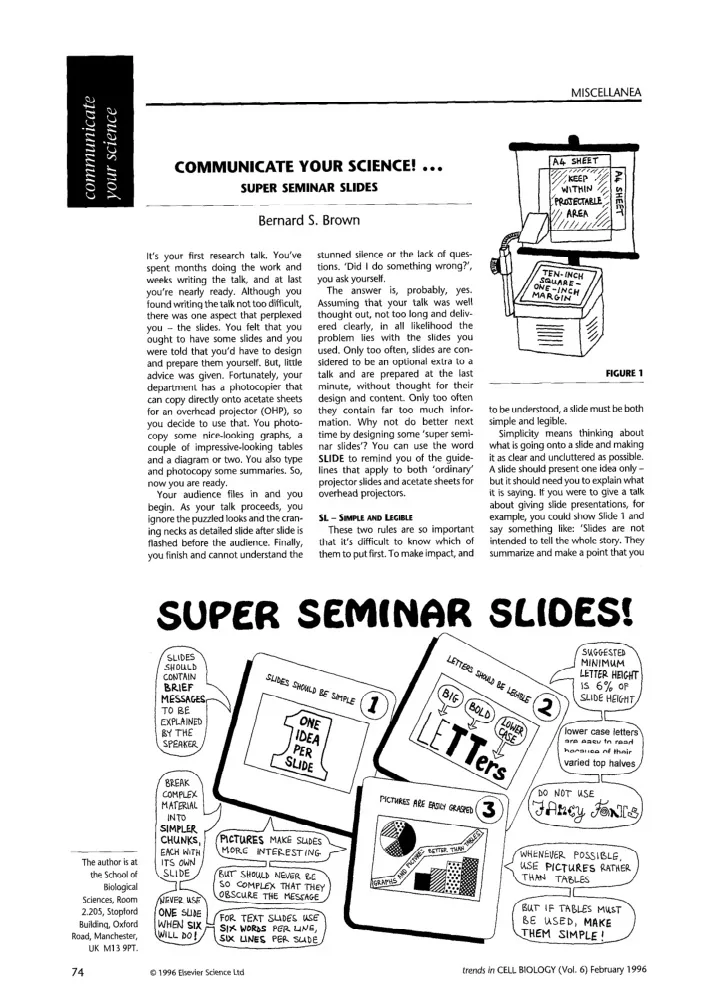
it should need you to explain what it is saying. If you were to give a talk about giving slide presentations, for example, you could show Slide 1 and say something like: ‘Slides are not intended to tell the whole story. They summarize and make a point that you

SLIOES!

/ SUGGESTEB \

74

0 1996 Elsevier Science Ltd trends in CELL BIOLOGY (Vol. 6) February 1996
slide-2
SLIDE 2

l-----l Story = Slides + Speaker

The Magical Number Seven Plus or Minus

/ .

SLIDE 3 *Never use one slide when ‘Six lines par slide, six words ‘No more words than you’d put on front

  • f a T-shirt!

then amplify and explain. The story is the slide, backed up by the speaker’s explanation.’ Then, you could show Slide 2 and say, ‘The American psy- chologist George Miller, in a paper published in 1956, concluded that people listening to a talk were able to remember about seven pieces

  • f infor-

mation, plus

  • r

minus two.’ Next, addressing how much information should go onto a slide, you could show Slide 3 and say, ‘Many rules

  • f thumb

have been devised to guide the slide maker. Here are three

  • f them.

In a presentation, divide your material into short chunks and put each chunk

  • n

its

  • wn

slide. For slides containing words

  • nly,

try to keep to six lines, each containing no more than six words. More graphically, you could say that you should never put more words

  • n

a slide than you could get

  • nto

the front

  • f a T-shirt.

All these statements, and

  • thers

not included here, are merely guides, not holy writ!’ No matter how simple a slide is, its impact is lost if it is not legible. Legibility means both the area

  • f

slide covered and the size and style

  • f

typeface used. Remember that you

  • nly

have about 2cm2

  • f

slide,

  • r

about 700cm’

  • f

OHP acetate sheet to contain your message, so don’t

  • vercrowd

it. Indeed, OHP sheets carry hidden risks. They are commonly supplied in two shapes, square

  • r oblong.

The square is 10 in. (267 mm) X loin., which is diffi- cult to file in an A4-based filing sys- tem, but which fits the square OHP platen perfectly. However, not all the area is projected. The

  • blong

is A4 (297mm tall by 210mm wide), which is filed easily but is too tall and too narrow for the OHP platen. The point is that you need to decide beforehand what is the usable area

  • f

these sheets. A useful rule

  • f

thumb (Fig. 1) is to leave a 2Scm (1 in.) margin around the square sheets, to give a working area

  • f

470 cm2. For A4 sheets, you can use the area formed by two A4 sheets

  • verlapped

as shown in Figure

  • 1. This

is a square

  • f side

21 cm, giving an area

  • f 441

cm2. Legibility also includes letter-size and letter-style. A rule-of-thumb states that letter-height should be 6%

  • f

slide-height. This means 1.2 mm for 35 mm slides and 1.2cm for OHP slides prepared as above. For letter- style, you should use lowe&case rather than capitals because they are easier to read, particularly if there is line after line

  • f them.

Traffic signs use lower- case lettering for this reason. Use a simple letter-style and avoid use

  • f

many varied fonts. I - INTERESTING The slides shown so far are all simple and legible. They do the job that a slide should do - communicate information to the viewer. But they are all boring because they contain

  • nly

words. Words are not visuals, so if you want to make your slides interesting you should include visuals too. Compare Slide 2 with Slide 4, and Slide 3 with Slides 5-7; the two sets

  • f

slides say the same thing

  • but

which do you think is more interesting? Notice that these visual versions con- tain fewer words, make their point more vividly and will need a little more explaining from you! One point to watch here is ‘art ver- sus science’. You should never let a diagram

  • r

illustration

  • bscure

your message. If you use too many vivid colours, if you use arty drawings rather than simple sketches,

  • r

if you use three-dimensional pillars for bar charts, then these devices might prove distracting. Think carefully about whether to use them. D - DESIGNED By this, I mean thinking about not

  • nly

what is to go

  • nto

a slide but whereabouts in your square

  • r oblong

it is to go. Books

  • n graphic

design go into such matters in detail, but I would go so far as to say that if it looks right it very likely is right! We all have an instinctive design-sense that tells us when something doesn’t look quite right. One way to cultivate your design-sense is to look at

  • ther

people’s examples. Examine the graphics in newspapers and

  • n

tele- vision programmes. I<eep an ‘ideas file’

  • f

adverts, brochures, pictures, diagrams and flow-sheets that might be of use to you. If you find this advice too vague then try the following tips: * Place captions in prime spots

  • n

the slide: top-left above the draw- ing

  • r

bottom-middle beneath the drawing.

l

Avoid vertical captions since they are harder to read. They may be all right for factory chimneys, but, for your slides, put the letters

  • n

their sides, reading upwards.

l

When drawing graphs, use bold

rather than spidery lines. You will find some ideas

  • n the

accompany- ing cartoon

  • n page

74.

r2

+ n

I ! /

/

SLIDE 6

SIX words

  • nly on each line

L,NES ____________________________ ONLY ___ ___________ _ _____________ ON ________________________________ EACH _________________------- __-_ SL,DE ______L----_____------------ / SLIDE 7 \ trends in CELL BIOLOGY (Vol. 6) February 1996

75

slide-3
SLIDE 3

MISCELLANEA

The authors are at the Dept

  • f

Physiology, University

  • f

British Columbia, Vancouver, B.C., Canada V6T 123. Also to consider under design is ‘table manners’. By this, I mean the use and abuse

  • f tables
  • n slides.

How many tables have we seen that filled the slide and, to add to our difficulties, had a six-line caption underneath? Such tables are frequently copied from books. Tables in books are all right

  • in

books. But with tables

  • n

slides, your audience will find it difficult to read, analyse and compare columns and lines

  • f numbers.

If you want to use complicated tables, then you can save yourself a lot of trouble by copy- ing a sheet from a British Rail timetable to use as a universal table! Nobody will be able to read it, so you can make it mean what you like! If you want your tables to be easy

  • n

your audience, then keep them simple

  • not

too many columns, not too many lines. Better still

  • translate

the table to a more pictorial form

  • bar

chart, graph

  • r drawing.

E - EASY

Your slides should be easy. Their content should make them easy to take in and understand. Their design should make them easy

  • n

the eye. One book points

  • ut

that a slide presentation is a theatrical perfor- mance, a one-person show, with the audience wanting to be delighted with what it is seeing. If it is, then the audience will remember your slides long after your talk has ended. And those attending will also have fond memories

  • f

you as a good com- municator who presented some super seminar slides!

Here’s where to find more help:

ANHOLT,

  • R. R. H. (1994)

Dazzle ‘em with Style - The Art of Oral Scientific Communication,

  • pp. 99-l 24,
  • W. H. Freeman

BIRCH, N. J. (1988) The rule of sixes,

  • Biochem. Educ. 16,22

BRISTOE, M. H. (1990) A Researcher’s Guide to Scientific and Medical Illustrations,

  • pp. 123-I

33, Springer-Verlag SIMMONDS,

  • D. and REYNOLDS, L. (1994)

Data Presentation and Visual Literacy in Medicine ond Science, pp. 123-l 28 and 135-I 44, Butterworth-Heinemann

Microscopy animations

  • n

the Web

Lance A. Ladic and Alison M. J. Buchan

The advent

  • f the

World Wide Web has enabled the presentation

  • f multi-

media content

  • n the

Internet and has simplified access to information. This communication technology holds great promise for the dissemination

  • f

scientific animations between researchers around the world, some- thing that is not easily done with exist- ing media. This article will examine some

  • f

the issues surrounding microscopy animations

  • n

the Web: what is out there, how to find it, how to put your animations

  • n

line and what is in store for the future. Although the primary focus

  • f

the article is on microscopy, the’topics discussed are also of general relevance to other types

  • f scientific

animations

  • n the

Web.

Types

  • f animations

An increasing number

  • f

researchers around the world are generating animations from digital microscopy data and are putting these

  • n

the Web to communicate their research to colleagues. These

  • fferings

include data from confocal microscopes, high-resolution charge- coupled device (CCD) cameras and

  • ther

cellular-imaging devices. The animations are typically in the form

  • f

either time-lapse sequences depicting changes from image to image,

  • r

animations

  • f

three-dimensional (3-D) reconstructions generated from sequential stacks

  • f

2-D images through a specimen.

Locating microscopy animations

  • n the Web

Although there are many microscopy animations

  • n

the Web, there is no central repository from which they can be accessed. Conducting keyword-based queries with Web search tools does not guar- antee success. Attempts have been made to compile a list of institutions that are involved with microscopy research (most notably at the Microscopes and Microscopy Web

Pageathttp://www.lars.bbsrc. ac . uk/micro/).

However, there are numerous sites with animations that are not listed. So, how do you locate microscopy animations

  • n the

Web? The most common source

  • f news

about new and existing animations are Internet mailing lists and Usenet newsgroups (see Box 1). Mail and News archives

  • n

the Web can also be searched for the mention

  • f

ani- mations. A helpful trick is to use key- words related to animation formats, such as ‘MPEC’ and ‘QuickTime’, in these queries. As part

  • f

a Web page that I maintain

(http://www.cs.ubc.ca/ spider/ladic/confocal.html),

I have compiled a list

  • f

sites that have animations related to 3-D confocal microscopy. Typically, most Web sites present

  • nly

a small number

  • f

microscopy-related animations. Each

  • f the

following sites utilizes ani- mation in a different way to present their research, and each serves as an example

  • f how

the Web can be used to transfer visual information between colleagues. ‘FishScope’

(http: // weber.u.washington.edu/

  • fishscop)

contains an archive

  • f

time-lapse recordings and confocal microscope images dealing with the developmental biology

  • f

fish. Through viewing these animations, you can follow the movement

  • f indi-

vidual cells at different stages

  • f

embryogenesis. Similarly, an ani- mation that follows the temporal development

  • f

a Cuenorhabditis elegans embryo at a single focal plane (using a confocal microscope) can be found

  • n

a Web page at the Integrated Microscopy Resource, University

  • f Wisconsin-Madison,

USA

(http://www.bocklabs.wisc. edu/imr/instruments/4da. html).

Animations

  • f 3-D

reconstruc- tions

  • f

cells microinjected with modified

  • ligonucleotides

can be found

  • n

Daniel Chin’s home page from The Agouron Institute, La Jolla, CA, USA

(http://agi.org/

  • therD/Dan.html).

Some

  • f these

animations demonstrate the appli- cation

  • f

a blind deconvolution algorithm to improve the resolution

  • f

linear structures in all viewing

76

0 1996 Elsevier Science Ltd trends in CELL BIOLOGY (Vol. 6) February 1996