START Make a horizontal diagram including the following answers - - PowerPoint PPT Presentation

start make a horizontal diagram including the following
SMART_READER_LITE
LIVE PREVIEW

START Make a horizontal diagram including the following answers - - PowerPoint PPT Presentation

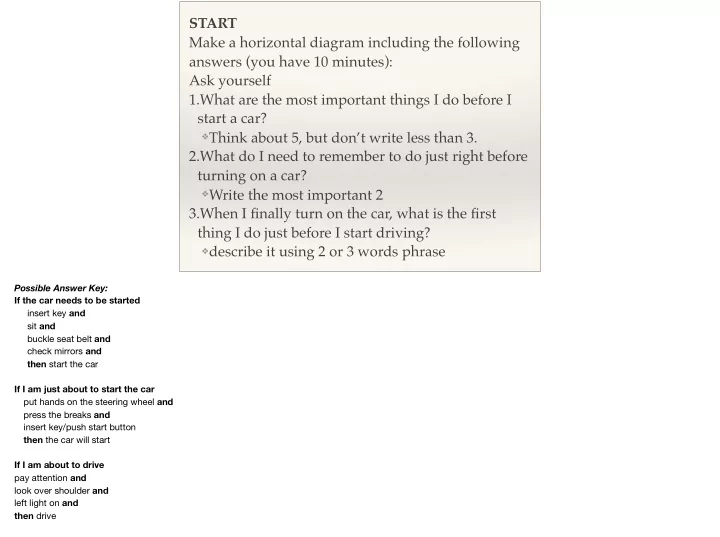
START Make a horizontal diagram including the following answers (you have 10 minutes): Ask yourself 1.What are the most important things I do before I start a car? Think about 5, but dont write less than 3. 2.What do I need to remember


slide-1
SLIDE 1

START Make a horizontal diagram including the following answers (you have 10 minutes): Ask yourself 1.What are the most important things I do before I start a car?

❖Think about 5, but don’t write less than 3.

2.What do I need to remember to do just right before turning on a car?

❖Write the most important 2

3.When I finally turn on the car, what is the first thing I do just before I start driving?

❖describe it using 2 or 3 words phrase

Possible Answer Key: If the car needs to be started insert key and sit and buckle seat belt and check mirrors and then start the car If I am just about to start the car put hands on the steering wheel and press the breaks and insert key/push start button then the car will start If I am about to drive pay attention and look over shoulder and left light on and then drive

slide-2
SLIDE 2

MIDDLE Make a vertical diagram including the following answers (you have 10 minutes): 1.My car is on and I’m ready to go. What is the most important decision I make just before starting to drive? 2.While driving, what do I usually do?

❖write answer using action and non-action verbs ❖think about 6-8, but do not write more than 5

3.How long does it take me to decide where to park? How do I decide it?

❖think about 2-4 parameters, but write only the

most important one.

Possible Answer Key: 1- If I am about to drive look over the sides to make sure no one is coming and turn on the go signal and release the breaks and press the accelerator then drive 2- If I am driving for some time I look around and pay attention and feel happy and sing and listen to music/radio and then keep driving until destination 3- If I want to park then it takes me 2-3 minutes. I look for the closest spot.

slide-3
SLIDE 3

FINISH Make a horizontal diagram including the following answers (you have 10 minutes): 1.I just parked my car. What do I automatically do?

❖Think about 3-4 actions, but write the 2 most

important ones. 2.Beside those unconscious actions, which are the conscious actions I do after I turn off the car?

❖think about a few of them, but just write the least

and most important ones. 3.Once I’m ready to leave the car, what are the most important things I can never forget?

❖think about 3-4, but just write 1.

Possible Answer Key 1-If I park my car I turn it off then I take my keys. 2-If I turn off my car Then I look in the mirror If I park my car then I take my key and my bag 3- If I leave the car then I lock it

slide-4
SLIDE 4

Kennia Delafe

Cognitive Simulation

  • a bridge to the mind-

IDE 712 Professor: Rob S Pusch, Ph.D

What comes to your mind when you hear the term Cognitive Simulation? a brief history of its origins:

  • were originated during the information processing revolution by Newell and Simon (1972)
  • Computers were first used to represent the way humans processed information
  • so it has been a connection between psychology and computer science
  • early steps of CS were based on artificial intelligence languages developed to represent objects and ideas consistent with human functioning
  • Cognitive Simulations are runnable computer programs that represent models of human cognitive activities
  • Those computer programs output explicit representations of mental processes and knowledge structures
slide-5
SLIDE 5

Cognitive Simulation

Main purpose:

❖ reify mental constructs ❖ demonstrate theories and models of human mental

functioning in a computer program

❖ transform unclear ideas into specific and accurate theories

(Kieras, 1990)

❖ provide theoretical facts about human mental functioning

(Kieras, 1990) to explore and validate psychological theories (Neches, 1982)

❖ provide a way for testing theories using algorithms

slide-6
SLIDE 6

When it should be used

❖ to express and better understand some theoretical

ideas

❖ to explain events in details ❖ to clarify what humans might be doing or thinking

while completing a task

❖ to design experiments to explore new phenomena ❖ to conduct cognitive task analysis (CTA) for problem

solving activities (Kieras 1985)

  • specially effective for fault diagnosis and problem solving in accident situations.
  • CTA reveal the knowledge and reasoning required to successfully respond to a task demand
  • CTA provides a tool for understanding the extent to which the environment supports the diagnostic confronted by the problem solver
slide-7
SLIDE 7

How it is used

❖ Semantic network frame-based systems: ❖ human memory structures represented by concept maps or

conceptual graphs

❖ represent memory structures as network of ideas ❖ represent the organization of ideas in a content domain ❖ Production Rule Systems: ❖ facts and rule in the form: IF (condition) THEN (action) ❖ represent cognitive skills in a computer program ❖ higher level task models through the use of control models

  • production rule knowledge base are the most common now
  • it requires the designer to identify the goals, decisions, or outcomes of the knowledge base
  • example: When I am driving

IF I see the yellow light AND closed to the interception THEN I continue driving Obviously, it is more complicated in real live due other facts such as roads conditions, others drivers behaviors, and more

slide-8
SLIDE 8

How to produce it

Process of constructing Cognitive Simulations

  • 1. identification of an appropriate problem
  • 2. limit and define the problem domain
  • 3. specify solutions, goals, conclusions, or behaviors
  • 4. specify attributes or factors and attribute/factor values
  • 5. develop solution matrix
  • 6. generate and sequence rules
  • 7. evaluate the simulation

1. identification of and appropriate problem

  • 1. evaluate problems in terms of: demand or importance, payoff, available expertise, complexity, problem domain, definable process.
  • 2. limit and define the problem domain
  • 1. identify important components, define relationship, eliminate unnecessary elements
  • 3. specify solutions, goals, conclusions, or behaviors
  • 1. generate all possible solutions, identify the most probable solution
  • 4. specify attributes or factors and attribute/factor values
  • 1. identify factor in decision making, spare critical from trivial attributes, identify and assign attribute values
  • 5. develop solution matrix
  • 1. tribute values along the top, rows represent unique conditions, solution/goal in the last column, most likely goals for inclusion at the bottom
  • 6. generate and sequence rules
  • 1. rules for each row, start with IF + condition that are compared with situations or desires, combine conditions using AND/OR/NOT, sequence rules, position

most likely result first

  • 7. evaluate the simulation
  • 1. does the simulation display apparently realist behaviors?
  • 2. can you explain how the computer model works on therms of the theory?
  • 3. if working with a well-developed phenomenon, does the model precisely address the data?
slide-9
SLIDE 9

Advantages Disadvantages

❖ reveal consequences of

different cognitive mechanisms

❖ process is more

meaningful and realistic

❖ theoretical models are

found deficient

❖ represent only one

form of knowledge; skill performance depends on multiple representations

❖ building CS requires

formal operational reasoning

Advantages:

  • 1. building a runnable computer program forces the analyst to describe cognitive mechanisms in detail….
  • 2. when modeling reflective behavior, CS relays on personal activity as well as theoretical making the process…
  • 3. when reuniting personal knowledge bases to theoretical descriptions, learners find that ….
slide-10
SLIDE 10

Application of Cognitive Simulations

❖ to support research, not

specifically directed to task analysis

❖ identify the cognitive activities

in fault management under dynamic conditions in nuclear power plants

slide-11
SLIDE 11

What do we know about what we know?

Picture retrieve from: https://jp.123rf.com/stock-photo/tree_of_knowledge.html?sti=n9n01w3y5sp0c1rplt|

What we know about our own learning What we do not know we know

Novices make mistakes because of lack of knowledge or incorrect knowledge Experts can only describe 30% of what they know Going back to the beginning exercise Final question: How long have you been driving?

  • bserve in the way novice and expert drivers translate the pre-scribed goals into own operative goals
  • bserve in which way novice/expert mental modes or personal theories are used to represent their performance requirements and work context

Cognitive resources (relevant knowledge/skills) novice/experts use to accomplish the tasks they deem important