Summary so far SQL is based on relational algebra. Database Usage - - PDF document

summary so far
SMART_READER_LITE
LIVE PREVIEW

Summary so far SQL is based on relational algebra. Database Usage - - PDF document

Summary so far SQL is based on relational algebra. Database Usage Operations over relations Operations for: (and Construction) Selection of rows ( ) Projection of columns ( ) SQL Queries and Relational Algebra


slide-1
SLIDE 1

1

Database Usage (and Construction)

SQL Queries and Relational Algebra Views

Summary so far

  • SQL is based on relational algebra.

– Operations over relations

  • Operations for:

– Selection of rows () – Projection of columns () – Combining tables

  • Cartesian product (x)
  • Join, natural join (⋈

⋈ ⋈ ⋈C, ⋈ ⋈ ⋈ ⋈)

Subqueries

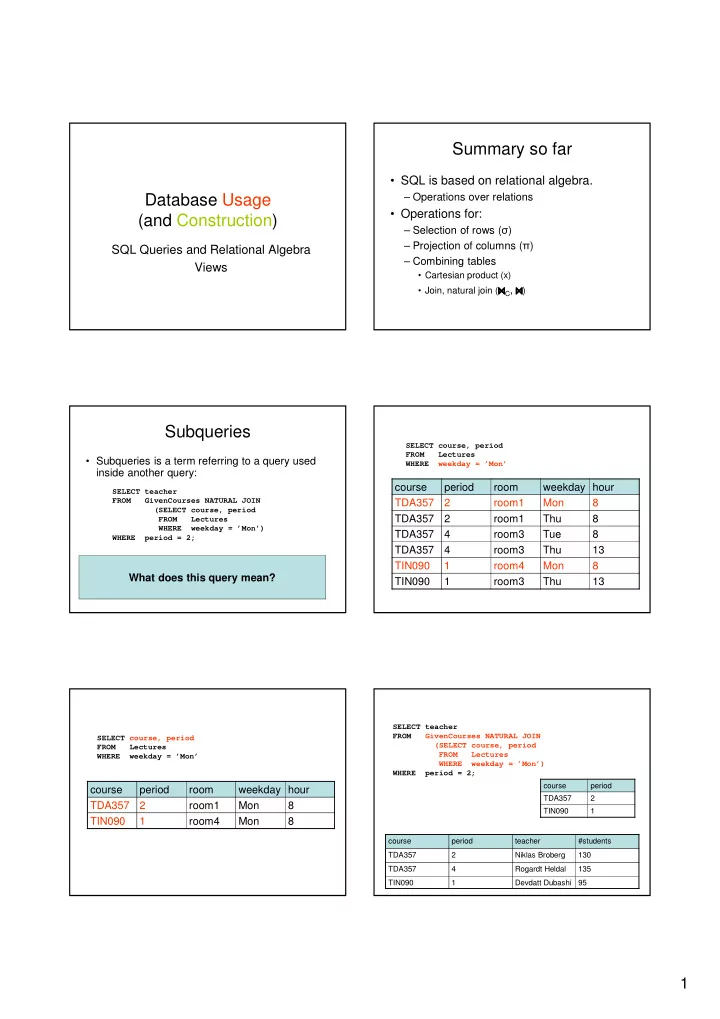
  • Subqueries is a term referring to a query used

inside another query:

  • Beware the natural join!!
  • ”List all teachers who have lectures on Mondays in period 2”
  • SQL is a language where any query can be written in lots of

different ways… SELECT teacher FROM GivenCourses NATURAL JOIN (SELECT course, period FROM Lectures WHERE weekday = ’Mon’) WHERE period = 2;

What does this query mean? course period room weekday hour TDA357 2 room1 Mon 8 TDA357 2 room1 Thu 8 TDA357 4 room3 Tue 8 TDA357 4 room3 Thu 13 TIN090 1 room4 Mon 8 TIN090 1 room3 Thu 13

SELECT course, period FROM Lectures WHERE weekday = ’Mon’

course period room weekday hour TDA357 2 room1 Mon 8 TIN090 1 room4 Mon 8

SELECT course, period FROM Lectures WHERE weekday = ’Mon’ course period TDA357 2 TIN090 1 course period teacher #students TDA357 2 Niklas Broberg 130 TDA357 4 Rogardt Heldal 135 TIN090 1 Devdatt Dubashi 95 SELECT teacher FROM GivenCourses NATURAL JOIN (SELECT course, period FROM Lectures WHERE weekday = ’Mon’) WHERE period = 2;

slide-2
SLIDE 2

2

course period teacher #students TDA357 2 Niklas Broberg 130 TIN090 1 Devdatt Dubashi 95 SELECT teacher FROM GivenCourses NATURAL JOIN (SELECT course, period FROM Lectures WHERE weekday = ’Mon’) WHERE period = 2;

Result

teacher Niklas Broberg

Renaming attributes

  • Sometimes we want to give new names to

attributes in the result of a query.

– To better understand what the result models are. – In some cases, to simplify queries

SELECT * FROM Courses NATURAL JOIN (SELECT course as code, period, teacher FROM GivenCourses);

Renaming relations

  • Name the result of a subquery to be able

to refer to the attributes in it.

  • Alias existing relations (tables) to make

referring to it simpler, or to disambiguate.

SELECT L.course, weekday, hour, room FROM Lectures L, GivenCourses G, Rooms WHERE L.course = G.course AND L.period = G.period AND room = name AND nrSeats < nrStudents; List all lectures that are scheduled in rooms with too few seats.

What does this query mean?

Renaming in Relational Algebra

  • Renaming = Given a relation, give a new name

to it, and (possibly) to its attributes

– Rename R to A, and the attributes of R to the names specified by X (must match the number of attributes). – Leaving out X means attribute names stay the same. – Renaming the relation is only necessary for subqueries. – = rho = greek letter r = rename

ρA(X)(R)

Quiz!

Write a query that lists all courses that are given in more than one period, with different teachers.

SELECT A.course FROM GivenCourses A, GivenCourses B WHERE A.course = B.course AND A.teacher <> B.teacher AND A.period <> B.period;

slide-3
SLIDE 3

3

Sequencing

  • Easier to handle subqueries separately when

queries become complicated.

– Example: X(R1 ⋈ ⋈ ⋈ ⋈C R2) could be written as – In SQL:

R3 := R1 x R2 R4 := C(R3) R := πX(R4) WITH R3 AS (SELECT * FROM R1, R2), R4 AS (SELECT * FROM R3 WHERE C) SELECT X FROM R4;

  • Example:

WITH DBLectures AS (SELECT room, hour, weekday FROM Lectures WHERE course = ’TDA357’ AND period = 2) SELECT weekday FROM DBLectures WHERE room = ’VR’; Lists the days when the Databases course has lectures in room VR during period 2.

What does this query mean?

Creating views

  • A view is a ”virtual table”, or ”persistent

query” – a relation defined in the database using data contained in other tables.

  • For purposes of querying, a view works

just like a table. The main difference is that you can’t perform modifications on it – its contents is defined by other tables.

CREATE VIEW viewname AS query

Example:

CREATE VIEW DBLectures AS SELECT room, hour, weekday FROM Lectures WHERE course = ’TDA357’ AND period = 2; SELECT weekday FROM DBLectures WHERE room = ’VR’;

The WHERE clause

  • Specify conditions over rows.
  • Can involve

– constants – attributes in the row – simple value functions (e.g. ABS, UPPER) – subqueries

  • Lots of nice tests to make…

Testing for membership

  • Test whether or not a tuple is a member of

some relation.

tuple [NOT] IN subquery {or literal set} SELECT course FROM GivenCourses WHERE period IN (1,4);

List all courses that take place in the first or fourth periods.

slide-4
SLIDE 4

4

Quiz!

List all courses given by a teacher who also gives the Databases course (TDA357). (You must use IN…)

SELECT course FROM GivenCourses WHERE teacher IN (SELECT teacher FROM GivenCourses WHERE course = ’TDA357’);

Testing for existence

  • Test whether or not a relation is empty.

[NOT] EXISTS subquery SELECT code, name FROM Courses WHERE EXISTS (SELECT * FROM Lectures WHERE course = code);

e.g. List all courses that have lectures. Note that code is in scope here since it is an attribute in the row being tested in the outer ”WHERE” clause. This is called a correlated query.

Quiz!

List all courses that are not given in the second period. (You must use EXISTS…)

SELECT code FROM Courses WHERE NOT EXISTS (SELECT * FROM GivenCourses WHERE course = code AND period = 2);

Ordinary comparisons

  • Normal comparison operators like =, <, <>,

but also the special BETWEEN.

– Same thing as

value1 BETWEEN value2 AND value3 SELECT course FROM GivenCourses WHERE period BETWEEN 2 AND 3;

List all courses that take place in the second or third periods.

value2 <= value1 AND value1 <= value3

Comparisons with many rows

  • Two operators that let us compare with all

the values in a relation at the same time.

tuple op ANY subquery {or literal set} tuple op ALL subquery {or literal set} SELECT course FROM GivenCourses WHERE period = ANY (1,4);

List all courses that take place in the first or fourth periods.

Quiz!

List the course(s) with the fewest number of students (in any period). (You must use ANY or ALL…)

SELECT course FROM GivenCourses WHERE nrStudents <= ALL (SELECT nrStudents FROM GivenCourses);

slide-5
SLIDE 5

5

String comparisons

  • Normal comparison operators like < use

lexicographical order.

– ’foo’ < ’fool’ < ’foul’

  • Searching for patterns in strings:

– Two special pattern characters:

  • _ (underscore) matches any one character.
  • % matches any (possibly empty) sequence of

characters. string LIKE pattern

Quiz!

List all courses that have anything to do with databases (i.e. have the word Database in their name).

SELECT * FROM Courses WHERE name LIKE ’%Database%’;

The NULL symbol

  • Special symbol NULL means either

– we have no value, or – we don’t know the value

  • Use with care!

– Comparisons and other operations won’t work. – May take up unnecessary space.

Comparing values with NULL

  • The logic of SQL is a three-valued logic –

TRUE, FALSE and UNKNOWN.

  • Comparing any value with NULL results in

UNKNOWN.

  • A row is selected if all the conditions in the

WHERE clause are TRUE for that row, i.e. not FALSE or UNKNOWN.

Three-valued logic

  • Rules for logic with unknowns:

– true AND unknown = unknown – false AND unknown = false – true OR unknown = true – false OR unknown = unknown – unknown AND/OR unknown = unknown

Unintuitive result

SELECT * FROM Rooms WHERE nrSeats > 10 OR nrSeats <= 10;

name nrSeats

VR NULL

Rooms We don’t know the value UNKNOWN UNKNOWN UNKNOWN

slide-6
SLIDE 6

6

Don’t expect the ”usual” results

  • Laws of three-valued logic are not the

same as those for two-valued logic.

  • Some laws hold, like commutativity of

AND and OR.

  • Others do not:

p OR NOT p = true

Arithmetic in queries

  • We allow arithmetic operations in queries.
  • Not just arithmetic, but rather any
  • perations on values.

– Oracle has lots of pre-defined functions.

SELECT weekday, hour, room, course, nrSeats – nrStudents as nrFreeSeats FROM Rooms, (Lectures NATURAL JOIN GivenCourses) WHERE name = room;

Constants

  • Constants can be used in projections.

– Beware of keywords…

SELECT code, name, ’Database course’ as comment FROM Courses WHERE name LIKE ’%Database%’;

code name comment

TDA357 Databases Databases course

Quiz!

What will the result of this query be?

SELECT 1 FROM Courses;

code name

TDA357 Databases TIN090 Algorithms

Courses

1

1 1

For each row in Courses that passes the test (all rows since we have no test), project the value 1.

Aggregation

  • Aggregation functions are functions that

produce a single value over a relation.

– SUM, MAX, MIN, AVG, COUNT…

SELECT MAX(nrSeats) FROM Rooms; SELECT COUNT(*) FROM Lectures WHERE room = ’VR’;

MAX actually has Rooms as an implicit argument!

Quiz!

List the room(s) with the highest number of seats, and its number of seats. NOT correct! Error when trying to execute, why is it so?

SELECT name, MAX(nrSeats) FROM Rooms;

slide-7
SLIDE 7

7

Aggregate functions are special

  • Compare the following:

– The ordinary selection/projection results in a relation with a single attribute nrSeats, and

  • ne row for each row in Rooms.

– The aggregation results in a single value, not a relation. – We can’t mix both kinds in the same query!

(almost…more on this later)

SELECT MAX(nrSeats) FROM Rooms; SELECT nrSeats FROM Rooms;

name nrSeats room1 10 room2 20 room3 55 room4 30 room5 34 SELECT nrSeats FROM Rooms; nrSeats 10 20 55 30 34 MAX(nrSeats) 55 name nrSeats room1 10 room2 20 room3 55 room4 30 room5 34 SELECT MAX (nrSeats) FROM Rooms; NRSEATS 55 SELECT MAX (nrSeats) AS nrSeats FROM Rooms;

Quiz! New attempt

List the room(s) with the highest number of seats, and its number of seats. Not correct either, will list all rooms, together with the highest number of seats in any room. Let’s try yet again…

SELECT name, (SELECT MAX(nrSeats) FROM Rooms) FROM Rooms;

name nrSeats room1 55 room2 55 room3 55 room4 55 room5 55

SELECT name, (SELECT MAX(nrSeats) FROM Rooms) FROM Rooms;

name nrSeats room1 10 room2 20 room3 55 room4 30 room5 34

Quiz! New attempt

List the room(s) with the highest number of seats, and its number of seats. Still not correct, MAX(nrSeats) is not a test over a row so it can’t appear in the WHERE clause! Let’s try yet again…

SELECT name, nrSeats FROM Rooms WHERE nrSeats = MAX(nrSeats);

slide-8
SLIDE 8

8

Quiz!

List the room(s) with the highest number of seats, and its number of seats. That’s better!

SELECT name, nrSeats FROM Rooms WHERE nrSeats = (SELECT MAX(nrSeats) FROM Rooms);

Single-value queries

  • If the result of a query is known to be a

single value (like for MAX), the whole query may be used as a value.

  • Dynamic verification, so be careful…

SELECT name, nrSeats FROM Rooms WHERE nrSeats = (SELECT MAX(nrSeats) FROM Rooms);

NULL in aggregations

  • NULL never contributes to a sum, average
  • r count, and can never be the maximum
  • r minimum value.
  • If there are no non-null values, the result
  • f the aggregation is NULL.

Summary – aggregation

  • Aggregation functions: MAX, MIN, COUNT,

AVG, SUM

  • Compute a single value over a whole relation.
  • Can’t put aggregation directly in the WHERE

clause (since it’s not a function on values).

  • Can’t mix aggregation and normal projection!

… well, not quite true…

Not quite true?

  • Sometimes we want to compute an

aggregation for every value of some other attribute.

– Example: List the average number of students that each teacher has on his or her courses. – To write a query for this, we must compute the averaging aggregation for each value of teacher.

Grouping

  • Grouping intuitively means to partition a relation

into several groups, based on the value of some attribute(s).

– ”All courses with this teacher go in this group, all courses with that teacher go in that group, …”

  • Each group is a sub-relation, and aggregations

can be computed over them.

  • Within each group, all rows have the same value

for the attribute(s) grouped on, and therefore we can project that value as well!

slide-9
SLIDE 9

9

Grouping

  • Grouping = given a relation R, a set of attributes

X, and a set of aggregation expressions G; partition R into groups R1…Rn such that all rows in Ri have the same value on all attributes in X, and project X and G for each group.

– ”For each X, compute G” – = gamma = greek letter g = grouping

X,G(R)

SELECT X,G FROM R GROUP BY X;

Example: List the average number of students that each teacher has on his or her courses.

SELECT teacher, AVG(nrStudents) FROM GivenCourses GROUP BY teacher;

course per teacher nrSt.

TDA357 4 Rogardt Heldal 130 TDA590 2 Rogardt Heldal 70 TIN090 1 Devdatt Dubhashi 62

teacher AVG(nrSt.)

Rogardt Heldal 100 Devdatt Dubhashi 62

teacher, AVG(nrStudents)(GivenCourses)

SQL? Relational Algebra? Result?

Specialized renaming of attributes

  • General renaming operator, rename R to

A and its attributes to X :

  • More convenient alternative for grouping,

rename the result of expression G to B:

– e.g. – Works in normal projection (π) as well.

ρA(X)(R) X,G→B(R)

teacher, AVG(nrStudents)→avgStudents(GivenCourses)

Summary – grouping and aggregation

  • Aggregation functions: MAX, MIN, COUNT,

AVG, SUM

– Compute a single value over a whole relation, or a partition of a relation (i.e. a group). – If no grouping attributes are given, the aggregation affects the whole relation (and no ordinary attributes can be projected).

  • Can’t put aggregation directly in the WHERE

clause (since it’s not a function on values).

  • Can’t mix aggregation and normal projection!

– If an aggregation function is used in the SELECT clause, then the only other things that may be used there are other aggregation functions, and attributes that are grouped on.

Summary

  • Complex queries, involving subqueries

– Renaming of relations and attributes

  • Creating views
  • Lots and lots of tests for the WHERE clause

– IN, EXISTS, BETWEEN, ALL, ANY, LIKE

  • Arithmetic and other functions, constant values
  • Aggregation functions

– more on these next time