Swaminathan Sundararaman, Sriram Subramanian, Abhishek Rajimwale, - - PowerPoint PPT Presentation

swaminathan sundararaman sriram subramanian abhishek
SMART_READER_LITE
LIVE PREVIEW

Swaminathan Sundararaman, Sriram Subramanian, Abhishek Rajimwale, - - PowerPoint PPT Presentation

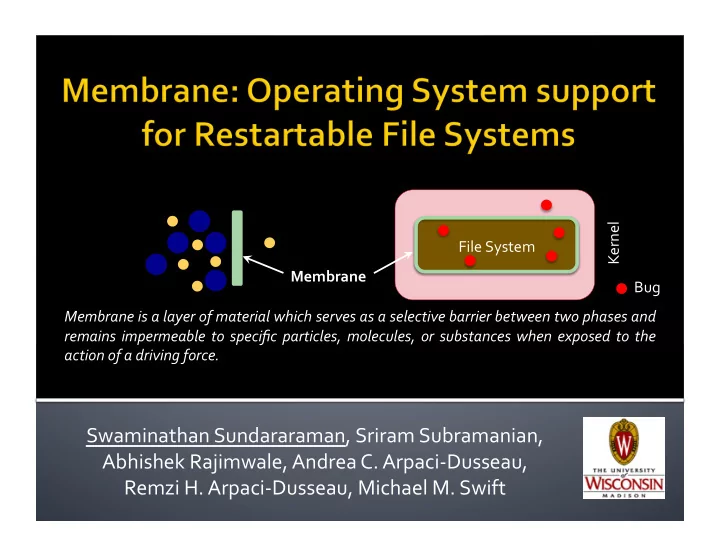
Kernel File System Membrane Bug Membrane is a layer of material which serves as a selective barrier between two phases and remains impermeable to specific particles, molecules, or substances when exposed to the action of a driving force.


slide-1
SLIDE 1

Swaminathan Sundararaman, Sriram Subramanian, Abhishek Rajimwale, Andrea C. Arpaci‐Dusseau, Remzi H. Arpaci‐Dusseau, Michael M. Swift

File System Kernel Membrane is a layer of material which serves as a selective barrier between two phases and remains impermeable to specific particles, molecules, or substances when exposed to the action of a driving force. Membrane Bug

slide-2
SLIDE 2

 Bugs are common in any large software

  • File systems contain 1,000 – 100,000 loc

 Recent work has uncovered 100s of bugs

[Engler OSDI ’00, Musuvathi OSDI ’02, Prabhakaran SOSP ‘03, Yang OSDI ’04, Gunawi FAST ‘08, Rubio-Gonzales PLDI ’09]

  • Error handling code, recovery code, etc.

 File systems are part of core kernel

  • A single bug could make the kernel unusable

3/2/10 Membrane: Operating System Support for Restartable File Systems (FAST '10) 2

slide-3
SLIDE 3

 FS developers are good

at detecting bugs

  • “Paranoid” about failures

 Lots of checks all over

the file system code!

File System assert() BUG() panic() xfs 2119 18 43 ubifs 369 36 2

  • cfs2

261 531 8 gfs2 156 60 afs 106 38 ext4 42 182 12 reiserfs 1 109 93 ntfs 288 2 Number of calls to assert, BUG, and panic in Linux 2.6.27

3/2/10 3 Membrane: Operating System Support for Restartable File Systems (FAST '10)

Detection is easy but recovery is hard

slide-4
SLIDE 4

3/2/10 4 Membrane: Operating System Support for Restartable File Systems (FAST '10)

VFS File System App App App

Processes could potentially use corrupt in‐memory file‐system objects

Crash File System App VFS

No fault isolation Inconsistent kernel state Hard to free FS objects

Common solution: crash file system and hope problem goes away after OS reboot

Inode

i_count

0x00002 Address mapping

File systems manage their

  • wn in‐memory objects

Process killed on crash

slide-5
SLIDE 5

 To develop perfect file systems

  • Tools do not uncover all file system bugs
  • Bugs still are fixed manually
  • Code constantly modified due to new features

 Make file systems handle all error cases

  • Interacts with many external components

▪ VFS, memory mgmt., network, page cache, and I/O

3/2/10 5 Membrane: Operating System Support for Restartable File Systems (FAST '10)

Cope with bugs than hope to avoid them

slide-6
SLIDE 6

 Membrane: OS framework to support

lightweight, stateful recovery from FS crashes

 Upon failure transparently restart FS

  • Restore state and allow pending application

requests to be serviced

  • Applications oblivious to crashes

 A generic solution to handle all FS crashes

  • Last resort before file systems decide to give up

3/2/10 6 Membrane: Operating System Support for Restartable File Systems (FAST '10)

slide-7
SLIDE 7

 Implemented Membrane in Linux 2.6.15

  • Evaluated with ext2, VFAT, and ext3

 Evaluation

  • Transparency: hide failures (~50 faults) from appl.
  • Performance: < 3% for micro & macro benchmarks
  • Recovery time: < 30 milliseconds to restart FS
  • Generality: < 5 lines of code for each FS

3/2/10 7 Membrane: Operating System Support for Restartable File Systems (FAST '10)

slide-8
SLIDE 8

 Motivation  Restartable file systems  Evaluation  Conclusions

3/2/10 Membrane: Operating System Support for Restartable File Systems (FAST '10) 8

slide-9
SLIDE 9

 Fault Detection

  • Helps detect faults quickly

 Fault Anticipation

  • Records file‐system state

 Fault Recovery

  • Executes recovery protocol to cleanup and restart

the failed file system

3/2/10 Membrane: Operating System Support for Restartable File Systems (FAST '10) 9

Membrane Fault Anticipation Fault Detection Fault Recovery

slide-10
SLIDE 10

 Correct recovery requires early detection

  • Membrane best handles “fail‐stop” failures

 Both hardware and software‐based detection

  • H/W: null pointer, general protection error, ...
  • S/W: asserts(), BUG(), BUG_ON(), panic()

 Assume transient faults during recovery

  • Non‐transient faults: return error to that process

3/2/10 Membrane: Operating System Support for Restartable File Systems (FAST '10) 10

slide-11
SLIDE 11

3/2/10 Membrane: Operating System Support for Restartable File Systems (FAST '10) 11

Membrane Fault Anticipation Fault Detection Fault Recovery

slide-12
SLIDE 12

Additional work done in anticipation of a failure

 Issue: where to restart the file system from?

  • File systems constantly updated by applications

 Possible solutions:

  • Make each operation atomic
  • Leverage in‐built crash consistency mechanism

 Not all FS have crash consistency mechanism

3/2/10 Membrane: Operating System Support for Restartable File Systems (FAST '10) 12

Generic mechanism to checkpoint FS state

slide-13
SLIDE 13

3/2/10 Membrane: Operating System Support for Restartable File Systems (FAST '10) 13

VFS File System Page Cache Disk App App App File systems write to disk through page cache All requests enter via VFS layer

ext3 VFAT

Control requests to FS & dirty pages to disk

Checkpoint: consistent state of the file system that can be safely rolled back to in the event of a crash

slide-14
SLIDE 14

3/2/10 Membrane: Operating System Support for Restartable File Systems (FAST '10) 14

VFS File System Page Cache Disk App VFS File System Page Cache App Disk

Regular During Checkpoint After Checkpoint

VFS File System Page Cache App Disk

STOP STOP

Membrane

STOP

Consistent image ✓ ✓ ✓ ✓

Copy‐on‐Write

Can be written back to disk

Disk Disk Disk Consistent Image #1 Consistent Image #2

On crash roll back to last consistent Image

Consistent Image #3

slide-15
SLIDE 15

After Recovery

 On crash: flush dirty pages of last checkpoint  Throw away the in‐memory state  Remount from the last checkpoint

  • Consistent file‐system image on disk

 Issue: state after checkpoint would be lost

  • Operations completed after checkpoint returned

back to applications

3/2/10 Membrane: Operating System Support for Restartable File Systems (FAST '10) 15

VFS File System Page Cache App Disk ✓ ✓ ✓ ✓

Crash

STOP

On Crash

Need to recreate state after checkpoint

slide-16
SLIDE 16

 Log operations along with their return value

  • Replay completed operations after checkpoint

 Operations are logged at the VFS layer

  • File‐system independent approach

 Logs are maintained in‐memory and not on disk  How long should we keep the log records?

  • Log thrown away at checkpoint completion

3/2/10 Membrane: Operating System Support for Restartable File Systems (FAST '10) 16

slide-17
SLIDE 17

3/2/10 Membrane: Operating System Support for Restartable File Systems (FAST '10) 17

Membrane Fault Anticipation Fault Detection Fault Recovery

slide-18
SLIDE 18

Important steps in recovery:

  • 1. Cleanup state of partially‐completed operations
  • 2. Cleanup in‐memory state of file system
  • 3. Remount file system from last checkpoint
  • 4. Replay completed operations after checkpoint
  • 5. Re‐execute partially complete operations

3/2/10 Membrane: Operating System Support for Restartable File Systems (FAST '10) 18

slide-19
SLIDE 19

File System

3/2/10 Membrane: Operating System Support for Restartable File Systems (FAST '10) 19

VFS File System App App App VFS File System App Page Cache Kernel User

FS code should not be trusted after crash Multiple threads inside file system

Crash

Intertwined execution Processes cannot be killed after crash

Application threads killed? ‐ application state will be lost

Clean way to undo incomplete operations

slide-20
SLIDE 20

Skip: file‐system code Trust: kernel code (VFS, memory mgmt., …)

‐ Cleanup state on error from file systems

 How to prevent execution of FS code?

  • Control capture mechanism: marks file‐system

code pages as non‐executable

  • Unwind Stack: stores return address (of last

kernel function) along with expected error value

3/2/10 Membrane: Operating System Support for Restartable File Systems (FAST '10) 20

slide-21
SLIDE 21

 E.g., create code path in ext2

3/2/10 Membrane: Operating System Support for Restartable File Systems (FAST '10) 21

sys_open() do_sys_open() filp_open()

  • pen_namei()

ext2_create() Unwind Stack block_prepare_write() ext2_prepare_write() ext2_addlink() ext2_get_block() vfs_create regs rval fn

‐ENOMEM

rax rbp rsi rdi rbx rcx rdx r8 …

blk..._write regs rval fn

‐EIO

rax rbp rsi rdi rbx rcx rdx r8 …

1

Release fd

1 2 3

Clear buffer Zero page Mark not dirty

3

Release namei data

2

vfs_create()

fault membrane fault membrane

Crash Non‐executable

ext2_create() ext2_get_block() ‐EIO ‐ENOMEM

Kernel File system

Kernel is restored to a consistent state

slide-22
SLIDE 22

3/2/10 Membrane: Operating System Support for Restartable File Systems (FAST '10) 22

Membrane Fault Anticipation Fault Detection Fault Recovery

slide-23
SLIDE 23

3/2/10 Membrane: Operating System Support for Restartable File Systems (FAST '10) 23

VFS File System Application T0 T1 time checkpoint

Open (“file”) write() read() Completed In-progress

Legend:

Crash write()

Periodically create checkpoints 1 Move to recent checkpoint 4 Replay completed

  • perations

5 Unwind in‐flight processes 3 File System Crash 2 Re‐execute unwound process 6

1 2 4 5 6 link() Close() 3

T2

slide-24
SLIDE 24

 Motivation  Restartable file systems  Evaluation  Conclusions

3/2/10 Membrane: Operating System Support for Restartable File Systems (FAST '10) 24

slide-25
SLIDE 25

 Questions that we want to answer:

  • Can membrane hide failures from applications?
  • What is the overhead during user workloads?
  • Portability of existing FS to work with Membrane?
  • How much time does it take to recover the FS?

 Setup:

  • 2.2 GHz Opteron processor & 2 GB RAM
  • Two 80 GB western digital disk
  • Linux 2.6.15 64bit kernel, 5.5K LOC were added
  • File systems: ext2, VFAT, ext3

3/2/10 Membrane: Operating System Support for Restartable File Systems (FAST '10) 25

slide-26
SLIDE 26

Ext3_Function Fault Ext3 + Native Ext3 + Membrane

D e t e c t e d ? Application? FS Consistent? F S U s a b l e ? D e t e c t e d ? Application? FS Consistent? F S U s a b l e ?

create null‐pointer

✗ ✗ d ✓ ✓ ✓ get_blk_handle bh_result

✗ ✗ d ✓ ✓ ✓ follow_link nd_set_link

✗ ✓ d ✓ ✓ ✓ mkdir d_instantiate

✗ ✗ d ✓ ✓ ✓ free_inode clear_inode

✗ ✗ d ✓ ✓ ✓ read_blk_bmap sb_bread

✓ ✗ d ✓ ✓ ✓ readdir null‐pointer

✗ ✗ d ✓ ✓ ✓ file_write file_aio_write G ✗ ✓ ✓ d ✓ ✓ ✓

3/2/10 Membrane: Operating System Support for Restartable File Systems (FAST '10) 26

Legend: O – oops, G‐ prot. fault, d – detected,

  • – cannot unmount, ✗ ‐ no, ✓‐ yes

Membrane successfully hides faults

slide-27
SLIDE 27

3/2/10 Membrane: Operating System Support for Restartable File Systems (FAST '10) 27

Time in Seconds

Workload: Copy, untar, make of OpenSSH 4.51

slide-28
SLIDE 28

3/2/10 Membrane: Operating System Support for Restartable File Systems (FAST '10) 28

Time in Seconds

Workload: Copy, untar, make of OpenSSH 4.51

28.5 28.9 30.1 30.8 28.7 29.1 1.4% 2.3% 1.4%

Reliability almost comes for free

slide-29
SLIDE 29

File System Added Modified Deleted

Ext2 4 VFAT 5 Ext3 1 JBD 4

29

Individual file system changes

Minimal changes to port existing FS to Membrane

3/2/10 Membrane: Operating System Support for Restartable File Systems (FAST '10)

Existing code remains unchanged Additions: track allocations and write super block

No crash‐consistency crash‐consistency

slide-30
SLIDE 30

 Motivation  Restartable file systems  Evaluation  Conclusions

3/2/10 Membrane: Operating System Support for Restartable File Systems (FAST '10) 30

slide-31
SLIDE 31

 Failures are inevitable in file systems

  • Learn to cope and not hope to avoid them

 Membrane: Generic recovery mechanism

  • Users: Build trust in new file systems (e.g., btrfs)
  • Developers: Quick‐fix bug patching

 Encourage more integrity checks in FS code

  • Detection is easy but recovery is hard

3/2/10 Membrane: Operating System Support for Restartable File Systems (FAST '10) 31

slide-32
SLIDE 32

Questions?

3/2/10 Membrane: Operating System Support for Restartable File Systems (FAST '10) 32

Advanced Systems Lab (ADSL) University of Wisconsin‐Madison h<p://www.cs.wisc.edu/adsl

slide-33
SLIDE 33

 Files may be recreated during recovery

  • Inode numbers could change after restart

Solution: make create() part of a checkpoint

3/2/10 Membrane: Operating System Support for Restartable File Systems (FAST '10) 33

VFS File System Application

Epoch 0

After Crash Recovery Before Crash

Epoch 0 create (“file1”) stat (“file1”) write (“file1”, 4k) File : file1 Inode# : 15 create (“file1”) stat (“file1”) write (“file1”, 4k)

File1: inode# 12 File1: inode# 15 Inode# Mismatch

File : file1 Inode# : 12

slide-34
SLIDE 34

34

Time in Seconds

 3000 files (sizes 4K to 4MB), 60K transactions

46.9 47.2 43.1 43.8 478.2 484.1 0.6% 1.6% 1.2%

3/2/10 Membrane: Operating System Support for Restartable File Systems (FAST '10)

slide-35
SLIDE 35

Data (Mb) Recovery Time (ms) 10 12.9 20 13.2 40 16.1

35

Open Sessions Recovery Time (ms) 200 11.4 400 14.6 800 22.0 Log Records Recovery Time (ms) 1K 15.3 10K 16.8 100K 25.2

 Recovery time is a function of:

  • Dirty blocks, open sessions, and log records
  • We varied each of them individually

Recovery time is in the order of a few milliseconds

3/2/10 Membrane: Operating System Support for Restartable File Systems (FAST '10)

slide-36
SLIDE 36

Restart ext2 during random‐read benchmark

36 3/2/10 Membrane: Operating System Support for Restartable File Systems (FAST '10)

slide-37
SLIDE 37

File System Added Modified

Ext2 4 VFAT 5 Ext3 1 JBD 4

37

Components No Checkpoint With Checkpoint

Added Modified Added Modified FS 1929 30 2979 64 MM 779 5 867 15 Arch 733 4 Headers 522 6 552 6 Module 238 238 Total 3468 41 5369 89

Individual file system changes Kernel changes

3/2/10 Membrane: Operating System Support for Restartable File Systems (FAST '10)

slide-38
SLIDE 38

 Have built‐in crash consistency mechanism

  • Journaling or Snapshotting

 Seamlessly integrate with these mechanism

  • Need FSes to indicate beginning and end of an

transaction

  • Works for data and ordered journaling mode
  • Need to combine writeback mode with COW

38 3/2/10 Membrane: Operating System Support for Restartable File Systems (FAST '10)

slide-39
SLIDE 39

 Goal: Reduce the overhead of logging writes

  • Soln: Grab data from page cache during recovery

39

VFS File System Page Cache VFS File System Page Cache Before Crash During Recovery VFS File System Page Cache After Recovery Write (fd, buf, offset, count)

3/2/10 Membrane: Operating System Support for Restartable File Systems (FAST '10)

slide-40
SLIDE 40

 During log replay could data be written in

different order?

  • Log entries need not represent actual order

 Not a problem for meta‐data updates

  • Only one of them succeed and is recorded in log

 Deterministic data‐block updates with page

stealing mechanism

  • Latest version of the page is used during replay

40 3/2/10 Membrane: Operating System Support for Restartable File Systems (FAST '10)

slide-41
SLIDE 41
  • 1. Code to recover from all failures
  • Not feasible in reality
  • 2. Restart on failure
  • Previous work have taken

this approach FS need: stateful & lightweight recovery

41

Heavyweight Lightweight

Stateless Stateful

Nooks/Shadow Xen, Minix L4, Nexus

SafeDrive Singularity CuriOS EROS

3/2/10 Membrane: Operating System Support for Restartable File Systems (FAST '10)