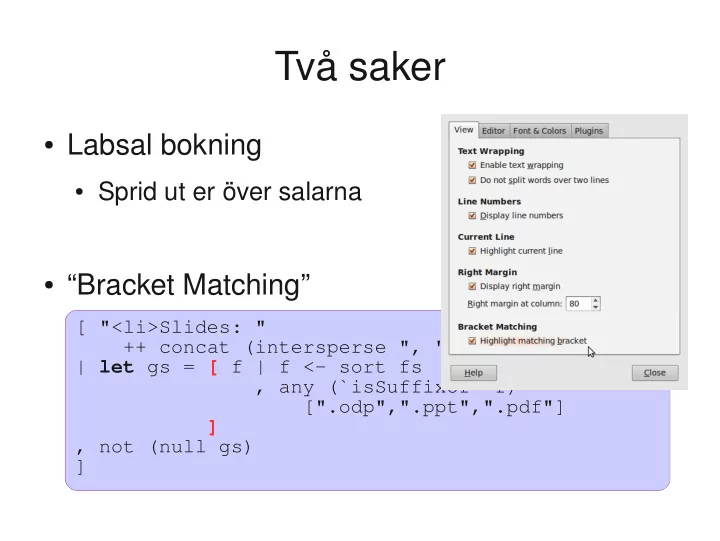
SLIDE 1 Två saker
- Labsal bokning
- Sprid ut er över salarna
- “Bracket Matching”
[ "<li>Slides: " ++ concat (intersperse ", " (map lnk gs)) | let gs = [ f | f <- sort fs , any (`isSuffixOf` f) [".odp",".ppt",".pdf"] ] , not (null gs) ] [ "<li>Slides: " ++ concat (intersperse ", " (map lnk gs)) | let gs = [ f | f <- sort fs , any (`isSuffixOf` f) [".odp",".ppt",".pdf"] ] , not (null gs) ]
SLIDE 2
IO and Instructions
Koen Lindström Claessen
SLIDE 3 Apple Pie
Mumsig äppelpaj Värm upp ugnen till 225 grader, blanda ingredienserna nedan och se till att fatet är både ugnsäkert och insmort med margarin. Lägg på äpplena som du tärnar först och sen kanel och socker ovanpå. Häll på resten av smulpajen och låt stå i ugnen i ca 25 minuter. Servera med massor av vaniljsås! 2.5 dl mjöl 100 gram margarin 5-6 äpplen, gärna riktigt stora 1 dl socker 1 msk kanel Mycket vaniljsås, gärna Marzan
Difference?
SLIDE 4 Running a Program
What is the type
How do you write this as a function?
SLIDE 5 A Simple Example
Prelude> writeFile “myfile.txt” “Anna+Kalle=sant” Prelude>
- Writes the text “Anna+Kalle=sant” to the file
called “myfile.txt”
- No result displayed---why not?
SLIDE 6 What is the Type of writeFile?
Prelude> :i writeFile writeFile :: FilePath -> String -> IO ()
- When you give Haskell an expression of
type IO, it obeys the instructions (instead of printing the result)
Just a String INSTRUCTIONS to the operating system to write the file
SLIDE 7 The type ()
- The type () is called the unit type
- It only has one value, namely ()
- We can see () as the “empty tuple”
- It means that there is no interesting result
SLIDE 8 The type FilePath
- Is a type synonym...
- ...which is a way to give a name to a type that
already exists
- for convenience and/or documentation
- (Remember: data creates a new type, which is
different )
type FilePath = String data Shape = Circle Float | ...
SLIDE 9 An Analogy
- Instructions:
- Value:
- 1. Take this card
- 2. Put the card in the Bankomat
- 3. Enter the code “1437”
- 4. Select “500kr”
- 5. Take the money
Which would you rather have?
SLIDE 10 Apple Pie
Mumsig äppelpaj Värm upp ugnen till 225 grader, blanda ingredienserna nedan och se till att fatet är både ugnsäkert och insmort med margarin. Lägg på äpplena som du tärnar först och sen kanel och socker ovanpå. Häll på resten av smulpajen och låt stå i ugnen i ca 25 minuter. Servera med massor av vaniljsås! 2.5 dl mjöl 100 gram margarin 5-6 äpplen, gärna riktigt stora 1 dl socker 1 msk kanel Mycket vaniljsås, gärna Marzan
Which would you rather have?
SLIDE 11 Instructions with a result value
Prelude> :i readFile readFile :: FilePath -> IO String
- readFile “myfile.txt” is not a String
- no String can be extracted from it...
- ...but we can use it to create other instructions
that use the result
INSTRUCTIONS for computing a String We cannot extract 500kr from the list of instructions either...
SLIDE 12
Putting Instructions Together
copyFile :: FilePath -> FilePath -> IO () copyFile file1 file2 = do s <- readFile file1 writeFile file2 s writeTwoFiles :: FilePath -> String -> IO () writeTwoFiles file s = do writeFile (file ++ “1”) s writeFile (file ++ ”2”) s Use do to combine instructions into larger ones
SLIDE 13
Putting Instructions Together (2)
catFiles :: FilePath -> FilePath -> IO String catFiles file1 file2 = do s1 <- readFile file1 s2 <- readFile file2 return (s1++s2) Use do to combine instructions into larger ones Use return to create an instruction with just a result return :: a -> IO a
SLIDE 14 Instructions vs. Functions
- Functions always give the same result for the
same arguments
- Instructions can behave differently on different
- ccasions
- Confusing them is a major source of bugs
- Most programming languages do so...
- ...understanding the difference is important!
SLIDE 15
The IO type
data IO a -- a built-in type putStr :: String -> IO () putStrLn :: String -> IO () readFile :: FilePath -> IO String writeFile :: FilePath -> String -> IO () ... Look in the standard modules: IO, System.IO, System.*, ...
SLIDE 16 Some Examples
- doTwice :: IO a -> IO (a,a)
- dont :: IO a -> IO ()
- second :: [IO a] -> IO a
- (see file Instructions.hs)
SLIDE 17 Evaluating & Executing
- IO actions of result type ()
- are just executed
- IO actions of other result types
- are executed, and then the result is printed
Prelude> writeFile “emails.txt” “anna@gmail.com” Prelude> readFile “emails.txt” “anna@gmail.com”
SLIDE 18 Quiz
sortFile :: FilePath -> FilePath -> IO ()
- Define the following function:
- “sortFile file1 file2” reads the lines of file1, sorts
them, and writes the result to file2
- You may use the following standard functions:
sort :: Ord a => [a] -> [a] lines :: String -> [String] unlines :: [String] -> String
SLIDE 19
Answer
sortFile :: FilePath -> FilePath -> IO () sortFile file1 file2 = do s <- readFile file1 writeFile file2 (unlines (sort (lines s)))
SLIDE 20 An Example
getLine :: IO String
- Let's define the following function:
Prelude> getLine apa “apa”
- We may use the following standard function:
getChar :: IO Char
SLIDE 21
Two useful functions
sequence :: [IO a] -> IO [a] sequence_ :: [IO ()] -> IO () Can be used to combine lists of instructions into one instruction
SLIDE 22 An Example
writeFiles :: FilePath -> [String] -> IO ()
- Let's define the following function:
Prelude> writeFiles “file” [“apa”,”bepa”,”cepa”] Prelude> readFile “file1” “apa” Prelude> readFile “file3” “cepa”
- We may use the following standard functions:
show :: Show a => a -> String zip :: [a] -> [b] -> [(a,b)]
SLIDE 23
A possible definition
writeFiles :: FilePath -> [String] -> IO () writeFiles file xs = sequence_ [ writeFile (file++show i) x | (x,i) <- zip xs [1..length xs] ] We create complex instructions by combining simple instructions
SLIDE 24
Definitions?
sequence_ :: [IO ()] -> IO () sequence :: [IO a] -> IO [a]
SLIDE 25 Functions vs. Instructions
- Functions always produce the same results for
the same arguments
- Instructions can have varying results for each
time they are executed
putStrLn :: String -> IO () readFile :: FilePath -> IO String getLine :: IO String YES! They deliver the same instructions for the same arguments (but executing these instructions can have different results)
SLIDE 26 What is the Type of doTwice?
Prelude> :i doTwice doTwice :: Monad m => m a -> m (a,a)
- We will see other kinds of instructions (than
IO) in the next lecture
Monad = Instructions There are several different kinds of instructions!
SLIDE 27
Reading
Chapter 18 of the text book on IO
SLIDE 28 Do’s and Don’ts
isBig :: Integer -> Bool isBig n | n > 9999 = True | otherwise = False isBig :: Integer -> Bool isBig n = n > 9999
guards and boolean results
SLIDE 29 Do’s and Don’ts
resultIsSmall :: Integer -> Bool resultIsSmall n = isSmall (f n) == True resultIsSmall :: Integer -> Bool resultIsSmall n = isSmall (f n)
comparison with a boolean constant
SLIDE 30 Do’s and Don’ts
resultIsBig :: Integer -> Bool resultIsBig n = isSmall (f n) == False resultIsBig :: Integer -> Bool resultIsBig n = not (isSmall (f n))
comparison with a boolean constant
SLIDE 31 Do’s and Don’ts
fun1 :: [Integer] -> Bool fun1 [] = False fun1 (x:xs) = length (x:xs) == 10 fun1 :: [Integer] -> Bool fun1 xs = length xs == 10
repeated code necessary case distinction?
Do not make unnecessary case distinctions
SLIDE 32 Do’s and Don’ts
fun2 :: [Integer] -> Integer fun2 [x] = calc x fun2 (x:xs) = calc x + fun2 xs fun2 :: [Integer] -> Integer fun2 [] = 0 fun2 (x:xs) = calc x + fun2 xs
repeated code right base case ?
Make the base case as simple as possible