Web programming Cristian Estan guest lecture in CS640 November 13 - - PDF document

web programming
SMART_READER_LITE
LIVE PREVIEW

Web programming Cristian Estan guest lecture in CS640 November 13 - - PDF document

Web programming Cristian Estan guest lecture in CS640 November 13 2007 The web as a platform for applications Feature Web app. Desktop app. Graphics Strong Unlimited User interaction Strong Unlimited Network usage High Varies


slide-1
SLIDE 1

1

Web programming

Cristian Estan – guest lecture in CS640 November 13 2007

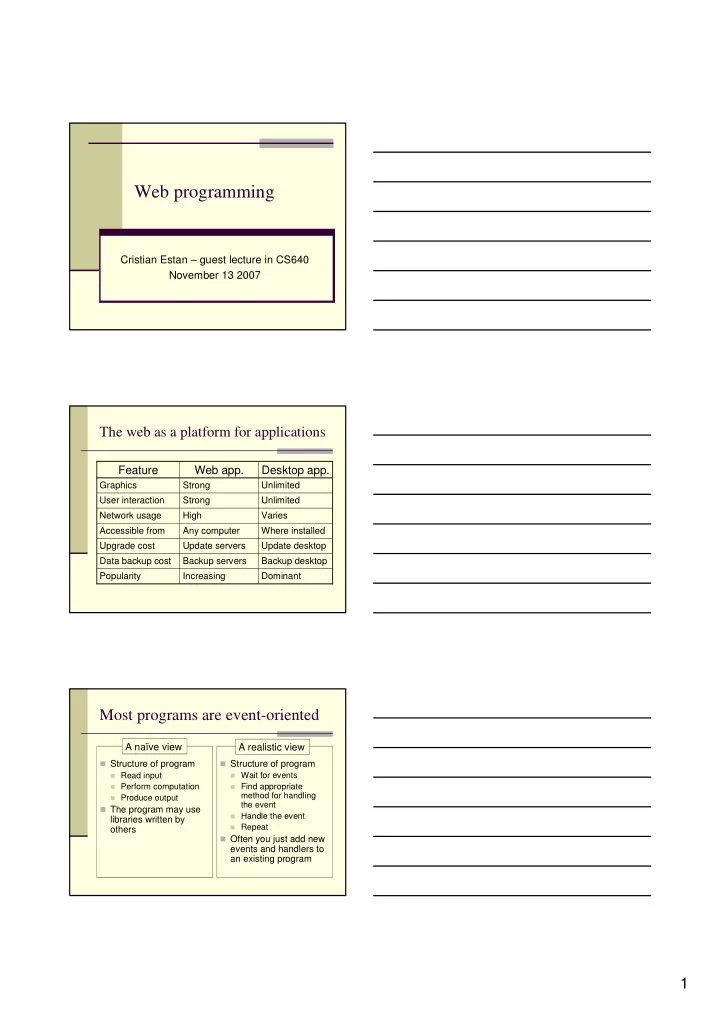
The web as a platform for applications

Varies High Network usage Unlimited Strong User interaction Update desktop Update servers Upgrade cost Dominant Increasing Popularity Backup desktop Backup servers Data backup cost Where installed Any computer Accessible from Unlimited Strong Graphics

Desktop app. Web app. Feature

Most programs are event-oriented

Structure of program

Read input Perform computation Produce output

The program may use

libraries written by

  • thers

Structure of program

Wait for events Find appropriate

method for handling the event

Handle the event Repeat

Often you just add new

events and handlers to an existing program

A naïve view A realistic view

slide-2
SLIDE 2

2 Overview

Web documents Server-side programming Client-side programming Web services

HyperText Markup Language

Disagreement about HTML’s role

Only give the content and structure of the document, leave

visualization to the browser

Browsers vary (graphical, text based, mobile devices) User preferences vary (some people like larger fonts) Environment varies (screen sizes, fonts available, etc.)

But authors want to control what the document looks like

Trend towards separating content from presentation

Cascading Style Sheets – presentation information only HTML documents contain little formatting

Current state of the standards

In the 90s browser wars (IE vs. Netscape) were

driving the evolution of HTML

Non-standard extensions used by pages lead to lock-in

W3C (World Wide Web Consortium) sets standards Last HTML standard 4.01 (December 1999) XHTML 1.0 new XML-based format

XML (extensible markup language) – focuses on

semantics and is used as general purpose format for structured data

A document called DTD or XML Schema defines what

tags and attributes are allowed in an XML document

slide-3
SLIDE 3

3

<TITLE>Bucky Badger’s web page</TITLE> <BODY> <H1>Welcome to Bucky's web page</H1> <IMG SRC="bucky.gif"> <P>I am Bucky, the mascot for University of Wisconsin

  • athletics. Please visit

<A HREF="http://www.uwbadgers.com/football/index.html"> the web page of our football team</A> and <A HREF="http://www.uwbadgers.com/basketball/index.html"> the web page of our basketball team</A>. </BODY>

A valid web page

<!DOCTYPE html PUBLIC "-//W3C//DTD XHTML 1.0 Transitional//EN" "http://www.w3.org/TR/xhtml1/DTD/xhtml1-transitional.dtd"> <html> <head> <title>Bucky Badger’s web page</title> </head> <body> <h1>Welcome to Bucky's web page</h1><!-- Users don’t see this comment. --> <img src="bucky.gif" alt="A picture of Bucky" /> <p>I am Bucky, the mascot for University of Wisconsin athletics. Please visit <a href="http://www.uwbadgers.com/football/index.html"> the web page of our football team</a> and <a href="http://www.uwbadgers.com/basketball/index.html"> the web page of

  • ur basketball team</a>.</p>

</body> </html>

About forms

Forms are the traditional way for users to

send information to a web server

The user fills out fields in the browser The user submits the form http carries the user input to the web server A server side program processes the user data The server sends a reply document to the

client

slide-4
SLIDE 4

4

<h3>Search form</h3> <form method="get“ action="http://www.googlesyndicatedsearch.com/u/univwisc"> <p>What are you looking for? <input type="text" name="q" id="searchText" value="Your search terms..." /> <input type="hidden" name="hl" value="en" /> <input type="hidden" name="ie" value="ISO-8859-1" /> <input type="submit" id="searchButton" value="Search UW-Madison" /> </p></form>

About tables

Their original role was to display tables Their most prevalent use is for controlling the

placement of visual elements on the page

http://www.cs.wisc.edu, http://www.google.com Frames control placement too – don’t use them

The table is a collection of rows The rows are collections of cells Cells on the same row/column are aligned Cells can contain anything (even other tables)

The <table></table> tag

Defines a table The “border” attribute defines the width of the

lines used to draw the table (in pixels)

Defaults to 0 which means no lines are drawn

The “width” attribute controls table width

By default it is in pixels It can be given as a percentage of the window If not specified, the table is only as wide as

needed to display cell contents

slide-5
SLIDE 5

5 The <tr></tr> tag

Defines a table row

The “align” attribute controls horizontal

alignment of text in cells – can be “left”, “right”, “center”

The “valign” attribute controls vertical

alignment of text in cells – can be “top”, “bottom”, “middle”

The “nowrap” attribute instructs the browser

not to wrap the text from within the cells

The <td></td> tag

Defines a table cell

Has “align”, “valign” and “nowrap” attributes “width” can be given as percentage of table

width

“height” gives minimum height for cell “colspan” allows a cell to span multiple

columns

“rowspan” allows a cell to span multiple rows

<table border="3"> <tr align="center"><td>Title</td> <td>Authors</td> <td>Publisher</td> </tr> <tr><td>HTML: The Definitive Guide</td> <td>Chuck Musciano and Bill Kennedy</td> <td>O'Reilly &amp; Associates</td> </tr> <tr><td>Learning C# 2005</td> <td>Jesse Liberty and Brian MacDonald</td> <td>O'Reilly &amp; Associates</td> </tr> </table>

slide-6
SLIDE 6

6

<table width="300"> <tr valign="top"> <td rowspan="2" valign="middle"> <i>You can contact the people listed here.</i></td> <td width="140"> <img src="sohi-mini.jpg" /> <br /><b><a href="/~sohi/">Prof. Gurindar Sohi </a></b> <br />Chair</td> <td width="140"> <img src="horwitz-mini.jpg" /> <br /><b><a href="/~horwitz/">Prof. Susan Horwitz </a></b> <br />Associate Chair</td> </tr> <tr><td colspan="2" align="center"> <i>There are a few others we should have listed.</i> </td> </tr> </table>

Overview

Web documents Server-side programming Client-side programming Web services

Server side programming

Short history

CGI – separate programs launched by web server

They produce an HTML document as output They receive arguments as input Strong isolation, bad performance

Programs embedded inside web page (php, ASP, JSP)

Program executed inside web server process

Separate “code-behind” file for the code (ASP.NET)

What are dynamic pages used for?

Personalizing based on user identity Interacting with databases (e.g. on-line banking) Web applications (e.g. web based email)

Separate database keeps persistent data

slide-7
SLIDE 7

7 “Lifecycle” of static web page

Web server machine Server code Server data File system Web client HTTP request URL Request HTTP response HTML file

Lifecycle of ASP.NET webpage

Web server machine Server code Server data File system Web client HTTP request URL Request HTTP response Objects representing this web page .aspx file codebehind HTML snippets

Page with database interaction

Web server machine Server code Server data File system Web client HTTP request URL Request HTTP response Objects representing this web page .aspx file codebehind HTML snippets Database SQL interaction

slide-8
SLIDE 8

8 Trivial ASPX File

<%@ Page Language="C#" AutoEventWireup="true" CodeFile="Stub.aspx.cs" Inherits="Stub" %> <!DOCTYPE html PUBLIC "-//W3C//DTD XHTML 1.0 Transitional//EN" "http://www.w3.org/TR/xhtml1/DTD/xhtml1-transitional.dtd"> <html xmlns="http://www.w3.org/1999/xhtml" > <head runat="server"> <title>Untitled Page</title> </head> <body> <form id="form1" runat="server"> <div> <asp:Label ID="lblTime" runat="server" /> </div> </form> </body> </html>

Trivial Code Behind File

using System; using System.Data; using System.Configuration; using System.Collections; using System.Web; using System.Web.Security; using System.Web.UI; using System.Web.UI.WebControls; using System.Web.UI.WebControls.WebParts; using System.Web.UI.HtmlControls; public partial class Stub : System.Web.UI.Page { protected void Page_Load(object sender, EventArgs e) { lblTime.Text = DateTime.Now.ToLongTimeString(); } }

Output from Trivial Page

<!DOCTYPE html PUBLIC "-//W3C//DTD XHTML 1.0 Transitional//EN" "http://www.w3.org/TR/xhtml1/DTD/xhtml1-transitional.dtd"> <html xmlns="http://www.w3.org/1999/xhtml" > <head><title> Untitled Page </title></head> <body> <form name="form1" method="post" action="Stub.aspx" id="form1"> <div> <input type="hidden" name="__VIEWSTATE" id="__VIEWSTATE" value="/stuff" /> </div> <div> <span id="lblTime">2:52:13 PM</span> </div> </form> </body> </html>

slide-9
SLIDE 9

9 Overview

Web documents Server-side programming Client-side programming Web services

Why is JavaScript important?

Web pages can contain JavaScript programs executed

inside the browser

Supported by all major browsers

Microsoft’s version called Jscript (the language is the same)

User may disable JavaScript due to security fears

This is default for some newer versions of Internet Explorer

Client-side programming important for web because

Can promptly validate user input Can update the web page without postback to server Allows page to react to user actions other than pushing a

“submit” button – more interactivity

What is JavaScript?

Interpreted, object-oriented programming language

with dynamic typing

Introduced by Netscape with Netscape 2.0 in 1995 Standardized as ECMAScript by ECMA (European

Computer Manufacturers Association)

Not related to Java other than the name

Tightly integrated with browser

Can handle many types of events generated by the

normal interaction between user and browser

Can modify the internal objects based on which the

browser renders the web page

slide-10
SLIDE 10

10

<head> <title>JavaScript Hello world!</title> </head> <body> <script> document.write("Hello world!"); </script> </body>

Adding JavaScript to a page

Using the <script> </script> tag

Text between tags is JavaScript program Can specify external file using src attribute Executed as the document is loading

Value of an attribute such as onclick

This type of code is called event handler Executed when event happens Can define event handlers for almost any

HTML element in page

Some events JavaScript can handle

The control’s state changes

  • nchange

The control gets focus

  • nfocus

Specific to forms The form is submitted

  • nsubmit

Document load complete Key released Key pressed and released Key pressed down Mouse button released Mouse button pressed Mouse moves off el. Mouse moves over el. Mouse click on element Triggered when Used for <body> and <img>

  • nload

Used for form elements and <body>

  • nkeyup
  • nkeypress

Used for form elements and <body> Return false to cancel

  • nkeydown
  • nmouseup
  • nmousedown
  • nmouseout
  • nmouseover

Return false to cancel default action

  • nclick

Comments Handler

slide-11
SLIDE 11

11 Document Object Model

Describes how the document object from

JavaScript can be traversed and modified

Represented as tree structure Can add new elements to the page Can change attributes of existing elements

DOM has levels 0-3 and many sub-standards The DOM interface used in other contexts with

  • ther languages (C++, Java, python, etc.)

The document as a tree

<html> <head> <title>A Document</title> </head> <body> <h1>A web page</h1> <p>A <i>simple</i> paragraph</p> </body> </html>

document <html> <head> <body> <title> “A document” <h1> <p> “A web page” “A ” “simple” “ paragraph” <i>

Changing the structure

function addItalic(){ var i=document.createElement("i"); i.appendChild(document.createTextNode("italic")); addParagraph(i); } function addBold(){ var b=document.createElement("b"); b.appendChild(document.createTextNode("bold")); addParagraph(b); } function addParagraph(node){ var p=document.createElement("p"); p.appendChild(document.createTextNode("Some ")); p.appendChild(node); p.appendChild(document.createTextNode(" text.")); document.getElementById("playground").appendChild(p); } function clearAll(){ var d=document.getElementById("playground"); while(d.childNodes.length>0) d.removeChild(d.childNodes[0]); }

slide-12
SLIDE 12

12 Dynamic Colors

function changeBGColor(color){ var p=document.getElementById("para1"); p.style.backgroundColor=color; } function checkColor(){ var s=document.getElementById("textfield1").value; if (s.length!=6){ alert('Must enter six hex digits'); return; } for (var i=0;i<6;i++){ if(!((s[i]>='A' && s[i]<='F')|| (s[i]>='a' && s[i]<='f')|| (s[i]>='0' && s[i]<='9'))){ alert(" Character '"+s[i]+"' is not valid"); return; } } changeBGColor("#"+s); }

Overview

Web documents Server-side programming Client-side programming Web services

What are web services?

A form of remote procedure call: your program (the client) asks

another computer (the server) to run a procedure for you

  • Parameters sent over the network from client to server
  • Results sent over network from server to client

Why would you ever want to do a remote procedure call?

  • Data needed for answer not (easily) accessible to your

computer

  • You want to re-use existing procedures that run in a different

environment than your program

  • Your computer lacks the resources (i.e. processor capacity,

memory, network connection speed) to compute the result

There are many other forms of RPC older than web services

  • CORBA, DCOM, SunRPC, RMI
slide-13
SLIDE 13

13 Internals of an RPC framework

Code for marshalling/unmarshalling – encoding and

decoding parameters/results

A.k.a. serializing objects

Description of the available procedures (methods)

Using an interface description language (IDL)

Framework that turns these descriptions into “stubs”

On the client the stub makes it look to your program

like the stub is executing the procedure locally

On the server the stub invokes the procedure The client and server stub interact over the network

Specific to web services

They run over http

Procedure call is in an http request Result is in an http response

They use XML to

Encode responses Encode requests (sometimes) Describe the procedures (incl. arguments and results)

Client and server often use different languages

Client may be JavaScript code in browser – AJAX

Client and server are often in different organizations