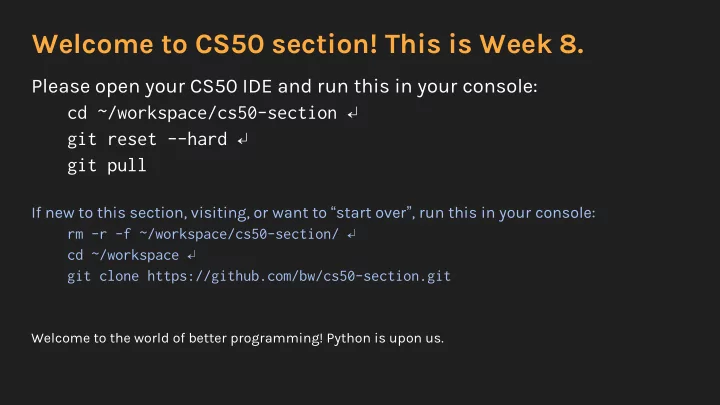
SLIDE 1 Welcome to CS50 section! This is Week 8.
Please open your CS50 IDE and run this in your console: cd ~/workspace/cs50-section ↵ git reset --hard ↵ git pull
If new to this section, visiting, or want to “start over”, run this in your console: rm -r -f ~/workspace/cs50-section/ ↵ cd ~/workspace ↵ git clone https://github.com/bw/cs50-section.git
Welcome to the world of better programming! Python is upon us.
SLIDE 2
Welcome to Python
Python lets us write smarter programs, faster. Course timeline: Raw C code Distribution C code Raw Python code Framework Python code (Flask) HTML/CSS JavaScript JavaScript frameworks (jQuery) (The rest go fast!)
SLIDE 3 Before starting pset 6
- Conceptual basics of Python
○ Definitions that will help
- Python syntax
- Comparisons of Python vs. C
- Basic Flask details
- Model/view/controller paradigm (MVC)
SLIDE 4
Definitions are underlined (Write me down!)
SLIDE 5 Type strength
- In Python, you don’t need to explicitly define variable types.
- Instead of:
float change = 0.5;
- In Python, the compiler guesses:
change = 0.5 # It has a decimal! It must be a float. change = 1 # Oh there’s no decimal. I guess this is an integer.
SLIDE 6 Type strength
We can put programming languages into two large buckets:
- Strongly typed
- Weakly typed
SLIDE 7 Type strength
We can put programming languages into two large buckets:
○ You need to tell the computer the type (int, float, etc) ○ The computer cares what the type is ○ The computer gets mad at you if the type is wrong
SLIDE 8 Type strength
We can put programming languages into two large buckets:
○ You need to tell the computer the type (int, float, etc) ○ The computer cares what the type is ○ The computer gets mad at you if the type is wrong
○ The computer infers the type (i.e. it makes an educated guess) ○ The computer knows, but doesn’t care, what the type is
SLIDE 9 Type strength
○ Classical languages: C, Java
- Weakly typed languages (mostly)
○ Modern languages: PHP, Python, JavaScript
SLIDE 10 Type strength
○ Classical languages: C, Java ○ New languages: TypeScript, etc.
- Weakly typed languages (mostly)
○ Modern languages: PHP, Python, JavaScript
SLIDE 11
Type strength
Benefits of strong typing: Benefits of weak typing:
SLIDE 12 Type strength
Benefits of strong typing:
- Less room for mistakes
- You always know the type
- No implicit conversion
- Less “dangerous”
Benefits of weak typing:
SLIDE 13 Type strength
Benefits of strong typing:
- Less room for mistakes
- You always know the type
- No implicit conversion
- Less “dangerous”
Benefits of weak typing:
- More flexible
- Easier to switch between
types (but more dangerous)
SLIDE 14
Type strength
Just because types are not explicitly defined in Python, does not mean that they don’t exist! Python tracks data types underneath the hood.
SLIDE 15 Data types
There aren’t many data types you need to know in Python:
○ Integer ○ Float
- String
- List
- Tuple
- Dictionary
SLIDE 16 Data types
- We have a few new data types which are different than C’s arrays.
- These are the iterables:
○ Lists ○ Tuples ○ Dictionaries ○ (Also strings, kind of)
SLIDE 17 Data types → Lists
- Arrays in C = Lists in Python, with some differences:
○ Lists have no predetermined size ○ Lists don’t have to be of the same data type
- Lists created using square brackets:
my_list = [1, 2, 3, “bing”, “bong”]
○ my_list.append(value) ○ my_list.extend([list]) ○ my_list.insert(location, value) ○ As well as .remove(value), .copy(), .sort(), etc.
SLIDE 18 Data types → Lists
- Size of a list (and any other iterable):
○ len(name_of_list)
- Consult online resources for more information
○ Python 3 vs Python 2
SLIDE 19
Data types → Tuples
Tuples are like lists, except they are (a) explicitly ordered, and (b) immutable
SLIDE 20 Immutability
- A variable is mutable if it can be changed.
- A variable is immutable if it cannot be changed once it is defined.
○ Think of constants and #DEFINE in C
SLIDE 21 Data types → Tuples
Tuples are like lists, except they are (a) explicitly ordered, and (b) immutable
○ To pass around data simply, for example: Coordinates can be (x, y)
■ To change the coordinates, we can just redefine it. ■ We don’t have to worry about them being changed.
- Defined with parentheses:
my_tuple = (1, 2, 5, “ding”, “dong”)
SLIDE 22 Data types → Dictionaries
Dictionaries are like hash tables in C, except that someone did all the hard work for you. And they’re more flexible.
- Dictionaries consist of key-value pairs.
○ The keys can be integers or strings. ○ The values can be anything (including other dictionaries).
- Contents of dictionaries are mutable.
SLIDE 23 Data types → Dictionaries
- Defined with curly braces:
my_dictionary = { “bing”: “bop”, 4: 120 }
- Methods you can use with dictionaries:
○ .clear(), .update(), .keys(), .values(), .items() ○ Look these up on the Internet
SLIDE 24 Functions
- Functions are introduced with “def”:
def square(x): return x**2
- Functions can have multiple parameters:
def multiply_three(x1, x2, x3): return x1 * x2 * x3
- (Advanced) Functions can have optional and keyword arguments
- too. Google for this (“kwargs”) if curious.
SLIDE 25 Functions
- You can return multiple values from a function, via a tuple.
- Functions must be defined before they’re called.
○ If your code runs in a giant function main(), you’ll be okay. ○ But Python doesn’t, by default, have a main() function.
SLIDE 26 Object oriented programming
- We’ve talked about objects in programming before.
- Now it’s time to expand on this paradigm.
SLIDE 27 Object oriented programming
- Objects are similar to C’s structs, in the sense that they have fields.
- But objects have methods too, functions specific to that object.
- Types of objects are called classes in Python (and most languages).
SLIDE 28 Object oriented programming
- Objects are similar to C’s structs, in the sense that they have fields.
- But objects have methods too, functions specific to that object.
- Types of objects are called classes in Python (and most languages).
- In OOP, all classes must have:
○ A constructor, a special function that creates the object. ○ A destructor, a special function that destroys the object.
■ In Python, no explicit destructor-- it does this for you.
SLIDE 29 OOP → Syntax
class Student(): def __init__(self, name, year="Freshman"): self.name = name self.year = year def endYear(self): if self.year == "Freshman": self.year = "Sophomore" elif self.year == "Sophomore": self.year = "Junior" elif self.year == "Junior": self.year = "Senior" else: self.year = "Alum" def info(self): print("{} is a {}".format(self.name, self.year))
SLIDE 30 OOP → Constructor and destructor
- Constructors in Python are called using __init__:
def __init__(self, name, year="Freshman"): self.name = name self.year = year
- No explicit destructor in Python
SLIDE 31
OOP → Example
from student import Student # create two new students, one is a freshman brandon = Student("Brandon", "Sophomore") newkid = Student("John Harvard") # everyone graduates at the end of the year brandon.endYear() newkid.endYear() # new years, now! brandon.info() newkid.info()
SLIDE 32 Miscellaneous Python
- No ++, use += 1 instead
- No semicolons
- / (divide) for floating point division, and // for integer division.
SLIDE 33
MVC
SLIDE 34
That’s all for today!