A computer comprises 1 A cabinet 5: Inside the box Power - - PDF document

a computer comprises 1
SMART_READER_LITE
LIVE PREVIEW

A computer comprises 1 A cabinet 5: Inside the box Power - - PDF document

A computer comprises 1 A cabinet 5: Inside the box Power Supply, Fan(s) Cables, indicators, switches Serviced bays for additional units Building blocks of a PC A motherboard CL1 2007/08 1 CL1


slide-1
SLIDE 1

1

CL1 2007/08 1

5: Inside the box

Building blocks of a PC

CL1 2007/08 2

A computer comprises … 1

  • A cabinet

… … …

  • Power Supply, Fan(s)
  • Cables, indicators, switches
  • Serviced bays for additional units
  • A motherboard

… …

CL1 2007/08 3

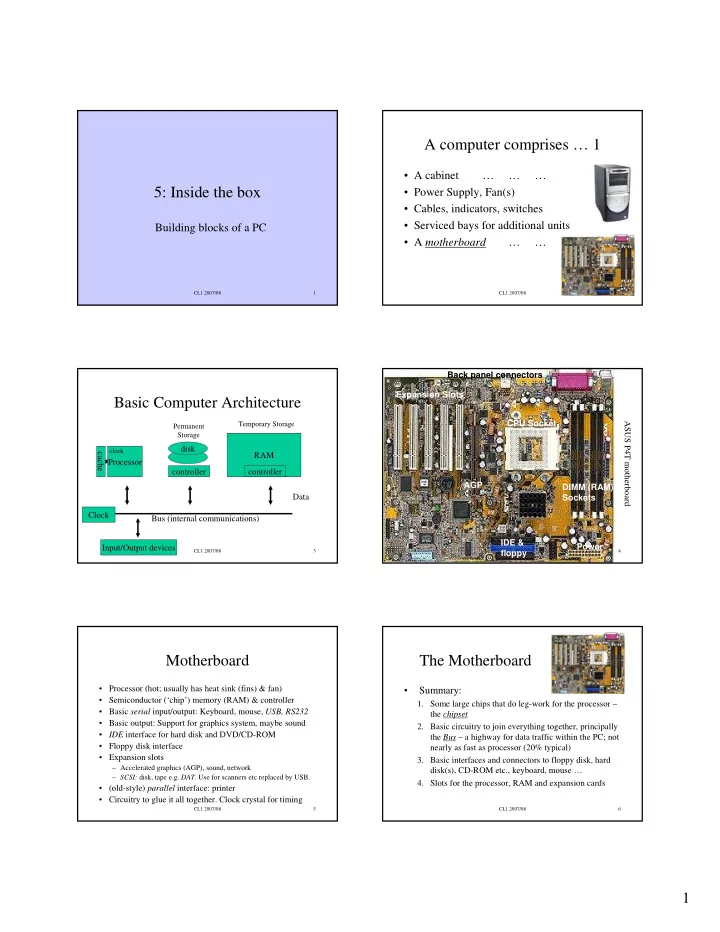
Basic Computer Architecture

Processor disk RAM controller Bus (internal communications) Data

Permanent Storage Temporary Storage

Input/Output devices cache controller Clock

clock

CL1 2007/08 4

ASUS P4T motherboard Expansion Slots CPU Socket DIMM (RAM) Sockets IDE & floppy Power AGP Back panel connectors

CL1 2007/08 5

Motherboard

  • Processor (hot; usually has heat sink (fins) & fan)
  • Semiconductor (‘chip’) memory (RAM) & controller
  • Basic serial input/output: Keyboard, mouse, USB, RS232
  • Basic output: Support for graphics system, maybe sound
  • IDE interface for hard disk and DVD/CD-ROM
  • Floppy disk interface
  • Expansion slots

– Accelerated graphics (AGP), sound, network – SCSI: disk, tape e.g. DAT. Use for scanners etc replaced by USB.

  • (old-style) parallel interface: printer
  • Circuitry to glue it all together. Clock crystal for timing

CL1 2007/08 6

The Motherboard

  • Summary:
  • 1. Some large chips that do leg-work for the processor –

the chipset

  • 2. Basic circuitry to join everything together, principally

the Bus – a highway for data traffic within the PC; not nearly as fast as processor (20% typical)

  • 3. Basic interfaces and connectors to floppy disk, hard

disk(s), CD-ROM etc., keyboard, mouse …

  • 4. Slots for the processor, RAM and expansion cards
slide-2
SLIDE 2

2

CL1 2007/08 7

The Processor

  • Performs most but not all computation and control

(Graphics chips are also complex)

  • Much faster than other components
  • Clever design needed to achieve speed

– Cache is a small store of ultra-fast memory within the chip, a sort of scratch-pad – Parallelism – doing many operations simultaneously – Pipeline – fetch data or perform calculations that might be needed later, discarding them if not.

CL1 2007/08 8

RAM memory

  • “2 Gigabytes of Random Access Memory”
  • Semiconductor; SIMMs, DIMMs etc.
  • Computer’s ‘notepad’: volatile - contents lost

when switched off

  • Unless you are doing heavy number crunching or

serious graphics, adding memory will improve performance more than anything else

  • Also occurs as video RAM and cache

CL1 2007/08 9

Cacheing (real world)

  • You have to phone a list of people from a

mobile phone

  • In each case, 1st time you have to look up

number from Directory Enquiries

  • If you need to redial you use ‘recent dialled’

number in phone memory (or quickly learn to write numbers down for later use)

  • This is a cache

CL1 2007/08 10

Cacheing on read

Processing entity Fetch item 1st time (slow) No cache: With cache: Slow storage Fetch item 2nd time (slow) Fetch item 1st time from storage (slow) Processing entity Fetch item 2nd and subsequent times from (fast) cache

Keep copy

Processors cache instructions and data; Operating system caches disk pages; Web browsers cache bits of Web pages.

CL1 2007/08 11

(Cacheing on write)

Processing entity

Keeps copy

Writes item 1st time No cache: With cache: Slow storage Reads it back (when required) Writes item 1st time Processing entity (Disk cacheing) Cache may not be written back to disk immediately. This is why you don’t want to just switch off a PC - disk may not be consistent. Writes item 2nd time Writes item 2nd time Writes back to disk periodically Reads it back from cache

CL1 2007/08 12

The Processor

  • “Intel Pentium 4, 3.4GHz”
  • Two major PC processor manufacturers left: Intel

(Pentium … ) vs AMD (Athlon …)

  • Also G3, G4 (IBM, Mac); SPARC (Sun)
  • The last 20% of clock speed doubles the cost of the

processor and gets you 4-5 months future-proofing (i.e. before the technology is overtaken)

  • Processor development and manufacture costs $billions
slide-3
SLIDE 3

3

CL1 2007/08 13

The big con

  • PC clock speed (e.g. 3.4 GHz) is always quoted but is an

incomplete indication of performance

  • Performance depends on a chain of factors and on how

the computer is used

  • Performance depends on Processor speed + amount of

Cache + speed of motherboard + Memory speed + Disk speed + graphics speed

  • Processor spends most of its time idle.
  • Processor activity governed by ticks of a very fast clock
  • MHz, GHz: MegaHertz, GigaHertz – measures of (clock)

frequency

CL1 2007/08 14

Hard disc

  • “300 Gb 7200 RPM SCSI drive”
  • 300 Gb (Gigabytes) is the disk capacity
  • 7200 RPM indicates the rotational speed of the disk;

more is better. Seek time is a measure of how fast the disk head can move across the disk; short time is better.

  • SCSI is the Small Computer Systems Interface used in

many computer disks; alternative is IDE (PCs, Macs)

CL1 2007/08 15

CD/DVD

  • “12x DVD; 40r16w12rw DVD/CD-ROM”
  • Drive can read CDs and DVDs and write CD-R (write
  • nce) and CD-RW (rewritable) disks. Speeds refer.
  • DVD is taking over from CD; 12x is an indication of

speed; more is better

  • CD-ROM media have a capacity of around 650 Mb
  • DVD media capacity depends on no. of layers

– 1 layer, 1 side: 4.7 Gb – 2 layer, 2 side: 17 Gb

CL1 2007/08 16

Graphics

  • “PCI-Express accelerated graphics card”
  • If you’re a gamer the graphics card may be

the most important aspect of the PC

CL1 2007/08 17

Monitor

  • “17" FST monitor, 0.28 mm, 1280*1024”
  • 17” is the diagonal size of the tube; visible part is

usually rather less. FST = Flatter Squarer Tube

  • (0.28 mm is the dot pitch; smaller is better)
  • 1280*1024 is the screen resolution in pixels

– About 4:3 aspect ratio (like a TV)

  • LCD screens: big laptop screens with backlight

– Some widescreen; overlap with HD TVs

CL1 2007/08 18

Hardware options

  • Sound card, microphone
  • Network Card
  • Accelerated graphics
  • Video capture card
  • High performance disk interface (e.g. SCSI)
  • TV tuner? Etc. etc.
  • Trend is to put intelligence in peripherals attached

via fast interfaces such as USB

slide-4
SLIDE 4

4

CL1 2007/08 19

Connectors

USB (General purpose) RJ45 (Ethernet) PS/2 mouse, keyboard S-VGA (Monitor)

CL1 2007/08 20

Connectors - diagrams

PS/2 mouse, keyboard S-VGA RS-232 USB

CL1 2007/08 21

Systems in a nutshell

  • Operating system is the software you need to

run your applications (Office, Web browser) …

  • Windows utterly dominates business world
  • Windows (3.1 … 98.. Me) / XP-home: home
  • Windows NT / 2000 / XP-Pro, Vista: corporate,

specialist

  • Mac – Specialist, especially multimedia,

collaboration, art, design, architecture. More user friendly, stylish. Now Unix-based

CL1 2007/08 22

Unix, Linux

  • First there was Unix (1970s)
  • Solaris, HP-UX, AIX: proprietary versions of Unix
  • Linux (Linus Torvalds), Richard Stallman: version of Unix

– Software ‘Source’ free (distributions at low cost) – Free Software Foundation - GNU – Many thousands of people producing Linux software – Secure, reliable but user interface ‘clunkier’ – Some ‘killer apps’ missing (Office, Photoshop)

  • Windows: for ‘vanilla’ office desktop IT
  • Unix for ‘back office’, infrastructure, anything home-grown
  • r specialised.
  • All this IMHO. Beware religious wars

CL1 2007/08 23

A computer is like a Banana

  • It is perishable – write-down 2-3 years
  • So is this kind of information
  • To keep up to date read PC magazines,

manufacturer catalogues & web pages, trade papers etc.

  • From CL1 point of view, terms here are

illustrations of principles

CL1 2007/08 24

Key Points

  • Major units of a small computer and how they

work together

  • Design tricks for performance

– Cache, pipeline, parallelism

  • PC raw speed is not the whole story
  • Characteristics of the principal operating systems
  • A few things to consider when buying a PC