Building New Robots 1 Extending Robot Language Suppose we needed a - - PowerPoint PPT Presentation

▶
building new robots
SMART_READER_LITE
LIVE PREVIEW

Building New Robots 1 Extending Robot Language Suppose we needed a - - PowerPoint PPT Presentation

Building New Robots 1 Extending Robot Language Suppose we needed a Robot to patrol the walls of a castle: Castle Wall Castle Turret Intro to Object-Oriented Dev I Building a Castle Guard Robot 2 Extending Robot Language We could


slide-1
SLIDE 1

Extending Robot Language

Intro to Object-Oriented Dev I
1

Building New Robots

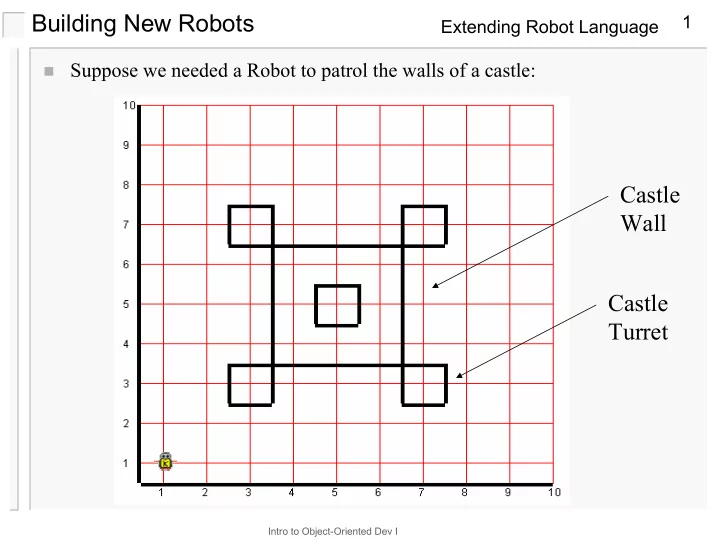
Suppose we needed a Robot to patrol the walls of a castle:

Castle Turret Castle Wall

slide-2
SLIDE 2

Extending Robot Language

Intro to Object-Oriented Dev I

2

Building a Castle Guard Robot

We could solve this problem by writing the solution as we have

with our earlier Robot programs

We would find that the code would become very long

– Making it harder to read and understand – Making it harder to figure out where our logic errors are

We would also notice that there is a lot of repetitive code There has to be a way to improve readability, maintenance, and

re-use code

Suppose we had a Robot that knew how to patrol the walls of a

castle?

We can build one…

slide-3
SLIDE 3

Extending Robot Language

Intro to Object-Oriented Dev I

3

Defining New Classes of Robots

To build a new class of robots, we include a new class specification in a new

file of our program

The general form of this specification:

class <new-class-name> extends <old-class-name> { <list-of-new-methods> }

  • ld-class-name
  • ld-class-name

new-class-name new-class-name

slide-4
SLIDE 4

Extending Robot Language

Intro to Object-Oriented Dev I

4

Specification Details

Reserved Words and symbols

– class – extends – braces { }

We must replace the elements in angle brackets < >

appropriately

– <new-class-name>

what do we call this new type of robot?

– <old-class-name>

what old robot to add features to?

– <list-of-new-methods>

list of new features

slide-5
SLIDE 5

Extending Robot Language

Intro to Object-Oriented Dev I

5

Naming Things

In developing the names for robots and new methods – any uppercase and lowercase letters {A..Z, a..z}, digits

{0..9}, and underscore { _ } can be used

– unique name to the program – does not match any reserved words – must begin with a letter

typically upper case for a class lower case for a method or instruction

slide-6
SLIDE 6

Extending Robot Language

Intro to Object-Oriented Dev I

6

extends Robot?

class CastleGuard extends VPIRobot

By use of the extends keyword we indicate the CastleGuard

inherits all the capabilities of the VPIRobot class

–

in other words CastleGuard knows all about move(), turnLeft(), pickBeeper(), putBeeper(), and shutOff()

VPIRobot is the base class of CastleGuard CastleGuard is a derived class of VPIRobot

IS-A relationship

– CastleGuard IS A VPIRobot

VPIRobot VPIRobot CastleGuard CastleGuard

slide-7
SLIDE 7

Extending Robot Language

Intro to Object-Oriented Dev I

7

Class header: CastleGuard

class CastleGuard extends VPIRobot {

}

The CastleGuard robot inherits information and extends the capabilities of

the VPIRobot robot

–

Everything a VPIRobot can do, a CastleGuard can do

–

move(), turnLeft(), pickBeeper(), putBeeper(), turnOff()

–

But a CastleGuard will be able to do more (have more features)

FYI: The name of a class will be same as the name of the file that contains it,

with a .java suffix

–

The CastleGuard class will be specified in the file CastleGuard.java

slide-8
SLIDE 8

Extending Robot Language

Intro to Object-Oriented Dev I

8

Constructing a new robot

The class constructor method:

public CastleGuard (int street, int ave, Directions.Directions facing, int numBeepers) { super(street, ave, facing, numBeepers); }

This specifies how a CastleGuard robot is to be initialized

Since a CastleGuard is a VPIRobot it must be initialized in the same way. We must specify location, direction, and number of beepers

– A constructor has the same name as the class – Constructor methods are NOT inherited. – The super keyword indicates that this object is to be built the same way

as its parent, VPIRobot

– The super keyword invokes the constructor of the base class. – Our robot constructors will always look like this at the beginning

slide-9
SLIDE 9

Extending Robot Language

Intro to Object-Oriented Dev I

9

New robot methods

public void turnRight() { turnLeft(); turnLeft(); turnLeft(); }

  • public is a modifier letting us know that we can access this method from outside

the class (in task(), for example)

  • void is a keyword indicating that the method returns nothing.
  • Notice that CastleGuard() can use turnRight() as part of its other method

definitions

slide-10
SLIDE 10

Extending Robot Language

Intro to Object-Oriented Dev I

10

Advantages of building new robots

Structure problem solutions Programs become easier to understand and read Lead to fewer errors Enable future modifications and code reuse Debugging programs is easier

–

New instructions can be tested independently

–

New instructions impose structure, which makes it easier to find bugs

slide-11
SLIDE 11

Extending Robot Language

Intro to Object-Oriented Dev I

11

Over-Riding Methods

What if we wanted a CastleGuard robot to leave a trail of beepers as it

patrolled?

We could do this by adding a new method, but we could also do it making it

the default move behavior of CastleGuard robots.

We do this by over-riding the inherited move() method: By including the above method declaration in our CastleGuard robot class

it will replace (over-ride) the default inherited move() method.

Recall that the super keyword allowed us to invoke the inherited base class

constructor, it can also be used to invoke the base class over-ridden method.

public void move() { putBeeper(); super.move(); }