CS640: Introduction to Computer Networks Aditya Akella Lecture 14 - - PDF document

cs640 introduction to computer networks
SMART_READER_LITE
LIVE PREVIEW

CS640: Introduction to Computer Networks Aditya Akella Lecture 14 - - PDF document

CS640: Introduction to Computer Networks Aditya Akella Lecture 14 TCP I - Transport Protocols The Road Ahead Transport introduction Error recovery & flow control basics TCP Flow Control basics 2 Transport Protocols


slide-1
SLIDE 1

1

CS640: Introduction to Computer Networks

Aditya Akella Lecture 14 TCP – I - Transport Protocols

2

The Road Ahead

  • Transport introduction
  • Error recovery & flow control basics
  • TCP Flow Control basics

3

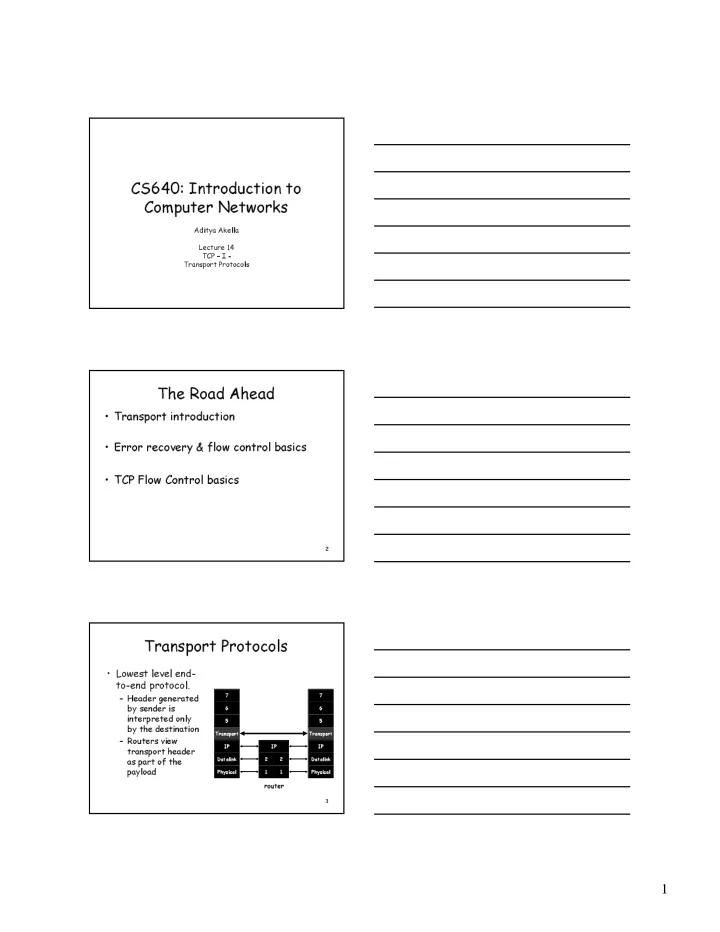
Transport Protocols

  • Lowest level end-

to-end protocol.

– Header generated by sender is interpreted only by the destination – Routers view transport header as part of the payload

7 6 5 7 6 5 Transport IP Datalink Physical Transport IP Datalink Physical IP

router

2 2 1 1

slide-2
SLIDE 2

2

4

Functionality Split

  • Network provides best-effort delivery
  • End-systems implement many functions

– Reliability – In-order delivery – De-multiplexing – Message boundaries – Connection abstraction – Congestion control – …

5

Transport Protocols

  • UDP provides just integrity and demux
  • TCP adds…

– Connection-oriented – Reliable – Ordered – Point-to-point – Byte-stream – Full duplex – Flow and congestion controlled

  • Request-reply service

– RPC-like – Not covered here

6

UDP: User Datagram Protocol

  • “No frills,” “bare bones”

Internet transport protocol

  • “Best effort” service, UDP

segments may be:

– Lost – Delivered out of order to app

  • Connectionless:

– No handshaking between UDP sender, receiver – Each UDP segment handled independently of others

Why is there a UDP?

  • No connection establishment

(which can add delay)

  • Simple: no connection state at

sender, receiver

  • Small header
  • No congestion control: UDP

can blast away as fast as desired

slide-3
SLIDE 3

3

7

More on UDP

  • Often used for

streaming multimedia apps

– Loss tolerant – Rate sensitive

  • Other UDP uses

(why?):

– DNS, SNMP

  • Reliable transfer over

UDP

– Must be at application layer – Application-specific error recovery

Source port # Dest port # 32 bits

Application data (message) UDP segment format

Length Checksum Length, in bytes of UDP segment, including header

8

TCP

Source port Destination port Sequence number Acknowledgement Advertised window HdrLen Flags Checksum Urgent pointer Options (variable)

Data

Flags: SYN FIN RESET PUSH URG ACK

Reliable, In-order, Connection oriented, Byte stream abstraction

9

Reliability: Straw-man approaches

Time Packet ACK T i m e

  • u

t

  • Receiver sends

acknowledgement (ACK) when it receives packet

– Sender waits for ACK and timeouts if it does not arrive within some time period

  • Simplest version: Send a

packet, stop and wait until ACK arrives

– Problems? Sender Receiver

slide-4
SLIDE 4

4

10

Recovering from Error

Packet A CK T i m e

  • u

t Packet ACK T i m e

  • u

t Packet T i m e

  • u

t Packet ACK T i m e

  • u

t Time Packet lost Early timeout Packet ACK T i m e

  • u

t Packet ACK T i m e

  • u

t ACK lost

DUPLICATE PACKETS!!!

11

How to Recognize Duplicates?

  • Use sequence numbers

– both packets and acks

  • Sequence # in packet is finite

How big should it be?

  • For stop and wait?

– One bit – won’t send seq #1 until received ACK for seq #0

  • Problem with Stop and Wait:

– Poor efficiency Pkt 0 A CK 0 Pkt 0 ACK 1 Pkt 1 ACK 0

12

How to Ensure Efficiency?

  • How to “keep the pipe full”?

– Answer: Pipelining

  • Send multiple packets without waiting for

first to be acked

  • How many such packets max?

– Suppose 10Mbps link, 4ms delay, 500byte pkts – 1? 10? 20? – Round trip delay * bandwidth = capacity of pipe

  • Consequences:

– Cannot use a 1 bit sequence number any more – Buffering may be required – Range of sequence number and buffer size will depend on loss recovery

slide-5
SLIDE 5

5

13

Pipelining Implementation: “Sliding Window”

  • Sliding buffer at sender and receiver

– Packets in transit ≤ sender buffer size – Advance when sender and receiver agree packets at beginning have been received

  • Receiver has to buffer a packet until all prior packets

have arrived

  • Goal: provides reliable, ordered delivery
  • Two ways to do this:

– Go-Back-N – Selective Repeat

14

GBN Window Sliding – Common Case

  • On reception of new ACK (i.e. ACK for

something that was not acked earlier)

– Increase sequence of max ACK received – Send next packet

  • On reception of new in-order data packet

(next expected)

– Hand packet to application – Send cumulative ACK – acknowledges reception of all in-sequence packets up to sequence number – Increase sequence of max acceptable packet

15

Receiver Sender

Go-Back-N: Sender/Receiver State

… … Sent & Acked Sent Not Acked OK to Send Not Usable … …

Max acceptable Receiver window Max ACK received Next seqnum

Received & Acked Acceptable Packet Not Usable

Sender window Next expected

slide-6
SLIDE 6

6

16

Go-Back-N with Losses

  • On reception of out-of-order packet

– Don’t ACK (wait for source to timeout) – Discard out of order packets – Cumulative ACK (helps source identify loss)

  • Timeout (Go-Back-N recovery)

– Set timer upon transmission of packet – Retransmit all unacknowledged packets

17

Go-Back-N With Losses

  • Simple behavior
  • One timeout
  • Simple buffering
  • Performance during

loss recovery

  • No longer have an

entire window in transit

  • Can have much

more clever loss recovery

18

Selective Repeat

  • Receiver individually acknowledges all correctly

received pkts

– Buffers packets, as needed, for eventual in-order delivery to upper layer

  • Sender only resends packets for which ACK not

received

– Sender timer for each unACKed packet

  • Sender window

– N consecutive seq #’s – Again limits seq #s of sent, unACKed packets

slide-7
SLIDE 7

7

19

Selective Repeat: Sender, Receiver Windows

20

Sequence Numbers

  • How large do sequence numbers need to be?

– Depends on sender/receiver window size

  • Must take wrap-around into account
  • E.g.

– Max seq = 7, window_size = 7 – If pkts 0..6 are sent successfully and all acks lost

  • Receiver expects 7,0..5, sender retransmits old 0..6!!!
  • Max sequence must be ≥ 2 * window_size
  • TCP uses 32 bit sequence numbers

21

TCP Flow Control

  • TCP is a sliding window protocol

– For window size n, can send up to n bytes without receiving an acknowledgement – When the data is acknowledged then the window slides forward

  • Each packet advertises a window size

– Indicates number of bytes the receiver has space for

  • Original TCP always sent entire window

– Congestion control now limits this

slide-8
SLIDE 8

8

22

TCP Sequence Numbers

  • Sequence Number Space

– Each byte in byte stream is numbered. – 32 bit value – Wraps around

  • Initial values selected at start up time

– TCP breaks up the byte stream in packets.

  • Packet size is limited to the Maximum

Segment Size

– Each packet has a sequence number. – Indicates where it fits in the byte stream

23

acknowledged sent to be sent outside window

Source Port

  • Dest. Port

Sequence Number Acknowledgment HL/Flags Window Checksum Urgent Pointer Options… Source Port

  • Dest. Port

Sequence Number Acknowledgment HL/Flags Window Checksum Urgent Pointer Options...

Packet Sent Packet Received App write

Window Flow Control: Send Side

24

Summary

  • Transport service

– UDP mostly just IP service – TCP congestion controlled, reliable, byte stream

  • Types of ARQ protocols

– Stop-and-wait slow, simple – Go-back-n can keep link utilized (except w/ losses) – Selective repeat efficient loss recovery

  • Sliding window flow control

– Addresses buffering issues and keeps link utilized – TCP uses sliding window – 32bit sequence numbers