csci 6730 4730

CSCI 6730 / 4730 Really, the part of the system that runs in - PowerPoint PPT Presentation

Review : What is An Operating System? Key Points Software ( kernel ) that runs at all times CSCI 6730 / 4730 Really, the part of the system that runs in kernel mode (or need to). Operating Systems But note - there


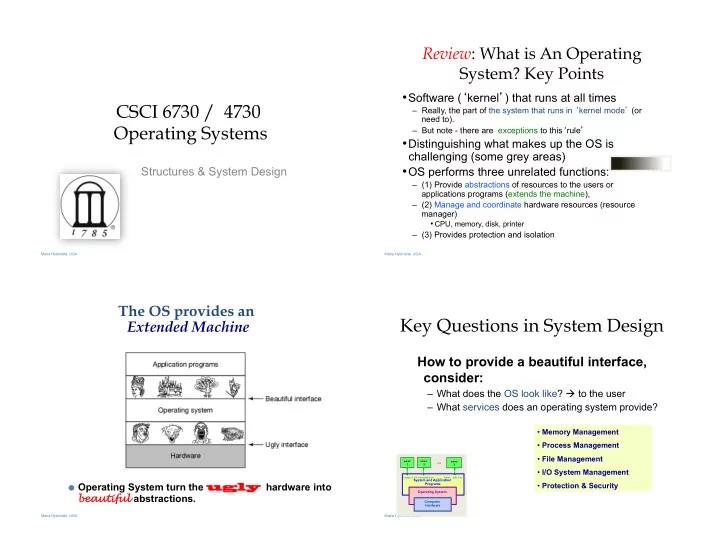
  1. Review : What is An Operating System? Key Points • Software ( � kernel � ) that runs at all times CSCI 6730 / 4730 – Really, the part of the system that runs in � kernel mode �� (or need to). Operating Systems – But note - there are exceptions to this � rule � • Distinguishing what makes up the OS is challenging (some grey areas) • OS performs three unrelated functions: Structures & System Design – (1) Provide abstractions of resources to the users or applications programs (extends the machine), – (2) Manage and coordinate hardware resources (resource manager) • CPU, memory, disk, printer – (3) Provides protection and isolation Maria Hybinette, UGA Maria Hybinette, UGA The OS provides an Key Questions in System Design Extended Machine How to provide a beautiful interface, consider: – What does the OS look like? à to the user – What services does an operating system provide? • Memory Management • Process Management • File Management … user user user 1 2 3 • I/O System Management … compiler assembler text editor System and Application ● Operating System turn the ugly ugly hardware into • Protection & Security Programs Operating System bea eautiful abstractions. Computer Hardware Maria Hybinette, UGA Maria Hybinette, UGA

  2. Review: Operating System Operating System Design Criteria Consider Roles: • How do you hide the complexity and limitations • Intermediary, manager and of hardware from application programmers? protector. use … user user r – What is the hardware interface? (the physical reality) (1) Emulates the hardware extending 1 2 n the ‘machine’ and (2) Provides a nice (and safe) – ~~~~~~~ Transformations ~~~~~~~~~~~ ~~~~~~~ Transformations ~~~~~~~~~~~ ! … programming environment for compiler assembler text editor ! System and Application Programs (3) [multiple] � activities � ( processes ) – What is the application interface? (what are the nicer and in the system. Operating more beautiful abstractions) System Computer Definition: A process is an activity in Hardware In terms of particular hardware (i.e., CPU, the system – a running program, an Memory, Network) what criteria does activity that may need � services � (we will cover this concept in detail next your system need to address (or solve). week). Maria Hybinette, UGA Maria Hybinette, UGA Focus on these OS Roles: Some Example Design Questions • Provide standard services and resources : • How to make multiple CPU appear as one CPU but faster? • How to make limited memory appear as infinite (e.g., a large – Screen, CPU, I/O, disk, mouse array may not fit into memory). – Resource abstraction (extended machine) • How to make a mechanical disk appear to be as fast as • Provide for sharing of resources: electronic memory? – coordinate between multiple applications to work together in • How to make insecure, unreliable network transmissions • safe, efficient, and fair ways (protected) appear to be reliable and secure ? – Resource coordination & management. • How to make many physical machines appear to be a single machine? GOALS ü Fairness Fairness ü Timeliness Timeliness ü Secure Secure ü Reliable Reliable ü Ownership Ownership ü Single Single � machininess machininess � ü Power-efficient Power-efficient Maria Hybinette, UGA Maria Hybinette, UGA

  3. Shell : Another Level of Resource provided to users • Example: Accessing a raw disk involves • Provide � users � with access to the – specifying the data, the length of data, the disk drive, the services provided by the kernel. track location(s), and the sector location(s) within the corresponding track(s). (150 mph) – A � shell � of-course,– illusion of a thin layer of abstraction to the kernel and its services. write( block, len, device, track, sector ); • CLI – command line interface to kernel • Problem: But applications don � t want to worry services (project 1 focus) about the complexity of a disk (e.g., don’t care • GUI - graphical user interface to the about tracks or sectors) kernel lseek( file, file_size, SEEK_SET ); – à Project 1 [Check DONE write( file, text, len ); Person Shell Abstraction A track System Calls Disk platters OS Abstraction Disk arm Heads generate a with disk magnetic field that Hardware heads Maria Hybinette, UGA Maria Hybinette, UGA polarize the disk Functionality of a [CLI] � shell � Review and Moving On… • Provides two things: • Looked at the OS role: – Interactive Use (IU) - – And an environment for � scripting � (programmable) – in abstracting the � machine � (system calls, and shells). – Project 1 : deals primarily with IU. • Next: OS role in providing resources (memory) • sh : (Ken) thompson shell, the standard shell – What is needed for effective sharing of resources? – piping and simple control structure, and wildcarding – Eventually replaced by the (Stephen) Bourne shell • protection – Linux uses bash (bourne again shell) as their default ‘sh’. • csh : Bill Joy’s shell – history, command line ediFng • tcsh : (tenex c shell) extension of csh – great for IU, not so great for scripFng • ksh : (David) Korn Shell – original version – bulk of code is to provide a great environment for scripFng provides powerful programming constructs). – [problem?] Proprietary (unFl recently -2006) Maria Hybinette, UGA Maria Hybinette, UGA

  4. Coordination : Resource Sharing Coordination : Resource Sharing • Goal : Protect the OS from other activities and provide protection across activities. • Areas of protection: • Problem : Activities can crash each other (and crash the OS) – Memory unless there is coordination between them. • General Solution : Constrain an activity so it only runs in its – Writing to disk (where) – really any form of I/O. own memory environment (e.g., in its own sandbox), and – Creating new processes make sure the activity cannot access other sandboxes. – Sandbox: Address Space (memory space) ● How do the OS create (and manage) these • Protects activities from touching other memory spaces, memory spaces including the Operating System’s address � areas � of protection? space ● Hardware Maria Hybinette, UGA Maria Hybinette, UGA Protection Implementation: “ Dual Hardware: Different modes of Mode” Operations protection (>2 Intel) How does the OS prevent arbitrary programs (run by arbitrary users) • Hardware provides different mode � bits � of from invoking accidental or malicious calls to halt the operating system protection – where at the lowest level – ring 0 – or modify memory such as the master boot sector? anything goes, unrestricted mode (the trusted • General Idea: The OS is omnipotent and kernel runs here). everything else isn’t - as simple as that • Intel x86 architecture provides multiple levels of protection: – Utilize Two CPU mode operations (provided by hardware) • Kernel Mode – Anything goes – access everywhere (unrestricted access) to the underlying hardware. – In this mode can execute any CPU instruction and reference any memory access • User Mode – Activity can only access state within its own address space (for example - web browsers, calculators, compilers, JVM, word from microsoft, power point, etc run in user mode). Maria Hybinette, UGA Maria Hybinette, UGA

Recommend


More recommend


Explore More Topics

Stay informed with curated content and fresh updates.