Everyware: Build front pages and sections fast and easy with - - PDF document

everyware build front pages and sections fast and easy
SMART_READER_LITE
LIVE PREVIEW

Everyware: Build front pages and sections fast and easy with - - PDF document

Everyware: Build front pages and sections fast and easy with out-of-the-box widgets Everyware is our out-of-the-box You want one person to work on the entire front manually? Or multiple people on different parts of presentation layer in the


slide-1
SLIDE 1

Everyware is our out-of-the-box presentation layer in the digital presentation universe. It has never been faster or easier to set up your frontpage, menus and sectionpages. Oh... and content management for specific devices is naturally a standard feature.

Everyware: Build front pages and sections fast and easy with out-of-the-box widgets

You want one person to work on the entire front manually? Or multiple people on different parts of the front? No problem. You want a fully automated site that is fed with new content from the digital backend? No problem. You want to control the publishing from a list outside

  • f Wordpress? No problem.
  • Built on Wordpress – easy to get started
  • Scalable and redundant architecture with

continous development

  • Easy to use page structure tools
  • Of course it’s responsive and simple to

show/hide content depending on device

  • Editor-friendly workflow (Wordpress not

required at all in the day to day work)

  • Integrated with Infomaker Dashboard
  • Infomaker Digital Writer ready
  • Decoupled approach with the content

stored in Open Content

1 Infomaker Presentation Tools / Everyware, www.infomaker.io

Everyware is complete setup and a series of plugins for Wordpress that connect your site to the Open Content backend and enable the page structure tool Everyboard. You can connect your Everyboard to one or more

  • pages. And you can even embed boards within in each
  • ther. This gives you many possibilities to perfect your

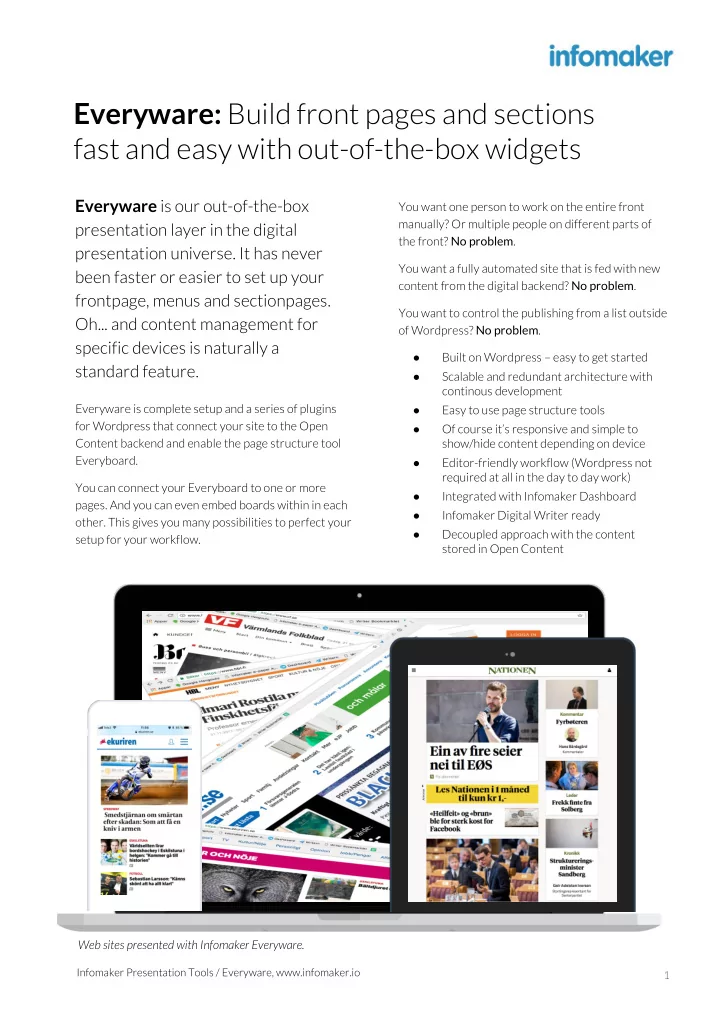
setup for your workflow. Web sites presented with Infomaker Everyware.

slide-2
SLIDE 2

Developer friendly It’s easy to get started with the Everyware platform – PHP, Wordpress, JavaScript and you are good to go. Editor friendly We have put a lot of effort in Everyware to make it easy for the editorial department to work day to

  • day. Everyboard and OC Lists are examples of this.

Built for Amazon AWS We always host Everyware in Amazon AWS. It has been a proven premium solution for our customers. Scalable to suit your needs Thanks to front end scaling we can handle your page views. Built on Wordpress Wordpress is of course a huge CMS-platform used thousands of sites big and small. Many plugins and widgets work out-of-the-box. Reliable backend Spend less time on server issues and let us handle the hosting. Develop yourself, or get our application support for running issues. Proven solution Millions of page views every week – all over the Nordic region. Integrated to Infomaker solutions Works out-of-the-box with solutions such as Digital Writer, Dashboard, Open Content and Newspilot.

Everyware overview

Infomaker Everyware 2 A selection of web sites presented with Infomaker Everyware.

slide-3
SLIDE 3

Content creation tools:

Dashboard: Day to day planning of content is usually done with Dashboard lists, outside of Wordpress. Digital Writer: Of course you can use the best content creation tool, the Digital Writer from

  • Infomaker. Embedding and displaying “any” content

has never been easier. Newspilot: It is also possible to create content in Newspilot using the classic Writer, planning content in the Everylist tool integrated within Newspilot. Infomaker Everyware 3

For developers:

What is the difference between Everyware and Vanilla Wordpress? All content is stored in Open Content, available to you anywhere, always. We developed a Wordpress-plugin to fetch content. As a developer you will learn how to make SolR queries to populate widgets with correct content.

Built on Wordpress – but with the best Dashboard, Writer and content repository

We use Wordpress for managing pages, users, page rendering and as a development platform. In other words, Wordpress developers will feel right at

  • home. Instead of using built in tools, we use the creation tools from Infomaker.

Widgets in Wordpress admin as part of Infomaker Everyware.

slide-4
SLIDE 4

Infomaker Everyware 4

Everyboard is what makes Everyware unique. It lets you rebuild your pages as often as you want to, with zero input from your developers.

Anyone can build a front page with Everyboard, it’s that easy. Use predefined templates or build from scratch, drag and drop widgets and customize for your page needs. Need to restructure your front page on Sunday due to an election? Take a copy of the current front page board, make necessary adjustments – you can even set your new board to be automatically activated on a specific time and date. Or maybe you just want to put the Sport news on top today? Drag and drop, save, you’re all done!

Structure your pages with simple drag and drop – as easy as building with Lego

  • Easy to use page structure builder
  • Works with Newspilot and Dashboard

lists for simple publishing workflow

  • Drag and drop articles to your widgets
  • Work manually, fully automated or

everything in between

  • Rearrange your frontpage in seconds
  • Build new sectionpages in minutes
  • Link boards to another to avoid

repetitive work Fill your building blocks with widgets – Dashboard lists, Latest sports, Most read, RSS-feeds – and use anywhere on your page. Hide part of the front for mobiles, another from

  • desktop. This is possible for both content and ads.

Everyboard in Infomaker Everyware. Everyboard in Infomaker Everyware.

slide-5
SLIDE 5

Infomaker Everyware 5

Dashboard lists let your users plan pages or part of pages directly in

  • Dashboard. In Everyboard you assign

lists, or even part of lists to your

  • board. Now anyone can plan your

front page, and keep it up to date, every day.

Your editorial staff won’t even know they have Wordpress, since all most users will need is Dashboard lists. And the same list can be used on multiple places. The front page can show positions 1–3 of the Sports list, whereas the Sports page can show 1–10, in any order you like. And of course, the same lists can be used in our App Platform, this way you will save time if you want all platforms to have the same content.

Incredible simple front page planning with Dashboard lists – easy as 1-2-3

The list in Dashboard, the App Platform showing position 1–2 and Everyware below showing position 1–4 of a “Breaking News” list. Web site presented with lists created in Dashboard and presented with widgets in Infomaker Everyware.

slide-6
SLIDE 6

Continuous deployment We constantly work on improving all of the services that are being developed, maintained and monitored by Infomaker. We believe in continuous deployment to increase efficient and lower time-to-market and risks for downtime by major upgrades. We also use Jenkins for automated and safe deployment processes. Develop yourself, with us or use third parties We can also offer application responsibility that gives you the possibility of flexible technical competence. Writing your own plugins is easy, and well

  • documented. And our developers will gladly help you

make your or other 3rd party widgets suitable for the scalable environments we like to setup in AWS. Infomaker Everyware 6

Everyware helps you structure and design websites in a simple way. In a responsive world where scalable architecture is becoming increasingly important, our solutions are constantly available for you and your developers.

Everyware is hosted in a scalable and redundant Amazon-environment and uses techniques such as PHP, OpenResty, Lua, Redis and MySQL. Infomaker can take full responsibility for operations, support and maintenance. It is also possible to agree upon application support for continuous development of your Everyware solution.

Modern scalable architecture – continuous development and deployment

Infomaker Everyware hosting and monitoring in AWS and availability monitoring in New Relic.

slide-7
SLIDE 7

We need integrations to analytics, subscription and video system. How will that be managed? The chances are that we already support the integration you need. Thus, building the support in you Wordpress-theme is a small job in most cases. In

  • ther cases you can do it yourself or hire our

developers to help you out! We have some really awesome ideas we want in Everyware! Love to hear that! We are always looking for new ideas for our presentation layer. And if the new stuff is of value for the platform it could be developed as a joint venture project as a part of the platform. How are upgrades to the platform managed? We regularly upgrade you Everyware to the latest Wordpress versions. We always upgrade stage first, and move forward with the production environment after approved test on your side. Want to know more? Be in touch! Phone: +46 480 36 20 00 E-mail: info@infomaker.se www: www.infomaker.io

Some good-to-know info!

What does it cost? Flexible licensing model depending on your

  • rganisation size (titles, page views …) as well on

actual hosting costs. One monthly payment covers all: support and updates. I want Everyware. How do I get it? We set up an onboarding project. Such an

  • nboarding usually takes between 4–16 hours. This

depends on how much you intend to develop yourself as well as how you will create content. We also setup your stage and production environments in Amazon, so you can get started. Do I need to install any extra backend servers? No, Everyware is delivered as a cloud service. Your setup will include a stage- and production environment. Do I have to choose all solutions from Infomaker? Of course not! There are clear benefits – and many

  • f our customers have done so but it is possible to

pick the cherries from the cake, it’s really up to you!

Everyware Q&A

Infomaker Everyware 7

OC Mast er

Apps Everyware Live Content Cloud Writer Creation Tools Newspilot Dashboard Planning Tools Open Content Editorial Open Content Master or Satellite Filter Filter OC Satellite OC Satellite

Everyware as a presentation layer in the publishing workflow. Write and create your content using the Digital Writer. Create digital editions and manage curated lists with the Dashboard tools. The content is stored in the Open Content Backend, that can be scaled to any level using the satellite model.

The publishing workflow