if Statement Programs often contain statements that may or may Flow - - PowerPoint PPT Presentation

if statement
SMART_READER_LITE
LIVE PREVIEW

if Statement Programs often contain statements that may or may Flow - - PowerPoint PPT Presentation

if Statement Programs often contain statements that may or may Flow of Control: Branching not be executed depending on conditions. An if statement checks whether a condition is true (Savitch, Chapter 3) before deciding whether to execute


slide-1
SLIDE 1

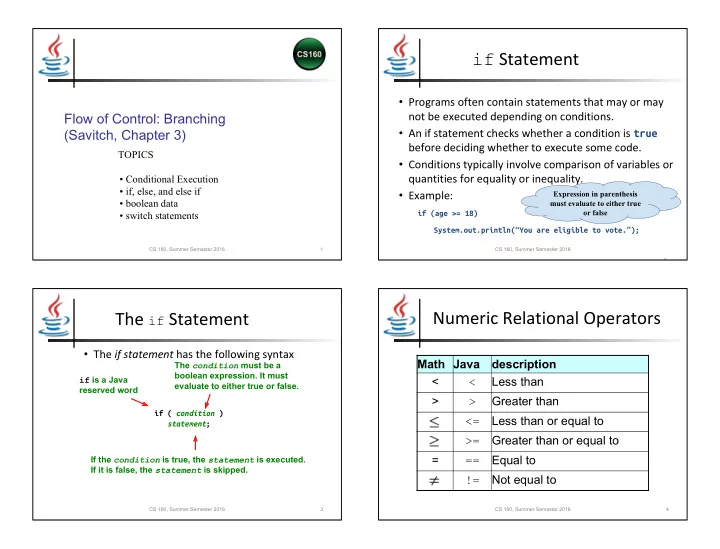
Flow of Control: Branching (Savitch, Chapter 3)

TOPICS

  • Conditional Execution
  • if, else, and else if
  • boolean data
  • switch statements

1 CS 160, Summer Semester 2016

if Statement

  • Programs often contain statements that may or may

not be executed depending on conditions.

  • An if statement checks whether a condition is true

before deciding whether to execute some code.

  • Conditions typically involve comparison of variables or

quantities for equality or inequality.

  • Example:

if (age >= 18)

System.out.println(“You are eligible to vote.”);

CS 160, Summer Semester 2016 2

Expression in parenthesis must evaluate to either true

  • r false

The if Statement

  • The if statement has the following syntax

if ( condition ) statement; if is a Java reserved word The condition must be a boolean expression. It must evaluate to either true or false. If the condition is true, the statement is executed. If it is false, the statement is skipped.

3 CS 160, Summer Semester 2016

Numeric Relational Operators

Math Java description < < Less than > > Greater than <= Less than or equal to >= Greater than or equal to = == Equal to != Not equal to

4 CS 160, Summer Semester 2016

slide-2
SLIDE 2

if Statement with else

  • An if statement may have an optional else

clause that will only be executed when the condition is false

  • Example:

if ( wages <= 57600.0 )

tax = 0.124 * wages; else tax = 0.124 * 57600.0;

NONE! One or the other must execute NONE! One or the other must execute

5 CS 160, Summer Semester 2016

Give an example of when BOTH statements will execute? Give an example of when NEITHER statement will execute?

Defining Blocks

  • To execute more than one statement conditionally, use { } to

define a block (aka “compound statement”) for the sequence of statements

  • Example:

if (firstNumber <= secondNumber) { quotient = secondNumber / firstNumber; remainder = secondNumber % firstNumber; } else { quotient = firstNumber / secondNumber; remainder = firstNumber % secondNumber; }

6 CS 160, Summer Semester 2016

Cascading if-else Statements

  • Example:

if (condition1) statement1; else if (condition2) statement2; else statement3;

7 CS 160, Summer Semester 2016

Dangling else

  • Code written:

if (condition1) if (condition2) statement1; else statement2;

  • Which if does the

else finish?

Be sure to use indentation properly Otherwise too difficult to read!

8 CS 160, Summer Semester 2016

else will match to the nearest unmatched if within the same block

slide-3
SLIDE 3

Fix dangling else using blocks

  • Code written:

if (condition1) { if (condition2) statement1; } else statement2;

9 CS 160, Summer Semester 2016

boolean Data Type

  • boolean
  • A primitive data type that can be set to:

– true – false

  • Example:

boolean correct = true;

10 CS 160, Summer Semester 2016

NOTE: No quotation marks because this is a boolean, not a String.

Boolean Expressions

  • Conditions are expressions that have a truth

value.

  • Arithmetic relational operators produce a

truth value, e.g.,

– 10 < 3 – x > y – a >= (b + 12)

11 CS 160, Summer Semester 2016

boolean Operators

  • Logical “and” (conjunction)

– Java symbol && – Math symbol ∧ – true only when both expressions are true

(MINIMUM_WAGE <= wages) && (wages <= MAXIMUM_WAGE)

  • Logical inclusive “or” (disjunction)

– Java symbol || – Math symbol ∨ – true when either or both expressions are true

(wages < MINIMUM_WAGE ) || (wages > MAXIMUM_WAGE )

12 CS 160, Summer Semester 2016

slide-4
SLIDE 4

boolean Operators (cont.)

  • Logical “exclusive or”

– Java symbol ^ – Math symbol ⊕ – true when exactly one of the expressions is true

(MINIMUM_WAGE < wages) ^ (MINIMUM_WAGE == wages)

  • Logical “not” (negation)

– Java symbol ! – Math symbol ¬

!(MINIMUM_WAGE == wages)

13 CS 160, Summer Semester 2016

Java Logical and Arithmetic Operator Precedence Rules

14 CS 160, Summer Semester 2016

Precedence Level Operators 1. !

  • (unary)

2. * / % 3. +

  • 4.

< <= > >= 5. == != 6. ^ & | 7. && 8. ||

Complicated Boolean Expressions

boolean isLeapYear = ((year % 4) == 0) && ((year % 100) != 0) || ((year % 400) == 0);

Interpretation:

  • Leap years are every four years (divisible by 4)

except for centuries that are not divisible by 400.

15 CS 160, Summer Semester 2016

Combining Relational Operators

  • Unlike some other operators, relationals cannot

be combined in Java.

  • Example:

(a <= b <= c) – Does not mean a <= b and b <= c. – It produces a compile-time error -- cannot compare a boolean (return value of <= operator) with a number. – How should this be done?

16 CS 160, Summer Semester 2016

( a <= b && b <= c)

slide-5
SLIDE 5

switch Statement

  • Used to accomplish multi-way branching based on the value
  • f an integer, character, or string selector variable.
  • Example:

switch (numberOfPassengers)

{ case 0: System.out.println(“The Harley”); break; case 1: System.out.println(“The Dune Buggy”); break; default: System.out.println(“The Humvee”); }

17 CS 160, Summer Semester 2016

ONLY int, char or String

break moves flow of control to end of switch statement

Don’t need a break after default – already at end

default case is executed if no other case values match expression

Using break in switch statements

  • Consider the code fragment below

int i = 1; switch (i) { case 0: System.out.println(“0”); case 1: System.out.println(“1”); case 2: System.out.println(“2”); case 3: System.out.println(“3”); } System.out.println( );

  • Without breaks what is the output?

(note: it is legal to leave out the breaks and sometimes desired) 1 2 3

18 CS 160, Summer Semester 2016

Why execute multiple cases?

  • Consider if you want a base level with add-ons for increasing

numbers as in…

switch (zoomember_level) { case 500: System.out.print(“Meet a tiger”); case 100: System.out.print(“ Free t-shirt”); case 50: System.out.print(“ Free admission!”); default: System.out.println(); }

  • Example of when we want to leave off the break statements to

allow execution to follow through

19 CS 160, Summer Semester 2016

Symbolic Constants in switch Statements

final int SUNDAY = 1, MONDAY = 2, TUESDAY = 3, WEDNESDAY = 4, THURSDAY = 5, FRIDAY = 6, SATURDAY = 7; int d; ... switch (d) { case SUNDAY: System.out.print(“Sunday”); break; case MONDAY: System.out.print(“Monday”); break; case TUESDAY: System.out.print(“Tuesday”); break; case WEDNESDAY: System.out.print(“Wednesday”); break; case THURSDAY: System.out.print(“Thursday”); break; case FRIDAY: System.out.print(“Friday”); break; case SATURDAY: System.out.print(“Ski day”); break; }

20 CS 160, Summer Semester 2016

slide-6
SLIDE 6

Multiple case Labels

switch (d) { case MONDAY: case WEDNESDAY: case FRIDAY: System.out.println(“C.S. meets at 9:00 today”); System.out.println(“Math meets at 10:00 today”); break; case TUESDAY: case THURSDAY: System.out.println(“English meets at 9:00 today”); System.out.println(“Chemistry meets at 10:00 today”); break; case SUNDAY: case SATURDAY: System.out.println(“Enjoy the weekend”); }

21 CS 160, Summer Semester 2016

switch example

  • Display the students’ grade based on entering their grade as an int between 0 and

100 (90+ = A, 80-89 = B, 70-79 = C) switch( grade / 10 ) { case 10: case 9: System.out.println( “A” ); break; case 8: System.out.println( “B” ); break; case 7: System.out.println( “C” ); break; default: System.out.println( “F” ); }

22 CS 160, Summer Semester 2016

Integer division is our friend!

Comparing switch and if statements

  • switch statement

switch (expression) { case value1: statement1; break; case value2: statement2; break; … case valueX: statementX; break; default: statementY; }

  • if equivalent

value = expression; if (value == value1) statement1; else if (value == value2) statement2; … else if (value == valueX) statementX; else statementY;

23 CS 160, Summer Semester 2016

Comparing switch and if statements Print out whether the char ch is a vowel or not

  • switch statement

switch (letter) { case ‘A’: case ‘a’: case ‘E’: case ‘e’: case ‘I’: case ‘i’: case ‘O’: case ‘o’: case ‘U’: case ‘u’: System.out.println( “vowel” ); break; default: System.out.println( “consonant” ); }

  • if equivalent

if ( letter == ‘A’ || letter == ‘a’ || letter == ‘E’ || letter == ‘e’ || letter == ‘I’ || letter == ‘i’ || letter == ‘O’ || letter == ‘o’ || letter == ‘U’ || letter == ‘u’ ){ System.out.println( “vowel” ); } else { System.out.println( “consonant” ); }

24 CS 160, Summer Semester 2016

slide-7
SLIDE 7

Summary

  • Flow of control
  • if statements
  • boolean expressions
  • if-else statements
  • Order of operations
  • Relational operators
  • switch statement

CS 160, Spring Semester 2016 25