Produce an image of 3D world, in world device coordinate not - - PDF document

produce an image of 3d world in world device coordinate
SMART_READER_LITE
LIVE PREVIEW

Produce an image of 3D world, in world device coordinate not - - PDF document

Produce an image of 3D world, in world device coordinate not interested in entire world, only portion this portion is called a "window" WIndow is set via some command such as SetWindow2d(xmin, Ymin, Xmax Ymax) Can use the window to


slide-1
SLIDE 1

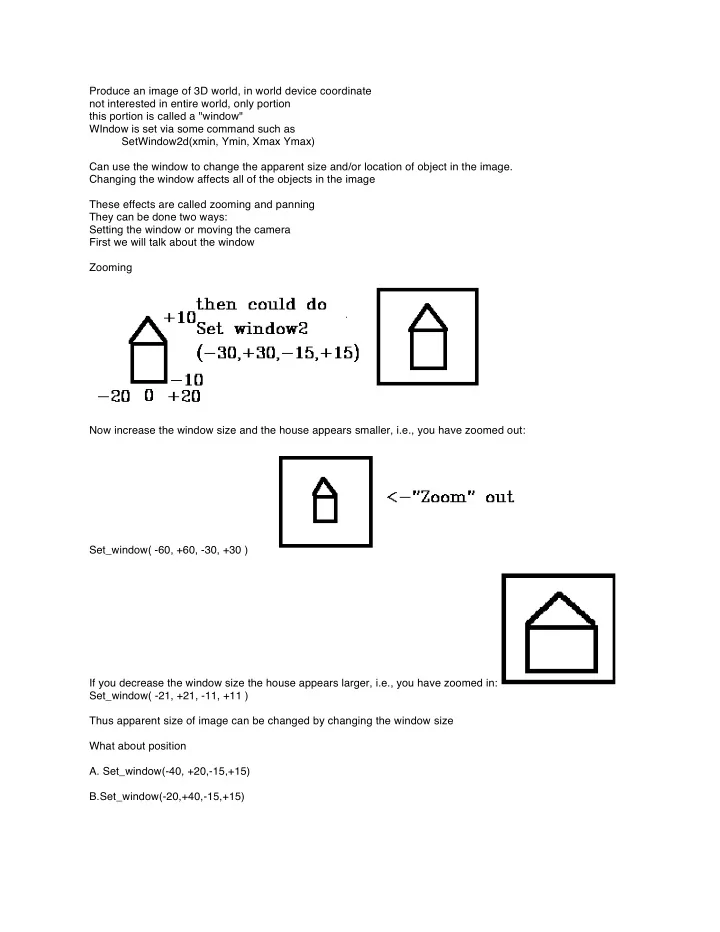
Produce an image of 3D world, in world device coordinate not interested in entire world, only portion this portion is called a "window" WIndow is set via some command such as SetWindow2d(xmin, Ymin, Xmax Ymax) Can use the window to change the apparent size and/or location of object in the image. Changing the window affects all of the objects in the image These effects are called zooming and panning They can be done two ways: Setting the window or moving the camera First we will talk about the window Zooming Now increase the window size and the house appears smaller, i.e., you have zoomed out: Set_window( -60, +60, -30, +30 ) If you decrease the window size the house appears larger, i.e., you have zoomed in: Set_window( -21, +21, -11, +11 ) Thus apparent size of image can be changed by changing the window size What about position

  • A. Set_window(-40, +20,-15,+15)

B.Set_window(-20,+40,-15,+15)

slide-2
SLIDE 2

Moving all objects in the scene by changing the window is called "panning".

  • Viewport

Windowing system is responsible for opening the window (GLUT) By default in OpenGL, sets the viewport to be the entire set of pixels in the rectangle defined by this window. You can use glViewport() to choose a smaller drawing region For example you may want to subdivide the window to create a split-screen effect for multiple views in the same window (See slide on viewport) Can display multiple images in different viewports: Set_window( -30, +30, -15, +15); Set_viewport(0.0, 0.5, 0.0, 0.5); -- lower left Draw_house; Set_viewport(0.5, 1.0, 0.0, 0.5); -- lower right Draw_house; Set_viewport(0.0, 0.5, 0.5, 1.0); -- upper left Draw_house; Set_viewport( 0.5, 1.0, 0.5, 1.0); -- upper right Draw_house; This gives the following image:

  • 3D Camera Transformation
slide-3
SLIDE 3

Use camera analogy viewer observes scene thru camera and can move around the scene Define a viewing coordinate system: position and orientation of the camera align view coordinate system with world coordinate system -> viewing transformation matrix viewing transformation matrix is applied to all objects moves them into proper position as seen by camera First step : Choosing the VCS origin (in world coordinates). This is the VRP, that is, the position of the camera (observer). Next, we define a projection plane (view plane or image plane). Choose a view plane normal vector, N which determines the positive Z axis direction. Next choose a view up vector, V which determines the positive y axis direction. We are through since the positive U (X) axis is orthogonal to the V (Y) and N (Z) axis. Now that we have defined a VCS (left handed) we must perform a coordinate transformation to align the WCS with the VCS.

slide-4
SLIDE 4

Problem choosing N and orthogonal vector V So we use an alternative method choose: Eye point, Look at point, and Up vector Normal to view plane becomes the normalized vector from Eye to Lookat length of this vector is the view plane distance gluLookAt(..) Defines a viewing matrix and multiplies it to the right of the current matrix

slide-5
SLIDE 5

In the default position, the camera is at the origin, is looking down the negative z-axis, and has the positive y-axis as straight up. This is the same as calling

gluLookat (0.0, 0.0, 0.0, 0.0, 0.0, -100.0, 0.0, 1.0, 0.0);

The z value of the reference point is -100.0, but could be any negative z, because the line of sight will remain the same. In this case, you don’t actually want to call gluLookAt(), because this is the default (see Figure 3-11) and you are already there! (The lines extending from the camera represent the viewing volume, which indicates its field of view.) This is the same as doing translation and rotations to get the camera to where you want it.

  • 3D Viewing Projections

Map 3D object to 2D display Two General methods: Parallel (orthographic) and Perspective Parallel Viewing Projections

slide-6
SLIDE 6

Parallel rays (projectors) emanate from a center of projection (the eye) and intersect the projection plane For Orthographic projections, center of projection is at infinity Two classes of parallel projections

  • rthographic: direction of projection is perpendicular to projection plane
  • blique projection: direction of projection is not perpendicular to projection plane

Draw projection of point to projection plane similar to this (for orthographic and parallel):

  • rthographic: discard the z coordinates

Engineering drawing frequently use front, side, top orthographic views of an object (Maya: modeling)

slide-7
SLIDE 7
  • rthographic projection that show more than 1 side of an object are called axonometric orthographic

projections The most common axonometric projection is an isometric projection where the projection plane intersects each coordinate axis in the model coordinate system at an equal distance. Isometric Projection The projection plane intersects the x, y, z axes at equal distances and the projection plane Normal makes an equal angle with the three axes. To form an orthographic projection xp = x, yp= y , zp = 0. To form different types e.g., Isometric, just manipulate

  • bject with 3D transformations.

The projectors are not perpendicular to the projection plane but are parallel from the object to the projection plane

slide-8
SLIDE 8

????? (error from note copy?) The projectors are defined by two angles A and d where: A = angle of line (x,y,xp,yp) with projection plane, d = angle of line (x, y, xp, yp) with x axis in projection plane L = Length of Line (x,y,xp,yp). Then: cos d = (xp - x) / L ------> xp = x + Lcos d , sin d = (yp - y) / L ------> yp = y + Lsin d , tan A = z / L Now define L1 = L / z

  • ---> L= L1 z ,

so tan A = z / L = 1 / L1 ; xp = x + z(L1cos d) ; yp = y + z(L1sin d) |1 0 0 0 | P = |0 1 0 0 | |L1cosq L1sinq 1 0 | |0 0 0 1 | Now if A = 90° (projection line is perpendicular to PP) then tanA = infinity => L1 = 0, so have an rthographic projection. Two special cases of oblique projection A) A = 45° , tanA = 1 => L1 = 1 This is a Cavalier projection such that all lines perpendicular to the projection planeare projected with no change in length. B) tanA = 2, A= 63.40°, L1 = 1 / 2 Lines which are perpendicular to the projection planeare projected at 1 / 2 length . This is a Cabinet projection.

  • Perspective Viewing Projection

Objects are projected directly toward the eye and they are drawn where they meet a view plane in front of the eye size of object is proportional to 1/z for eye at origin looking up at negative z axis y_s = (d/z)*y (for slide image or figure 6.9 of Shirley book)

slide-9
SLIDE 9

Eye at finite distance from projection plane That distance determines size of objects in projection plane farther the object, the smaller it is Perspective projection is thus more realistic since distance object appear smaller OpenGL specify projection void glFrustum(GLdouble left, GLdouble right, GLdouble bottom, GLdouble top, GLdouble near, GLdouble far); Creates a matrix for a perspective-view frustum and multiplies the current matrix by it. The frustum’s viewing volume is defined by the parameters: (left, bottom, -near) and (right, top, -near) specify the (x, y, z) coordinates of the lower-left and upper-right corners of the near clipping plane; near and far give the distances from the viewpoint to the near and far clipping planes. They should always be positive. frustum has a default orientation in 3D space You can perform rotation or translations on the projection matrix to alter this orientation, but it is tricky and nearly always avoidable glFrustum can be nonintuitive Instead may want to use gluPerspective void gluPerspective(GLdouble fovy, GLdouble aspect, GLdouble near, GLdouble far); Creates a matrix for a symmetric perspective-view frustum and multiplies the current matrix by it. fovy is the angle of the field of view in the x-z plane; its value must be in the range [0.0,180.0]. aspect is the aspect ratio of the frustum, its width divided by its height. near and far values the distances between the viewpoint and the clipping planes, along the negative z-axis. They should always be positive. Picking the FOV is the hardest part.... it involves knowing the eyepoint (where the user views the screen from) and the size of the window. For example, if you window is 11 inches high and you choose field of view of 90 degrees, then your eye has to be about 7.8 inches from the screen for the image to appear undistorted. usually FOV of 40 to 60 degrees works. See Example 3-3 for calculating FOV in OpenGL book See the troubleshooting pg 129 of Chapter 3 of OpenGL book (pg # refers to book version1.1)

  • Vanishing Points
slide-10
SLIDE 10
  • FINISH up on powerpoint slides
  • THinking towards the assignment and

back to zoom and panning via the camera The assignment: This project will help you familiarize yourself with three-dimensional modeling and viewing, and user input, and makes you write an OpenGL program from scratch. Completing the basic assignment will be worth 100 points. Focus first on the mechanics of viewing and interaction, and only worry about making a fancy model, and other special features, if you have time. The project is to model an object in 3D, and move it around using the ``glass-ball'' (aka ``arc-ball'') user

  • interface. The idea if the interface is that we imagine the object to be embedded in a clear glass trackball. When

you hold any mouse button down in the window containing the object, moving the mouse spins the glass trackball, and the object along with it. Notice that the object should rotates around an axis perpendicular to the direction that the mouse is moving. Moving the mouse with the buttons released does nothing.

  • Good set of input for moving the camera,

2 numbers: degrees rotate around x axis degrees rotate around y axis Think about drawing a line dividing the screen left to right if we move our camera up, we expect things on that line to stay in the center

slide-11
SLIDE 11

things in front of that line move down, thing behind that line move up call this the "apparent X axis" Similiarly if divide screen horizontally, we get an "apparent Y axis" if we move left or right, we expect things on tine wih the axis not to move Our eye coordinate system has Y toward top, X to right Note the eye coordinate system is not what we want to rotate around Use the LookAt point, which should be the center of our model if it is not, we can still pan around, but it will be less intuitive and look like the model is moving around as well as spinning Problem: Order of operations pan(0,15) pan(15,0) not necessarily equal to pan(15,15) however if we do small changes each time, as with the mouse, we may not notice if do large (pan 45 deg to right), do only one axis at a time to not surprise user Consider the task if want function to pan camera up, what do we change? don't want to change at point, keeps us looking at model don't want to change the view angle, because we aren't changing the camera, just moving it that leave Eye and Up Move both (Up is more subtle) if up vector at 90 degree from line of sight (Y axis) and we moved up 90 degrees we could be looking "down" on object compared to original view if we did not move up vector, up would be along line of sight.. viewing model breaks if move left to right still need to move up to keep orthogonal basis luckily it is easy to do, because apply same thing to Eye and Up, keeping them in the same relative position with respect to one another. How to find the axes: work with Eye first and we know how to rotate a point around x, y or z axis and the origin reduce current problem to rotating around " movement around apparent X (vertical divide) is a rotate around axis that is left to right know left to right is perpendicular to to plane made by up and line of sight this screams cross product, getting sign correct, we can get a vector to the right Up x (Eye - At) Note we have to take these to the origin to use it as a vector in the cross product Then the "apparent Y axis" (may or may not be the up vector) is (Eye-At ) x apparent Xaxis Find easier axis we convert points for drawing on the screen took from world to eye coordinates then project them onto the screen

  • ur eye is in world coordinates, not eye, but we have a matrix that can give us eye coordinates

convert eye to eye coordinates move it slightly

slide-12
SLIDE 12

rotate it around basic axes convert back to world coordinates tricky bits: eye coordinate >> origin at Eye point need origin at "At" point, and Eye relative to From in eye coordinates is always 0,0,0 From Peter shirley's book (pg 115) we have two coordinate systems e= Eye point g= gaze direction (at-eye) t = up Align this relative to a new coordinate system, uvw let Mv = xu yu zu 0 | | 1 0 0 -xe xv yv zv 0 | | 0 1 0 -ye xw yx zw 0 | | 0 0 1 -ze 0 0 0 1 | | 0 0 0 1 Applying Mv to point p aligns p to the coordinate axis Given Mo as the orthogonal view matrix (6.4 of pg 113 of Shirley) compute Mv compute Mo M = MoMv apply M to each point For perspective viewing compute Mv computer Mo compute Mp M = MoMpMv apply M to each point where Mp 1 0 0 0 0 1 0 0 0 0 (n+f)/n -f 0 0 (1/n) 0