
SLIDE 1
Programming of Interactive Systems Week 4: Graphics & Images - - PowerPoint PPT Presentation
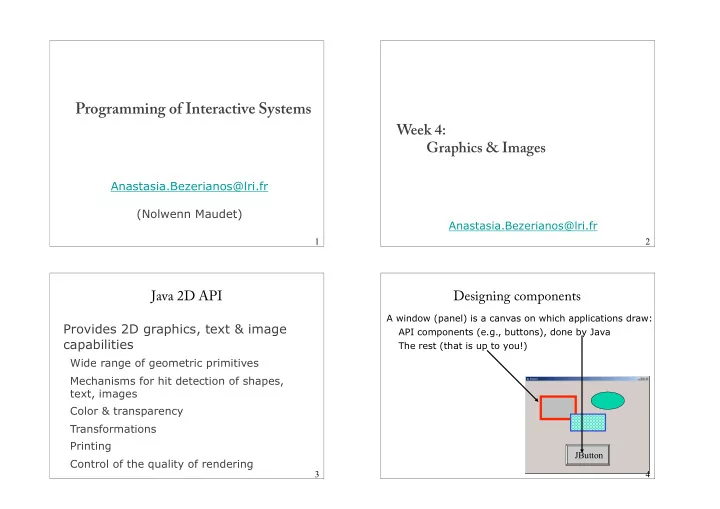
Programming of Interactive Systems Week 4: Graphics & Images Anastasia.Bezerianos@lri.fr (Nolwenn Maudet) Anastasia.Bezerianos@lri.fr 1 2 Java 2D API Designing components A window (panel) is a canvas on which applications draw:
void paint (Graphics G_Arg) { Graphics2D g2 = (Graphics2D) G_Arg; }
We call repaint() if we want to update our component Asynchronous, Java deals with paint in Graphics
setSize(), setEnable(), setBackground(), setFont(), setForeground()...
import java.awt.Graphics import java.awt.Graphics2D // Java2
Graphics g = myJPanel.getGraphics( ); Graphics2D g2 = (Graphics2D) g;
g2.drawLine(x1,y1, x2,y2);
public class MyPanel extends JPanel { public void paintComponent(Graphics g){ super.paintComponents(g); // erases background Graphics2D g2 = (Graphics2D)g; //cast for java2 // my graphics: g2.setColor(new Color(255,0,0)); g2.fillRect(10,10,200,50); // left, top, width, height g2.setColor(new Color(0,0,0)); g2.drawString("Hello World", 20, 20);// S, left, BOTTOM } }
public class MyPanel extends JPanel { public void paintComponent(Graphics g) { super.paintComponent(g); // erases background Graphics2D g2 = (Graphics2D) g; // cast for java2 // my graphics: g2.setColor(new Color(255, 0, 0)); g2.fillRect(10, 10, 200, 50); g2.setColor(new Color(0, 0, 0)); g2.drawString("Hello World", 20, 20); } public static void main(String[] args) { JFrame frame = new JFrame(“my panel”); JPanel jp = new MyPanel(); frame.getContentPane().add(jp); frame.setDefaultCloseOperation(javax.swing.JFrame.EXIT_ON_CLOSE); frame.setSize(250, 200); frame.setVisible(true); } }
void paint (Graphics G_Arg) { Graphics2D g2 = (Graphics2D) G_Arg; }
We call repaint() if we want to update our component Asynchronous, Java deals with paint in Graphics
setSize(), setEnable(), setBackground(), setFont(), setForeground()...
0,0 = top left by default
by default : entire component, but we can constraint it
Color col1 = new Color (255, 0, 0); RGB but can have HSV
Font font1 = new Font("SansSerif", Font.BOLD, 12);
import javax.swing.*; import java.awt.*; public class SwingDemo7 extends JFrame { public JPanel panel; public void init() { Container cp = getContentPane(); this.setTitle("example 7"); this.setDefaultCloseOperation(EXIT_ON_CLOSE); panel = new JPanel(); cp.add(panel); } public static void main(String[] args) { SwingDemo7 frame = new SwingDemo7(); frame.init(); frame.setSize(250,250); frame.setVisible(true); Graphics g = frame.panel.getGraphics(); Graphics2D g2 = (Graphics2D) g; g2.setColor( Color.RED ); for (int i = 0; i <100 ;++i) { g2.drawLine( (int)(250*Math.random()), (int)(250*Math.random()), (int)(250*Math.random()), (int)(250*Math.random()) ); } } }
import javax.swing.*; import java.awt.*; public class SwingDemo7 extends JFrame { public JPanel panel; public void init() { Container cp = getContentPane(); this.setTitle("example 7"); this.setDefaultCloseOperation(EXIT_ON_CLOSE); panel = new JPanel(); cp.add(panel); } public static void main(String[] args) { SwingDemo7 frame = new SwingDemo7(); frame.init(); frame.setSize(250,250); frame.setVisible(true); Graphics g = frame.panel.getGraphics(); Graphics2D g2 = (Graphics2D) g; g2.setColor( Color.RED ); for (int i = 0; i <100 ;++i) { g2.drawLine( (int)(250*Math.random()), (int)(250*Math.random()), (int)(250*Math.random()), (int)(250*Math.random()) ); } } }
import javax.swing.*; import java.awt.*; public class SwingDemo7 extends JFrame { public JPanel panel; public void init() { Container cp = getContentPane(); this.setTitle("example 7"); this.setDefaultCloseOperation(EXIT_ON_CLOSE); panel = new JPanel(); cp.add(panel); } public void paint(Graphics g) { g = this.panel.getGraphics(); Graphics2D g2 = (Graphics2D) g; g2.setColor(Color.RED); for (int i = 0; i < 100; ++i) { g2.drawLine((int) (250 * Math.random()), (int) (250 * Math.random()), (int) (250 * Math.random()), (int) (250 * Math.random())); } } public static void main(String[] args) { SwingDemo7 frame = new SwingDemo7(); frame.init(); frame.setSize(250,250); frame.setVisible(true); } }
what happens after resizing?
import javax.swing.*; import java.awt.*; public class SwingDemo7 extends JFrame { public JPanel panel; public void init() { Container cp = getContentPane(); this.setTitle("example 7"); this.setDefaultCloseOperation(EXIT_ON_CLOSE); panel = new JPanel(); cp.add(panel); } public void paint(Graphics g) { g = this.panel.getGraphics(); Graphics2D g2 = (Graphics2D) g; g2.setColor(Color.RED); for (int i = 0; i < 100; ++i) { g2.drawLine((int) (250 * Math.random()), (int) (250 * Math.random()), (int) (250 * Math.random()), (int) (250 * Math.random())); } } public static void main(String[] args) { SwingDemo7 frame = new SwingDemo7(); frame.init(); frame.setSize(250,250); frame.setVisible(true); } }
what happens after resizing?
import javax.swing.*; import java.awt.*; public class SwingDemo7 extends JFrame { public JPanel panel; public void init() { Container cp = getContentPane(); this.setTitle("example 7"); this.setDefaultCloseOperation(EXIT_ON_CLOSE); panel = new JPanel(); cp.add(panel); } public void paint(Graphics g) { super.paintComponents(g); g = this.panel.getGraphics(); Graphics2D g2 = (Graphics2D) g; g2.setColor(Color.RED); for (int i = 0; i < 100; ++i) { g2.drawLine((int) (250 * Math.random()), (int) (250 * Math.random()), (int) (250 * Math.random()), (int) (250 * Math.random())); } } public static void main(String[] args) { SwingDemo7 frame = new SwingDemo7(); frame.init(); frame.setSize(250,250); frame.setVisible(true); } }
what happens after resizing?
properties depend on current color (i.e., last defined color)
* = { Rect, Oval, String, Arc, Polygon, PolyLine }
Returns an instance/object with info on the size of the text
Needs an instance/object "Image"
Translation, rotation, zoom, penchant (sheer)
public void paintComponent(Graphics g){ super.paintComponent(g); // erases background Graphics2D g2 = (Graphics2D)g; //cast for java2 g2.setRenderingHint( RenderingHints.KEY_TEXT_ANTIALIASING, RenderingHints.VALUE_TEXT_ANTIALIAS_ON); // my graphics: g2.setColor(new Color(255,0,0)); g2.fillRect(10,10,200,50); // left, top, width, height g2.setColor(new Color(0,0,0)); g2.drawString("Hello World", 20, 20);// S, left, BOTTOM }
import java.awt.*; import java.awt.image.BufferedImage; import java.io.*; import javax.imageio.ImageIO; import javax.swing.*; public class SwingDemo8 extends JPanel { BufferedImage image; public SwingDemo8(BufferedImage image) { this.image = image; } protected void paintComponent(Graphics g) { int x = (getWidth() - image.getWidth()) / 2; int y = (getHeight() - image.getHeight()) / 2; g.drawImage(image, x, y, this); } public static void main(String[] args) throws IOException { BufferedImage image = ImageIO.read(new File("image.jpg")); SwingDemo8 myDemo = new SwingDemo8(image); JFrame f = new JFrame(); f.setDefaultCloseOperation(JFrame.EXIT_ON_CLOSE); f.add(new JScrollPane(myDemo)); f.setSize(400, 400); f.setLocation(200, 200); f.setVisible(true); } }
after resizing (content unchanged)
import java.awt.*; import java.awt.image.BufferedImage; import java.io.*; import javax.imageio.ImageIO; import javax.swing.*; public class SwingDemo9 extends JPanel { BufferedImage image; public SwingDemo8(BufferedImage image) { this.image = image; } protected void paintComponent(Graphics g) { g.drawImage(image, 0, 0, getWidth(), getHeight(), 0, 0, image.getWidth(), image.getHeight(), this); // drawImage (I, dst, src, null/this) : // dst how many pixels we'll draw, src part of the image to draw } public static void main(String[] args) throws IOException { BufferedImage image = ImageIO.read(new File("image.jpg")); SwingDemo9 myDemo = new SwingDemo9(image); JFrame f = new JFrame(); f.setDefaultCloseOperation(JFrame.EXIT_ON_CLOSE); f.add(new JScrollPane(myDemo)); f.setSize(400, 400); f.setLocation(200, 200); f.setVisible(true); } }
after resizing change size
rect.setRect(x+marginx, y + marginy, w,h); g2.clip(rect); g2.drawImage(image,x,y,null); // could be other shapes
g2.translate (100,200); AffineTransform atransf = new Affintetransform(); atransf.rotate(Math.PI/2); // rotate 90 degrees g2.transform(atransf);