Ray Casting Based on slides of Thomas Funkhouser 3D Rendering - - PDF document

ray casting
SMART_READER_LITE
LIVE PREVIEW

Ray Casting Based on slides of Thomas Funkhouser 3D Rendering - - PDF document

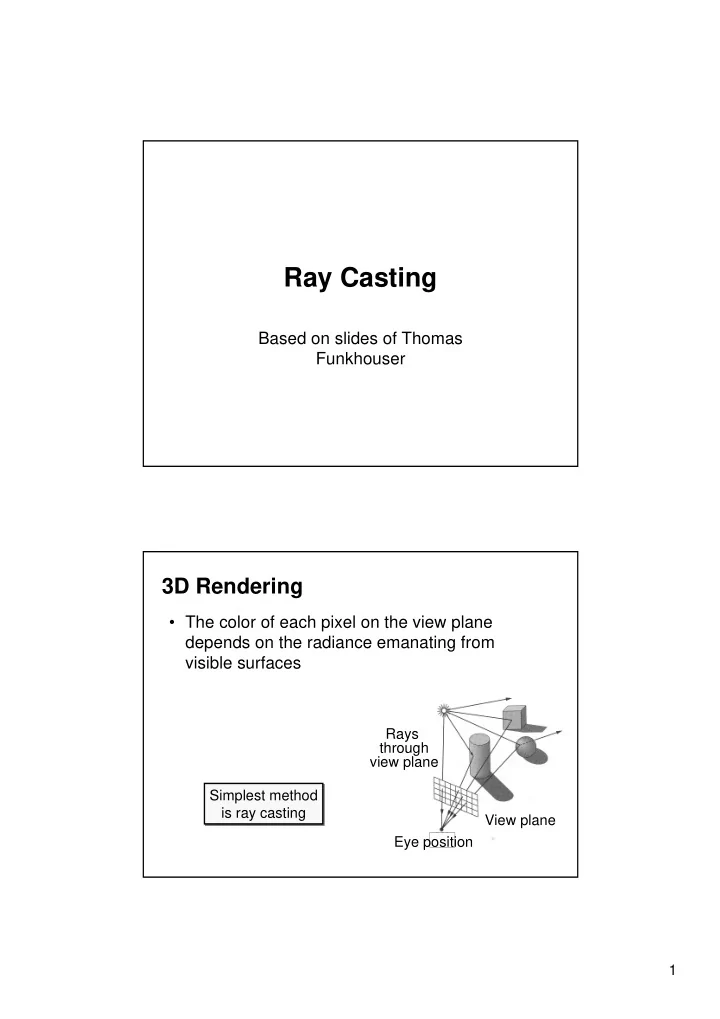
Ray Casting Based on slides of Thomas Funkhouser 3D Rendering The color of each pixel on the view plane depends on the radiance emanating from visible surfaces Rays through view plane Simplest method is ray casting View plane Eye

slide-1
SLIDE 1

1

Ray Casting

Based on slides of Thomas Funkhouser

3D Rendering

  • The color of each pixel on the view plane

depends on the radiance emanating from visible surfaces

View plane Eye position Simplest method is ray casting Rays through view plane

slide-2
SLIDE 2

2

Ray Casting

  • For each sample …

Construct ray from eye position through view plane Find first surface intersected by ray through pixel Compute color sample based on surface radiance

Ray Casting

  • For each sample …

Construct ray from eye position through view plane Find first surface intersected by ray through pixel Compute color sample based on surface radiance Samples on view plane Eye position Rays through view plane

slide-3
SLIDE 3

3

Ray Casting

  • Simple implementation:

Image RayCast(Camera camera, Scene scene, int width, int height) { Image image = new Image(width, height); for (int i = 0; i < width; i++) { for (int j = 0; j < height; j++) { Ray ray = ConstructRayThroughPixel(camera, i, j); Intersection hit = FindIntersection(ray, scene); image[i][j] = GetColor(hit); } } return image; }

Ray Casting

  • Simple implementation:

Image RayCast(Camera camera, Scene scene, int width, int height) { Image image = new Image(width, height); for (int i = 0; i < width; i++) { for (int j = 0; j < height; j++) { Ray ray = ConstructRayThroughPixel(camera, i, j); Intersection hit = FindIntersection(ray, scene); image[i][j] = GetColor(hit); } } return image; }

slide-4
SLIDE 4

4

Constructing Ray Through a Pixel

right back Up direction

P0

t

  • w

a r d s

View Plane P V

Ray: P = P0 + tV

Constructing Ray Through a Pixel

  • 2D Example

d

  • towards

P0

right right = towards x up = frustum half-angle d = distance to view plane P1 = P0 + d*towards - d*tan()*right P2 = P0 + d*towards + d*tan()*right P1 P2

2*d*tan(

P P = P1 + (i/width + 0.5) * 2*d*tan ()*right V = (P - P0) / ||P - P0 || V

Ray: P = P0 + tV

slide-5
SLIDE 5

5

Ray Casting

  • Simple implementation:

Image RayCast(Camera camera, Scene scene, int width, int height) { Image image = new Image(width, height); for (int i = 0; i < width; i++) { for (int j = 0; j < height; j++) { Ray ray = ConstructRayThroughPixel(camera, i, j); Intersection hit = FindIntersection(ray, scene); image[i][j] = GetColor(hit); } } return image; }

Ray-Scene Intersection

  • Intersections with geometric primitives

Sphere Triangle Groups of primitives (scene)

  • Acceleration techniques

Bounding volume hierarchies Spatial partitions

  • Uniform grids
  • Octrees
  • BSP trees
slide-6
SLIDE 6

6

Ray-Sphere Intersection

Ray: P = P0 + tV Sphere: |P - O|2 - r 2 = 0 P0

V

O P

r

P’

Ray-Sphere Intersection I

Ray: P = P0 + tV Sphere: |P - O|2 - r 2 = 0 Substituting for P, we get: |P0 + tV - O|2 - r 2 = 0 Solve quadratic equation: at2 + bt + c = 0 where: a = 1 b = 2 V • (P0 - O) c = |P0 - C|2 - r 2 = 0 P0

V

O P

r

P’ Algebraic Method P = P0 + tV

slide-7
SLIDE 7

7

Ray-Sphere Intersection II

Ray: P = P0 + tV Sphere: |P - O|2 - r 2 = 0 L = O - P0 tca = L • V if (tca < 0) return 0 d2 = L • L - tca

2

if (d2 > r2) return 0 thc = sqrt(r2 - d2) t = tca - thc and tca + thc P0

V

O P

r

P’

r d thc tca L

Geometric Method P = P0 + tV

Ray-Sphere Intersection

P0

V

O P

r

N = (P - O) / ||P - O||

N

  • Need normal vector at intersection

for lighting calculations

slide-8
SLIDE 8

8

Ray-Scene Intersection

  • Intersections with geometric primitives

Sphere » Triangle Groups of primitives (scene)

  • Acceleration techniques

Bounding volume hierarchies Spatial partitions

  • Uniform grids
  • Octrees
  • BSP trees

Ray-Triangle Intersection

  • First, intersect ray with plane
  • Then, check if point is inside triangle

P P0 V

slide-9
SLIDE 9

9

Ray-Plane Intersection

Ray: P = P0 + tV Plane: P • N + d = 0 Substituting for P, we get: (P0 + tV) • N + d = 0 Solution: t = -(P0 • N + d) / (V • N) N P P0 V Algebraic Method P = P0 + tV

Ray-Triangle Intersection I

  • Check if point is inside triangle algebraically

P P0 N1 T1 T2 T3 V2 V1 For each side of triangle V1 = T1 - P V2 = T2 - P N1 = V2 x V1 Normalize N1 d1 = -P0 • N1 if ((P • N1 + d1 ) < 0) return FALSE; end

slide-10
SLIDE 10

10

Ray-Triangle Intersection II

  • Check if point is inside triangle parametrically

P P0 Compute P = (T2-T1) + (T3-T1) Check if point inside triangle. 0 1 and 0 1 V

  • T1

T2 T3

Other Ray-Primitive Intersections

  • Cone, cylinder, ellipsoid:

Similar to sphere

  • Box

Intersect 3 front-facing planes, return closest

  • Convex polygon

Same as triangle (check point-in-polygon algebraically)

  • Concave polygon

Same plane intersection More complex point-in-polygon test

slide-11
SLIDE 11

11

Ray-Scene Intersection

  • Find intersection with front-most primitive in group

A B C D E F

Intersection FindIntersection(Ray ray, Scene scene) { min_t = infinity min_primitive = NULL For each primitive in scene { t = Intersect(ray, primitive); if (t < min_t) then min_primitive = primitive min_t = t } } return Intersection(min_t, min_primitive) }

Ray-Scene Intersection

  • Intersections with geometric primitives

Sphere Triangle Groups of primitives (scene)

» Acceleration techniques

Bounding volume hierarchies Spatial partitions

  • Uniform grids
  • Octrees
  • BSP trees

Next Time!

slide-12
SLIDE 12

12

Summary

  • Writing a simple ray casting renderer is easy

Generate rays Intersection tests Lighting calculations

Image RayCast(Camera camera, Scene scene, int width, int height) { Image image = new Image(width, height); for (int i = 0; i < width; i++) { for (int j = 0; j < height; j++) { Ray ray = ConstructRayThroughPixel(camera, i, j); Intersection hit = FindIntersection(ray, scene); image[i][j] = GetColor(hit); } } return image; }

Constructing Ray Through a Pixel

right back Up direction

P0

t

  • w

a r d s

View Plane P V

Ray: P = P0 + tV Vy Vx

P0

slide-13
SLIDE 13

13

We need to determine Vx and Vy

right back Up direction

P0

t

  • w

a r d s

View Plane P V

Ray: P = P0 + tV Vy Vx

P0

Camera Coordinate System

  • Find the transformation matrix M that rotate the

world coordinate system to the camera coordinate system (Vx,Vy,Vz) (normalized)

Vy Vx Vz y x z M (0,0,1) = Vz

slide-14
SLIDE 14

14

Camera Coordinate System

  • The vector X and Y are rotated by M

Vy Vx Vz y x z M (0,0,1) = Vz

The definition of the Matrix M

1 Cx Sx

  • Sx

Cx

Cy Sy 1

  • Sy

Cy

  • CxCy

Sx

  • CxSy
  • SxCy

Cx SxSy

  • Sy

Cy

= M =

Cz Sz Sz Cz 1

  • (0,0,1) •

= (0,0,1) Rotate around x Rotate around z Rotate around y Let Cx and Sx denote sin(x), cos(x), respectively

slide-15
SLIDE 15

15

The definition of the Matrix M

Since: (0,0,1) M = (-CxSy, -Sx, CxCy) = (Vz.x,Vz.y,Vz.z) = Vz = (a,b,c). We get: a = -CxSy; b = -Sx; c = CxCy,

  • r

Sx = -b; Cx = sqrt(1 - sqr(Sx)); Sy = -a/Cx;Cy = c/Cx;

Compute the Camera Coordinate System

Now, use M to rotate the world coordinate vectors:

Vx = (1,0,0) • M Vy = (0,1,0) • M Vz = (0,0,1) • M Note that the vector V is normalized.

slide-16
SLIDE 16

16

We need to determine Vx and Vy

E

t

  • w

a r d s

View Plane P

Vy Vx

P0

f Vz P = E + Vz * f P0 = P - wVx - hVy Let f be the distance between the eye E and the plane along Vz, and w and h the lengths

  • f half the screen size.

The main loop

Image RayCast(Camera camera, Scene scene, int width, int height) { Image image = new Image(width, height); Set P0 (as in the previous slide); for (int i = 0; i < height; i++) { p = P0; for (int j = 0; j < width; j++) { Ray ray = E + t * (p – E); Intersection hit = FindIntersection(ray, scene); image[i][j] = GetColor(hit); p += Vx; // move one pixel along the vector Vx } P0 += Vy; // move one pixel along the vector Vy } return image; }