Ray Tracing Ray Tracing Ray Casting Ray Casting Ray-Surface - - PDF document

ray tracing ray tracing
SMART_READER_LITE
LIVE PREVIEW

Ray Tracing Ray Tracing Ray Casting Ray Casting Ray-Surface - - PDF document

Ray Tracing Ray Tracing Ray Casting Ray Casting Ray-Surface Intersections Ray-Surface Intersections Barycentric Coordinates Barycentric Coordinates Reflection and Transmission Reflection and Transmission [Angel, Ch 13.2-13.3] [Angel, Ch


slide-1
SLIDE 1

1 Ray Casting Ray-Surface Intersections Barycentric Coordinates Reflection and Transmission [Angel, Ch 13.2-13.3] Ray Tracing Handouts Ray Casting Ray-Surface Intersections Barycentric Coordinates Reflection and Transmission [Angel, Ch 13.2-13.3] Ray Tracing Handouts

Ray Tracing Ray Tracing

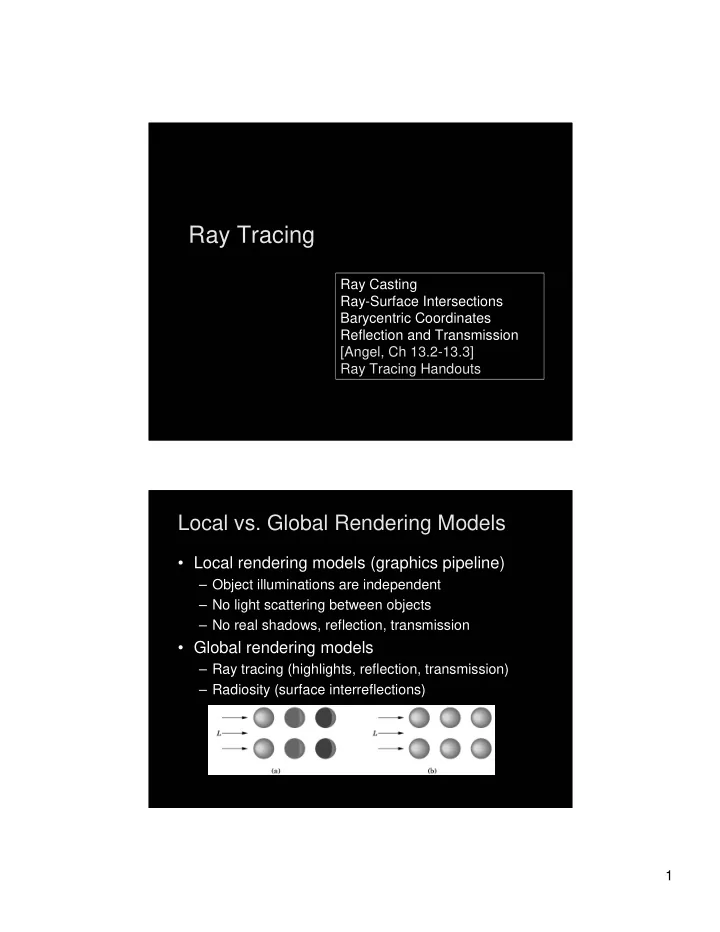
Local vs. Global Rendering Models Local vs. Global Rendering Models

  • Local rendering models (graphics pipeline)

– Object illuminations are independent – No light scattering between objects – No real shadows, reflection, transmission

  • Global rendering models

– Ray tracing (highlights, reflection, transmission) – Radiosity (surface interreflections)

slide-2
SLIDE 2

2

Object Space vs. Image Space Object Space vs. Image Space

  • Graphics pipeline: for each object, render

– Efficient pipeline architecture, on-line – Difficulty: object interactions

  • Ray tracing: for each pixel, determine color

– Pixel-level parallelism, off-line – Difficulty: efficiency, light scattering

  • Radiosity: for each two surface patches,

determine diffuse interreflections

– Solving integral equations, off-line – Difficulty: efficiency, reflection

Forward Ray Tracing Forward Ray Tracing

  • Rays as paths of photons in world space
  • Forward ray tracing: follow photon from light

sources to viewer

  • Problem: many rays will

not contribute to image!

slide-3
SLIDE 3

3

Backward Ray Tracing Backward Ray Tracing

  • Ray-casting: one ray from center of projection

through each pixel in image plane

  • Illumination
  • 1. Phong (local as before)
  • 2. Shadow rays
  • 3. Specular reflection
  • 4. Specular transmission
  • (3) and (4) are recursive

Shadow Rays Shadow Rays

  • Determine if light “really” hits surface point
  • Cast shadow ray from surface point to light
  • If shadow ray hits opaque object,no contribution
  • Improved diffuse reflection
slide-4
SLIDE 4

4

Reflection Rays Reflection Rays

  • Calculate specular component of illumination
  • Compute reflection ray (recall: backward!)
  • Call ray tracer recursively to determine color
  • Add contributions
  • Transmission ray

– Analogue for transparent or translucent surface – Use Snell’s laws for refraction

  • Later:

– Optimizations, stopping criteria

Ray Casting Ray Casting

  • Simplest case of ray tracing
  • Required as first step of recursive ray tracing
  • Basic ray-casting algorithm

– For each pixel (x,y) fire a ray from COP through (x,y) – For each ray & object calculate closest intersection – For closest intersection point p

  • Calculate surface normal
  • For each light source, calculate and add contributions
  • Critical operations

– Ray-surface intersections – Illumination calculation

slide-5
SLIDE 5

5

Recursive Ray Tracing Recursive Ray Tracing

  • Calculate specular component

– Reflect ray from eye on specular surface – Transmit ray from eye through transparent surface

  • Determine color of incoming ray by recursion
  • Trace to fixed depth
  • Cut off if contribution

below threshold

Angle of Reflection Angle of Reflection

  • Recall: incoming angle = outgoing angle
  • r = 2(l n) n – l
  • For incoming/outgoing ray negate l !
  • Compute only for surfaces

with actual reflection

  • Use specular coefficient
  • Add specular and diffuse

components

slide-6
SLIDE 6

6

Refraction Refraction

  • Index of refraction is relative speed of light
  • Snell’s law

– l = index of refraction for upper material – t = index of refraction for lower material

[U =

Raytracing Example Raytracing Example

www.povray.org

slide-7
SLIDE 7

7

Raytracing Example Raytracing Example

rayshade gallery

Raytracing Example Raytracing Example

rayshade gallery

slide-8
SLIDE 8

8

Raytracing Example Raytracing Example

www.povray.org

Raytracing Example Raytracing Example

Saito, Saturn Ring

slide-9
SLIDE 9

9

Raytracing Example Raytracing Example

www.povray.org

Raytracing Example Raytracing Example

www.povray.org

slide-10
SLIDE 10

10

Raytracing Example Raytracing Example

rayshade gallery

Intersections Intersections

slide-11
SLIDE 11

11

Ray-Surface Intersections Ray-Surface Intersections

  • General implicit surfaces
  • General parametric surfaces
  • Specialized analysis for special surfaces

– Spheres – Planes – Polygons – Quadrics

  • Do not decompose objects into triangles!
  • CSG is also a good possibility

Rays and Parametric Surfaces Rays and Parametric Surfaces

  • Ray in parametric form

– Origin p0 = [x0 y0 z0 1]T – Direction d = [xd yd zd 0]t – Assume d normalized (xd

2 + yd 2 + zd 2 = 1)

– Ray p(t) = p0 + d t for t > 0

  • Surface in parametric form

– Point q = g(u, v), possible bounds on u, v – Solve p + d t = g(u, v) – Three equations in three unknowns (t, u, v)

slide-12
SLIDE 12

12

Rays and Implicit Surfaces Rays and Implicit Surfaces

  • Ray in parametric form

– Origin p0 = [x0 y0 z0 1]T – Direction d = [xd yd zd 0]t – Assume d normalized (xd

2 + yd 2 + zd 2 = 1)

– Ray p(t) = p0 + d t for t > 0

  • Implicit surface

– Given by f(q) = 0 – Consists of all points q such that f(q) = 0 – Substitute ray equation for q: f(p0 + d t) = 0 – Solve for t (univariate root finding) – Closed form (if possible) or numerical approximation

Ray-Sphere Intersection I Ray-Sphere Intersection I

  • Common and easy case
  • Define sphere by

– Center c = [xc yc zc 1]T – Radius r – Surface f(q) = (x – xc)2 + (y – yc)2+ (z – zc)2 – r2 = 0

  • Plug in ray equations for x, y, z:
slide-13
SLIDE 13

13

Ray-Sphere Intersection II Ray-Sphere Intersection II

  • Simplify to
  • Solve to obtain t0 and t1

where Check if t0, t1> 0 (ray) Return min(t0, t1)

Ray-Sphere Intersection III Ray-Sphere Intersection III

  • For lighting, calculate unit normal
  • Negate if ray originates inside the sphere!
slide-14
SLIDE 14

14

Simple Optimizations Simple Optimizations

  • Factor common subexpressions
  • Compute only what is necessary

– Calculate b2 – 4c, abort if negative – Compute normal only for closest intersection – Other similar optimizations [Handout]

Ray-Polygon Intersection I Ray-Polygon Intersection I

  • Assume planar polygon
  • 1. Intersect ray with plane containing polygon
  • 2. Check if intersection point is inside polygon
  • Plane

– Implicit form: ax + by + cz + d = 0 – Unit normal: n = [a b c 0]T with a2 + b2 + c2 = 1

  • Substitute:
  • Solve:
slide-15
SLIDE 15

15

Ray-Polygon Intersection II Ray-Polygon Intersection II

  • Substitute t to obtain intersection point in plane
  • Test if point inside polygon [see Handout]

Ray-Quadric Intersection Ray-Quadric Intersection

  • Quadric f(p) = f(x, y, z) = 0, where f is

polynomial of order 2

  • Sphere, ellipsoid, paraboloid, hyperboloid,

cone, cylinder

  • Closed form solution as for sphere
  • Important case for modelling in ray tracing
  • Combine with CSG

[see Handout]

slide-16
SLIDE 16

16

Barycentric Coordinates Barycentric Coordinates Interpolated Shading for Ray Tracing Interpolated Shading for Ray Tracing

  • Assume we know normals at vertices
  • How do we compute normal of interior point?
  • Need linear interpolation between 3 points
  • Barycentric coordinates
  • Yields same answer as scan conversion
slide-17
SLIDE 17

17

Barycentric Coordinates in 1D Barycentric Coordinates in 1D

  • Linear interpolation

– p(t) = (1 – t)p1 + t p2, 0 t 1 – p(t) = p1 + p2 where + = 1 – p is between p1 and p2 iff 0 , 1

  • Geometric intuition

– Weigh each vertex by ratio of distances from ends

  • , are called barycentric coordinates
  • p1

p p2

Barycentric Coordinates in 2D Barycentric Coordinates in 2D

  • Given 3 points instead of 2
  • Define 3 barycentric coordinates, , ,
  • p = p1 + p2 + p3
  • p inside triangle iff 0 , , 1, + + = 1
  • How do we calculate , , given p?

p1 p2 p3 p

slide-18
SLIDE 18

18

Barycentric Coordinates for Triangle Barycentric Coordinates for Triangle

  • Coordinates are ratios of triangle areas

1

C

C

2

C

  • C
  • 1

2 1 1 2 1 2 2 1 2 1

C C C C C C C C C CC C C C C C CC Area Area Area Area Area Area

Computing Triangle Area Computing Triangle Area

  • In 3 dimensions

– Use cross product – Parallelogram formula – Area(ABC) = (1/2)|(B – A) (C – A)| – Optimization: project, use 2D formula

  • In 2 dimensions

– Area(x-y-proj(ABC)) = (1/2)((bx – ax)(cy – ay) – (cx – ax) (by – ay)) A B C

slide-19
SLIDE 19

19

Ray Tracing Preliminary Assessment Ray Tracing Preliminary Assessment

  • Global illumination method
  • Image-based
  • Pros:

– Relatively accurate shadows, reflections, refractions

  • Cons:

– Slow (per pixel parallelism, not pipeline parallelism) – Aliasing – Inter-object diffuse reflections

Ray Tracing Acceleration Ray Tracing Acceleration

  • Faster intersections

– Faster ray-object intersections

  • Object bounding volume
  • Efficient intersectors

– Fewer ray-object intersections

  • Hierarchical bounding volumes (boxes, spheres)
  • Spatial data structures
  • Directional techniques
  • Fewer rays

– Adaptive tree-depth control – Stochastic sampling

  • Generalized rays (beams, cones)
slide-20
SLIDE 20

20