Ray-tracing Acceleration Motivation Distribution Ray Tracing - - PDF document

ray tracing acceleration
SMART_READER_LITE
LIVE PREVIEW

Ray-tracing Acceleration Motivation Distribution Ray Tracing - - PDF document

Ray-tracing Acceleration Motivation Distribution Ray Tracing Soft shadows Acceleration Data Structures Antialiasing (getting rid of jaggies) for Ray Tracing Glossy reflection Motion blur Depth of field (focus)


slide-1
SLIDE 1

1

Acceleration Data Structures for Ray Tracing

Thanks to Fredo Durand and Barb Cutler

Ray-tracing Acceleration

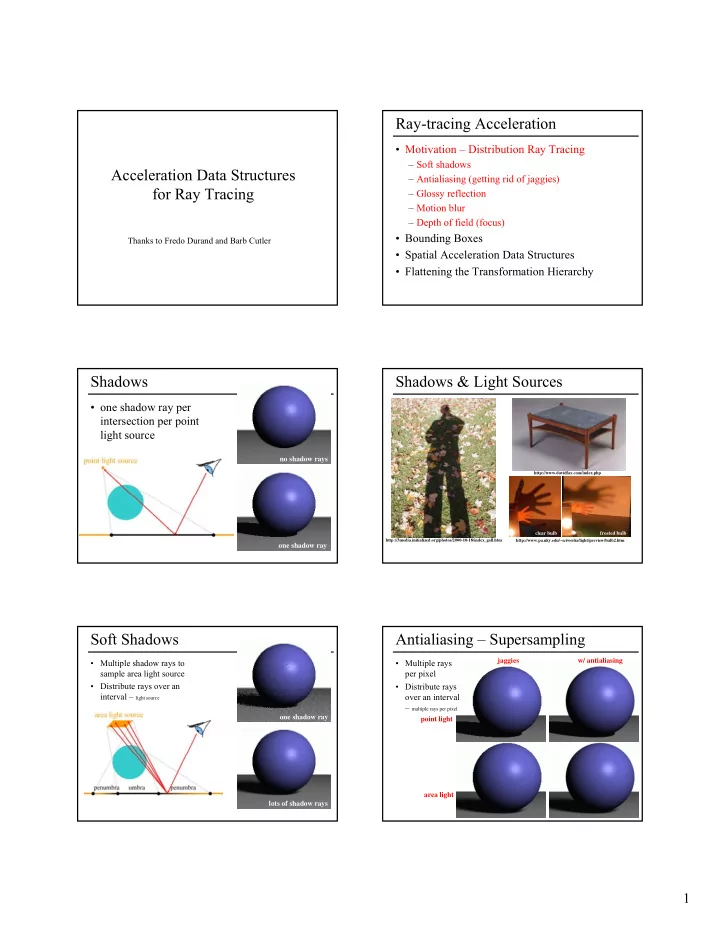
  • Motivation – Distribution Ray Tracing

– Soft shadows – Antialiasing (getting rid of jaggies) – Glossy reflection – Motion blur – Depth of field (focus)

  • Bounding Boxes
  • Spatial Acceleration Data Structures
  • Flattening the Transformation Hierarchy

Shadows

  • one shadow ray per

intersection per point light source

no shadow rays

  • ne shadow ray

Shadows & Light Sources

http://www.pa.uky.edu/~sciworks/light/preview/bulb2.htm

clear bulb frosted bulb

http://3media.initialized.org/photos/2000-10-18/index_gall.htm http://www.davidfay.com/index.php

Soft Shadows

  • Multiple shadow rays to

sample area light source

  • Distribute rays over an

interval – light source

  • ne shadow ray

lots of shadow rays

Antialiasing – Supersampling

  • Multiple rays

per pixel

  • Distribute rays
  • ver an interval

– multiple rays per pixel

point light area light jaggies w/ antialiasing

slide-2
SLIDE 2

2

  • one reflection ray per intersection

perfect mirror

Reflection

θ θ

Glossy Reflection

polished surface θ θ

Justin Legakis

  • multiple reflection rays
  • Distribute rays over an

interval – multiple reflection rays

Motion Blur

  • Sample objects

temporally

  • Distribute rays over

an interval - time

Rob Cook

Depth of Field

  • Distribute rays over

an interval - lens area

Justin Legakis

focal length film

Ray Tracing Algorithm Analysis

  • Ray casting
  • Lots of primitives
  • Recursive
  • Distributed Ray

Tracing Effects – Soft shadows – Anti-aliasing – Glossy reflection – Motion blur – Depth of field

cost ≈ height * width * num primitives * intersection cost * size of recursive ray tree * num shadow rays * num supersamples * num glossy rays * num temporal samples * num focal samples * . . .

can we reduce this?

Ray-Tracing Taxonomy

by James Arvo and David Kirk

slide-3
SLIDE 3

3

Ray-tracing Acceleration

  • Motivation – Distribution Ray Tracing
  • Bounding Boxes

– of each primitive – of groups – of transformed primitives

  • Spatial Acceleration Data Structures
  • Flattening the Transformation Hierarchy

Acceleration of Ray Casting

  • Goal: Reduce the

number of ray/primitive intersections

Conservative Bounding Region

  • First check for an

intersection with a conservative bounding region

  • Early reject

Conservative Bounding Regions

axis-aligned bounding box non-aligned bounding box bounding sphere arbitrary convex region (bounding half-spaces)

  • tight → avoid

false positives

  • fast to intersect

Intersection with Axis-Aligned Box

  • For all 3 axes,

calculate the intersection distances t1 and t2

  • tnear = max (t1x, t1y, t1z)

tfar = min (t2x, t2y, t2z)

  • If tnear> tfar,

box is missed

  • If tfar< tmin,

box is behind

  • If box survived tests,

report intersection at tnear

y=Y2 y=Y1 x=X1 x=X2 tnear tfar t1x t1y t2x t2y

Bounding Box of a Triangle

(xmin, ymin, zmin) (xmax, ymax, zmax) (x0, y0, z0) (x1, y1, z1) (x2, y2, z2) = (min(x0,x1,x2), min(y0,y1,y2), min(z0,z1,z2)) = (max(x0,x1,x2), max(y0,y1,y2), max(z0,z1,z2))

slide-4
SLIDE 4

4

Bounding Box of a Sphere

r (xmin, ymin, zmin) (xmax, ymax, zmax) (x, y, z) = (x-r, y-r, z-r) = (x+r, y+r, z+r)

Bounding Box of a Plane

(xmin, ymin, zmin) (xmax, ymax, zmax) = (-∞, -∞, -∞)* = (+∞, +∞, +∞)* n = (a, b, c) ax + by + cz = d

* unless n is exactly perpendicular to an axis

Bounding Box of a Group

(xmin_b, ymin_b, zmin_b) (xmin, ymin, zmin) (xmax, ymax, zmax) = (min(xmin_a,xmin_b), min(ymin_a,ymin_b), min(zmin_a,zmin_b)) = (max(xmax_a,xmax_b), max(ymax_a,ymax_b), max(zmax_a,zmax_b)) (xmin_a, ymin_a, zmin_a) (xmax_b, ymax_b, zmax_b) (xmax_a, ymax_a, zmax_a)

Bounding Box of a Transform

(x'min, y'min, z'min) (x'max, y'max, z'max) = (min(x0,x1,x2,x3,x4,x5,x6,x7), min(y0,y1,y2,y3,y4,x5,x6,x7), min(z0,z1,z2,z3,z4,x5,x6,x7))

M

(xmin, ymin, zmin) (x0,y0,z0) = M (xmin,ymin,zmin) = (max(x0,x1,x2,x3,x4,x5,x6,x7), max(y0,y1,y2,y3,y4,x5,x6,x7), max(z0,z1,z2,z3,z4,x5,x6,x7)) (x1,y1,z1) = M (xmax,ymin,zmin) (x2,y2,z2) = M (xmin,ymax,zmin) (x3,y3,z3) = M (xmax,ymax,zmin) (xmax, ymax, zmax)

Special Case: Transformed Triangle

M

Can we do better?

Special Case: Transformed Triangle

(xmax, ymax, zmax) = (max(x'0,x'1,x'2), max(y'0,y'1,y'2), max(z'0,z'1,z'2))

M

(xmin, ymin, zmin) = (min(x'0,x'1,x'2), min(y'0,y'1,y'2), min(z'0,z'1,z'2)) (x'0,y'0,z'0) = M (x0,y0,z0) (x'1,y'1,z'1) = M (x1,y1,z1) (x'2,y'2,z'2) = M (x2,y2,z2) (x2, y2, z2) (x1, y1, z1) (x0, y0, z0)

slide-5
SLIDE 5

5

Ray-tracing Acceleration

  • Motivation – Distribution Ray Tracing
  • Bounding Boxes
  • Spatial Acceleration Data Structures

– Regular Grid – Adaptive Grids – Hierarchical Bounding Volumes

  • Flattening the Transformation Hierarchy

Regular Grid

Cell (i, j)

Create Grid

  • Find bounding

box of scene

  • Choose grid

resolution (nx, ny, nz)

  • gridx need

not = gridy

gridy gridx

Insert Primitives into Grid

  • Primitives

that overlap multiple cells?

  • Insert into

multiple cells (use pointers)

For Each Cell Along a Ray

  • Does the cell

contain an intersection?

  • Yes: return

closest intersection

  • No: continue

Preventing Repeated Computation

  • Perform the

computation

  • nce, "mark"

the object

  • Don't

re-intersect marked

  • bjects
slide-6
SLIDE 6

6

Don't Return Distant Intersections

  • If intersection

t is not within the cell range, continue (there may be something closer)

Which Cells Should We Examine?

  • Should we intersect

the ray with each voxel?

  • No! we can

do better!

Where Do We Start?

  • Intersect ray

with scene bounding box

  • Ray origin

may be inside the scene bounding box

tmin tnext_x tnext_y tmin tnext_y tnext_x Cell (i, j)

Is there a Pattern to Cell Crossings?

  • Yes, the

horizontal and vertical crossings have regular spacing

dtx = gridx / dirx dty = gridy / diry gridx gridy dirx diry

What's the Next Cell?

dtx dty Cell (i, j) if ( tnext_x < tnext_y ) i += signx tmin = tnext_x tnext_x += dtx else j += signy tmin = tnext_y tnext_y += dty tmin tnext_x tnext_y Cell (i+1, j) (dirx, diry) if (dirx > 0) signx = 1 else signx = -1 if (diry > 0) signy = 1 else signy = -1

What's the Next Cell?

  • 3DDDA – Three

Dimensional Digital Difference Analyzer

  • Similar to

Bresenham’s Line Rasterization!

slide-7
SLIDE 7

7

Pseudo-Code

create grid insert primitives into grid for each ray r find initial cell c(i,j), tmin, tnext_x & tnext_y compute dtx, dty, signx and signy while c != NULL for each primitive p in c intersect r with p if intersection in range found return c = find next cell

Regular Grid Discussion

  • Advantages?

– easy to construct – easy to traverse

  • Disadvantages?

– may be only sparsely filled – geometry may still be clumped

Ray-tracing Acceleration

  • Motivation – Distribution Ray Tracing
  • Bounding Boxes
  • Spatial Acceleration Data Structures

– Regular Grid – Adaptive Grids – Hierarchical Bounding Volumes

  • Flattening the Transformation Hierarchy

Adaptive Grids

Nested Grids Octree/(Quadtree)

  • Subdivide until each cell contains no more than

n elements, or maximum depth d is reached

Primitives in an Adaptive Grid

  • Can live at intermediate levels, or

be pushed to lowest level of grid

Octree/(Quadtree)

Adaptive Grid Discussion

  • Advantages?

– grid complexity matches geometric density

  • Disadvantages?

– more expensive to traverse (especially octree)

slide-8
SLIDE 8

8

Ray-tracing Acceleration

  • Motivation – Distribution Ray Tracing
  • Bounding Boxes
  • Spatial Acceleration Data Structures

– Regular Grid – Adaptive Grids – Hierarchical Bounding Volumes

  • Flattening the Transformation Hierarchy

Bounding Volume Hierarchy

  • Find bounding box of objects
  • Split objects into two groups
  • Recurse

Bounding Volume Hierarchy

  • Find bounding box of objects
  • Split objects into two groups
  • Recurse

Bounding Volume Hierarchy

  • Find bounding box of objects
  • Split objects into two groups
  • Recurse

Bounding Volume Hierarchy

  • Find bounding box of objects
  • Split objects into two groups
  • Recurse

Bounding Volume Hierarchy

  • Find bounding box of objects
  • Split objects into two groups
  • Recurse
slide-9
SLIDE 9

9

Where to split objects?

  • At midpoint OR
  • Sort, and put half of the objects on each side OR
  • Use modeling hierarchy

Intersection with BVH

  • Check sub-volume with closer intersection first

Intersection with BVH

  • Don't return intersection immediately if the
  • ther subvolume may have a closer intersection

Bounding Volume Hierarchy Discussion

  • Advantages

– easy to construct – easy to traverse – binary

  • Disadvantages

– may be difficult to choose a good split for a node – poor split may result in minimal spatial pruning

Ray-tracing Acceleration

  • Motivation – Distribution Ray Tracing
  • Bounding Boxes
  • Spatial Acceleration Data Structures
  • Flattening the Transformation Hierarchy

Transformation Hierarchy

group group transform transform transform transform A C D E

  • Group & Transformation

hierarchy may not be a good spatial hierarchy

transform B group transform A B transform C D transform C E

Flatten

slide-10
SLIDE 10

10

Ray Marching Visualization

primitive density sphere voxelization entered faces cells traversed

  • Next time: ray-tracing at Pixar