To enable breakout rooms, click the Breakout Rooms icon Youll be - PowerPoint PPT Presentation
To enable breakout rooms, click the Breakout Rooms icon Youll be prompted for the number of Breakout Rooms youd like to create, then click Create Click Options If youd like Participants to self-select their own
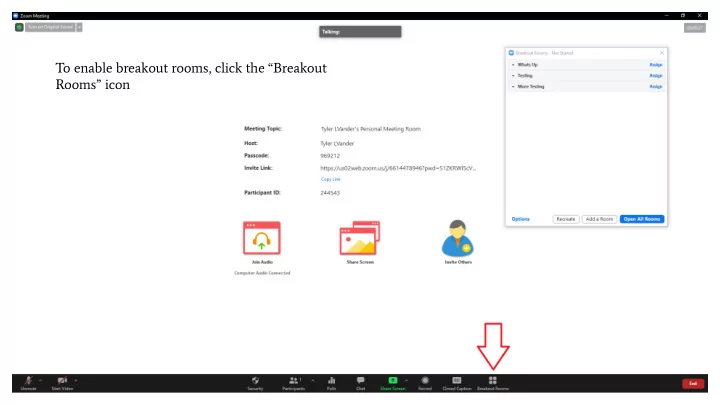
To enable breakout rooms, click the “Breakout Rooms” icon
You’ll be prompted for the number of Breakout Rooms you’d like to create, then click “Create”
Click “Options”
If you’d like Participants to self-select their own Breakout Rooms, select “Allow participants to choose room”. Else, leave this option unchecked.
Select “Open all Rooms”
Mouse over each user in “Unassigned” and click “Assign To” in order to assign users to Breakout Rooms.
Recommend
More recommend
Explore More Topics
Stay informed with curated content and fresh updates.