
SLIDE 1
Case Study on UWaterloo’s Quest
CS 846 Presented by: Yilun Bai Master’s student in Computer Science
7/17/2019
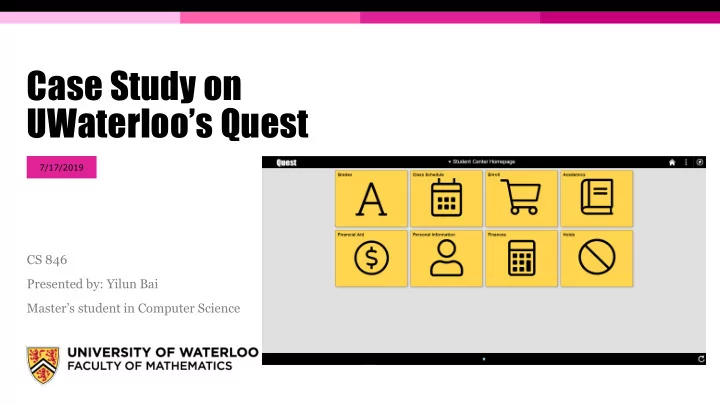
UWaterloos Quest 7/17/2019 CS 846 Presented by: Yilun Bai Masters - - PowerPoint PPT Presentation
Case Study on UWaterloos Quest 7/17/2019 CS 846 Presented by: Yilun Bai Masters student in Computer Science Outline Motivation Goal About Quest Features New look Case study on Quest Email
CS 846 Presented by: Yilun Bai Master’s student in Computer Science
7/17/2019
▪
Motivation
▪
Goal
▪
About Quest
▪
Features
▪
“New” look ▪
Case study on Quest
▪
Email conversation with Quest people
▪
Navigation - Click testing (sort of)
▪
UI design – vision, free spacing ▪
Problems with Quest
▪
Suggestions & Solutions
▪
Conclusion
PAGE 2
▪ We’re all students at UWaterloo and we all have struggled with Quest more or less ▪ Undergrad -> Grad
MyUW -> Quest Feels outdated
▪ Search “Quest” on Reddit – r/uwaterloo
▪ “… designed by a 6 year old…” ▪ “… annoying message upon log in…” ▪ “… being dumb…” ▪ ...... more
▪ Let’s make Quest better, shall we?
PAGE 3
▪ Talk with the Quest people to see why things are they way they are ▪ Identifying the problems with Quest ▪ Suggest some solutions to address the problems ▪ Send feedback to the Quest people to help improve the system
PAGE 4
▪ Quest is the University of Waterloo’s student information system. ▪ User Groups:
▪ Undergrad/Grad Applicants; (Future Students) – I wonder how many applicants turned down the offer just
because of the poor application experience on Quest.
▪ Undergrad/Grad students; (Current Students) ▪ Faculty and Staff;
▪ Access: Mobile devices/Desktop computer
PAGE 5
▪ Features:
PAGE 6
PAGE 7
▪ From now on,
▪ Old Quest –
Quest before the update in
▪ New Quest –
Quest after the update in
PAGE 8
PAGE 9
PAGE 10
PAGE 11
▪
The University of Waterloo’s Student Information System Program manages our student data, and is called Quest.
▪
The team manages the maintenance and development of Quest as it relates to:
▪
Admissions processing
▪
Student course enrolment and grades
▪
Course builds and scheduling
▪
Awards and financial aid
▪
Tuition assessment ▪
Steering Committee
PAGE 12
▪ Dear Quest people
▪ Doing a case study on Quest ▪ The new look starting in Feb. ▪ Any Software Requirement
Specification(SRS) document for Quest?
PAGE 13
▪ Quest – Oracle PeopleSoft
Campus solutions
▪ Update in Feb. – Adopting the
Fluid UI from Oracle
▪ Based on the agile nature, the
University has no documentation detailed requirements for changes
▪ Consulted each user group to
understand the optimal tile layout for the home screen
▪ Prototypes and changes were
implemented based upon feedback
PAGE 14
PAGE 15
PAGE 16
PAGE 17
PAGE 18
▪ The updated Quest is more like a hybrid child birthed by Fluid UI and the previous
version of Quest
▪ Only the Homepage and the navigation around the pages are changed ▪ There are no extra features or feature function improvements since the internal
pages remains the same
▪ Does the update make Quest easier to use? ▪ Let’s test it…
PAGE 19
▪ Lesson learned from
CS649 – HCI
▪ Given a task, count the
# of clicks to perform certain task
▪ Tasks are selected
based on the features listed on the official Quest website and commonly used
PAGE 20
▪ Old: ▪ New:
PAGE 21
▪ Old: ▪ New:
PAGE 22
▪ Old: ▪ New:
PAGE 23
▪ Old: ▪ New:
PAGE 24
▪ Old: ▪ New:
PAGE 25
▪ Old: ▪ New:
PAGE 26
▪ Suppose from
tuition page, we want to go the class schedule page
▪ Old:
▪ Suppose from
tuition page, we want to go the class schedule page
▪ New:
PAGE 28
Lesson from CS649 – HCI – Types of vision
Lesson from CS649 – HCI – Free Space
PAGE 29
PAGE 30
Free Space Free Space Central Vision
PAGE 31
Central Vision
PAGE 32
Free Space
Sidebar moves the main content towards the middle of the screen
Central Vision
▪ Click testing
▪ New version of Quest wins 4 out of 7 tasks ▪ Old version wins 1 out of 7 tasks ▪ Draw happen 2 out of 7 tasks
▪ The new Quest puts important content more
towards the middle of the screen compare to the old version
▪ But free spaces on the page are still massive
Overall, the updated Quest performs slightly better than the old version Issues discovered during the tests:
▪ The page/section/tab hierarchy is a mess –
e.g. Class Schedule can be viewed under Enroll, not My Academic
▪ The function of sidebar navigation and the
redundant; Some also not consistent
▪ Limited information displayed on the
Homepage
▪ Both versions couldn’t handle efficient
transfer from subpage to another subpage without going back to the Homepage
▪ Large empty spaces on the right side of the
page are wasted on basically every page
PAGE 33
▪
In the current Quest class Enroll process, users need to perform 3 steps:
1.
Select classes to add – put in the shopping cart
2.
Confirm classes
3.
Finish enrolling ▪
Often times we encounter failures due to time conflict with other courses. Need to go back to change the shopping cart and try again
▪
Especially for undergrad students who takes a lot of courses which have different section offerings
▪
Need users to manually check every time period.
▪
No visualization on the schedule for selected potential courses
PAGE 34
▪
The page/section hierarchy is a mess, e.g. Search for classes is on the same hierarchy with Enroll, but also can be performed under Add in Enroll…
▪
The function of sidebar navigation and the original top bar page navigation are redundant; Some also not consistent
▪
Limited information displayed on the Homepage
▪
Both versions couldn’t handle efficient transfer from subpage to another subpage without going back to the Homepage
▪
Large empty spaces on the right side of the page are wasted on basically every page
▪
Feature work flow is lengthy, i.e. class enrollment
▪
Overall UI lack of consistency – Black and Gold
▪
Toolbar & NavBar on top does basically nothing, e.g. Recent Places in NavBar
▪
The Sidebar and the top banner does not follow the changes of the pages if using the old “Go to” navigation instead of the SideBar
▪
...
PAGE 35
▪ Schedule builder – calendar views for each possible class arrangement ▪ Search functionality: search bar in the top banner for searching sites under UWaterloo ▪ Quick links widget on the right side of every page for easy changing between pages under
different categories
▪ Automatic exam information update – Final exam schedule, date, location, seat… ▪ Critical information/Notification – important due date (tuition, class enrollment/drop),
exam date approaching, etc.
▪ Customizable Homepage tiles, add/remove tiles ▪ Change password within Quest ▪ …
PAGE 36
▪ There are requirement engineering documents &
specifications for building Quest properly, i.e. the PeopleSoft Fluid UX Standards
▪ But the Quest people decide not to implement
Quest based on it completely. Why?
▪ Because they want to keep the familiar original
site for easier user adoption and migration
▪ And the “New” Quest becomes the “hybrid child”
▪ If it ain’t broke, don’t fix it. But Quest is “broke”. ▪ Bottom line, Quest actual site needs an overhaul
either strictly following the PeopleSoft Fluid UX Standards, or building from ground up completely
PAGE 37
By a tiny bit Not at all Not by 2019 standard Not at all, no feature improvement whatsoever Sort of, but with issues Don’t know what this means
▪ Anyone has any other struggles with Quest? ▪ What other features would you like to see in Quest? ▪ I’ll submit the feedback and suggestions through the
Quest Feedback form, or you can do it on your own.
▪ Let’s make UWaterloo Quest better! maybe not for us but for future students ;)
PAGE 38
THANK YOU!
PAGE 39