CS 543 - Computer Graphics: Introduction to Ray Tracing by Robert - - PDF document

cs 543 computer graphics introduction to ray tracing
SMART_READER_LITE
LIVE PREVIEW

CS 543 - Computer Graphics: Introduction to Ray Tracing by Robert - - PDF document

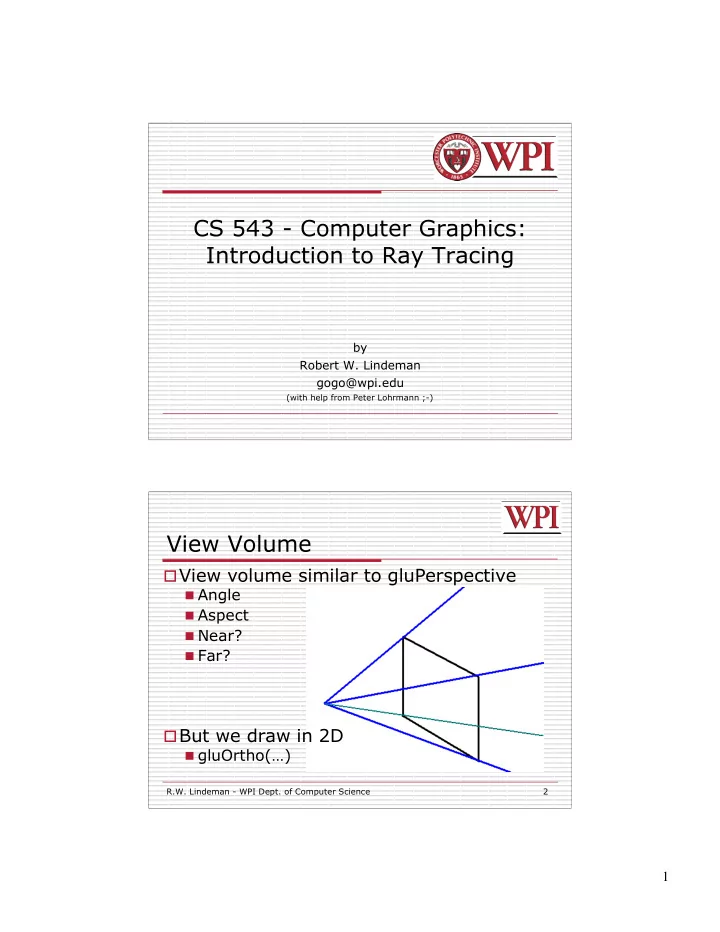
CS 543 - Computer Graphics: Introduction to Ray Tracing by Robert W. Lindeman gogo@wpi.edu (with help from Peter Lohrmann ;-) View Volume View volume similar to gluPerspective Angle Aspect Near? Far? But we draw in 2D


slide-1
SLIDE 1

1

CS 543 - Computer Graphics: Introduction to Ray Tracing

by Robert W. Lindeman gogo@wpi.edu

(with help from Peter Lohrmann ;-) R.W. Lindeman - WPI Dept. of Computer Science 2

View volume similar to gluPerspective

 Angle  Aspect  Near?  Far?

But we draw in 2D

 gluOrtho(…)

View Volume

slide-2
SLIDE 2

2

R.W. Lindeman - WPI Dept. of Computer Science 3

Primary Rays

Generate ray from eye through pixel into

scene of objects

Determine if ray hits an object Calculate lighting at that point Set pixel to necessary color

R.W. Lindeman - WPI Dept. of Computer Science 4

Primary Rays

Blue lines

represent ‘primary rays’

Some rays

receive color from object

Some rays

receive background color

slide-3
SLIDE 3

3

R.W. Lindeman - WPI Dept. of Computer Science 5

Determining a Hit

For each pixel,

test every object for a hit

Gather info

about hit

  • Point
  • Normal

R.W. Lindeman - WPI Dept. of Computer Science 6

What's so hard about that?

 Consider a mesh with only 1300

polygons being rendered to a screen resolution of 640x480.

 640x480x1300 = 399,360,000 possible

intersections!!  Adding 2 reflections = 1,198,080,000  Adding soft shadows = 13,178,880,000

slide-4
SLIDE 4

4

R.W. Lindeman - WPI Dept. of Computer Science 7

A Little Better Appreciation?

R.W. Lindeman - WPI Dept. of Computer Science 8

Real or Rendered?

slide-5
SLIDE 5

5

R.W. Lindeman - WPI Dept. of Computer Science 9

Traveling Through Spaces

 Transformed shape in world space  Generated ray in camera space

 Converted to world space during generation

 How do we calculate if a ray hits an

  • bject?

 Transformed objects could have ANY shape

R.W. Lindeman - WPI Dept. of Computer Science 10

Determining A Hit

Apply inverse transformation matrix

 Move object back to generic shape  Move ray to some new location.

slide-6
SLIDE 6

6

R.W. Lindeman - WPI Dept. of Computer Science 11

Determining A Hit (Sphere)

Parametric Equations

 P = S + tD  F(x,y,z) = x2 + y2 + z2 -1  F(P) = |P|2 -1 = 0  Substituting P into F(P) = 0, we get:  D2 * t2 + 2(S•D)*t + (S2 – 1) = 0  Recall the dot-product relation: |a+b|2 = |a|2 + 2a•b + |b|2  This is a quadratic equation of A2*t2 + 2Bt + C = 0

where A = D2 B = S•D C = S2 – 1

R.W. Lindeman - WPI Dept. of Computer Science 12

Determining A Hit (Sphere)

 Utilize quadratic equation:

 Find the hit point using:  If discriminant (B2-AC) is negative: ray misses sphere  If discriminant is zero: ray grazes sphere edge  Hit point is –B/A  Discriminant positive: ray pierces sphere  Two hits times (+ and – discriminant)

 Normal?

 Easy! It's the hit point!

thit = B A ± B2 AC A
slide-7
SLIDE 7

7

R.W. Lindeman - WPI Dept. of Computer Science 13

Intersecting Transformed Objects

F(P) becomes F(T-1(P))

 F(T-1(S + tD)) = 0  T-1(S + tD) = (T-1S) + (T-1D)t

R.W. Lindeman - WPI Dept. of Computer Science 14

Hit Info

Once we calculate a hit, gather

information

 Hit time  Hit object (pointer)  Entering?  Which surface of object  Hit point  Hit normal

slide-8
SLIDE 8

8

R.W. Lindeman - WPI Dept. of Computer Science 15

Parametric Shapes

 http://www.econym.demon.co.uk/isotut/parametric.htm

R.W. Lindeman - WPI Dept. of Computer Science 16

Find Best Hit

Given a set of hit times (intersections)

 Find the closest (soonest) hit  For each object that is hit by the ray

 Test if that hit time is the closest thus far

Clipping? Now we know which object the ray hit,

where it hit ,and the normal

Time to color the pixel!

slide-9
SLIDE 9

9

R.W. Lindeman - WPI Dept. of Computer Science 17

Coloring Pixels

 Is there a need to LERP?  If there are no hits, use a background

color

 Otherwise…

 "Default" color? (no lights …. ambient)  Contribution of lights

 Add calculated diffuse color  Add calculated specular color

 Contribution of other effects

R.W. Lindeman - WPI Dept. of Computer Science 18

Review Coloring (Ambient)

+ Ambient =

slide-10
SLIDE 10

10

R.W. Lindeman - WPI Dept. of Computer Science 19

Review Coloring (Diffuse)

X =

R.W. Lindeman - WPI Dept. of Computer Science 20

Review Coloring (Specular)

+ =

slide-11
SLIDE 11

11

R.W. Lindeman - WPI Dept. of Computer Science 21

Review Coloring (Shadows)

? =

R.W. Lindeman - WPI Dept. of Computer Science 22

Shade Function

Get the first hit in the scene If no hits, then return background color Gather some information about the best hit pixelColor += ambient contribution For each light in the scene pixelColor += calculated diffuse contribution pixelColor += calculated specular contribution return pixelColor

slide-12
SLIDE 12

12

R.W. Lindeman - WPI Dept. of Computer Science 23

References

F.S. Hill – Chapter 12